
android:allowBackup defaults to true if not specified in the manifest. The setting was designed for user can restore their app data after factory reset. The side effect: adb backup can dump the app’s entire data directory to a file on the user’s machine, where the file is decryptable without root. For apps that store sensitive data in /data/data/, this is a data exfiltration vector that requires only USB debugging in which users may leave it on for multiple purposes.
You can find the vulnerable application designed for this blog on VulnLabApp.
Vulnerable Files
1
2
android/app/src/main/AndroidManifest.xml # allowBackup=true
android/app/src/main/java/com/vulnlab/app/activities/LoginActivity.java # writes plaintext credentials into SharedPreferences
The pattern
1
2
3
4
5
<application
    android:name=".VulnApplication"
    android:label="VulnLabApp"
    android:allowBackup="true"
    ...>
No fullBackupContent filter, no dataExtractionRules. Every file under /data/data/com.vulnlab.app/ is in scope. Meanwhile LoginActivity happily stuffs the user’s email, password, session token, and a production API key into auth_prefs:
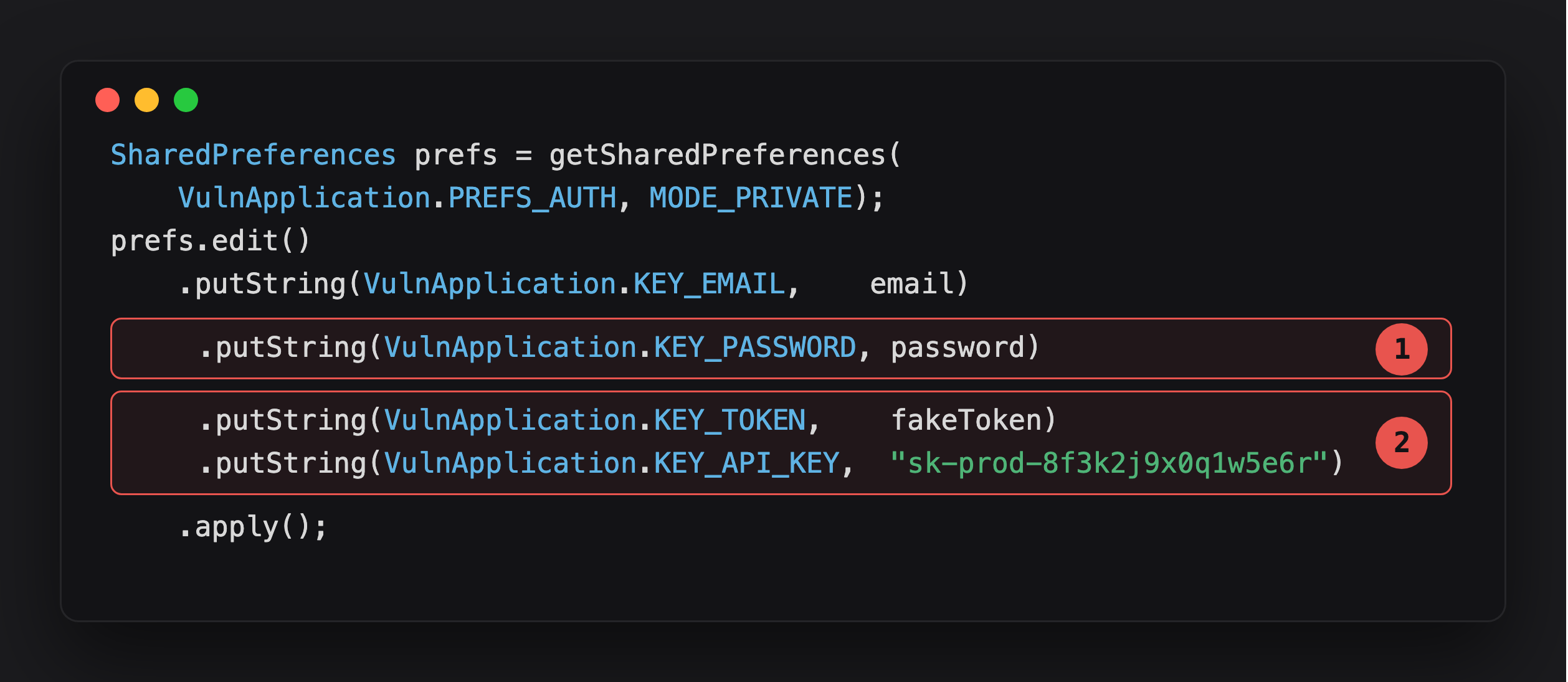
Highlight 1 is the password, stored as a plain string with no hashing or encryption - SharedPreferences is just an XML file on disk, and with allowBackup="true" that file ships out whole in every backup.
Highlight 2 is worse: a live session token and a production API key, same treatment. The token means account takeover without ever touching the password. The API key means whatever backend service it authenticates to is now reachable by anyone who gets a copy of this file.
allowBackup="true" (or absent — same thing) enables both the legacy Key-Value backup and the modern Auto Backup. fullBackupContent lets the developer opt out of specific subdirectories, but most apps do not bother — they ship with allowBackup="true" and no fullBackupContent filter.
The extraction command
1
adb backup -f vulnlab.ab -noapk com.vulnlab.app
The phone prompts the user to confirm. If they tap “Back up my data”, vulnlab.ab is written to the host machine containing the encrypted (but with empty password) app data tarball. Convert to tar:
1
2
3
dd if=vulnlab.ab bs=24 skip=1 | openssl zlib -d > vulnlab.tar
# Or with abe.jar:
java -jar abe.jar unpack vulnlab.ab vulnlab.tar
Inside the tar: apps/com.vulnlab.app/db/, apps/com.vulnlab.app/sp/, apps/com.vulnlab.app/f/ — the full data dir contents. apps/com.vulnlab.app/sp/auth_prefs.xml is the content: plaintext password, plaintext session token, plaintext API key.
When this actually matters
The user has to tap “Back up my data” on the device. That is the practical gap. Three scenarios where it bridges:
Compromised desktop. Attacker controls the user’s PC. User has USB debugging enabled (developers, power users, many enterprise BYOD deployments). Backup fires when phone is plugged in.
Lost / stolen device with USB debugging on. Finder of the phone (legitimate or not) connects to a computer. If debugging was on and authorized, backup works without user interaction. Many users authorize debugging on their personal computers and never revoke.
Identifying it
Read the manifest:
1
grep 'allowBackup' AndroidManifest.xml
If the value is true or the attribute is missing, the app is backup-enabled. Check for fullBackupContent:
1
2
3
<application
    android:allowBackup="true"
    android:fullBackupContent="@xml/backup_rules">
If present, open the rules:
1
2
3
4
5
<full-backup-content>
    <include domain="sharedpref" path="non_secret_prefs.xml" />
    <exclude domain="sharedpref" path="auth.xml" />
    <exclude domain="database" path="." />
</full-backup-content>
Good apps exclude everything sensitive. Many apps have fullBackupContent for the sake of having it and exclude one file while shipping ten others unrestricted. VulnLabApp doesn’t even bother with the filter — every file is in scope.
Exfiltration without ADB
adb backup is the standard path, but some apps and OEM SDKs expose backup-like APIs that can be triggered without ADB:
BackupManager.requestRestore. Some apps schedule restore operations. Less attacker-relevant.
Google Drive backup blob. Apps with allowBackup="true" and a logged-in Google account upload their backup to Drive. An attacker with the user’s Google credentials downloads from Drive. Not a mobile-app finding directly, but the upstream cause is the manifest setting.
OEM-specific backup tools. Samsung Smart Switch, Huawei Backup, Xiaomi Mi Cloud. Each has its own backup format and trust model. Worth testing if the target is OEM-specific.
Defence
1
2
3
<application
    android:allowBackup="false"
    ...>
The cleanest fix. For apps that want backup for non-sensitive prefs:
1
2
3
4
5
6
<full-backup-content>
    <exclude domain="sharedpref" path="auth.xml" />
    <exclude domain="database" path="." />
    <exclude domain="file" path="." />
    <include domain="sharedpref" path="ui_prefs.xml" />
</full-backup-content>
Exclude everything by default and include only what the user needs to restore (UI preferences, accessibility settings).
The naive fix that does not fix it: excluding one obviously-named file while leaving the rest of the data dir in scope.
1
2
3
4
<!-- This is what most apps ship. It does not work. -->
<full-backup-content>
    <exclude domain="sharedpref" path="auth.xml" />
</full-backup-content>
shared_prefs/ usually contains five or six files, not one. auth.xml is excluded. user.xml, prefs.xml, oauth.xml, tokens.xml, analytics.xml are not. The session token has been migrated three times in the app’s lifetime and lives in two of those today. The exclude is symbolic, not effective. The right pattern is the inverse — exclude everything, then include only the specific non-sensitive files. I have seen the broken pattern in two banking apps and one e-commerce app in the last year. The auth file was excluded; the session token had been migrated to a separately-named file in a refactor and the backup happily included it.
For Android 12+ targets, android:dataExtractionRules in API 31 is the modern replacement that lets you control device-to-device transfers separately from cloud backups.
Closing
allowBackup=true is the bug nobody wants to talk about because the exploitation gap is bigger than most Android-IPC bugs.
Happy Hacking !!