
NSKeyedUnarchiver decodes serialized object graphs from binary data. The legacy decode APIs - unarchiveObjectWithData:, unarchiveObjectWithFile:, initForReadingWithData: - permit any class in the Objective-C runtime to be instantiated as part of the decode. If the input comes from an untrusted source (network response, shared file, pasteboard, URL parameter), an attacker who can control the archive bytes can trigger instantiation of arbitrary classes and call their initWithCoder: methods. On Apple’s runtime, the gadget chains are shorter than Java’s because ObjC classes load with side effects.
The shape
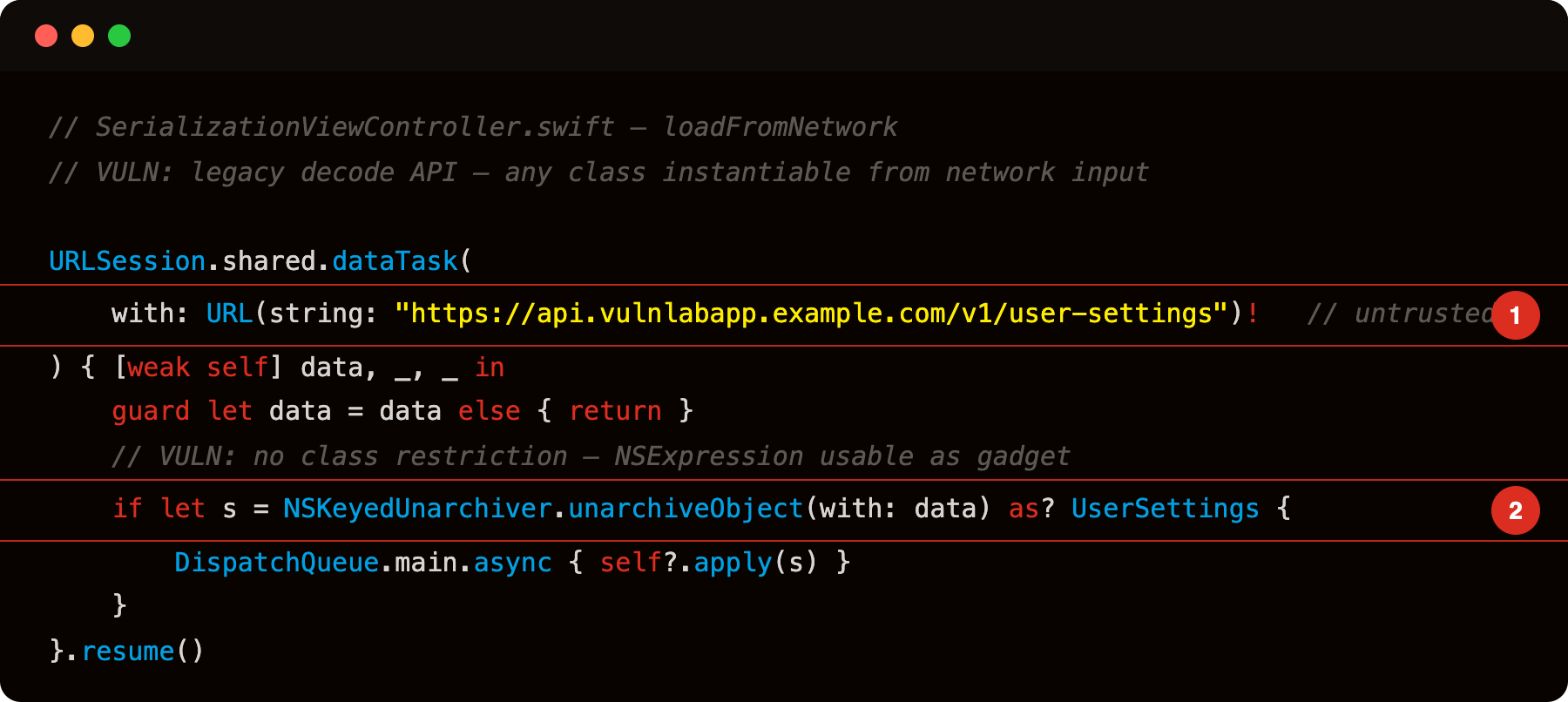
Highlight 1 is URL(string: "https://api.vulnlabapp.example.com/v1/user-settings")! - the archive data comes from a network endpoint; an attacker controlling the response via MITM, rogue server, or SSRF supplies the malicious archive.
Highlight 2 is NSKeyedUnarchiver.unarchiveObject(with: data) - legacy decode API with no class restriction; any Objective-C class present in the runtime (including NSExpression, NSInvocation, and third-party gadgets) can be instantiated from the attacker-supplied archive.
Both call sites use the legacy API. The input - network response or file path - is attacker-controllable in the right scenario. unarchiveObject(with:) does not restrict which classes may appear in the archive; any class whose initWithCoder: has side effects is a potential gadget.
The gadget surface on iOS
Unlike Java, Apple has not published a list of known iOS deserialization gadgets. The attack surface is:
NSExpression- can evaluate arbitrary predicates. Instances serialized withNSKeyedArchiverexecute the expression oninitWithCoder:.NSInvocation- stores a method call. Deserializing it can call a selector on an arbitrary target.- Third-party frameworks (Firebase, Realm, AFNetworking) that implement
NSCodingwith side effects ininitWithCoder:.
For bug bounty purposes, the finding is usually reported as “untrusted input reaches legacy NSKeyedUnarchiver decode API without class restriction” - demonstrating that the input is attacker-controllable is sufficient. Full gadget chain exploitation is complex and typically not required for triage.
Spotting it
Grep the binary strings or decompile:
1
2
3
nm Payload/VulnLabAppiOS.app/VulnLabAppiOS | grep -E 'unarchiveObjectWithData|unarchiveObjectWithFile|initForReadingWithData|initForReadingFrom'
# debug build — code is in the dylib:
nm Payload/VulnLabAppiOS.app/*.dylib | grep -E 'unarchiveObjectWithData|unarchiveObjectWithFile|initForReadingWithData|initForReadingFrom'
Any match is a candidate. Trace each call site to its input:
- Input from network response: highest risk.
- Input from app-controlled file inside the container: medium (needs path traversal to reach).
- Input from
UIPasteboard: medium (pasteboard is cross-app writable). - Input from a deep-link parameter pointing to a file: medium.
At runtime:
1
2
3
4
5
6
7
const unarchive = ObjC.classes.NSKeyedUnarchiver['+ unarchiveObjectWithData:'];
Interceptor.attach(unarchive.implementation, {
  onEnter: function (args) {
    const data = new ObjC.Object(args[2]);
    console.log('[NSKeyedUnarchiver] unarchiveObjectWithData: len=' + data.length());
  }
});
Fire the vulnerable flow, watch the hook. Confirm the input is data you (or a network actor) can influence.
Constructing a malicious archive
An attacker who can serve the network response (MITM, rogue server, or SSRF) crafts a valid NSKeyedArchiver payload. The format is a binary plist:
1
2
3
4
// Attacker-side: build archive containing NSExpression gadget
let expr = NSExpression(format: "FUNCTION('hello', 'stringByAppendingString:', ' world')")
let data = try! NSKeyedArchiver.archivedData(withRootObject: expr, requiringSecureCoding: false)
// Serve this data from the API endpoint
When the victim app calls unarchiveObject(with: data), NSExpression.initWithCoder: runs and evaluates the expression. Swap the expression for one that invokes a shell command or reads a file if the runtime permits.
The fix
Replace legacy APIs with unarchivedObject(ofClass:from:):
1
2
3
4
5
6
7
8
9
// FIX: restrict to only the expected class - any other class in the archive throws
do {
    let settings = try NSKeyedUnarchiver.unarchivedObject(
        ofClasses: [UserSettings.self, NSString.self, NSNumber.self],
        from: data)
    apply(settings as! UserSettings)
} catch {
    print("[deserialize] decode failed: \(error)")
}
The ofClasses: parameter is an allowlist. The archiver refuses to instantiate any class not in the set, which eliminates gadget chains that rely on instantiating NSExpression, NSInvocation, or anything else not on the list.
Also adopt NSSecureCoding in the serializable class:
1
2
3
4
5
class UserSettings: NSObject, NSSecureCoding {
    static var supportsSecureCoding: Bool { return true }

    // ... initWithCoder: and encode(with:) implementations
}
NSSecureCoding enforcement requires the archiver to verify each decoded object’s class matches the expected type before calling initWithCoder:. Combined with the ofClasses: allowlist, the attack surface collapses to the specific classes you listed.
Closing
unarchiveObjectWithData: is to iOS what Java’s ObjectInputStream is to Android - an unconstrained deserializer that trusts the bytes it reads. The fix is one method swap and a class allowlist. Worth checking every IPA for legacy decode APIs before moving on to higher-complexity vectors.
Happy Hacking !!