
URLSession caches HTTP responses on disk by default. The cache lands at Library/Caches/<bundle-id>/Cache.db - a SQLite file containing full response bodies and headers, including Authorization, Set-Cookie, and X-Auth-Token values. Any attacker with filesystem access reads every API response the app ever received without touching the network.
The shape
The default URLSessionConfiguration.default inherits URLCache.shared, which is disk-backed with 50 MB of storage:
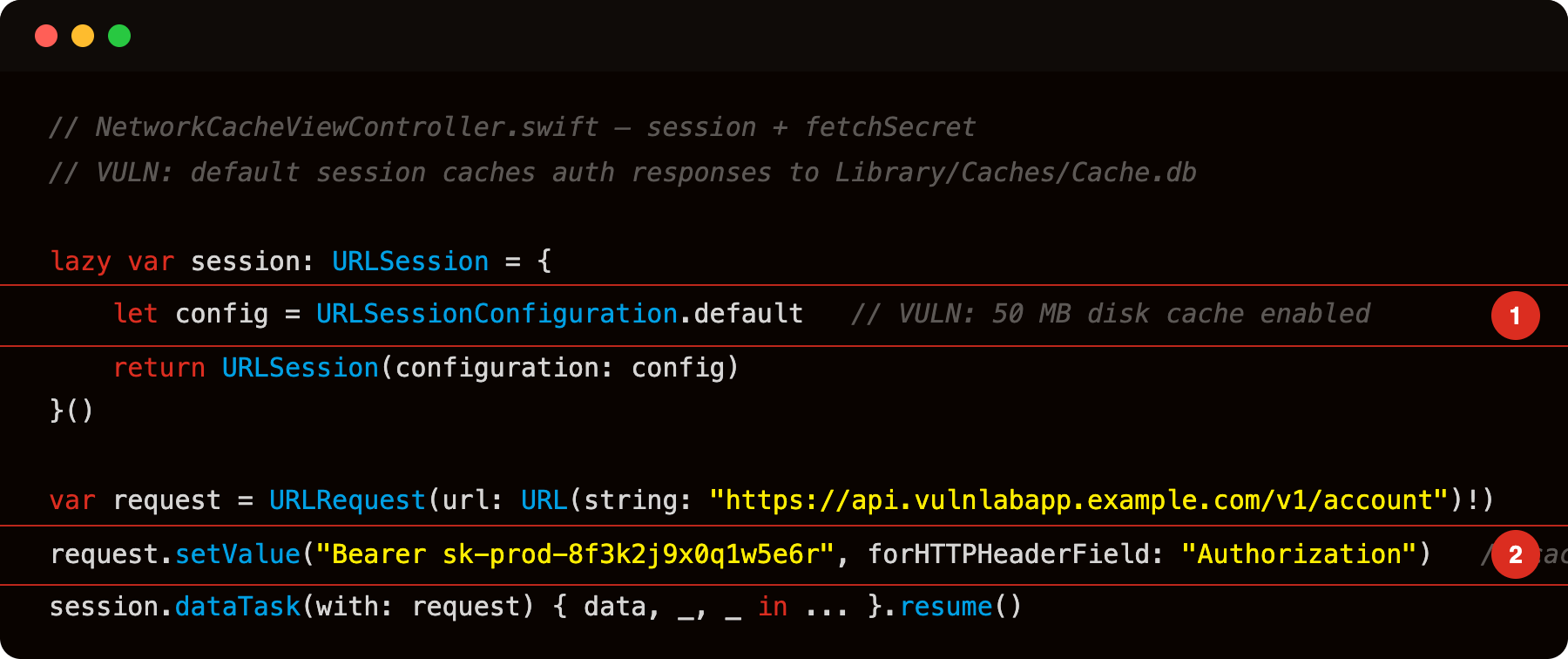
Highlight 1 is let config = URLSessionConfiguration.default - default config enables a 50 MB disk cache backed by SQLite at Library/Caches/Cache.db; every response including those containing auth tokens is written to disk.
Highlight 2 is request.setValue("Bearer sk-prod-8f3k2j9x0q1w5e6r", forHTTPHeaderField: "Authorization") - the Authorization header is part of the cached request object; sqlite3 Cache.db .dump on a jailbroken device recovers it in plaintext.
The response - status line, all response headers, body - goes into Cache.db as a cfurl_cache_receiver_data row. The Authorization header the app sent is stored in the request side of the same row.
Where the cache lives
1
/var/mobile/Containers/Data/Application/<UUID>/Library/Caches/<bundle-id>/Cache.db
Three tables matter:
1
2
3
cfurl_cache_response        - HTTP status + response headers
cfurl_cache_receiver_data   - response body (may be gzip-compressed blob)
cfurl_cache_blob_data       - overflow bodies, > 256KB
The request blob in cfurl_cache_response contains the full request headers - including whatever Authorization or session-cookie header the app sent.
Spotting it
Grep the decompile (or binary strings) for URLCache:
1
2
3
4
5
6
7
nm Payload/VulnLabAppiOS.app/VulnLabAppiOS | grep -E 'URLCache|diskCapacity|memoryCapacity|removeCachedResponse'
# debug build — code is in the dylib:
nm Payload/VulnLabAppiOS.app/*.dylib | grep -E 'URLCache|diskCapacity|memoryCapacity|removeCachedResponse'
# debug build installed via Xcode — code is in the dylib:
nm Payload/VulnLabAppiOS.app/*.dylib | grep -E 'URLCache|diskCapacity|memoryCapacity|removeCachedResponse'
# debug build — code is in the dylib:
nm Payload/VulnLabAppiOS.app/*.dylib | grep -E 'URLCache|diskCapacity|memoryCapacity|removeCachedResponse'
No output, or output that never sets diskCapacity: 0, is the finding. The default disk capacity is 50 MB.
At runtime, hook the cache write:
1
2
3
4
5
6
7
const NSURLCache = ObjC.classes.NSURLCache;
Interceptor.attach(NSURLCache['- storeCachedResponse:forRequest:'].implementation, {
    onEnter: function (args) {
        const req = new ObjC.Object(args[3]);
        console.log('[cache write] ' + req.URL());
    }
});
Every URL that gets cached fires this hook. Watch for authenticated endpoints - /account, /transactions, /messages.
Pulling the cache on a jailbroken device
1
2
scp root@device:"/var/mobile/Containers/Data/Application/<UUID>/Library/Caches/com.vulnlab.iosapp/Cache.db" .
sqlite3 Cache.db
Read the stored responses:
1
2
3
4
SELECT request_key, time_stamp FROM cfurl_cache_response;

-- Response body (may need hex → text conversion for gzip blobs)
SELECT hex(isDataOnFS), receiver_data FROM cfurl_cache_receiver_data LIMIT 5;
request_key is the full URL. receiver_data is the response body. For gzip-compressed bodies:
1
2
3
# Extract blob, decompress, read
sqlite3 Cache.db "SELECT writefile('/tmp/body.gz', receiver_data) FROM cfurl_cache_receiver_data LIMIT 1;"
gunzip /tmp/body.gz && cat /tmp/body
The output is the API response JSON - user profile, session token, account data, whatever the endpoint returned.
Via iTunes backup (no jailbreak required)
The Library/Caches/ directory is excluded from iTunes backups by default. However, a developer who moved the cache to Documents/ (common workaround for size limits) or a misconfigured cache URL under Library/Application Support/ does end up in backups.
Confirm via:
1
2
idevicebackup2 backup --full ./backup
ideviceinfo -u <UDID> -q com.apple.mobile.backup -k WillEncrypt
Then search the backup manifest for Cache.db entries.
The fix
Two options depending on what the app needs:
1
2
3
4
5
6
7
8
9
10
11
12
// Option 1: ephemeral session - no disk cache at all
let config = URLSessionConfiguration.ephemeral
let session = URLSession(configuration: config)

// Option 2: per-request cache policy for sensitive endpoints
var request = URLRequest(url: sensitiveURL)
request.cachePolicy = .reloadIgnoringLocalAndRemoteCacheData

// Option 3: wipe the disk cache on exit / background
func applicationDidEnterBackground(_ application: UIApplication) {
    URLCache.shared.removeAllCachedResponses()
}
URLSessionConfiguration.ephemeral is the strongest - it never writes to disk for any request in that session. The tradeoff is no caching benefit, which is fine for any session that carries credentials.
Closing
NSURLCache is the silent logger. The app never opts in to caching sensitive endpoints, it just never opts out. The audit step is one strings grep and one sqlite3 query on a test device. The fix is one line - URLSessionConfiguration.ephemeral for any session that touches authenticated APIs.
Happy Hacking !!