
class-dump (and its forks class-dump-z, classdump-dyld) extracts the Objective-C class metadata from an iOS Mach-O binary. The output is a header-file-style listing of every class, its instance variables, its methods, and method signatures. The metadata exists because the ObjC runtime uses it for message dispatch. Apps that ship without stripping it (most of them, since stripping breaks the runtime) expose their entire class structure to anyone with the IPA.
Combined with strings extraction of literal NSStrings in the binary, you have:
- Every API endpoint the app calls (URLs in string literals).
- Every internal class name and method.
- Debug error messages that reveal internal logic.
- Hardcoded keys, tokens, and secrets if the developer was sloppy.
This is the iOS analog of “I just grepped the decompiled Java for https://”.
The vulnerable pattern
VulnLabAppiOS’s WebViewController hardcodes its API base URLs as Swift string literals, production, admin, and internal, directly in the binary:
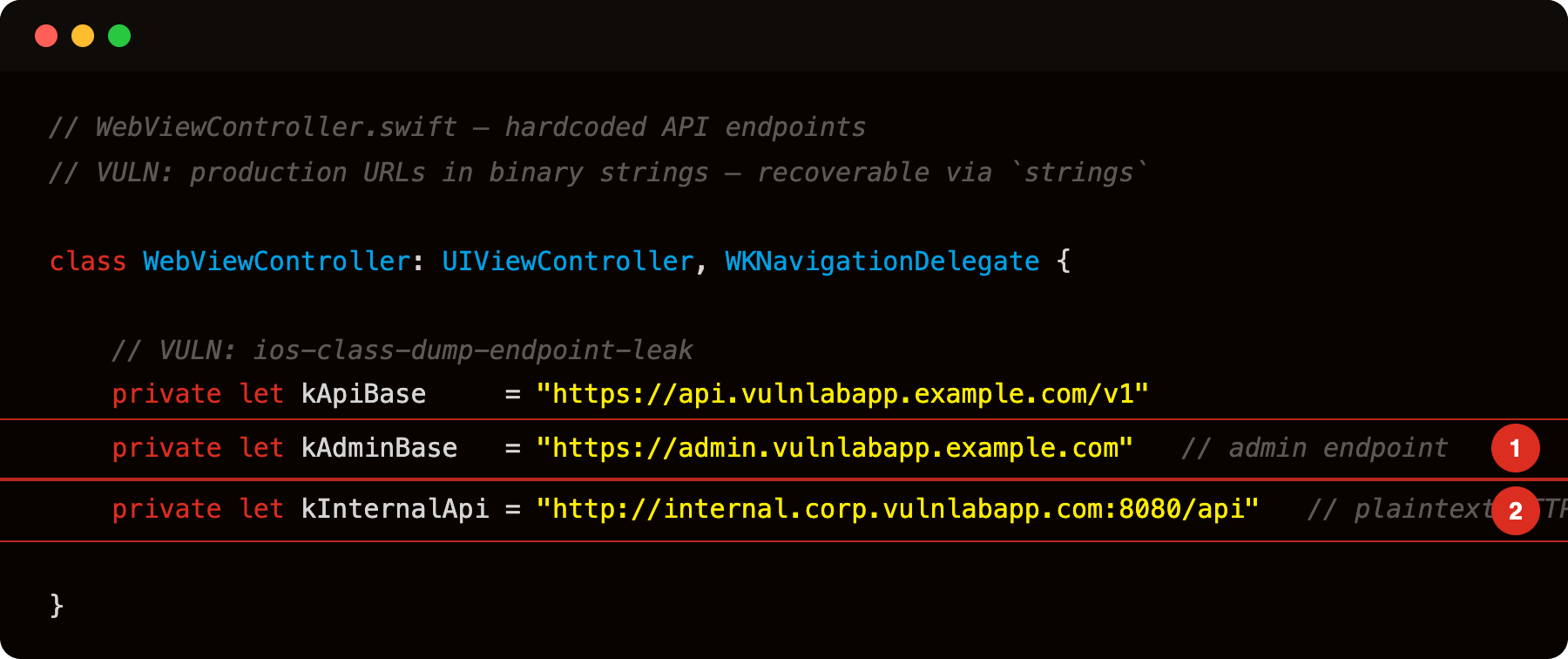
Highlight 1 is private let kAdminBase = "https://admin.vulnlabapp.example.com" - admin panel URL embedded as a Swift string constant; strings Payload/VulnLabAppiOS.app/VulnLabAppiOS recovers it with no disassembly.
Highlight 2 is private let kInternalApi = "http://internal.corp.vulnlabapp.com:8080/api" - internal corporate API over plaintext HTTP; both the endpoint and the non-standard port are directly readable from the binary.
Three strings, three different attack surfaces. The admin and internal endpoints are not reachable from the normal UI flow, but they are reachable from any caller that has the URL.
The extraction
1
2
3
4
5
6
7
8
# class-dump (release / App Store build — code is in the main binary)
class-dump -o headers/ Payload/VulnLabAppiOS.app/VulnLabAppiOS

# debug build installed via Xcode — code is in the dylib:
class-dump -o headers/ Payload/VulnLabAppiOS.app/*.dylib

# Or class-dump-z for older binaries
class-dump-z -H Payload/VulnLabAppiOS.app/VulnLabAppiOS -o headers/
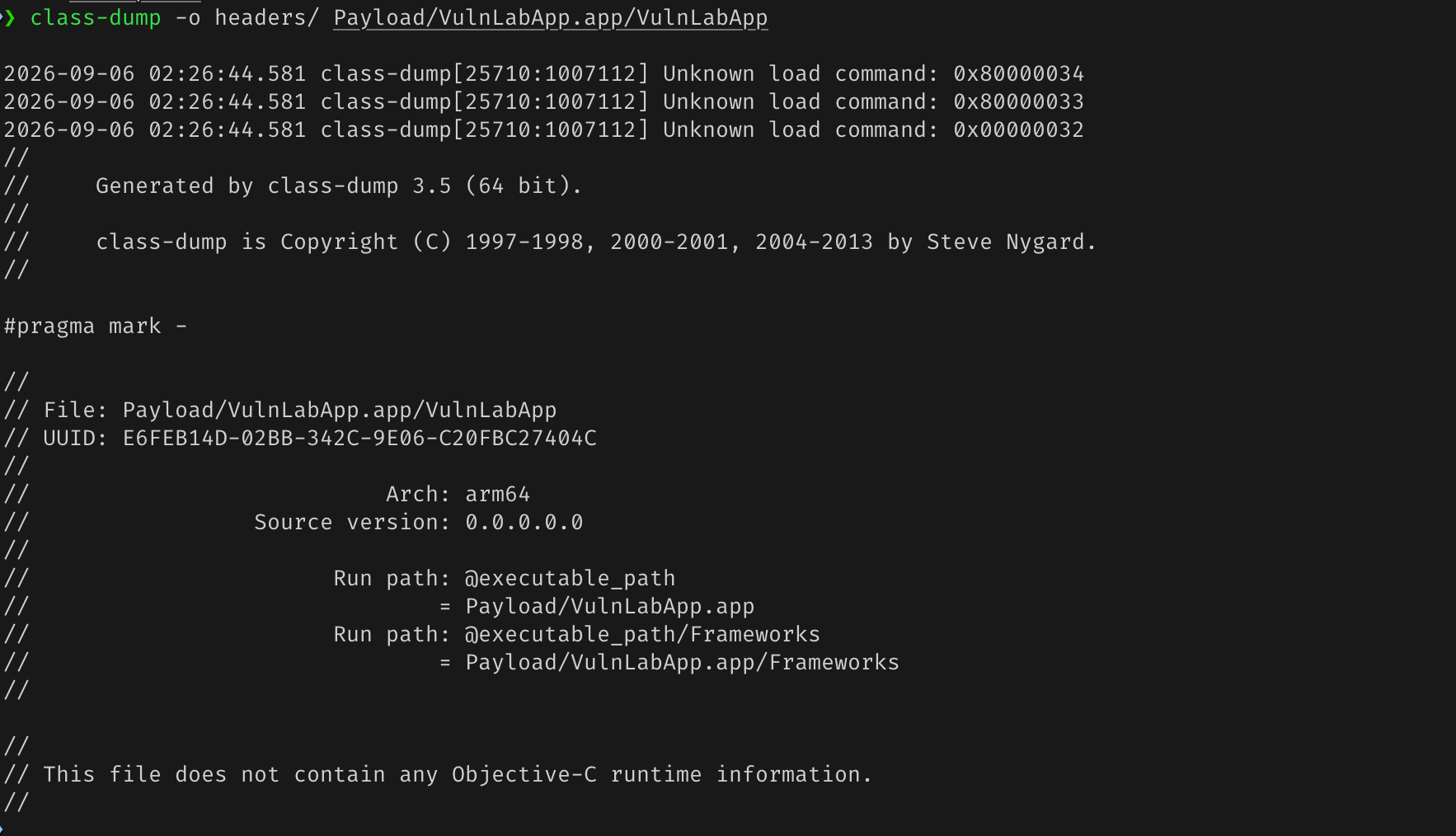
The headers/ directory now contains .h files for every Objective-C class. For Swift classes like WebViewController the method names and selectors are visible in the symbol table, and the string literals show up under __TEXT,__cstring / __TEXT,__objc_methname.
The strings extraction
1
2
3
4
# release build — strings are in the main binary:
strings Payload/VulnLabAppiOS.app/VulnLabAppiOS | grep -E '^https?://|^/api/|^/v[0-9]+/' | sort -u
# debug build — strings are in the dylib:
strings Payload/VulnLabAppiOS.app/*.dylib | grep -E '^https?://|^/api/|^/v[0-9]+/' | sort -u
The output is every URL-shaped literal in the binary:
1
2
3
https://api.vulnlabapp.example.com/v1
https://admin.vulnlabapp.example.com
http://internal.corp.vulnlabapp.com:8080/api

This is the app’s API endpoint inventory. The admin and internal hostnames are not reachable from the normal VulnLabAppiOS UI but are now first-class targets for further testing.
For each endpoint, the work is:
- Test it with the user’s auth token (captured via Frida or via mitmproxy on the device’s traffic).
- Look for IDOR, missing authorization, or trust-the-client-state bugs.
The hardcoded-secrets scan
1
2
3
4
# release build:
strings Payload/VulnLabAppiOS.app/VulnLabAppiOS | grep -iE 'api_key|secret|aws_|sk-prod|token=|password=' | head -100
# debug build:
strings Payload/VulnLabAppiOS.app/*.dylib | grep -iE 'api_key|secret|aws_|sk-prod|token=|password=' | head -100
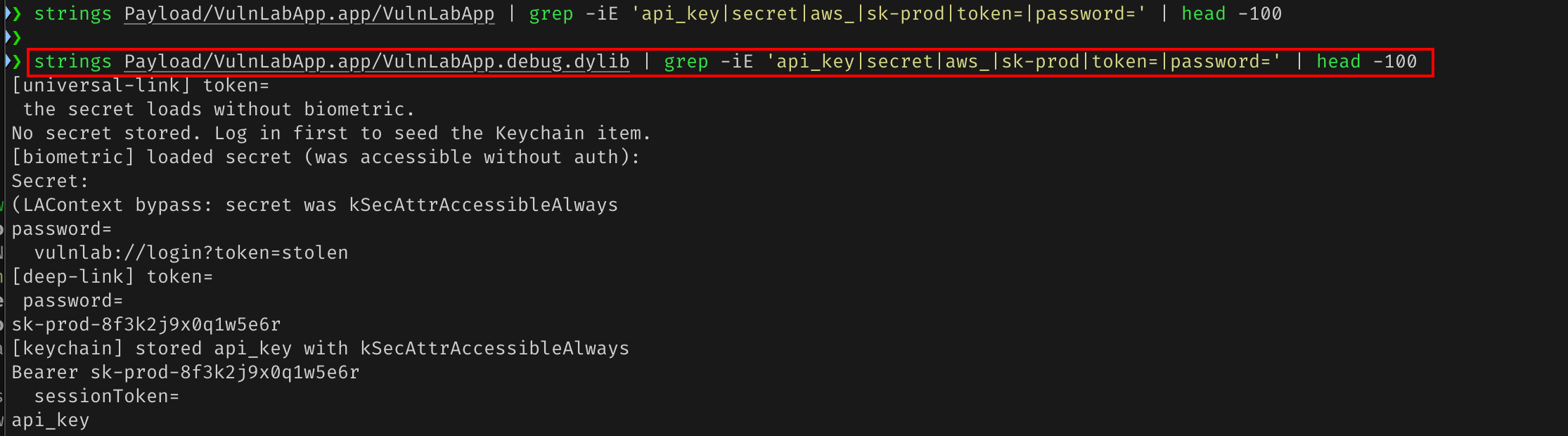
On VulnLabAppiOS this also surfaces the hardcoded sk-prod-8f3k2j9x0q1w5e6r API key that LoginViewController writes into the Keychain and UserDefaults.
Common findings:
- AWS access keys (
AKIA...). - Stripe / PayPal API keys.
- Mapbox / Firebase tokens.
- Internal API keys for analytics, attribution, crash reporting.
- Backend API tokens that the developer hardcoded for development and forgot.
Each is a finding in itself. Severity scales with what the key gates:
- AWS access key: critical. Cloud account access.
- Third-party SDK key: usually medium. The key is rate-limited per app and the SDK provider can revoke.
- Internal backend API key: high to critical depending on the key’s scope.
The internal-endpoint enumeration angle
Endpoints that the app never calls in normal UI flow are often less-protected than the user-facing endpoints. The chain:
class-dumpandstringsgive you the full endpoint list.- Identify endpoints that the app’s UI does not exercise.
- Test those with the user’s session token.
A specific pattern we see pay out: an admin endpoint accessible to any authenticated user, never linked from the app’s UI, that lets the user query other users’ data. The endpoint existed for an internal admin tool that shared the same auth system. Static analysis surfaced it; UI testing would never have.
The method-signature recovery angle
class-dump gives you method signatures including parameter types. This tells you what arguments each method expects. For internal-API-style methods:
1
2
- (void)userContentController:(WKUserContentController *)controller
                  didReceive:(WKScriptMessage *)message;
You know the method exists, what types it takes. Combined with Frida runtime invocation against a live VulnLabAppiOS process:
1
2
3
4
5
6
7
8
9
10
11
12
13
// Swift registers as 'VulnLabApp.WebViewController' (module.class, not module_class)
const cls = ObjC.classes['VulnLabApp.WebViewController'];
const instance = ObjC.chooseSync(cls)[0];

// loadURL is a pure Swift method (no @objc thunk) — not reachable via ObjC selector.
// The WKScriptMessageHandler bridge IS @objc. Hook it to intercept all JS bridge messages:
const bridgeSel = '- userContentController:didReceive:';
Interceptor.attach(instance.$class[bridgeSel].implementation, {
    onEnter: function (args) {
        const msg = new ObjC.Object(args[3]);
        console.log('[bridge] body:', msg.body().toString());
    }
});
This intercepts every message the page posts via window.webkit.messageHandlers.nativeBridge.postMessage(...) — no UI navigation required.
The “but my app is in Swift” mitigation
Swift apps generate less ObjC metadata. class-dump-style tools extract less. The available alternatives:
swift-class-dumpextracts Swift metadata. Less mature, but works.- IDA Pro / Ghidra parse Swift symbols natively.
- For Swift-only classes, the runtime introspection is via
Mirroror_typeName, accessible via Frida.
Apps that are pure Swift expose less than pure ObjC apps, but not none. The endpoints in string literals are unchanged, Swift apps still embed URL strings in the binary.
The defensive position
Apple’s recommendation for sensitive logic: server-side enforcement. Anything visible in the binary is visible to attackers. Apps that rely on hiding endpoints behind UI flow alone are not actually hiding them.
For hardcoded secrets, the defense is “don’t”. Use the user’s session token to authorize requests, fetch any per-user keys from the server at runtime, do not bundle secrets in the binary.
Closing
class-dump and strings are the iOS pentest equivalent of grep -r https:// on a decompiled Android codebase. The audit is mechanical, the artifacts are the finding when secrets are embedded, and the API inventory feeds every further test. Worth running on every iOS app at the start of an engagement.
Happy Hacking !!