
A HostnameVerifier that returns true unconditionally means TLS connections accept any hostname as long as the certificate is valid for some hostname. A network attacker with a Let’s Encrypt cert for their own domain can intercept the app’s traffic to api.target.com and the verifier raises no objection. Paired with a X509TrustManager that skips certificate validation entirely, the attacker does not even need a trusted cert - self-signed works.
Where do you grep for it?
1
2
3
4
5
grep -rn 'HostnameVerifier' decompile/
grep -rn 'setHostnameVerifier' decompile/
grep -rn 'checkServerTrusted' decompile/
grep -rn 'X509TrustManager' decompile/
grep -rn 'ALLOW_ALL_HOSTNAME_VERIFIER' decompile/   # Apache deprecated constant
For each verify method hit, check if it returns true without inspecting the hostname against the session. For each checkServerTrusted hit, check if the body is empty - empty body means trust everything.
What does the vulnerable code do?
NetworkActivity.fetchWithBrokenTls installs both bugs in the same connection:
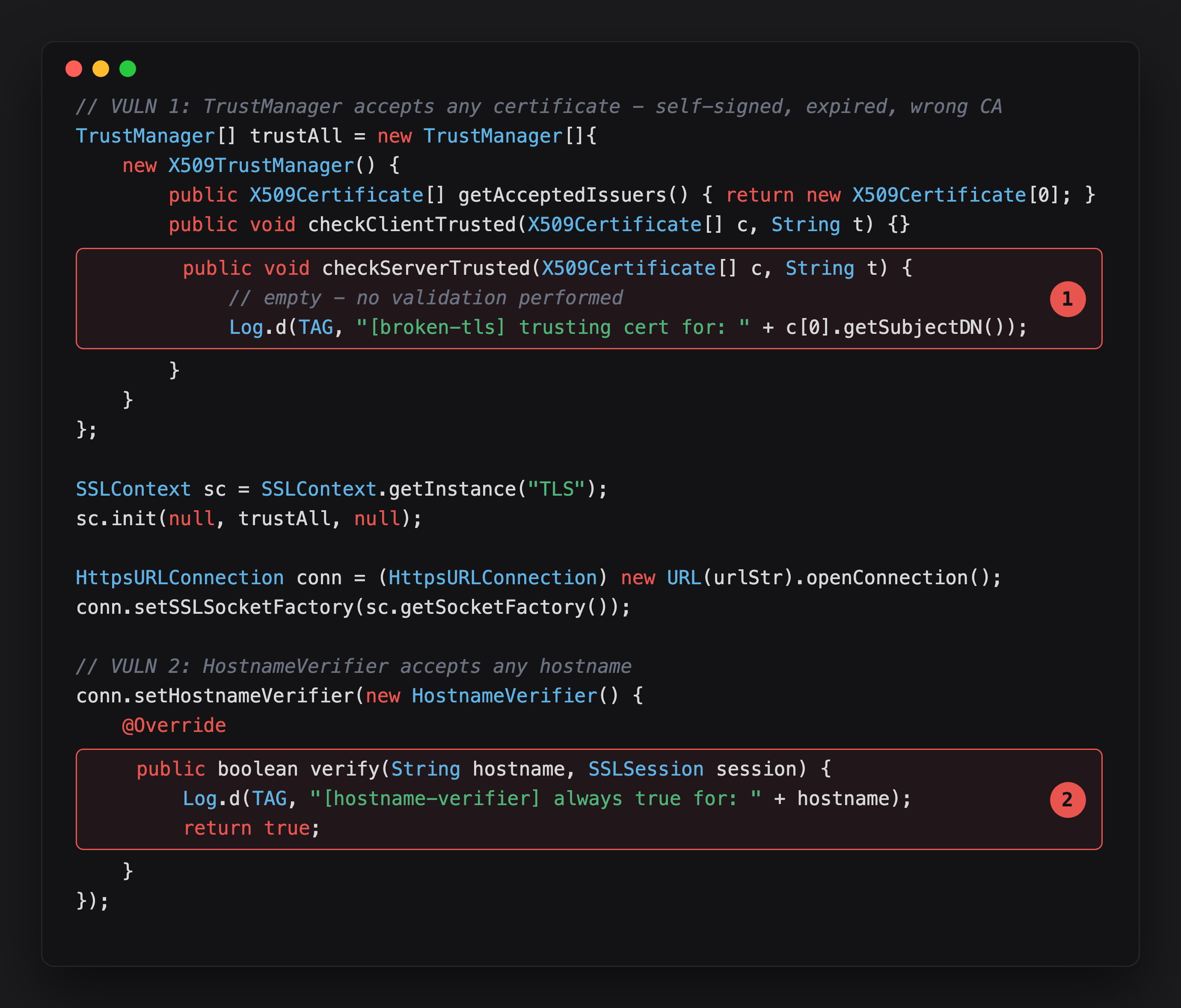
Highlight 1 is checkServerTrusted with an empty body - it never throws CertificateException, so every certificate passes, self-signed, expired, wrong CA, all of it.
Highlight 2 is verify returning true unconditionally - even a certificate that’s valid for the wrong hostname passes. Two independent checks, both neutered, stacked on the same connection.
checkServerTrusted has an empty body - it never throws CertificateException, so any certificate passes. The HostnameVerifier.verify always returns true - so even if the certificate is valid for the wrong domain, it passes too. Together: any cert from any CA for any hostname is accepted.
Can you confirm it at runtime?
NetworkActivity is not exported, but reachable on a rooted/debug device:
1
adb shell am start -n com.vulnlab.app/.activities.NetworkActivity
Tap Fetch with Broken TrustManager / HostnameVerifier. The app pre-fills https://self-signed.badssl.com/ - a site with a self-signed certificate that any correct TLS stack rejects. Getting HTTP 200 back is the proof both checks failed.
Logcat confirms both bugs fired:
1
adb logcat -s VulnNetwork
1
2
D VulnNetwork: [broken-tls] trusting cert for: CN=*.badssl.com
D VulnNetwork: [hostname-verifier] always true for: self-signed.badssl.com
The first line is checkServerTrusted logging instead of throwing - the cert was accepted. The second is the HostnameVerifier returning true without checking anything. Both bugs confirmed from the app’s own logs, no Frida needed.
How do you verify exploitation?
Set the device proxy to mitmproxy and change the URL to any endpoint with a valid TLS cert - https://example.com works:
1
2
mitmproxy --listen-port 8080 --ssl-insecure
adb shell settings put global http_proxy 192.168.1.100:8080
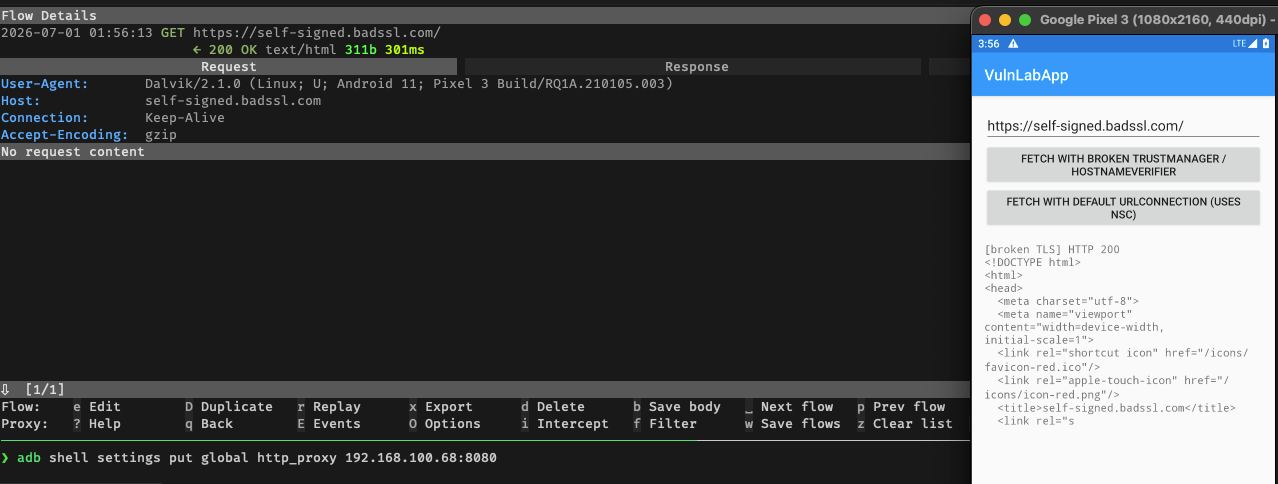
mitmproxy presents its own CA cert to the app. That CA is not in Android’s trust store - a correct X509TrustManager would reject it. Because checkServerTrusted is empty, the app accepts it and traffic decrypts in mitmproxy.
https://self-signed.badssl.com/ is the right target for the direct test (HTTP 200 without a proxy proves the app accepts self-signed certs), but for the mitmproxy MITM demo use a URL with a proper cert. mitmproxy itself validates its upstream connection, and self-signed.badssl.com fails that check - you see “Certificate verify failed” in mitmproxy’s flow view, not because the app rejected anything, but because mitmproxy could not reach the upstream server.
Does a BuildConfig.DEBUG guard save it?
The correct fix gates the permissive verifier to debug builds only:
1
2
3
4
5
if (BuildConfig.DEBUG) {
    conn.setHostnameVerifier((h, s) -> true);
} else {
    // default strict verifier
}
What shows up in practice:
1
2
3
4
if (BuildConfig.DEBUG || isInternalBuild()) {
    conn.setHostnameVerifier((h, s) -> true);
}
// no else - production takes the same path
Always confirm the value of BuildConfig.DEBUG at runtime before filing:
1
2
3
4
Java.perform(function () {
  const BC = Java.use('com.vulnlab.app.BuildConfig');
  console.log('[BuildConfig] DEBUG=' + BC.DEBUG.value);
});
If DEBUG=false and the permissive verifier is still installed, the finding is valid in production.
What about OkHttp?
The same bug shows up in OkHttp via sslSocketFactory:
1
2
3
4
OkHttpClient client = new OkHttpClient.Builder()
    .sslSocketFactory(insecureSslFactory(), trustAllManager())  // accepts any cert
    .hostnameVerifier((hostname, session) -> true)              // accepts any hostname
    .build();
Add this to your grep list:
1
2
grep -rn 'sslSocketFactory' decompile/
grep -rn 'hostnameVerifier' decompile/
If either points to a lambda or anonymous class that returns true or has an empty body, it is the same finding.
Closing
Both bugs strip TLS of its guarantees in different ways: the trust manager accepts any certificate, the hostname verifier accepts any hostname on that certificate. Combined, a network attacker with any TLS certificate can intercept all the app’s traffic. Detection is a grep. Confirmation is mitmproxy. Any app connecting to sensitive APIs with either bug shipping in production is fully exposed on any network the attacker can observe.
Happy Hacking !!