
CoreData (Apple’s persistence framework) and Realm (a popular third-party DB) both store data on disk in the app’s container. By default, neither is encrypted. iOS Data Protection covers the files at the OS level, they are encrypted on disk when the device is locked, but the moment the device is unlocked, the files are readable. Forensic acquisition tools, JB-based filesystem access, and unencrypted iTunes backups expose the contents.
For apps that store sensitive data in these databases without app-level encryption, the database file is the user’s data.
The vulnerable pattern
CoreDataViewController builds an NSPersistentContainer without setting any file-protection or encryption options, then writes sensitive plaintext into it:
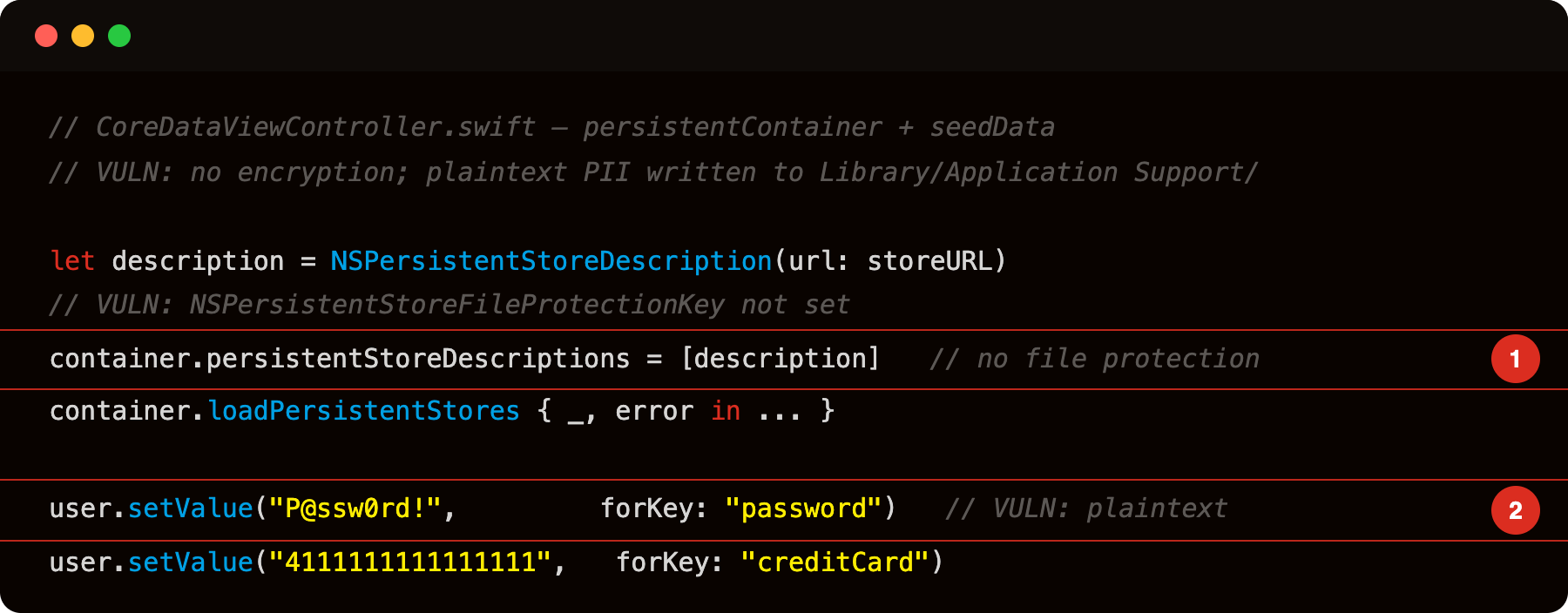
Highlight 1 is container.persistentStoreDescriptions = [description] - the store description has no NSPersistentStoreFileProtectionKey set; the SQLite database is created with the default NSFileProtectionNone, remaining readable while the device is locked.
Highlight 2 is user.setValue("P@ssw0rd!", forKey: "password") - plaintext credential seeded directly into the unprotected database; extractable with sqlite3 on a jailbroken device or via a forensic acquisition that accesses the app container.
Where the databases live
VulnLabAppiOS’s CoreData store lands at:
1
/var/mobile/Containers/Data/Application/<UUID>/Library/Application Support/VulnLabAppiOS.sqlite
Plus the WAL and SHM journal files:
1
2
VulnLabAppiOS.sqlite-wal
VulnLabAppiOS.sqlite-shm
Realm:
1
/var/mobile/Containers/Data/Application/<UUID>/Documents/<dbname>.realm
Plus the lock and management files. Realm DB files are a custom format (not SQLite) but openable with Realm Studio on the host.
Identifying the bug, encryption check
For CoreData, the question is whether the persistent store is configured with encryption. Default: no. The opt-in is:
1
2
3
4
let storeOptions: [String: Any] = [
    NSPersistentStoreFileProtectionKey: FileProtectionType.complete
]
// Set Data Protection but NOT app-level encryption
Data Protection != app-level encryption. The above only sets the file’s iOS-level data protection class. The contents are not separately encrypted by the app.
For app-level encryption, the developer would need to use a third-party SQLCipher-style integration with CoreData (uncommon) or manually encrypt sensitive fields before storing them (uncommon).
For Realm, the encryption opt-in is explicit:
1
2
3
4
5
let config = Realm.Configuration(
    encryptionKey: keyData,    // 64-byte key
    schemaVersion: 1
)
let realm = try Realm(configuration: config)
Without encryptionKey, the Realm file is plaintext. Many apps skip the encryption setup for “we’ll add it later” reasons that never materialize.
Extracting the database
Pull the file via SSH on a JB device:
1
2
scp -r root@device:/var/mobile/Containers/Data/Application/<UUID>/Library/'Application Support'/ ./
scp -r root@device:/var/mobile/Containers/Data/Application/<UUID>/Documents/ ./
For non-JB devices, the database is in iTunes backups (unless the developer set isExcludedFromBackup = true on the file URL, which is rare — the Data Protection class controls when the file is readable, not whether it’s backed up).
For Realm files, open with Realm Studio. For CoreData/SQLite, use sqlite3:
1
2
3
sqlite3 VulnLabAppiOS.sqlite
.tables
SELECT ZEMAIL, ZPASSWORD, ZSESSIONTOKEN, ZCREDITCARD, ZSSN FROM ZUSERRECORD;
VulnLabAppiOS’s UserRecord entity surfaces as the ZUSERRECORD table (CoreData’s Z-prefix naming convention). Columns: ZEMAIL, ZPASSWORD, ZSESSIONTOKEN, ZCREDITCARD, ZSSN, every value plaintext.
The high-value tables
Common patterns in mobile app databases:
ZUSER/ZACCOUNT, user profile, email, name, account identifiers.ZMESSAGE/ZCHAT, messaging app message history. End-to-end encrypted on the wire but plaintext on local disk.ZTRANSACTION/ZTRANSFER, banking app transaction history.ZCREDENTIAL/ZTOKEN, yes, sometimes apps store credentials here in plaintext.ZSESSION, session state.
For each table, the schema tells you the field names. Each row is a record. The attacker reads everything the app has cached.
The chain via iTunes backup
The most reachable path for non-JB attackers:
1
2
3
4
5
6
7
8
# Pair the device with a Mac/PC (one-time, requires the user to tap "Trust" on the device)
idevicepair pair

# Take a full backup
idevicebackup2 backup --full ./backup

# Decrypt if encrypted, then extract
idevicebackup2 unback ./backup
The output is a directory tree of the app’s container. The database files are inside. Open with sqlite3 or Realm Studio.
Realism: the user has to have trusted the host machine at some point. For domestic-attacker scenarios (spousal, sibling) this is the most common path. For broader threat models, it requires more setup.
Defence
For Realm: enable encryption with a key stored in Keychain:
1
2
3
4
5
6
7
8
// Generate or retrieve the key
let key = retrieveOrGenerateKey()   // 64 bytes

let config = Realm.Configuration(
    fileURL: ...,
    encryptionKey: key,
    schemaVersion: ...)
let realm = try Realm(configuration: config)
The key lives in Keychain with kSecAttrAccessibleWhenUnlockedThisDeviceOnly. The Realm file is encrypted on disk. Forensic access reads ciphertext.
For CoreData: SQLCipher integration is possible but complex. The practical alternative is encrypting sensitive fields before storing:
1
2
3
4
5
// Before
entity.token = sessionToken

// After
entity.tokenEncrypted = encryptWithKeychainKey(sessionToken)
The keychain key handles the protection. The DB file contains ciphertext.
For both: also set the iOS Data Protection class to .complete so that even when the device is locked, the OS file-level encryption applies:
1
2
3
let options: [String: Any] = [
    NSPersistentStoreFileProtectionKey: FileProtectionType.complete
]
Closing
Unencrypted CoreData / Realm is the bug class where “we use Apple’s framework” gets confused with “we encrypted our data”. The two are different. The audit step is checking the encryption configuration. The fix is Realm’s encryptionKey or per-field encryption for CoreData. Worth checking on every iOS app that persists sensitive data.
Happy Hacking !!