
App Transport Security (ATS) is iOS’s “all network traffic must be HTTPS with valid certs” policy. Introduced in iOS 9, it forced developers to migrate to HTTPS. The escape hatch is the NSAppTransportSecurity dictionary in Info.plist, where developers can declare exceptions. The most permissive exception, NSAllowsArbitraryLoads = true, turns ATS off entirely. Apps that ship with this in production are essentially announcing “we accept HTTP and we accept any TLS configuration”.
The shape
VulnLabAppiOS’s Info.plist ships with ATS turned off entirely and a redundant per-domain exception that downgrades TLS to 1.0:
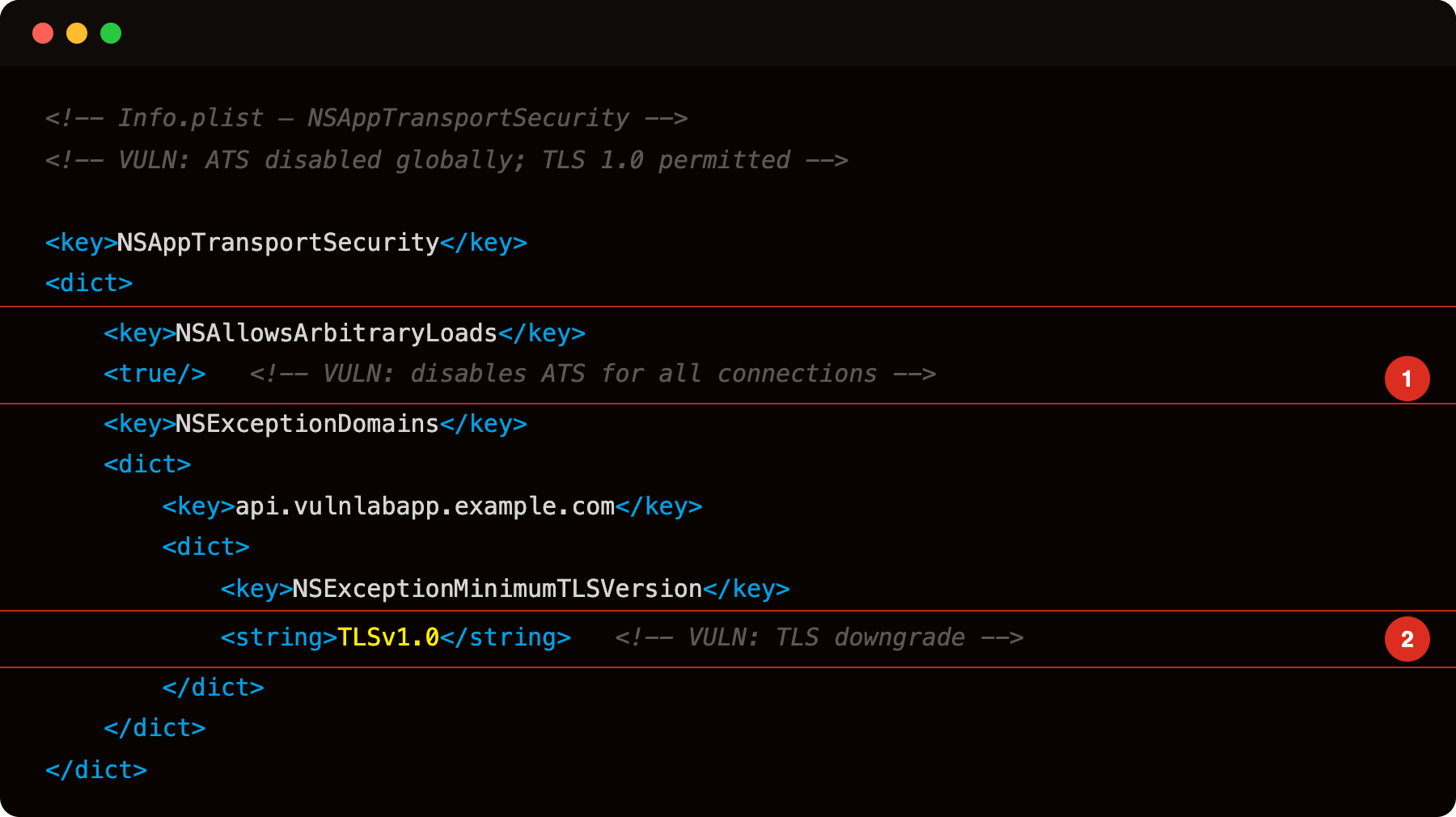
Highlight 1 is <true/> under NSAllowsArbitraryLoads - disables ATS globally for every network connection the app makes, including third-party SDKs and image CDNs; any URL the app loads can use plaintext HTTP with no system-level enforcement.
Highlight 2 is <string>TLSv1.0</string> under NSExceptionMinimumTLSVersion - explicitly permits TLS 1.0 connections to the API domain; TLS 1.0 is vulnerable to BEAST and POODLE and has been deprecated by all major RFCs.
Each exception is a downgrade. Cumulatively, they let the developer ship plaintext HTTP, weak TLS, or non-forward-secret cipher suites.
Identifying it
1
plutil -convert xml1 -o stdout Payload/VulnLabAppiOS.app/Info.plist | grep -A 30 NSAppTransportSecurity
Check for:
NSAllowsArbitraryLoads = true(whole-app off).NSAllowsArbitraryLoadsInWebContent = true(off for WKWebView traffic only, sometimes legitimate, sometimes not).NSAllowsLocalNetworking = true(allows HTTP to private IPs, useful for IoT apps, dangerous for general use).- Per-domain exceptions to specific endpoints.
For each exception, ask: is the named domain actually under the developer’s control? Is the downgrade necessary? Many apps add exceptions during dev for a Burp proxy and forget to remove them.
The exploitation path
ATS bypass on its own is not an exploit, it is a precondition. The actual attack is:
- VulnLabAppiOS communicates with
api.vulnlabapp.example.com(or thehttp://internal.corp.vulnlabapp.com:8080/apiendpoint hardcoded inWebViewController) over HTTP or TLS 1.0. - A network attacker (open Wi-Fi, malicious cellular base station, ISP-level) intercepts the traffic.
- The attacker reads or modifies requests and responses.
The interception happens because ATS was turned off; the app no longer enforces strong TLS. The attacker uses standard tools, mitmproxy, Burp, to MITM.
The proof-of-concept for triage is short:
1
2
3
4
5
6
7
# Attacker box: catch every request the app makes.
mitmproxy --mode transparent --listen-port 8080 --ssl-insecure

# On the device, point system proxy at the attacker box.
# No CA install needed for HTTP. For TLS 1.0 to api.vulnlabapp.example.com,
# generate a cert with the app's bundled CA bundle or use mitmproxy's CA
# (no pinning to defeat because ATS off implies no pinning enforced).
VulnLabAppiOS’s NetworkViewController.fetchTapped issues a plain GET to whichever URL the user types. With NSAllowsArbitraryLoads=true plus the TLSv1.0 exception, the cleartext request and any auth header land in the mitmproxy log on the first tap. The PoC video for the report is the proxy log next to the app screen, with one fetch.
Combined with apps that send auth tokens or PII in the requests, the attack is direct credential theft / data exfiltration. The exception is typically added during a Burp-proxy debugging session and forgotten before App Store submission.
The NSAllowsArbitraryLoadsInWebContent subtlety
This exception allows arbitrary loads from within WKWebView and similar web content. The rationale was that web content has its own browser-style certificate handling and ATS does not need to apply on top.
In practice, this allows apps to load arbitrary HTTP content into WebViews. Combined with the WKWebView deep link injection chain, an attacker can serve their payload over HTTP and have it loaded into the privileged WebView.
The proper restriction is keeping NSAllowsArbitraryLoadsInWebContent = false and using HTTPS for WebView content.
The NSAllowsLocalNetworking IoT case
Some apps need to talk to local-network devices (smart home, mDNS-discovered services). Apple introduced this exception to let those apps work without disabling ATS for all traffic.
The exception is narrowly scoped, it only allows traffic to private IP ranges (RFC 1918) and .local mDNS hostnames. The exception is reasonable for IoT apps. Worth checking that the app actually needs it; some apps add it pre-emptively without needing it.
The fix and what to look for
The correct Info.plist for a production app:
1
2
3
4
5
6
7
8
9
10
11
12
13
14
<!-- Either no NSAppTransportSecurity key at all (defaults are strict),
     or only narrowly-scoped exceptions for legitimate cases. -->
<key>NSAppTransportSecurity</key>
<dict>
    <key>NSExceptionDomains</key>
    <dict>
        <key>third-party-api.example.com</key>
        <dict>
            <!-- Only the specific exception needed, justified in code review -->
            <key>NSExceptionMinimumTLSVersion</key>
            <string>TLSv1.2</string>
        </dict>
    </dict>
</dict>
Apps that follow this pattern have a small, justified exception list. Apps with NSAllowsArbitraryLoads = true have either bad threat modeling or lazy migration debt from the iOS-9 era.
Closing
ATS exception audit is a five-minute Info.plist read. The bug class is well-known, the bounty triage is well-established, and the fix is one plist edit. Worth checking on every iOS app, particularly older codebases that pre-date the iOS 9 transition.
Happy Hacking !!