
When an iOS app backgrounds, the system takes a snapshot of its current screen and uses it for the app switcher’s thumbnails. The snapshot is stored as a PNG in the app’s container under Library/Caches/Snapshots/. The file persists across backgrounding cycles and survives until the app is killed or the snapshot is replaced.
For apps that fail to hide sensitive content before backgrounding, the snapshot file captures whatever was on screen, account balances, message contents, credit card numbers, OTP codes. The file is readable by any process with filesystem access to the app’s container.
The snapshot lifecycle
iOS triggers applicationWillResignActive and applicationDidEnterBackground when the app backgrounds. The snapshot is taken between these events, specifically when the system is about to take the screenshot for the app switcher.
The recommended pattern is to hide sensitive content in applicationWillResignActive. VulnLabAppiOS deliberately ships the broken version:
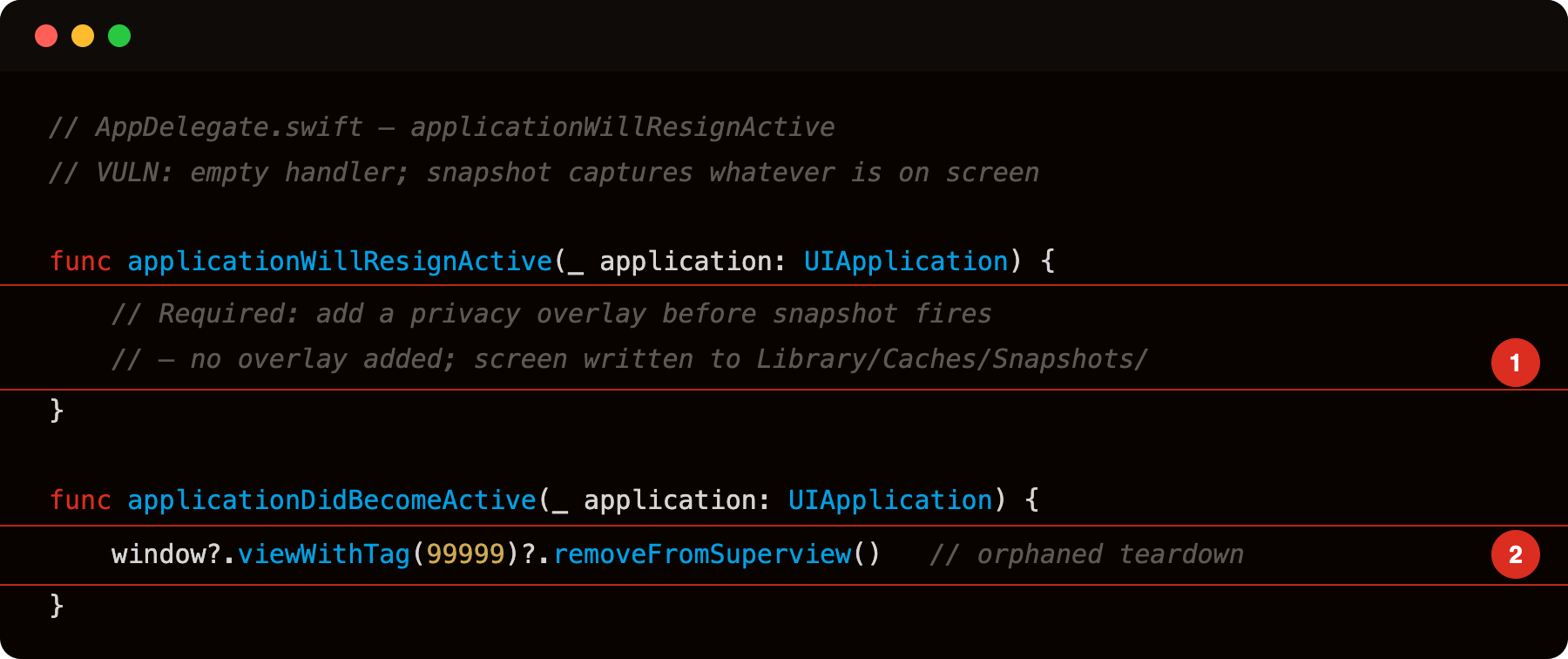
Highlight 1 is the empty applicationWillResignActive body - iOS fires this delegate method just before snapshotting the screen for the app switcher; no overlay is added here, so the live screen content (tokens, PII, form fields) is captured and written to Library/Caches/Snapshots/.
Highlight 2 is window?.viewWithTag(99999)?.removeFromSuperview() in applicationDidBecomeActive - teardown code for a privacy overlay that is never created; it removes nothing. The overlay setup was never implemented, leaving the snapshot path permanently exposed.
No overlay is added, so the snapshot captures whatever is on screen, account balances, OTPs, message contents.
Identifying the bug
The check is whether applicationWillResignActive (or sceneWillResignActive in scene-based apps) hides sensitive content.
Modern Swift/Xcode builds route UIApplicationDelegate conformances through Swift protocol witness tables, so strings and __objc_methnames come back empty. Use nm to find the mangled Swift symbol instead:
1
nm Payload/VulnLabAppiOS.app/VulnLabAppiOS | grep -i resign
If applicationWillResignActive is implemented you’ll see a mangled entry like $s10VulnLabApp11AppDelegateC30applicationWillResignActive.... Absent entry means the app relies on the default no-op. For each match, look at what the handler does. Common patterns:
1
2
3
4
5
6
7
8
9
10
11
12
// Good - hides content
func applicationWillResignActive(_ app: UIApplication) {
    addPrivacyOverlay()
}

// Bad - does nothing relevant to UI
func applicationWillResignActive(_ app: UIApplication) {
    saveState()
    analytics.flush()
}

// Worst - handler not implemented at all (uses default no-op)
Runtime confirmation:
1
2
3
4
5
6
7
8
9
10
11
12
13
14
15
16
17
// frida -U -f com.vulnlab.iosapp --no-pause -l hook.js
// Hook the system notification — fires before the snapshot regardless of Swift/ObjC dispatch
setTimeout(function () {
  const center = ObjC.classes.NSNotificationCenter.defaultCenter();
  const name = ObjC.classes.NSString.stringWithString_('UIApplicationWillResignActiveNotification');
  center.addObserverForName_object_queue_usingBlock_(
    name, null, null,
    new ObjC.Block({
      retType: 'void',
      argTypes: ['object'],
      implementation: function () {
        console.log('[snapshot] UIApplicationWillResignActiveNotification — snapshot taken now');
      }
    })
  );
  console.log('[*] watching UIApplicationWillResignActiveNotification');
}, 2000);
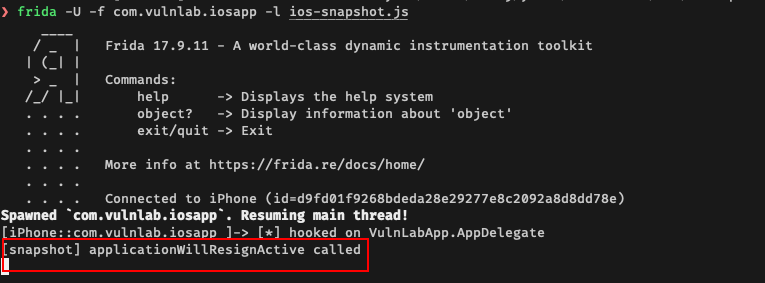
Press the home button or swipe up to background the app. The notification fires immediately before the snapshot is taken. Then pull the snapshot file from the filesystem and look at it.
Retrieving the snapshot
On a jailbroken device:
1
2
ssh root@device
find /var/mobile/Containers/Data/Application -name '*.ktx' -o -name '*.png' | grep -i snapshot
The snapshot is in Library/Caches/Snapshots/com.vulnlab.iosapp/ (filename varies by iOS version, often .ktx compressed images on newer iOS, .png on older). Convert and view:

1
2
3
# .ktx (newer iOS)
sips -s format png snapshot.ktx --out snapshot.png
# .png (older iOS) — open directly
The image shows whatever was on screen at the moment the snapshot was taken.
For non-jailbroken devices, the snapshot is included in iTunes backups (in the app’s container backup files). Pull the backup, navigate to the snapshot path.
The high-value scenarios
Apps where the snapshot leak matters:
Banking apps showing account balances. The snapshot shows the user’s balance, recent transactions, account numbers.
Messaging apps with unread messages on screen. The snapshot shows the most recent message contents.
Password manager apps showing entries. The snapshot reveals stored credentials.
Crypto wallet apps showing seed phrases / addresses. The snapshot exposes wallet recovery material.
2FA / OTP apps showing the current code. The snapshot captures the OTP.
For each, the snapshot persists until the next snapshot replaces it or the app is killed. An attacker who can read the filesystem (jailbreak, backup access, forensic acquisition) reads the cached snapshot and gets whatever was visible.
Attacker pathways
The snapshot file is in the app’s container. To read it:
Jailbroken device. Direct SSH or filesystem access. The user installed a JB-incompatible app, the JB is detected, the user removed the JB, and the snapshot is still there from the JB era. Or the attacker has the device.
iTunes backup. The container’s Caches dir is included in unencrypted backups (sometimes excluded depending on app entitlements, but often not). Pull the backup, navigate to the snapshot.
Sandbox-escape exploits. A separate iOS vulnerability that lets an app read another app’s container. Out of scope of mobile audit but worth noting as a chain target.
Shoulder-surfing the app switcher. The realism gap: the app switcher’s thumbnails show the snapshots when the user pulls them up. Anyone looking over the user’s shoulder sees the sensitive content. This is the easiest “attack”, no jailbreak, no backup, no exploit. Just human visual access.
Defence
The privacy overlay pattern is standard:
1
2
3
4
5
6
7
8
9
10
11
12
13
14
15
func applicationWillResignActive(_ app: UIApplication) {
    guard let window = self.window else { return }
    let overlay = UIView(frame: window.bounds)
    overlay.backgroundColor = .systemBackground
    overlay.tag = 0xDEADBEEF
    // Optional: app logo / "Bank App is locked" message
    let logo = UIImageView(image: UIImage(named: "AppLogo"))
    logo.center = overlay.center
    overlay.addSubview(logo)
    window.addSubview(overlay)
}

func applicationDidBecomeActive(_ app: UIApplication) {
    view.window?.viewWithTag(0xDEADBEEF)?.removeFromSuperview()
}
For scene-based apps, the same pattern in sceneWillResignActive / sceneDidBecomeActive.
Some apps also use isSecureTextEntry = true on text fields containing sensitive content, which prevents iOS from including the field’s contents in snapshots. Useful but limited, covers TextFields specifically, not labels or other views.
Closing
iOS background snapshot leak is the “what was on screen when the user pressed home” bug. The audit checks applicationWillResignActive. The fix is the privacy overlay. Worth checking on every iOS app that displays sensitive content, which is most banking, healthcare, and messaging apps.
Happy Hacking !!