
Universal Links are iOS’s robust deep-link mechanism, they prove domain ownership via a JSON file (apple-app-site-association, AASA) served from the domain’s .well-known/ path. Apple’s framework verifies the file against the app’s signing identity. Other apps cannot claim the same domain because they cannot serve the AASA from your DNS.
Misconfigurations turn this defence off silently. The app reverts to “any other app can compete for these links”, same vulnerable state as custom URL schemes. The bug is invisible unless you check the AASA carefully.
The pieces that must align
For a working Universal Link, three things have to be right:
- The app’s
Info.plistdeclarescom.apple.developer.associated-domainswithapplinks:domain.example. - The app’s entitlements include the associated-domains entitlement (signed by the team’s provisioning profile).
- The domain serves a valid AASA at
https://domain.example/.well-known/apple-app-site-associationwith the correct app ID.
If any one of these is wrong, the framework silently disables Universal Links for the domain. The app may still appear to handle them (because the developer also registered a custom URL scheme as fallback), but the verification provided by AASA is not active.
The AASA format
VulnLabAppiOS’s Info.plist declares the associated domain:
1
2
3
4
<key>com.apple.developer.associated-domains</key>
<array>
    <string>applinks:app.vulnlabapp.example.com</string>
</array>
The matching AASA the server should host at https://app.vulnlabapp.example.com/.well-known/apple-app-site-association:
1
2
3
4
5
6
7
8
9
10
11
12
13
14
15
16
17
18
19
{
    "applinks": {
        "details": [
            {
                "appIDs": ["ABCD1234.com.vulnlab.iosapp"],
                "components": [
                    {
                        "/": "/auth/*",
                        "comment": "Magic-link authentication"
                    },
                    {
                        "/": "/payment/confirm/*",
                        "comment": "Payment confirmation deeplinks"
                    }
                ]
            }
        ]
    }
}
VulnLabAppiOS registers the domain but ships no AASA, so verification silently fails. The continueUserActivity handler in AppDelegate.swift still runs whenever the user opens such a link in-app:
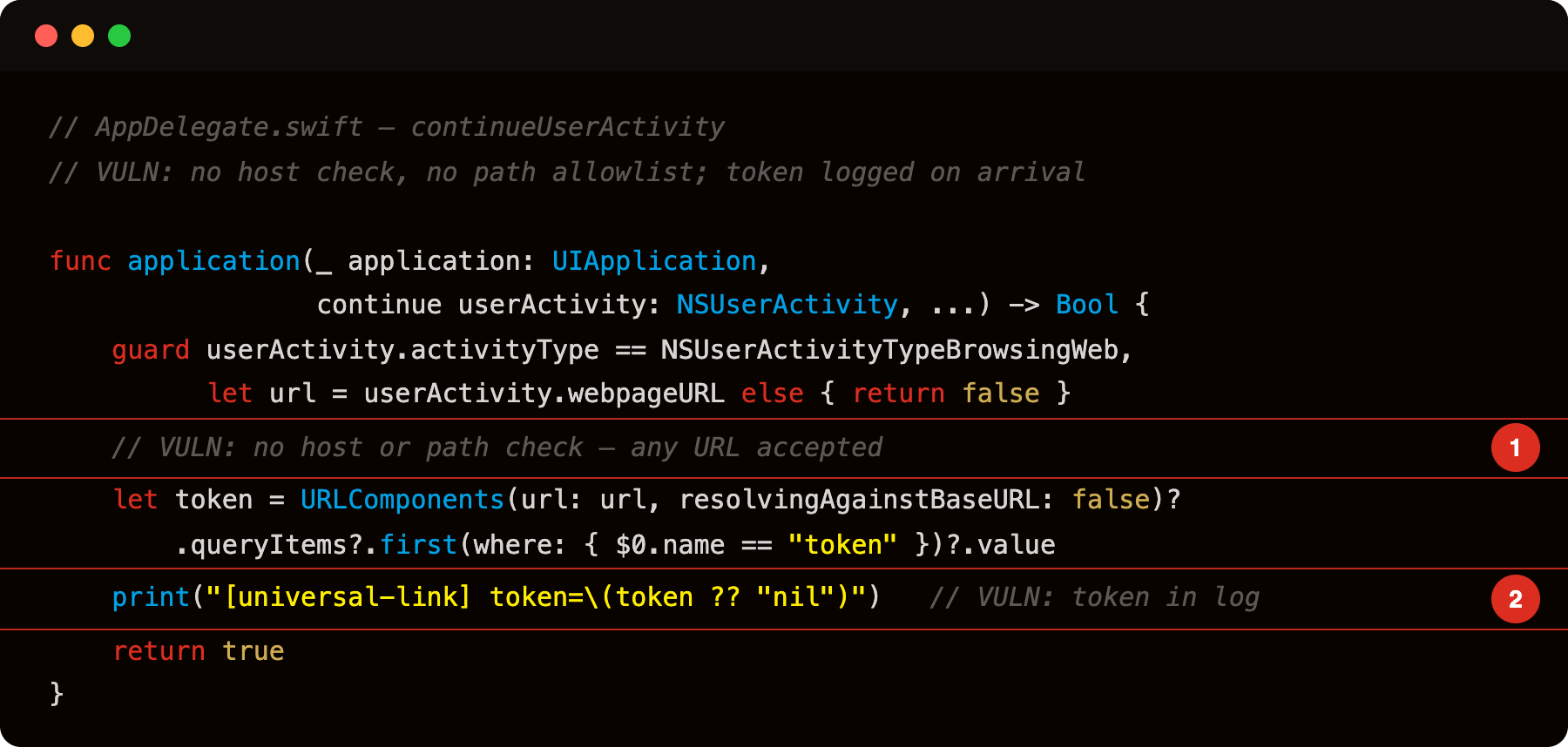
Highlight 1 is // VULN: no host or path check - any URL object reaching the handler is accepted; a malicious web page or another app can pass arbitrary hosts and paths to the handler, controlling the token query parameter value.
Highlight 2 is print("[universal-link] token=\(token ?? \"nil\")") - the token value extracted from the URL is logged; visible in Console.app.
The appIDs array contains TeamID-prefixed bundle identifiers. The components describe which path patterns the app handles. The framework downloads this once per install (or per app update / domain configuration change), verifies the app’s signing identity matches an entry, and registers the path patterns.
Misconfigurations you find in production
AASA returns 404. The domain serves the file at the wrong path, or the file was deleted, or the developer forgot to deploy it. Apple’s framework treats missing AASA as “verification failed, degrade to non-Universal-Links”. Custom schemes still work; Universal Links do not.
AASA returns redirect. The file is at https://domain.example/aasa and .well-known/apple-app-site-association redirects to it. The verifier does NOT follow redirects. Verification fails.
Wrong content-type. AASA must be served as application/json. Apps that serve it as text/plain or text/html fail verification.
Cached old AASA. The app updates its bundle ID or team ID. The AASA on the server still references the old IDs. Verification fails for the new app, succeeds for old installs.
JSON syntax error. Trailing comma, malformed escape, BOM. JSON parser rejects, verification fails.
Wildcard * mishandling. Components like "/": "*" or "/": "/*" are interpreted differently by different iOS versions. Some apps’ AASA matches less than the developer expected.
For each misconfiguration, the result is the same: Universal Links silently broken, custom-scheme fallback (if present) silently active, the app is vulnerable to the same hijacking as custom schemes.
Identifying it
1
2
3
4
5
6
7
# Fetch and verify the AASA
curl -v https://app.vulnlabapp.example.com/.well-known/apple-app-site-association

# Check the headers - content-type should be application/json
# Check the status - must be 200 (not 301, 302, or any redirect)
# Validate the JSON
curl -s https://app.vulnlabapp.example.com/.well-known/apple-app-site-association | jq .
If any of those fails, the AASA is broken.
Cross-reference with the app’s entitlements:
1
2
3
# the :- prefix outputs XML to stdout on modern macOS
codesign -d --entitlements :- Payload/VulnLabAppiOS.app
# look for com.apple.developer.associated-domains
The domain in the entitlements should match the AASA’s appIDs. The TeamID prefix in the bundle ID should match what is in the AASA.
Confirm the continueUserActivity handler is wired by hooking it at runtime:
1
2
3
4
5
6
7
8
9
10
11
12
13
setTimeout(function () {
  const app = ObjC.classes.UIApplication.sharedApplication();
  const cls = app.delegate().$className;
  Interceptor.attach(
    ObjC.classes[cls]['- application:continueUserActivity:restorationHandler:'].implementation,
    {
      onEnter: function (args) {
        const activity = new ObjC.Object(args[3]);
        console.log('[universal-link] ' + activity.webpageURL());
      }
    }
  );
}, 2000);
Trigger it from Frida to confirm the handler fires:
1
2
3
4
5
6
7
8
9
10
ObjC.schedule(ObjC.mainQueue, function () {
  const activity = ObjC.classes.NSUserActivity.alloc()
    .initWithActivityType_('NSUserActivityTypeBrowsingWeb');
  const url = ObjC.classes.NSURL.URLWithString_(
    'https://app.vulnlabapp.example.com/auth?token=test123'
  );
  activity.setWebpageURL_(url);
  const app = ObjC.classes.UIApplication.sharedApplication();
  app.delegate().application_continueUserActivity_restorationHandler_(app, activity, ptr(0));
});
If you have access to a test device, iOS also provides AASA verification logs:
1
log stream --predicate 'subsystem == "com.apple.swcd"' --info
Logs show whether SWC (Shared Web Credentials, also handles AASA) verified or failed for each domain.
The exploitation path
When AASA is misconfigured:
- The user receives a magic-link email with
https://app.vulnlabapp.example.com/auth/abc123. - The user taps the link.
- iOS would normally open the link in the registered app via the verified Universal Link.
- Because AASA verification failed, iOS opens the link in Safari instead.
- Safari renders whatever is at
app.vulnlabapp.example.com/auth/abc123, usually a “tap to open in app” page with a custom-scheme fallback link. - The user taps the fallback.
- The custom scheme (
vulnlab://orvulnlaboauth://) dispatches, and the attacker’s app with the same custom scheme wins.
The chain depends on the developer’s “tap to open in app” page using a custom scheme. Many apps have this exact pattern because it works as a fallback for users without the app installed (the page can offer download links to the App Store).
Domain takeover variant, the deeper case
If the developer pointed the app at a domain they no longer own:
- AASA was originally at
https://old-domain.example/.well-known/apple-app-site-association. - The domain expired.
- An attacker registers it.
- The attacker hosts an AASA listing their own TeamID + bundle ID.
- On next AASA re-verification (app update, periodic refresh), the attacker’s app gets verified.
Result: the attacker’s app exclusively owns the domain’s Universal Links. No competing chooser. Silent interception.
This is rare in active apps but common in legacy / sunsetting projects. Worth checking WHOIS on the domains declared in com.apple.developer.associated-domains.
Closing
Universal Links provide strong domain ownership when configured correctly and silently fail when any of the three pieces are off. The audit is one curl plus one entitlements check. The bug class is well-understood by triage. Worth the five minutes per audit.
Happy Hacking !!