
Log.d, Log.v, Log.i calls in production builds dump strings to logcat. On Android 4.1+ the READ_LOGS permission is signature-only, so a regular third-party app cannot read another app’s logs. But anyone with USB debugging enabled can. Crash-reporting SDKs like Crashlytics, Sentry, and Bugsnag also capture nearby logcat output when a crash occurs and ship it off-device. If sensitive data is in a Log.* call that was not stripped by ProGuard/R8, it leaks.
Where do you find it?
1
grep -rn 'Log\.\(d\|v\|i\|w\|e\)(' decompile/sources/ | grep -E 'token|auth|password|email|secret|key|ssn|dob|cc|bearer'
What does this code do?
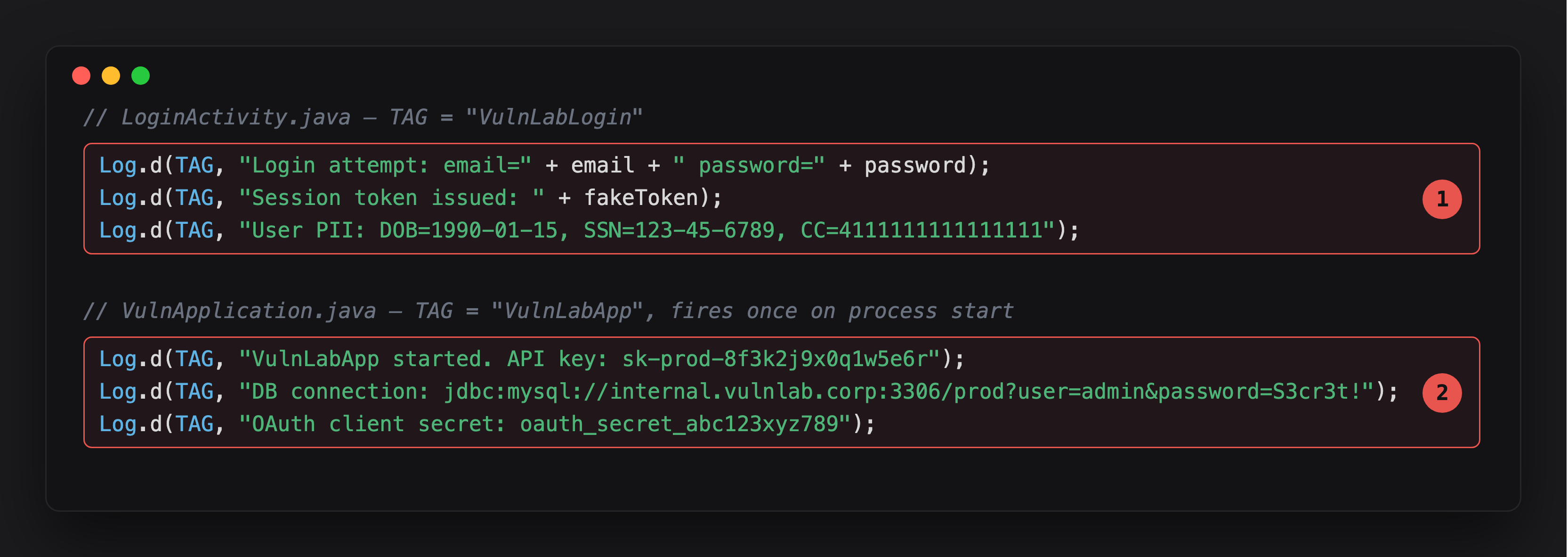
Highlight 1 is the login flow - password, session token, and a full set of PII (DOB, SSN, credit card) logged verbatim on every login attempt.
Highlight 2 fires once, on process start, and is arguably worse: a production API key, a database connection string with embedded credentials, and an OAuth client secret, all in logcat before the user does anything.
These strings are constructed at runtime and appear verbatim in logcat. The default proguard-android-optimize.txt does NOT strip Log calls - apps need explicit rules in their ProGuard config for that to happen.
Can you confirm it at runtime?
1
2
adb shell am start -n com.vulnlab.app/.activities.LoginActivity
adb logcat -s "VulnLabLogin:*" "VulnLabApp:*"
Or hook every Log call from Frida to catch them all regardless of tag:
1
2
3
4
5
6
7
8
9
10
Java.perform(function () {
  const Log = Java.use('android.util.Log');
  ['v', 'd', 'i', 'w', 'e'].forEach(function (level) {
    Log[level].overload('java.lang.String', 'java.lang.String').implementation =
        function (tag, msg) {
      console.log('[Log.' + level + '][' + tag + '] ' + msg);
      return this[level](tag, msg);
    };
  });
});
Walk the app through a login cycle. The trace prints every log call and its content, including the password and session token from LoginActivity and the API key from VulnApplication on process start.
What about READ_LOGS restrictions?
Three reachability paths that still matter:
USB debugging. Anyone with physical access who enables USB debugging can run adb logcat. Same realism as allowBackup exploits.
OEM-bundled apps. Samsung, Xiaomi, Huawei, Oppo ship “diagnostics” or “device assistant” apps with READ_LOGS granted by system signature. If one of those apps is compromised or abused, it can read the full logcat stream.
Integrated crash reporters. Apps that ship Crashlytics, Sentry, or Bugsnag have those SDKs capturing logcat output around crashes. The log content goes to the SDK provider’s infrastructure. The data leaves the device without the user knowing.
The crash-reporter path is the strongest bounty framing because it removes the USB requirement - the data exits to a third party automatically.
What do exception logs leak?
Even when Log.d calls are stripped by ProGuard, exception handlers often are not:
1
2
3
4
5
try {
    apiClient.request(url, body);
} catch (Exception e) {
    Log.e("Network", "Request failed: " + url + " body=" + body, e);
}
If body contains credentials or session tokens, those appear in the exception log verbatim. Crash reporters capture exception logs even when debug logging is stripped.
What about third-party logging wrappers?
Many apps use Timber or custom wrappers:
1
grep -rn 'Timber\.\|Logger\.d\|LogUtils\.' decompile/
Same audit applies. Timber.d(...) routes to Android’s Log under the hood. The wrapper does not strip the call unless specifically configured.
What is the fix?
Build-time stripping via ProGuard:
-assumenosideeffects class android.util.Log {
    public static *** v(...);
    public static *** d(...);
    public static *** i(...);
    public static *** w(...);
}
-assumenosideeffects class timber.log.Timber {
    public static *** v(...);
    public static *** d(...);
    public static *** i(...);
}
This removes the calls entirely from the compiled bytecode. BuildConfig.DEBUG guards are more fragile - they depend on every developer remembering to wrap every call.
Closing
Log.d in release builds is passive data exfiltration. The audit is mechanical - one grep, then check what’s in the strings. The realistic attack chain is “developer has USB debugging on, attacker has five seconds with the device” or “app ships a crash reporter that forwards the log contents off-device”. Both chains are bounty-relevant on any app that logs tokens, session identifiers, or PII in production.
Happy Hacking !!